
Please disclose if any significant portion of your mod was created using AI tools by adding the 'AI Generated' category. Failing to do so may result in the mod being removed from Thunderstore.

XPortalNetworksTribesPins
Select portal destination from a list of existing portals with custom networks with private portal and tribe restrictions. No more tag pairing, and no more portal hubs! Also manages map pins for the portals a player is allowed to use.
| Last updated | 17 hours ago |
| Total downloads | 7 |
| Total rating | 0 |
| Categories | Mods Server-side Client-side Transportation AI Generated Deep North Update |
| Dependency string | NorCal_Nerds-XPortalNetworksTribesPins-3.0.1 |
| Dependants | 0 other packages depend on this package |
This mod requires the following mods to function

denikson-BepInExPack_Valheim
BepInEx pack for Valheim. Preconfigured with the correct entry point for mods and preferred defaults for the community.
Preferred version: 5.4.2350
ValheimModding-Jotunn
Jötunn (/ˈjɔːtʊn/, 'giant'), the Valheim Library was created with the goal of making the lives of mod developers easier. It enables you to create mods for Valheim using an abstracted API so you can focus on the actual content creation.
Preferred version: 2.30.2README
🌀XPortal Networks Teams Pins
Inspired by Valpok's XPortalNetwork and buldosik's XPortalSharedMapPins - an inspiration only, no code from that project is used here - this mod combines them while adding support for private Triibe portal networks! Adding a new layer of portal privacy on multiplayer servers!
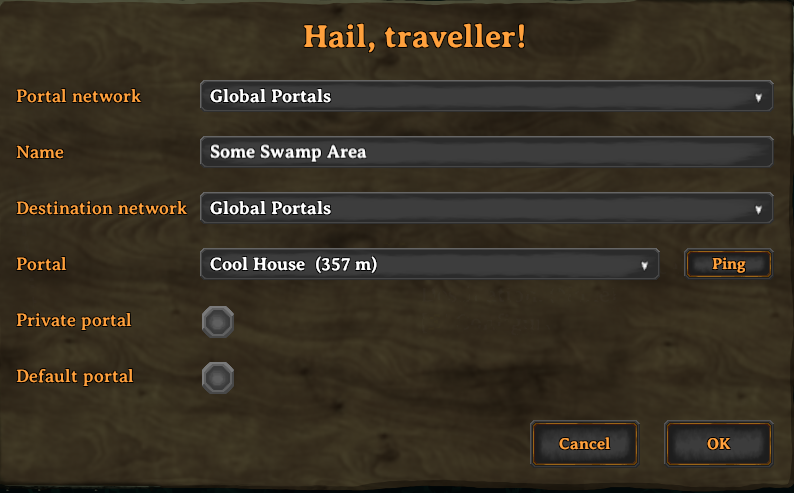
Portal Configuration UI
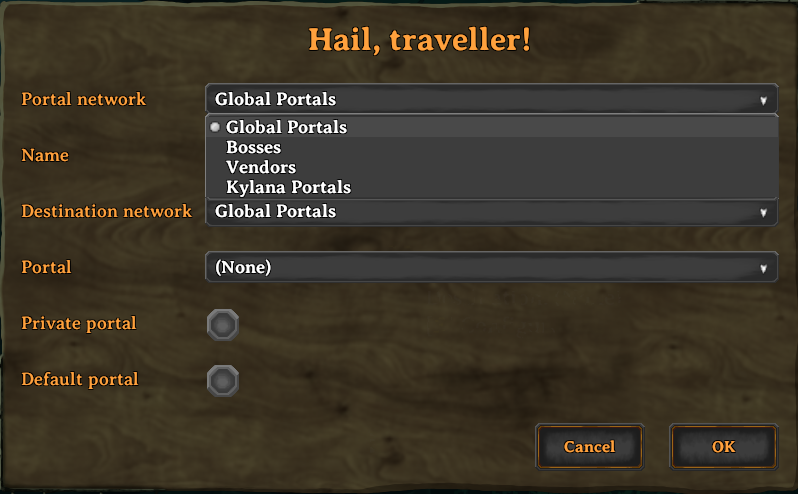
Network Selection Window
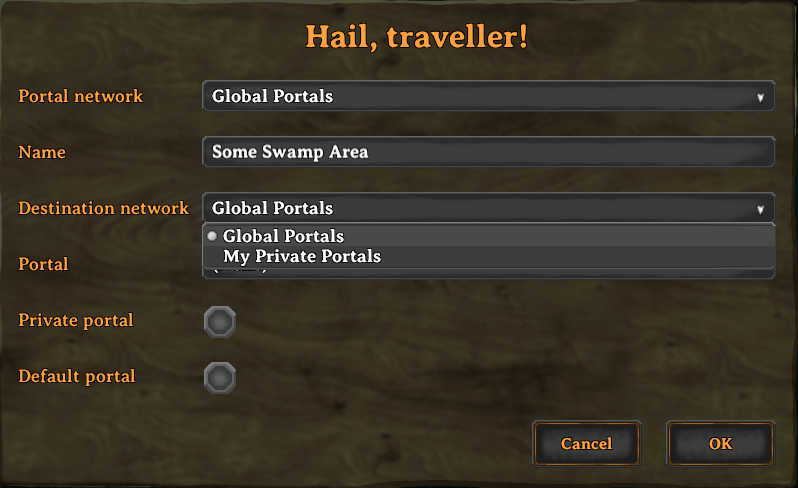
Destination Network Selection
What's New in XPortal Networks Teams Pins
XPortal Networks Teams Pins builds upon the solid foundation of the original XPortal mod by SpikeHimself, expanding it into a dedicated networking framework with extensive multiplayer features and numerous bug fixes:
- Portal Networks: Group portals into distinct networks:
- Global / Public Network: Accessible to all players on the server.
- Player Networks & Private Portals: Portals tied to individual players. Toggle the Private setting so unauthorized players cannot view or teleport through your personal portals.
- Custom Named Networks: Define up to 15 server-wide custom networks (such as Trade Hub, Clan Base, Mining Outposts, or Admin Only) via configuration, complete with real-time hot-reloading.
- Server Admin & Permission Controls: Configurable permissions allowing server admins to manage networks and prevent non-owners from deconstructing portals.
- Portal Pins on Your Map: Every portal you are allowed to use is pinned on your own map - the feature the XPortal Shared Map Pins companion mod inspired, built in as this mod's own re-implementation (an inspiration only - no code from that project is used here). Other players' private portals and restricted networks stay hidden.
- Bug Fixes & Modernization:
- Upgraded for the latest Valheim versions and .NET Framework 4.8.
- Resolved controller UI legend and navigation issues.
- Fixed dedicated server admin destruction and permission edge-cases.
- Enhanced ZDO network synchronization and reconnection reliability.
Features
🌐 Destination Selection Menu
When interacting with a portal, a clean UI opens allowing you to select your target destination from a dropdown menu. The list displays:
- The destination portal name
- Distance to the destination (in meters)
- Portal light color indicator (when paired with mods like Advanced Portals or Stone Portal)
🔒 Public, Private & Custom Networks
Organize your world’s transportation:
- Global Network: The shared network open to everyone.
- Personal Network: Portals automatically grouped under your character.
- Private Portals: Mark sensitive portals as private so other players cannot use or retarget them.
- Custom Named Networks: Admin-defined channels defined in
xportal_networks.jsonthat organize portals by faction, region, or purpose.
⭐ Default Portal Destination
You can set a portal as your Default Portal. Newly constructed portals will immediately link to your default portal automatically, saving you time when setting up forward operating bases.
🏷️ Uncapped Portal Name Length
XPortal Networks Teams Pins removes the vanilla character limit on portal tags, allowing you to give your portals descriptive and memorable names.
📍 Ping Portal on Map
Forgot where a portal leads? Click the Ping button to highlight the destination portal directly on your map and alert your fellow adventurers with a map ping.
🗺️ Portal Pins on Your Map
Every portal you are allowed to use is pinned on your own map automatically - this is the feature the standalone XPortal Shared Map Pins mod by buldosik inspired, built right in as this mod's own re-implementation. buldosik's mod is credited as an inspiration only: no code from that project is used here.
- Portals on the Global network, on tribe networks you are a member of, and your own private portals are pinned.
- Other players' private portals and restricted networks are never pinned, so the map cannot reveal portals you have no access to.
- The pins are local map data: nothing is written to the world, nothing is sent to other players, and vanilla player pins are untouched.
- Pins follow renamed, moved and destroyed portals, and come back if you delete one on the map.
- Disable them with
Show Portal Map Pins, or useShow Network In Pin Nameto prefix each pin with its network (for example[Trade Hub] North Base).
🎮 Full Gamepad & Controller Support
Fully navigable using controllers with integrated on-screen key hints:
| Button (Xbox / PlayStation) | Action |
|---|---|
| A / Cross | Confirm / Submit portal configuration |
| B / Circle | Cancel / Close menu |
| Y / Triangle | Ping selected destination on map |
| X / Square | Open / close destination dropdown list |
| D-Pad Up / Down | Navigate destination list |
Mod Compatibility & Integration
- Jötunn, the Valheim Library (Required)
- AdventureBackpacks: Fully Supported (Teleportation restrictions in equipped backpacks are strictly enforced).
- Fast Item Transfer: Fully Supported.
- Advanced Portals: Fully integrated—displays matching colored light icons in dropdowns.
- Stone Portal: Supported with distinctive portal coloring.
- VHVR - Valheim VR: Compatible.
- Nexus Update Check: Compatible.
- XPortal Shared Map Pins: Inspiration for this mod's portal map pins (no code from that project is used here), built in as of v2.6.0 — remove the standalone mod, or you will see duplicate map pins.
Note: Incompatible with AnyPortal (XPortal Networks Teams Pins replaces and supersedes AnyPortal functionality).
How to Use
- Build a Portal: Place a portal as normal.
- Access the Configuration UI: Walk up to the portal and press your interact key (
E/A). - Configure Your Portal:
- Portal Name: Enter a name for the current portal.
- Network: Choose whether this portal belongs to the Global network, your Personal network, or a Custom Named Network.
- Destination: Select the destination portal from the dropdown list.
- Make Private: (Optional) Check to restrict access so only you (and admins) can use or alter the portal.
- Set as Default: (Optional) Check to make this portal the automatic destination for newly built portals.
- Confirm: Click OK to save and activate the connection.
Configuration
General & Server Settings
The main configuration file is located at BepInEx/config/ghostwheel.mods.xportalnetworkstribespins.cfg. Server-owned settings (PingMapDisabled, DoublePortalCosts, HidePortalDistance, RestrictPortalRemoval, AdminsSeeAllNetworks and the Portal Networks entries) are synchronized from the server to every connected client via Jotunn's ServerSync, and can only be changed by server admins (or the host) - including from within the game client through the ConfigurationManager window.
| Setting | Type | Description |
|---|---|---|
PingMapDisabled |
Server Enforced | Disables map pinging for servers playing with nomap or immersive navigation rules. |
HidePortalDistance |
Server Enforced | Hides the meter distance displayed next to portal names in the dropdown. |
DoublePortalCosts |
Server Enforced | Doubles portal crafting costs to balance the convenience of one-to-many portal routing. |
RestrictPortalRemoval |
Server Enforced | Restricts deconstructing/destroying portals to the original creator or server admins. |
AdminsSeeAllNetworks |
Server Enforced | When disabled (the default), server admins and the host are treated like normal players for portal networks; when enabled they can see and use every network. |
Portal Network <n> -> Name |
Server Enforced | Display name of portal network n (1-15). Leave empty to keep that slot unused. |
Portal Network <n> -> Permitted |
Server Enforced | Comma separated player ids allowed to use network n (e.g. Steam_12345678901234567). Empty allows everyone. |
DefaultPrivatePortal |
Client Config | If true, newly placed portals start as private (owner-only). |
Show Portal Map Pins |
Client Config | Shows the portals you are allowed to use as pins on your own map. |
Show Network In Pin Name |
Client Config | Prefixes map pins with the name of the portal network, e.g. [Trade Hub] North Base. |
DisplayPortalColour |
Client Config | Displays colored indicators matching portal types in the menu. |
Custom Named Networks (config)
Servers define custom networks (ids 1-15) in per-network sections of BepInEx/config/ghostwheel.mods.xportalnetworkstribespins.cfg:
[Portal Network 1]
Name = Admin Network

[Portal Network 2]
Name = Trade Hub
Permitted = Steam_12345678901234567, Steam_76543210987654321

[Portal Network 3]
Name = North Outposts
Leave a name empty to keep that slot unused, and leave the allow list empty to let everyone use the network.
These entries are server-owned and synchronized by Jotunn's ServerSync, so server admins can add, rename and restrict networks from inside the game (ConfigurationManager -> XPortalNetworks -> Portal Networks) without touching any server files. Networks previously lived in xportal_networks.json; that file is imported once on upgrade, after which it is ignored and can be deleted.
Installation & Server Setup
Prerequisites
- BepInExPack Valheim (v5.4.2200+)
- Jötunn (ValheimLib) (v2.20.0+)
Automatic (Recommended)
Use a mod manager like Gale or Thunderstore Mod Manager to download and install XPortal Networks Teams Pins with one click.
Manual Installation
- Download the latest release
.zipfrom Thunderstore or GitHub Releases. - Extract the archive contents into your
Valheim/BepInEx/plugins/directory. - Ensure both client and dedicated server have XPortal Networks Teams Pinss installed for multiplayer synchronization.
Bugs, Feature Requests & Community
- Bug Reports: Please submit an issue on the GitHub Issues page using the
Bug reporttemplate. Please include yourLogOutput.logfile. - Feature Requests: Open an issue on GitHub selecting the
Feature requesttemplate. - Translations: Contributions for new languages or localization updates are welcome via GitHub pull requests or on Discord.
Credits & Acknowledgements
- Vapok: Author of the the expanded XPortalNetworks - the base this project is built upon and continues.
- SpikeHimself: Creator of the original XPortal mod, upon which XPortal Networks is built and expanded.
- sweetgiorni: Creator of the original AnyPortal concept.
- buldosik: Author of XPortalSharedMapPins - the standalone companion mod that inspired this mod's portal map pins (built in as of v2.6.0). Credited as an inspiration only: this mod contains no code from that project.
- Translations & Community: Thanks to kaiqueknup, makou, Smok3y97, MexExe, hanawa07, bonesbro, VasariRulez, Felix, and cawa-93 for original translations and community contributions.
🔒 Privacy
This mod collects and sends nothing. As of 3.0.0 the Vapok.Valheim.Common splash screen, its anonymous usage telemetry (mod_launch, mod_heartbeat, world_session_start) and its error reporting are no longer used at all: the mod never contacts that telemetry endpoint, never registers itself with it, and neither reads nor writes its opt-in preferences. There is no telemetry toggle to configure, and no setting in this mod's config file causes anything to leave your machine.
- What this mod stores locally: your own configuration file (see below), and the portal map pins, which are local map data - nothing is written to the world, sent over the network, or saved into your map file.
- Third-party telemetry: Unity's and the game's own analytics are untouched by this mod, and nothing here changes them either.
- Configuration Files: Settings can be managed through the BepInEx Configuration Manager, or by editing
[General]and[Local Config]inBepInEx/config/ghostwheel.mods.xportalnetworkstribespins.cfg.
👨💻 Blended and mixed by Ghostwheel

Author: Ghostwheel
Based On: Vapok/XPortalNetworks — the original mod this project continues
Source Code: ghstwhl/XPortalNetworksTribesPins
Changelog: Release Notes
