
Please disclose if any significant portion of your mod was created using AI tools by adding the 'AI Generated' category. Failing to do so may result in the mod being removed from Thunderstore.

Bindrune
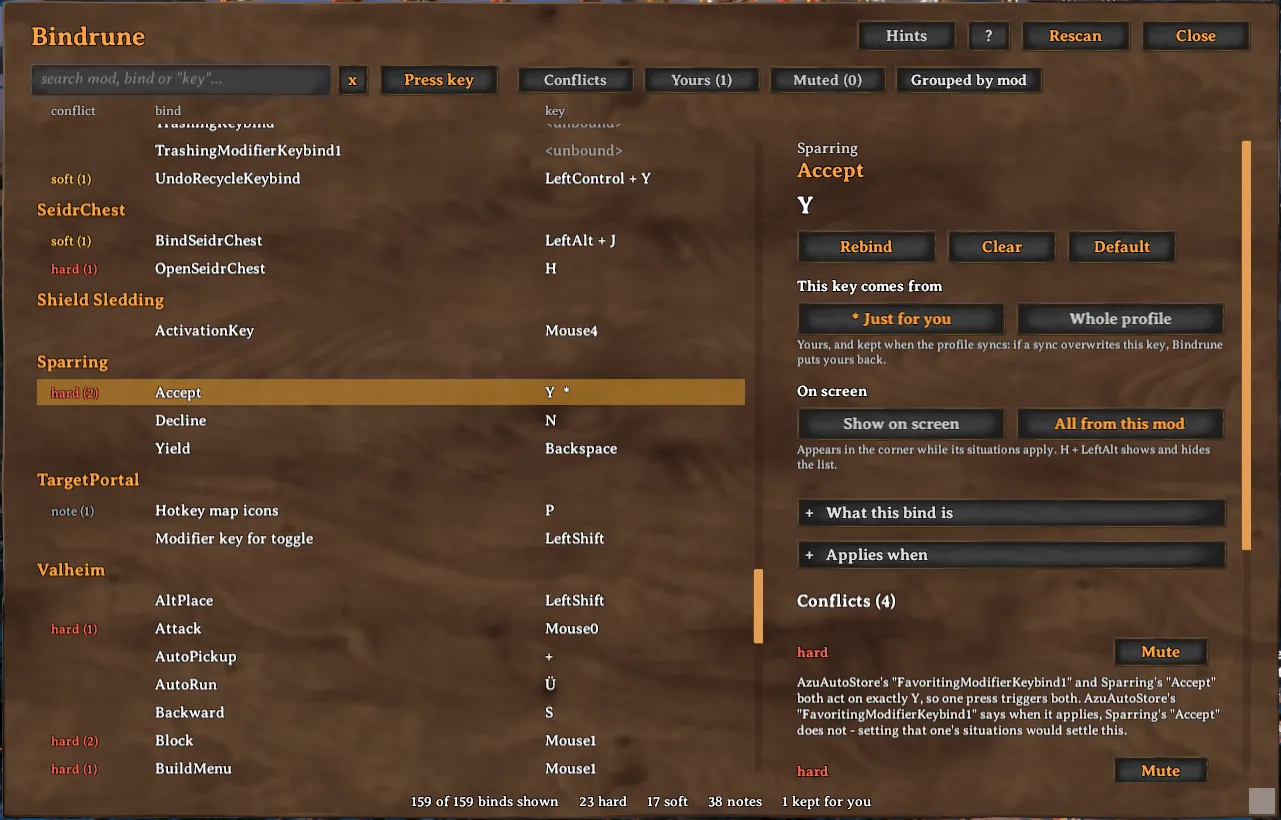
Every keybind from the game and your mods in one panel, with clashes explained and rebinding from the same place. Hotbar slots can be bound to any key, with or without a modifier.
| Date uploaded | a day ago |
| Version | 0.4.0 |
| Download link | isimp-Bindrune-0.4.0.zip |
| Downloads | 167 |
| Dependency string | isimp-Bindrune-0.4.0 |
This mod requires the following mods to function

denikson-BepInExPack_Valheim
BepInEx pack for Valheim. Preconfigured with the correct entry point for mods and preferred defaults for the community.
Preferred version: 5.4.2350
ValheimModding-Jotunn
Jötunn (/ˈjɔːtʊn/, 'giant'), the Valheim Library was created with the goal of making the lives of mod developers easier. It enables you to create mods for Valheim using an abstracted API so you can focus on the actual content creation.
Preferred version: 2.30.1README
Bindrune
Bindrune shows every keybind in your game in one panel: the game's own controls and the keybinds of every installed mod. When two binds share a key, it tells you whether they will actually get in each other's way, and why. It never blocks a binding. It explains what will happen and leaves the choice to you. It can also take the hotbar off the number keys, which the game itself does not allow.
AI notice
Most of Bindrune was written by Claude Code (Anthropic), which did the heavy lifting on implementation and design. Heads-up so you can judge for yourself.
Using it
Press Insert in game to open the panel. Select a bind to see what it clashes with, change its key from the same place, or mute a clash you are happy with. A new key nothing else uses is saved straight away. One that clashes is shown with what it would run into, and a few nearby keys that would not, before anything is saved.
You can tell Bindrune where a bind is used, for example only in the build menu or only with a pickaxe in hand. Binds that can never be active at the same time are then no longer reported as clashes.
Any bind can also be pinned to a small list of hints on screen, which only shows a bind while it applies. Alt+H shows and hides that list.
The hotbar keys
The game ties its hotbar to the number keys 1 to 8. Its controls let you add a second key to a slot, but never take the number away. Bindrune can put each slot on any key you like, with a modifier such as Alt if you want one, or on none, which leaves the number keys free for other binds. The hotbar shows the keys you chose, and so do the game's prompts that name them. They stay in place when the game reloads its controls, and they are yours alone, so a synced profile does not change them. Default on the bind gives the number back, and without Bindrune the game has its own keys again.

Your own keys
When a shared modpack profile is synced, it overwrites your config files and your rebinds with them. Bindrune can keep the keys you mark as your own outside the synced config and puts them back after every sync. The clashes you have waved through and the hints you have pinned are kept there too.
Requirements
Bindrune needs BepInEx 5 and Jotunn. Mod managers install Jotunn along with it.
More
Settings, the files Bindrune keeps, how it reads the game's binds, notes for mod authors and build instructions are on GitHub at https://github.com/isimp/Bindrune
CHANGELOG
Changelog
0.4.2
When bindrune.keys cannot be written, keybinds taken over from Keepsake now stay in Keepsake's file, to be taken over at the next launch, rather than being lost from both.
0.4.1
Keybinds kept in Keepsake become your own keys in Bindrune, which looks after keybinds while both are installed.
Return in the search box at the start menu no longer reaches the menu behind it, where it could still log a character in. The menu now ignores the keyboard while the panel is open.
0.4.0
The hotbar keys 1 to 8 can now be moved or cleared, which the game itself does not allow. Bindrune keeps the new key and puts it back whenever the game reloads its controls, and Default gives the digit back.
A hotbar key, or its alternate, can now take a modifier such as Alt + 1.
The hotbar shows the keys on its slots, and prompts such as cooking name them, or say hotbar when there are too many to list.
A key a bind cannot take is now refused as soon as you press it.
Binding a game control to a number key now works. It used to leave the control answering to no key, and clashes between the number keys and the hotbar were never reported.
Keys the game reads with a modifier, such as Ctrl + F3, are now reported when a longer combo fires them too.
0.3.2
The alternate hotbar keys and the alternate dodge are now listed. The game ships them without a key, and binds in that state were being missed.
A bind the game will not let you change now names the one you can change instead, with a button that goes straight to it. This is how the hotbar digits work.
Keys found only on non-US keyboards, such as the one beside left Shift, can now be set on the game's own controls. Mods cannot see those keys, so a mod bind says so rather than taking one.
A key that could not be set now says why, beside the buttons you set it with.
The panel keeps your search and your place in the list when you close, reopen or resize it.
Typing in the search box at the start menu no longer reaches the menu behind it, where Return pressed whatever was selected.
Problems Bindrune works around are now written to the log once each.
0.3.1
Five keys the game reads in its own code, such as F11 for screenshots and Ctrl+F1 to free the mouse, are now listed with its binds and reported when a mod uses them too.
Editing situations.txt or bindrune.keys by hand while the game runs is no longer undone by the next change in the panel, and opening the panel picks the edit up.
Putting your keys back after a profile sync now scans at most twice a session, at the main menu and once your character is in the world, instead of every 30 seconds for up to four minutes. Keys whose mod only binds them in the world are now restored however long the main menu stays open.
Key suggestions in the rebind preview are much cheaper to work out, and the on-screen hints no longer allocate anything while nothing on screen changes.
The panel now plays the game's own sounds when it opens and closes, when a key you press is set straight away, and when the hints key toggles the hints.
0.3.0
When a key you press for a bind clashes, Bindrune now suggests up to three nearby that would not, adding a modifier where the bind can take one. It prefers the modifiers your setup already uses, and never puts one on a key the game reads regardless of modifiers. A key shared with a bind that is never live at the same time is offered too, marked as shared.
A key nothing else uses is now bound as soon as you press it.
Keys the game reads on its own, such as F2 for the network panel or F11 for screenshots, are no longer shown as free.
The keys that open the map, inventory, chat and build menu now count as live in the world, where you press them to open those screens. A world bind on the same key used to be reported as harmless.
0.2.1
Muted clashes and pinned hints now live in BepInEx/bindrune.keys with your own keys, where a profile sync cannot replace them with the profile owner's. Existing ones are moved there on the first launch.
A mute now covers the clash you looked at rather than the pair for good. It is reported again if it turns into something worse, and dropped once it is gone.
A note about two binds sharing a key now names both of them.
Cancel now cancels a rebind instead of binding the left mouse button, and the Press key search does the same when clicked again. Left click is still bindable anywhere else.
0.2.0
Every clash a bind has now carries a Go to button that switches to the other bind in the pair, and scrolls its row into view.
0.1.0
First release.
