
Please disclose if any significant portion of your mod was created using AI tools by adding the 'AI Generated' category. Failing to do so may result in the mod being removed from Thunderstore.

AdminQoL
Console panel GUI with favorites, Expands vanilla itemsets command via YAML with EpicLoot and Jewelcrafting examples. Also adds learn/unlearn and clear-inventory commands, suppresses recipe unlock spam, removes equip delay and skill-up effects.
| Date uploaded | a month ago |
| Version | 1.1.2 |
| Download link | sighsorry-AdminQoL-1.1.2.zip |
| Downloads | 133 |
| Dependency string | sighsorry-AdminQoL-1.1.2 |
This mod requires the following mods to function

denikson-BepInExPack_Valheim
BepInEx pack for Valheim. Preconfigured with the correct entry point for mods and preferred defaults for the community.
Preferred version: 5.4.2350README
AdminQoL
Console panel GUI with favorites, configurable language cycling, and expanded vanilla itemsets via YAML with EpicLoot and Jewelcrafting examples. Also adds learn/unlearn and clear-inventory commands, suppresses recipe unlock spam, removes equip delay and skill-up effects.

Search for all the console commands that vanilla and other mods adds. Also you can favorite the commands in groups.

There is also wooden theme for console panel. You can turn off console panel with f6 by default.
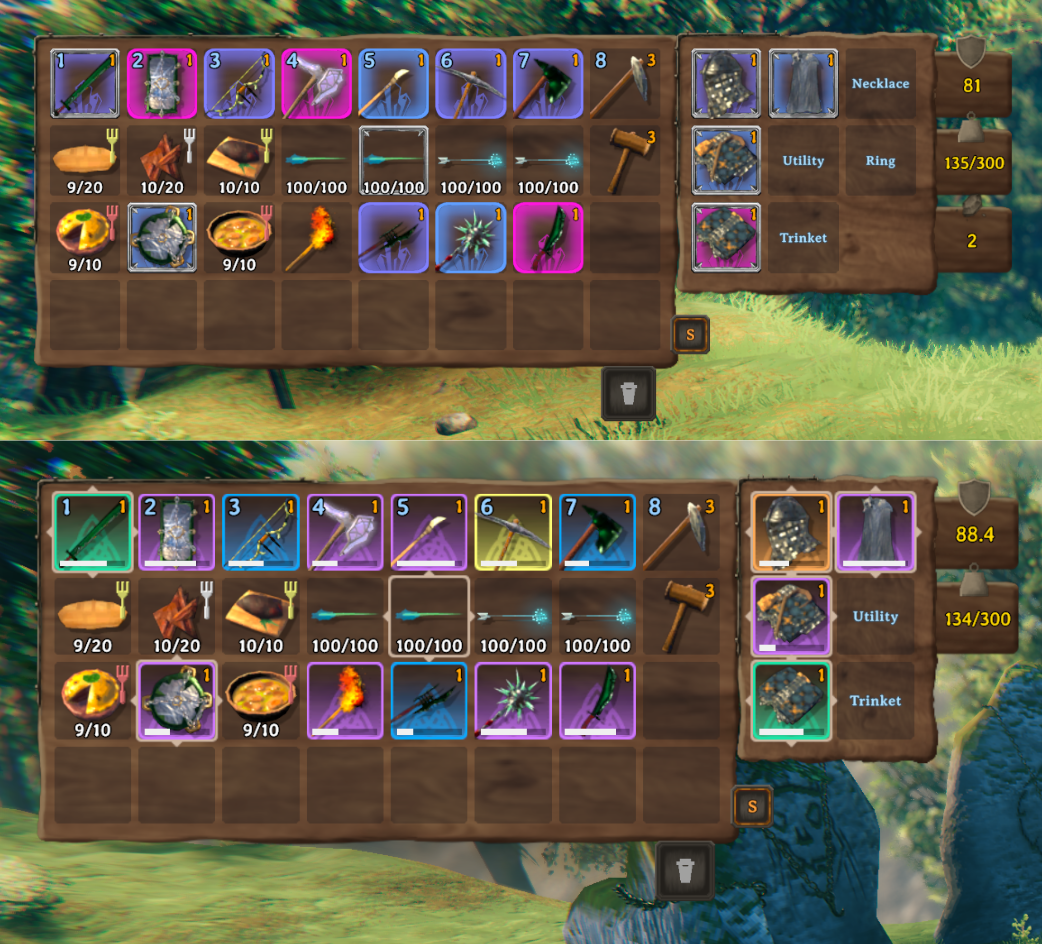
In vanilla, there is console command itemsets. Make your own sets for testing. You can edit vanilla sets or make your own sets. Set supports both Epicloot and Jewelcrafting.

Example of calling in built-in sets. Use command adminqol_clearinventory to clear your inventory if you need it.
Features
- Suppresses Valheim unlock popup spam from
MessageHud.QueueUnlockMsg. - Can hide skill level-up VFX/SFX and skill level-up alarm messages independently.
- Optional instant equip/unequip by removing Valheim's timed equip action.
- Adds admin-only local commands:
Features
- Suppresses Valheim unlock popup spam from
MessageHud.QueueUnlockMsg. - Can hide skill level-up VFX/SFX and skill level-up alarm messages independently.
- Optional instant equip/unequip by removing Valheim's timed equip action.
- Adds admin-only local commands:
- 'itemsets' <itemsetname> itemsetname is defined at
AdminQoL.ItemSets.yml,AdminQoL.ItemSets.EpicLoot.ymlandAdminQoL.ItemSets.Jewelcrafting.yml adminqol_learn <prefab|all>learns all recipes/discoveries, or a prefab item/build piece/crafting station and its related recipes.adminqol_unlearn <prefab|all>unlearns all known items, or a prefab item/build piece/crafting station and its related recipes.adminqol_clearinventorypermanently removes every item entry from the local player's inventory.adminqol_itemsets_reloadreloadsAdminQoL.ItemSets.yml.adminqol_itemsets_listlists currently loaded YAML itemsets.
- 'itemsets' <itemsetname> itemsetname is defined at
- Injects YAML itemsets into Valheim's vanilla
itemsetcommand, so custom sets work withitemset <name> [quality] [keep]. - Optional YAML item metadata for Jewelcrafting sockets and EpicLoot magic items when those mods are loaded.
- EpicLoot set bonuses remain defined by EpicLoot
legendaries.json; AdminQoL only marks itemset items with the matching EpicLoot IDs. - Adds a ConsolePanel command browser to Valheim's F5 console, with command grouping, search, numbered favorite profiles, and F6 show/hide.
- Makes the Settings language cycle order editable through
BepInEx/config/AdminQoL/LanguageSequence.yml. - Adds an admin-gated, read-only Prefab Profiling overlay for inspecting the currently hovered local object. G toggles the overlay and H copies the cached snapshot by default. A compatible ZoneSavior server can optionally resolve cached creator names; without it, unresolved creators remain
Unknown. - Does not use ServerSync. This is intentionally a client/admin utility.
Config
The BepInEx config file is BepInEx/config/sighsorry.AdminQoL.cfg.
Runtime-generated AdminQoL YAML files are stored in BepInEx/config/AdminQoL/.
1 - General:Require Server AdminandLoad YAML Item Sets.2 - Gameplay QoL: unlock popup/log suppression, skill level-up effects/alarm removal, and instant equip.3 - Console Panel: panel size, visual style, vanilla console bottom offset, mouse cursor release, and toggle key.4 - Console Panel Favorites: favorite tab count and favorite command lists.5 - Prefab Profiling: enable/admin gate, toggle-or-hold mode, and display/copy keys. Snapshots refresh once per second and always include the component list.
Learn/unlearn examples:
adminqol_learn all
adminqol_learn ShieldWood
adminqol_learn piece_workbench
adminqol_unlearn all
adminqol_unlearn ShieldWood
adminqol_unlearn piece_workbench
Targets match prefab names only. Item targets affect item discovery and matching output recipes; crafting station targets affect the station entry and recipes crafted there. Both full learn and full unlearn use the explicit all target, and all is included in tab completion.
Language Sequence
Opening Settings > Gameplay on a client creates BepInEx/config/AdminQoL/LanguageSequence.yml from Valheim's current language order. The file is generated only when missing and is never overwritten after it exists.
The YAML is a top-level list of Valheim's internal language IDs:
- English
- Swedish
- French
- Korean
The right arrow follows the list from top to bottom, the left arrow follows it in reverse, and both directions wrap at the ends. English is used as the sequence anchor. The file is read whenever the settings screen opens, so close and reopen Settings after editing it. Unknown and duplicate IDs are ignored, while installed languages missing from the file are appended in their current runtime order. An unreadable or empty file, or one with no supported IDs, falls back to the last valid sequence or Valheim's current order. Dedicated servers do not create or use this file.
YAML Itemsets
When YAML itemsets are first needed, the mod creates BepInEx/config/AdminQoL/AdminQoL.ItemSets.yml from Valheim's built-in itemsets. The file is generated once and is never overwritten by AdminQoL after it exists. Files in the previous BepInEx/config/AdminQoL.ItemSets*.yml root location are not loaded or migrated.
AdminQoL also creates and loads these optional example/reference files:
BepInEx/config/AdminQoL/AdminQoL.ItemSets.EpicLoot.ymlBepInEx/config/AdminQoL/AdminQoL.ItemSets.Jewelcrafting.yml
All files matching AdminQoL.ItemSets*.yml are loaded. The generated EpicLoot file is parsed only when EpicLoot is installed, and the generated Jewelcrafting file is parsed only when Jewelcrafting is installed. Their example entries are copied from all vanilla itemsets, renamed, and expanded with mod-specific blocks. They are enabled: true by default; set an entry to enabled: false if you do not want it in the itemset command.
itemSets:
  - name: MyAdminSet
    items:
      - prefab: SwordIron
        quality: 4
        stack: 1
        use: true
        hotbarSlot: 1
    skills:
      - skill: Swords
        level: 100
    knownStations:
      - piece_workbench
    knownItems:
      - Wood
      - Stone
    inheritKnownFromItemSet:
      - Start
hotbarSlot is Valheim's itemset hotbar placement. 1 means hotbar slot 1, 8 means hotbar slot 8, and 0 or an omitted field means no hotbar move.
If a YAML set name matches a vanilla set and replaceExisting is true, the YAML definition replaces the vanilla set at runtime. Missing replaceExisting is treated as false. Delete a generated file if you want AdminQoL to regenerate that file.
Known-item inheritance cycles are rejected before Valheim changes the inventory or character knowledge. Missing parent sets retain Valheim's normal behavior and are ignored. While applying a set, referenced crafting-station prefabs use their base level without querying scene-only extensions; placed stations retain Valheim's normal level calculation.
Jewelcrafting socket values support exact gem prefab names, empty, random_simple, random_advanced, and random_perfect. EpicLoot effects support exact effect IDs or type: random; value: random rolls through EpicLoot's effect value ranges.
AdminQoL does not register EpicLoot set definitions. Define custom EpicLoot sets in EpicLoot's legendaries.json, then reference the loaded legendaryId and optional setId from an AdminQoL.ItemSets*.yml file. If setId is omitted, AdminQoL asks EpicLoot which loaded set owns that legendaryId. The generated AdminQoL.ItemSets.EpicLoot.yml documents every supported epicLoot: field.
Known limitation: optional item metadata is applied to the item returned by Valheim's add operation. When one entry creates multiple item instances, earlier instances may not receive metadata; a partially failed add can also leave added items without metadata. For enhanced non-stackable gear, use separate stack: 1 entries and check inventory space. AdminQoL does not retry failed item grants.
Development verification
Build against the installed Valheim assemblies and automatically deploy the merged Debug plugin to the local game's BepInEx/plugins folder:
dotnet build AdminQoL.sln -c Debug -p:DeployToGame=true
pwsh -NoProfile -File ./VerifyStructureRegression.ps1 -PluginDll ./bin/Debug/AdminQoL.dll -GamePath '<Valheim installation>'
pwsh -NoProfile -File ./VerifyLightweightXRay.ps1 -PluginDll ./bin/Debug/AdminQoL.dll -MonoCecilDll '<Valheim installation>/BepInEx/core/Mono.Cecil.dll'
The structure regression runner requires PowerShell 7 and executes managed methods from the built DLL: knowledge updates, inheritance validation, station-reference scoping, and nested/finalizer cleanup. It also checks selected IL contracts. It does not construct live Unity components or change profiles/worlds. Its optional -BaselineDll argument compares Harmony targets and priorities against the unmodified 1.1.1 DLL, allowing only the scoped station-level patch added by this change.
These checks do not replace in-game verification. Before release, test F5/F6 and search focus during console/style changes and shutdown, category/favorite refresh after permission/config changes, prefab and placed crafting stations, and item counts/metadata with optional mods. Repeat relevant scenarios as host, dedicated-server admin, and non-admin client using disposable characters/worlds.
CHANGELOG
Version |
Update Notes |
|---|---|
| 1.1.4 | - Added admin-only Ignore Carry Weight (enabled by default) to prevent encumbrance and allow automatic pickup above the carry limit when inventory space or compatible stack capacity is available. - Preserves the game's auto-pickup toggle, ownership, pickup delay, range, and inventory checks; item weights and displayed carry capacity are unchanged. - Turning the option off restores normal weight checks. - Added carry-weight patch regression checks against Valheim 1.0.15 client and dedicated-server original assemblies. |
| 1.1.3 | - Updated AdminQoL for Valheim 1.0.7. - Updated the YAML itemset Inventory.AddItem Harmony target to Valheim's new signature while preserving vanilla cheat marking, inventory-overflow drops, and failure behavior. - Updated ConsolePanel pointer input to ZInput.pointerPosition. - Updated console command registration for the new constructor while keeping AdminQoL commands visible without devcommands and retaining the existing admin check. - Updated the BepInExPack dependency to 5.4.2350 and expanded client/dedicated-server original-assembly contract checks. |
| 1.1.2 | - Fixed stale optional item metadata after replacing a YAML itemset with a plain definition. - Rejects cyclic known-item inheritance before itemset inventory changes and safely handles referenced crafting-station prefabs while preserving placed-station levels. - Restores nested itemset application state and console input locks during cleanup. - Reduces redundant knowledge processing, console layout component creation, unchanged category/favorite button rebuilds, and tooltip measurement. - Co-located itemset patches and added managed regression and IL contract checks. |
| 1.1.1 | - Added client-side LanguageSequence.yml support for editing Valheim's Settings language cycle order with runtime validation and safe fallback behavior. - Moved all AdminQoL-generated YAML files into BepInEx/config/AdminQoL/. Files in the previous root itemset YAML location are intentionally not loaded or migrated. |
| 1.1.0 | - Fixed learn all and station-targeted learn commands on dedicated-server sessions by recording station knowledge without evaluating scene-only crafting-station extensions. - Prefab Profiling can optionally resolve unloaded or offline creator IDs from player-name history already recorded by a compatible ZoneSavior server. - The creator lookup is bounded, versioned, server-authenticated, and session-cached. Install AdminQoL 1.1.0 on the inspecting client and a compatible ZoneSavior build on the server to enable it; no AdminQoL server install or ZoneSavior client install is required, and missing, older, or incomplete ZoneSavior history safely retains the existing Unknown fallback. |
| 1.0.9 | - Fixed runtime MethodAccessException failures in durability protection, knowledge commands, and ConsolePanel access. - Compiled against Valheim's runtime assemblies so inaccessible member references are caught during builds. |
| 1.0.8 | - Made local game deployment opt-in and unified build path resolution. - Fixed YAML itemset replacement restoration and isolated EpicLoot/Jewelcrafting API failures. - Hardened admin revalidation, config/YAML reloads, shutdown cleanup, knowledge indexing, and ConsolePanel refresh state. |
| 1.0.7 | - Added admin-only Prefab Profiling hover diagnostics with prefab, ZDO, creator, owner, and component details. - Reduced repeated knowledge and itemset work, and hardened temporary state restoration. - Hardened Release manifest updates and package staging validation. |
| 1.0.6 | - Reduced repeated admin-only feature gating. - Clarified YAML itemset reload state tracking. - Consolidated ConsolePanel selection refresh flow. |
| 1.0.5 | - Added admin-only crafting station roof requirement bypass, enabled by default. - Changed durability loss prevention options to default on. |
| 1.0.4 | - Added admin-only durability loss prevention options. - Added ConsolePanel Off mode and ordered panel settings. - Reduced config reload noise and made YAML itemset reload safer with other mods. |
| 1.0.3 | - Fixed admin commands not working on dedi. - Fortified how unlearn command works. |
| 1.0.2 | - Fixed custom itemsets not recognizing All skill |
| 1.0.1 | - Added Console panel GUI - Refactored some codes |
| 1.0.0 | - Initial Release |
