
Please disclose if any significant portion of your mod was created using AI tools by adding the 'AI Generated' category. Failing to do so may result in the mod being removed from Thunderstore.

Clan
Build your Valheim clan with Leader, Officer, Member, and Guest roles, clan chat, a movable health HUD, private map pings, shared positions, custom emblems, and animated GIF emoji. Apply, invite, manage members, and stay connected across Valheim.
| Date uploaded | a month ago |
| Version | 1.0.2 |
| Download link | sighsorry-Clan-1.0.2.zip |
| Downloads | 45 |
| Dependency string | sighsorry-Clan-1.0.2 |
This mod requires the following mods to function

denikson-BepInExPack_Valheim
BepInEx pack for Valheim. Preconfigured with the correct entry point for mods and preferred defaults for the community.
Preferred version: 5.4.2351README
Clan
A server-authoritative clan system for Valheim, integrated into the vanilla chat UI.
Showcase
Clan panel and management
Open the Clan panel directly from gameplay, then browse clans and players, search the directory, apply or invite, and manage member roles.
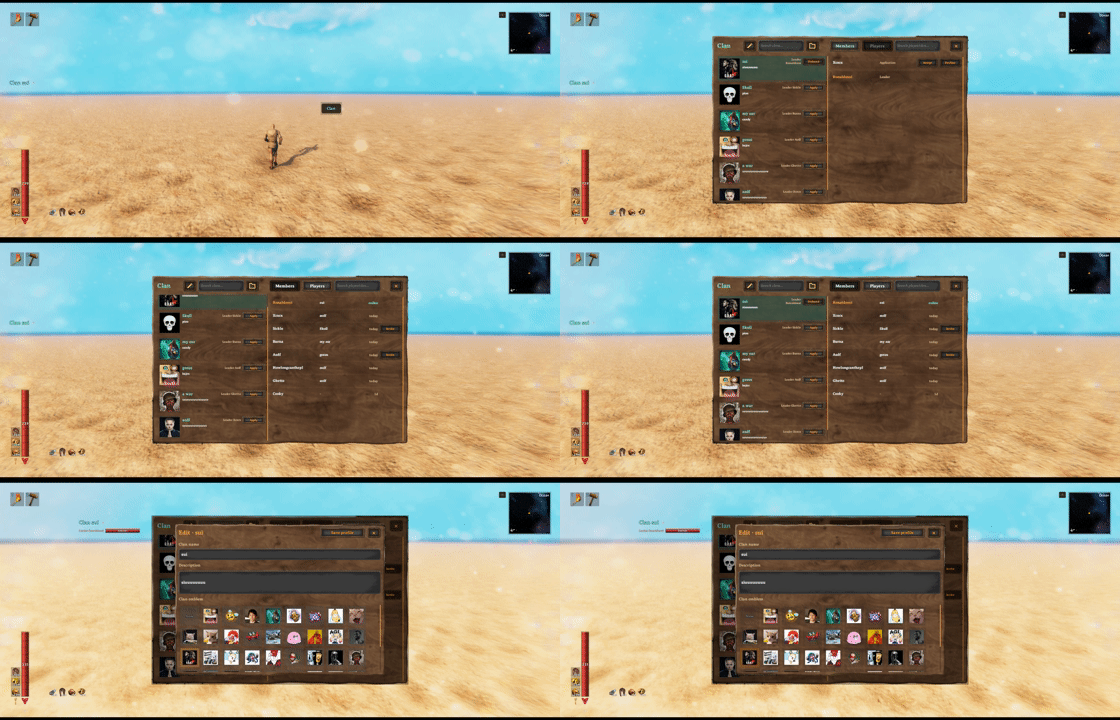
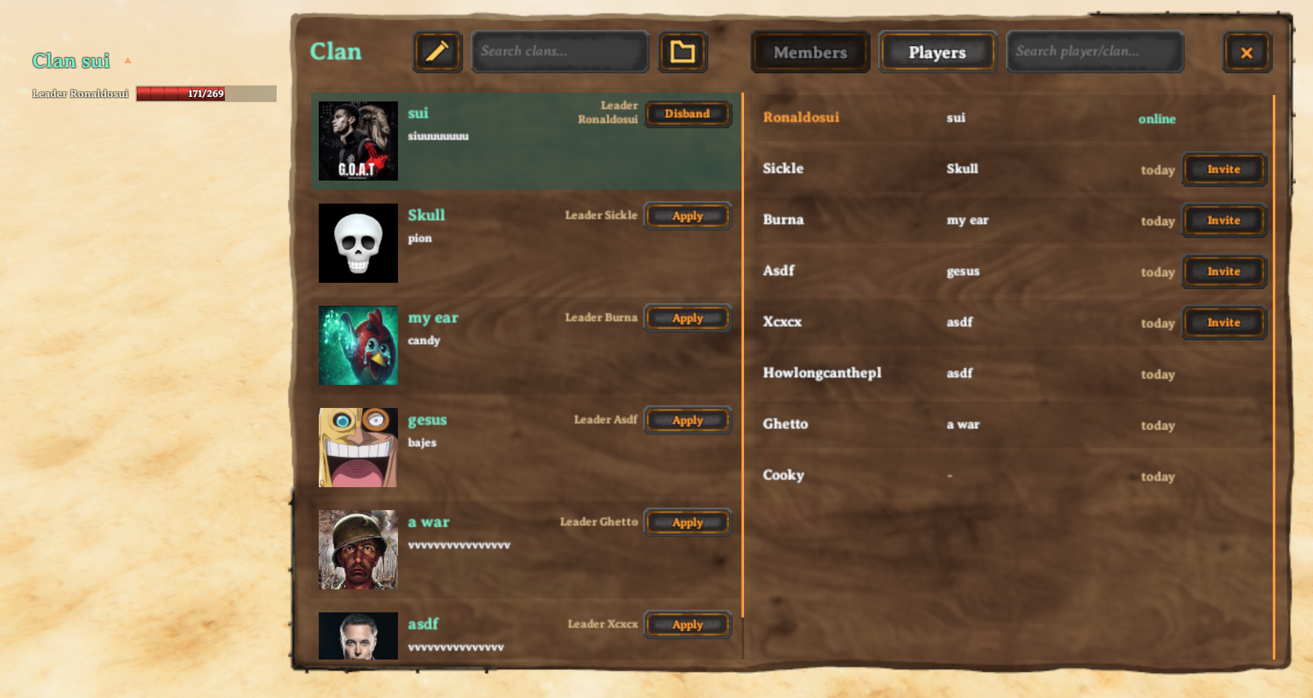
Leaders can update the clan name and description and choose an emblem from the server's media catalog.

Clan chat and notifications
Clan chat is attached to the vanilla chat UI, while the movable HUD keeps the active clan and online members visible during play.
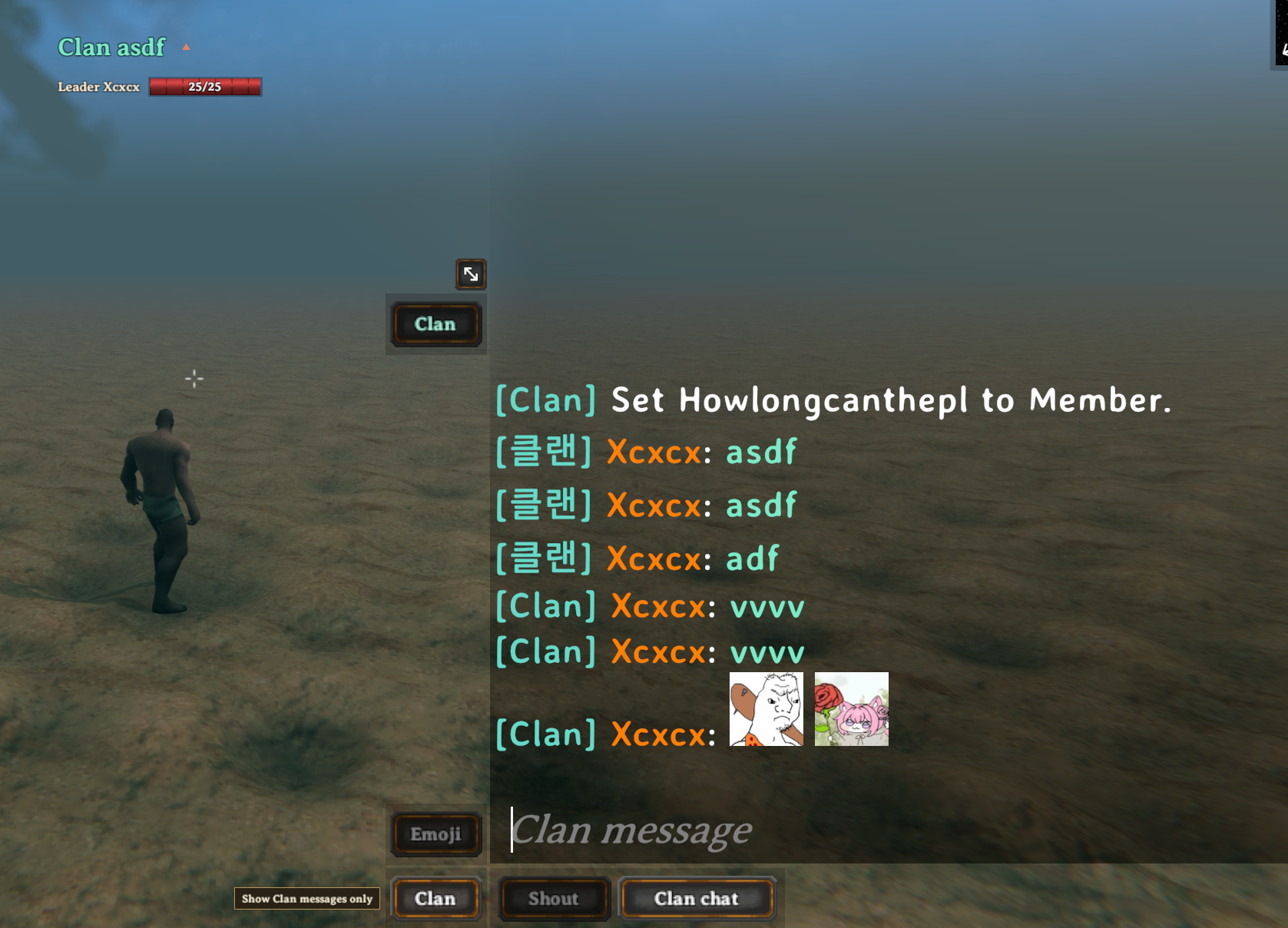
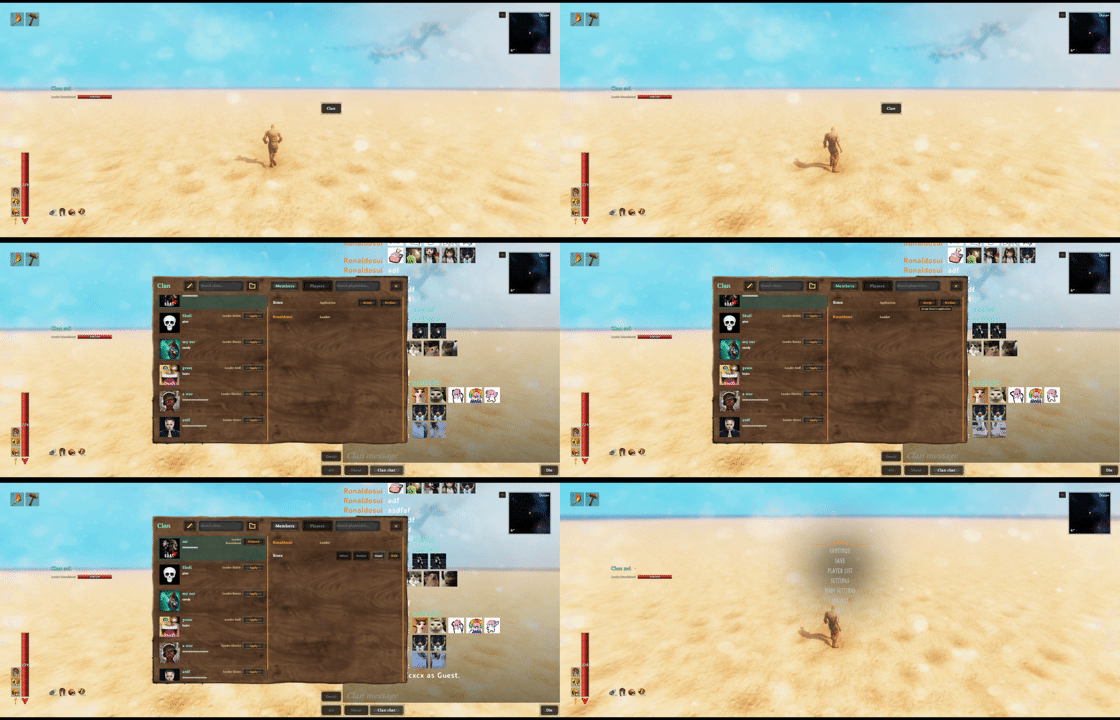
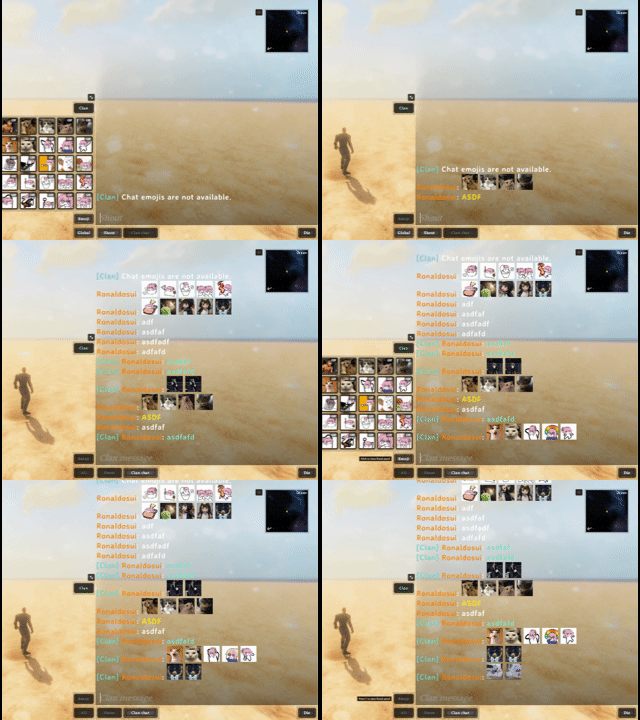
The view filter switches between all, clan, local, and global messages without changing the selected sending channel. Pending invitations and applications are surfaced through the Clan control.

Emoji and animated GIFs
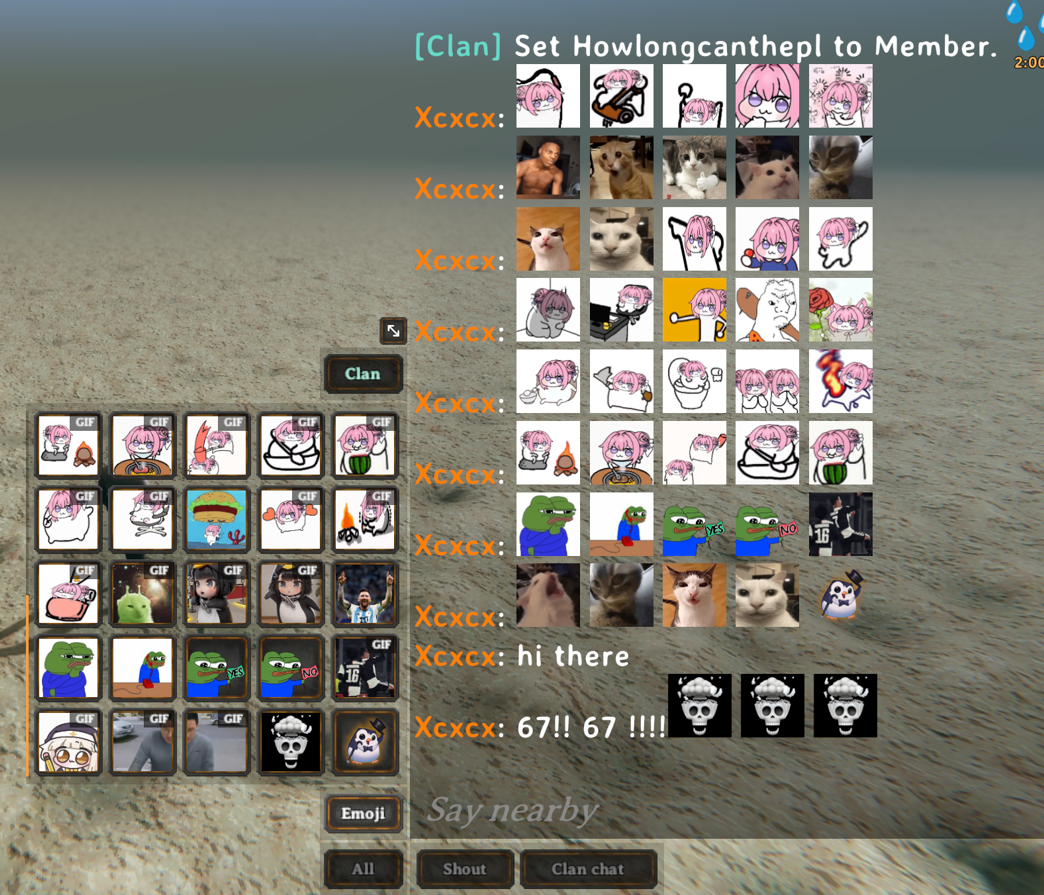
Open the five-column emoji picker from chat to insert server-synchronized PNG or GIF emoji. Animated GIFs play directly in supported chat messages.
Features
- Create, browse, search, and manage clans
Leader,Officer,Member, andGuestroles- Clan chat with
All,Clan,Local, andGlobalview filters - Clan-only map pings and optional position sharing
- Movable clan HUD with online player health
- Server-synchronized PNG/GIF emoji and PNG emblems
- English and Korean localization
Quick start
| Action | Default control |
|---|---|
| Open or close the Clan panel | H |
| Open chat and the Emoji panel | G |
| Send a clan-only map ping | Hold Left Shift while using the vanilla map ping |
Open the Clan panel to create a clan or apply to an existing one. Open vanilla chat to select a channel, insert emoji, filter visible messages, or open the Clan panel from the attached controls.
The Clan HUD is enabled by default and shows up to 10 online players. Drag its header to move it, or use the header control to collapse the player list.
Roles and Guest clans
A player may have:
- One primary clan role:
Leader,Officer, orMember - One persistent
Guestconnection to a different clan
While a Guest connection is active, the Guest clan is used for clan chat, HUD, pings, shared map positions, and friendly-fire checks. The primary membership remains stored and becomes active again after leaving or being removed from the Guest clan.
Accepted applications and invitations always start as Guest. Leaders and officers can manage eligible players from the roster; leadership transfer and clan profile management remain leader-only.
Custom emoji and emblems
The authoritative server loads media from:
BepInEx/config/Clan/emoji
BepInEx/config/Clan/emblems
For single-player and local hosting, place media in the local profile's folders. For a dedicated server, place media in that server installation's folders.
Clan does not embed a default media collection. Install an optional Clan media pack or copy your own files into these folders. This keeps the core mod small and lets server owners and modpack authors select their own catalog without replacing the Clan DLL.
Only the server or host's media catalog is published to connected clients. Remote clients first reuse valid files from the shared cache. When a cache entry is missing, Clan checks the same media-pack path and directly uses a byte-identical local file after verifying its length and SHA-256, without creating a cache copy. Any remaining files are downloaded automatically and added to the shared cache. Changes on the server or host are validated and reloaded automatically.
The legacy spritesheet.png format is not supported; use one image file per emoji.
| Content | Limit |
|---|---|
| Emoji catalog | 100 PNG/GIF files total, including up to 50 GIFs |
| Emblem catalog | 50 PNG files |
| PNG | 512 KiB, up to 512 × 512, 8-bit and non-interlaced |
| GIF | 2 MiB, up to 512 × 512; animated GIFs: up to 180 frames and 10 seconds, infinite loop |
Basenames must be unique within each folder, contain 1–32 characters, use lowercase a-z, digits, _, or -, and start and end with a letter or digit. Windows reserved names are not allowed, and extensions must be lowercase .png or .gif. The basename becomes the chat token:
wave.png      -> :clan_wave:
pink_math.gif -> :clan_pink_math:
GIFs are also limited to 8,388,608 decoded pixels per file and 3,000 frames across the full catalog. Invalid files are skipped and reported in the server log. Large GIF catalogs can use substantial system and graphics memory.
Each message may contain up to five recognized emoji tokens. Only the newest 15 GIF occurrences in the visible vanilla chat buffer animate; older GIFs remain visible on their first frame.
Clients download only missing media and keep a shared content cache under <Valheim save data>/Clan/cache. Downloads run in the background and do not block world entry.
Configuration and save data
Client and synchronized settings are stored in:
BepInEx/config/sighsorry.Clan.cfg
Main defaults are:
| Setting | Default | Scope |
|---|---|---|
| Lock Configuration | On |
Server-synchronized |
| Clan Friendly Fire | On |
Server-synchronized |
| Share Clan Positions | On |
Server-synchronized |
| Clan Ping Modifier Key | Left Shift |
Client |
| Clan Chat Window Scale | 2 (1–2) |
Client |
| Clan Panel Shortcut | H |
Client |
| Emoji Panel Shortcut | G |
Client |
| Chat After Send | KeepOpen |
Client |
| Show Clan Member HUD | On |
Client |
Clan Friendly Fire = On allows clan-connected players to damage one another.
Clan data is stored under:
<Valheim save data>/Clan/
On Windows without -savedir, the default location is:
%USERPROFILE%\AppData\LocalLow\IronGate\Valheim\Clan
| Path | Purpose |
|---|---|
clans.yml |
Clan registry |
recent-players.yml |
Recent-player directory |
cache/ |
Shared downloaded-media cache |
Worlds and mod-manager profiles using the same Valheim save-data root share this persistent Clan data and downloaded-media cache. Their server media sources remain profile-specific under BepInEx/config/Clan. Use separate -savedir values for independent dedicated-server registries. Do not delete the save-data Clan folder unless you also intend to delete saved clan data.
Mod API
ClanApi.ApiVersion is 4. Server-side integrations can query authoritative primary and Guest memberships with ResolveMemberships, query ward access with ResolveWardAuthorization, and invalidate cached results through RegistryRevision and RegistryChanged.
Fail closed when either lookup returns Unavailable.
CHANGELOG
Version |
Update Notes |
|---|---|
| 1.1.4 | - Adds optional InventorySlots item-tooltip hover and Mouse3 pinning in Clan chat through the additive Clan API v6 client formatting hook; neither mod requires the other - Includes authenticated routed sender identity and effective online roster checks for integrations without using display names for authorization - Isolates failed, invalid, or late formatter output and preserves readable chat, channel colors, and existing delivery rules - Changes the chat RPC protocol to v14; the save format is unchanged - Update servers and clients together to 1.1.4 |
| 1.1.3 | - Adds compatibility with WackyEpicMMOSystem 1.9.71's effective monster level and delayed boss-flag handling without adding version restrictions - Preserves monster-specific XP/level overrides, group multipliers and recipient XP rules; rejects ambiguous or incompatible XP patterns - Simplifies profile persistence placement, chat UI rebuild state and emoji animation-budget handling without changing configuration, saves or public APIs - Expands regression checks for XP argument selection, branch/exception preservation and emoji animation limits - Update servers and clients together to 1.1.3 |
| 1.1.2 | - Removes exact-version restrictions from the WackyEpicMMOSystem and RtDQuestForge adapters; compatible APIs and patch structure now determine whether sharing is enabled - Keeps signature checks, ambiguous/changed Epic XP pattern rejection and isolated adapter shutdown when a contract is incompatible - Reports each detected optional mod version in successful startup messages and updates compatibility documentation - Update servers and clients together to 1.1.2 |
| 1.1.1 | - Fixes a configuration reload/save feedback loop that could repeatedly log "Configuration reload complete" when filesystem callbacks were delayed - Reloads external configuration edits without rewriting the file, coalesces rapid changes and ignores repeated notifications with unchanged content - Preserves in-game setting saves, server configuration locks and local preferences; retries temporary file locks and ignores queued callbacks after shutdown - Adds regression checks for delayed callbacks, rapid edits, external reverts, file replacement and watcher cleanup - Update servers and clients together to 1.1.1 |
| 1.1.0 | - Adds optional WackyEpicMMOSystem 1.9.68 combat XP sharing with members of the effective clan, preserving the existing group multiplier, recipient range, level rules and XP modifiers - Adds optional RtDQuestForge 0.2.13 kill objective sharing with nearby living clan members; each player keeps their own quest acceptance, progress and completion rewards - Adds server-synchronized sharing switches and a QuestForge sharing range of 70 metres by default; Guest membership takes precedence over primary membership - Validates connected identities and clan recipients, adds quest death-ID deduplication and clears sharing state at session teardown - Adds compatibility checks, relay regression tests and an English handoff for the QuestForge author; no Jotunn dependency is added to Clan - Updates the BepInExPack dependency to 5.4.2351 - Update servers and clients together to 1.1.0; optional adapters enable only for the reviewed mod versions |
| 1.0.10 | - Places Valheim's chat window immediately behind the inventory and crafting Canvas so chat no longer covers crafting controls - Restores the original chat order when the UI is replaced or Clan shuts down, while preserving later order changes made by other mods - Adds lifecycle checks for inactive UI, live inventory order changes, UI replacement, shared Canvas guards, and cleanup - Update servers and clients together to 1.0.10 |
| 1.0.9 | - Sets the default vanilla chat window scale to 1.0 for new installations and newly generated configuration entries- Preserves existing saved Clan Chat Window Scale values and the adjustable 1.0–2.0 range- Update servers and clients together to 1.0.9 |
| 1.0.8 | - Restores Valheim's textured input-field style for Clan name, description, and clan/player search fields instead of the overly dark fallback background - Temporarily returns an enlarged chat window to normal scale while the inventory and crafting UI is visible so crafting controls remain unobstructed - Passes static IL and Harmony contract checks against the original Valheim 1.0.12 client and dedicated-server assemblies; no additional game compatibility code change was required - Update servers and clients together to 1.0.8 |
| 1.0.7 | - Uses Valheim's standard visible-player map icon and size for shared clan positions while tinting only the icon with the Clan color - Renders Hangul in clan-member map names through a Clan-scoped copy of the vanilla map font with Valheim's Korean fallback, without changing global TMP font settings - Removes the generated oversized clan-player marker while keeping clan-only ping visuals unchanged - Update servers and clients together to 1.0.7 |
| 1.0.6 | - Keeps the All/Shout/Clan footer below the chat input at large chat scales by reserving its lower margin and fitting only the footer controls when screen height is limited - Opens the Clan panel directly with J before chat has ever opened and keeps it alive when the chat dock attaches- Hosts standalone Clan and chat controls on one HUD-owned overlay and restores the pre-Jotunn-removal panel size without multiplying the HUD Canvas scale - Uses one click sound per Clan button under Valheim 1.0.7 instead of also playing the new pointer-selection sound - Update servers and clients together to 1.0.6 |
| 1.0.5 | - Targets Valheim 1.0.7 with original game assembly references and BepInExPack 5.4.2350 - Removes the Jotunn dependency; uses game UI resources with Clan-owned overlay, resource lifecycle, styling, and panel dragging - Adapts embedded ServerSync broadcasts to the game's constant target ID without changing the wire protocol - Updates split-dialog HUD input blocking and cursor control to SplitDialog and ZCursor; respects build selection, report dialogs, and demo input restrictions - Preserves configuration keys, clan storage, media validation, and API v5; adds no legacy runtime support or migration - Update servers and clients together to 1.0.5; Jotunn is no longer required |
| 1.0.4 | - Sets the default Clan panel key to J and Emoji panel key to H; existing saved shortcuts are preserved- Keeps the All chat filter button visibly enabled - Reduces unnecessary emblem-picker rebuilds, repeated chat layout measurements, and duplicate emoji hash checks while retaining download validation - Simplifies emoji catalog handoff, panel request state, and directory refresh handling - Resolves current clan recipients after server chat callbacks change the registry, preventing delivery through stale membership data - Adds regression smoke tests and makes local DLL deployment respect DeployToGame- Update servers and clients together to 1.0.4 |
| 1.0.3 | - Adds the optional server-only Clan API v5 ServerChatAccepted event for accepted clan chat, allowing integrations such as ServerManager to record clan chat without adding a dependency or changing private chat delivery |
| 1.0.2 | - Coalesces in-flight clan directory requests, debounces repeated refresh invalidations, retries queued refreshes after rate limits or send failures, recovers stalled requests after 30 seconds, and keeps directory panes loading without repeated rate-limit chat messages |
| 1.0.1 | - Adds English and Korean localization, H/G panel shortcuts, clearer clan/member/player, HUD, chat-filter, and map-ping UI, persistent Clan data and shared media caching, and reliability fixes for startup, cursor handling, Unicode validation, registry updates, and media synchronization |
| 1.0.0 | - First public release; declares Groups and Guilds incompatibility, adds Clan API v4, separates optional server media packs under BepInEx/config/Clan from persistent registry, recent-player, and shared-cache data, omits embedded PNG/GIF defaults, and directly reuses byte-identical client media-pack files before downloading missing content |
| 0.6.1 | - Replaces the hidden +/- height toggle with a persistent upper-left drag handle that uniformly scales the vanilla chat window, text, inline PNG/GIF emojis, and attached Clan controls while preserving the lower-right corner and screen bounds |
| 0.6.0 | - Makes local PNG/GIF emoji tokens available in Say, Shout, Whisper, and Clan; replaces the Chatter type-specific label patch with presentation-time TMP token rendering; and adds a session-local chat height expand/restore button outside the upper-left corner |
| 0.5.2 | - Silently skips the optional Chatter emoji integration when Chatter is not installed, removing harmless HarmonyX missing-type warnings without changing chat behavior |
| 0.5.1 | - Releases and shows the mouse cursor only while the Clan-attached chat input is actively focused, keeps Clan controls clickable without closing chat, and leaves cursor restoration to Valheim when chat closes; also recognizes Chatter's disabled input state so the dock cannot remain active after chat closes |
| 0.5.0 | - Breaking emoji update: replaces the server-transferred 5x5 sprite sheet with up to 25 individual PNG files and 10 individual GIF files preinstalled on the server and clients; only a canonical filename/length/SHA-256 manifest is synchronized, PNGs are packed into a client-local runtime atlas, and bounded GIFs render from composited frame atlases |
| 0.4.0 | - Adds validated server-distributed 5x5 Clan emoji atlases, a vanilla-chat emoji picker, safe namespaced chat tokens, bounded client hash caching, and client-local TMP sprite rendering |
| 0.3.1 | - Fixes gameplay input remaining blocked after closing chat with a Clan drawer open; drawers now follow vanilla chat lifetime and mouse suppression is limited to the Clan controls under the pointer |
| 0.3.0 | - Breaking release: replaces the 0.2.x save and RPC formats without migration; adds server-filtered invite candidates, live presence, application cancellation and moderator synchronization, clan colors and descriptions, a synchronized member limit, safer confirmations, server-side chat/ping rate limits, and read-only display of server-owned settings |
| 0.2.0 | - Breaking release: replaces the 0.1.x registry and RPC formats without migration; removes the standalone Clan panel in favor of the vanilla chat dock; targets players by stable ID; all servers and clients must upgrade together and clans must be recreated |
| 0.1.0 | - Clan foundation with Jotunn dependency, persistent server registry, Clan chat panel, channel buttons, feature dock, clan-only ping, and clan position sharing |
