
Please disclose if any significant portion of your mod was created using AI tools by adding the 'AI Generated' category. Failing to do so may result in the mod being removed from Thunderstore.

Homestead
All-in-one construction mod with blueprints, blueprint shop to trade blueprints, area save/dismantle, adjustable dvergr circlet light attached to buildcamera and placement helpers
| Date uploaded | a month ago |
| Version | 1.3.2 |
| Download link | sighsorry-Homestead-1.3.2.zip |
| Downloads | 602 |
| Dependency string | sighsorry-Homestead-1.3.2 |
This mod requires the following mods to function

denikson-BepInExPack_Valheim
BepInEx pack for Valheim. Preconfigured with the correct entry point for mods and preferred defaults for the community.
Preferred version: 5.4.2351README
Homestead

Homestead is a Valheim building mod focused on saving, rebuilding, trading, and cleaning up player structures. It brings blueprint workflows into the hammer tab, with Area Save, Area Dismantle, a Blueprint Store, build camera controls, placement helpers, and Dvergr circlet quality-of-life features.

Homestead tab within vanilla hammer.
Area save to make a blueprint, Area dismantle to teardown the builds, blueprint shop to sell the blueprints

Use build camera and area save to make blueprints.

Place your blueprint and put according materials into blueprint chest and confirm it. (Stations are needed to)
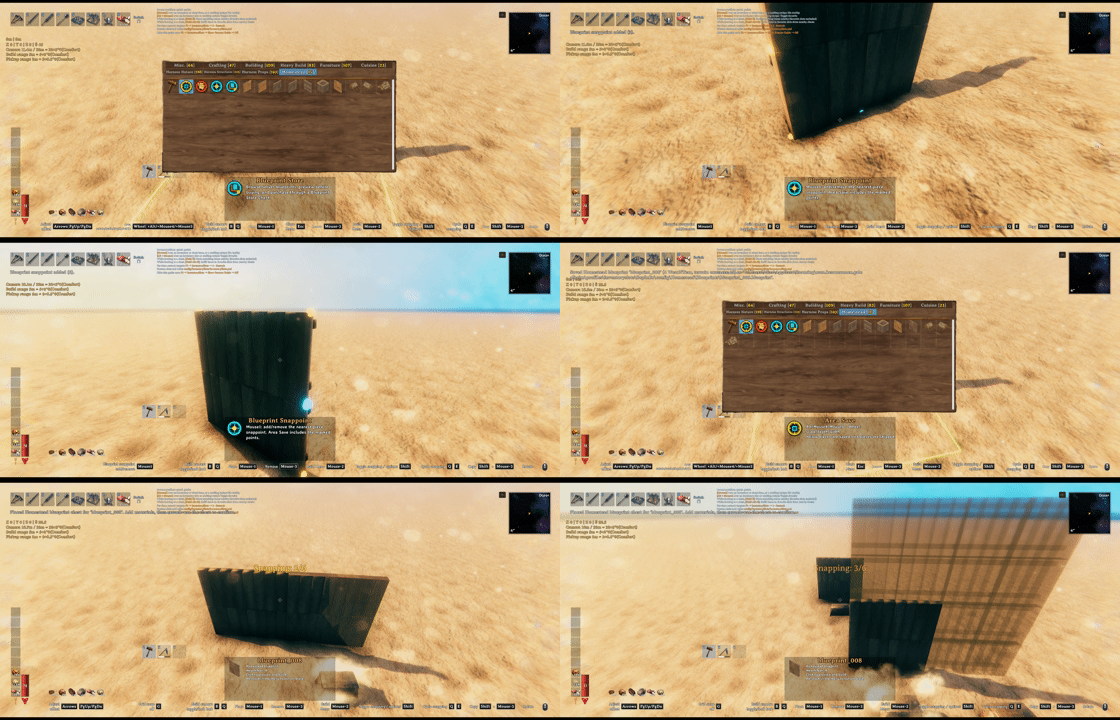
You can set snappoints on the build and save those snappoints in the blueprint.

Alt+click your blueprint and put it on the ground and put a price on your blueprint and list in on blueprint store

You can offer price for blueprints and get notifications for blueprints being enlisted and for offers being accepted/declined/suggested

Buy the blueprints and pay the price for it. And if you have sold your blueprints you can withdraw that from the store.
.

No more clicking all the pieces or using sledge hammer to teardown the build. You can use the tool area dismantle (Only dismantles what each player has built, respectively)

Build camera, dvergr circlet attached to build camera, dvergr circlet light adjustment, lock in pov (freefly feature), position adjustment
What It Adds
- Homestead hammer tab for Area Save, Area Dismantle, Blueprint Store, and saved blueprints.
- Native blueprints that preserve build pieces, required materials, preview placement, and final confirmation.
- Blueprint Store for listing, buying, offering, notifications, and seller payouts.
- Area Dismantle for removing owned builds in a selected rectangle and returning materials.
- Build camera for easier large-scale building from a detached view.
- Placement helpers for grid snap, nudging, rotation step, and X/Z rotation offsets.
- Dvergr circlet controls for light toggle, intensity, range, durability drain, and synced visuals.
- File location:
%USERPROFILE%\AppData\LocalLow\IronGate\Valheim\Homestead
Core Flow
Save And Build
- Equip the hammer.
- Open the
Homesteadtab. - Select
Area Save. - Mark a structure and save it as a blueprint.
- Select the saved blueprint from the Homestead tab.
- Place the blueprint chest.
- Deposit the required materials.
- Confirm the build with
Alt + E
Server owners can configure tab access (keep Lock Configuration = On to enforce synced settings):
- 01 - General / Homestead Tab Access:
Everyone(default) orAdminsOnly. Uses the server's ServerSync admin status, hides the hammer tab/tools for other players, and cancels active tool selection when access is removed. Existing network chests remain available. This controls the normal UI; it is not an anti-cheat restriction on modified clients or all Homestead features.
The upper-left status HUD groups selected area size, placement values and controls, Grid Snap, build camera conditions and ranges, and area repair radius. Circlet adjustments appear briefly at the bottom. Its position and font size use the existing 02 - Client / Status HUD settings, and its height follows the visible content. New configs default to X=30, Y=150 and font size 18; saved values are preserved. Shortcuts use orange keys in a key: action format.
02 - Client / HUD Controls Help (default On) controls the camera, arrow/PgUp/PgDn, rotation and Grid Snap help lines in this HUD. Turning it off keeps numeric status and area repair information. It replaces Build Camera Tooltip without reading or migrating that old setting, and works independently of Valheim's key hints. Cultivators show grid help without hammer-only movement controls; Area Save/Dismantle show movement help without grid. Keyboard placement help is hidden while using a controller.
Selecting repair shows its actual radius below the camera ranges, even with the camera off, and leaves the game's original repair description intact. The radius is base radius plus comfort scale times the cube root of cozy comfort; without cozy comfort only the base radius applies. This information is hidden when Homestead area repair is disabled or another supported area repair mod handles it.
Any player can confirm a construction plan chest; there is no creator-only confirmation setting. Shop listing/purchase/payout authorization is unchanged. Finished pieces keep the original chest creator. The person confirming supplies the existing knowledge/station/no-cost checks and optional inventory/AzuCraftyBoxes material pull.
Confirmation obtains a server reservation before taking chest ownership. Only one confirmation can hold it per chest; authorization must be renewed while building. Missing approval or a lost connection cancels the existing build transaction. A disconnected reservation expires after 60 seconds; confirmed reservations remain blocked until the chest disappears. Both server and clients need this updated DLL. Tab visibility and confirmation access are independent: admins can place plans while other players supply materials and finish them.
Sell A Blueprint
- Open the
Homesteadhammer tab. - Hover a saved blueprint.
- Use the Blueprint Store list modifier and click.
- Place the price chest.
- Set the price.
- Confirm the listing.
Buy A Blueprint
- Open
Blueprint Storefrom the Homestead tab. - Select a listing.
- Preview or place a purchase chest.
- Deposit the listed price materials.
- Confirm the purchase.
The purchased blueprint is saved to the buyer's blueprint list.
Area Tools
Area Save and Area Dismantle use the same rectangle controls:
Wheel: rotate the area.Alt + Wheel: scale width and depth together.Mouse4 + Wheel: adjust depth.Mouse5 + Wheel: adjust width.Arrows/PgUp/PgDn: nudge the tool or preview without a modifier key.
06 - Area Tools / Area Save Creator Mode defaults to AllCreators, allowing Area Save to include pieces built by you, other players, or no recorded creator. Existing config values and server-synced settings are preserved.
Area Dismantle is intentionally conservative:
- only matching player-owned pieces are dismantled
- Homestead blueprint/store chests are protected
- containers, item stands, and armor stands with contents are skipped
- extra prefab blacklist entries can be configured
Blueprint Building
Blueprint placement uses a temporary blueprint chest. The chest shows missing requirements, accepts only needed materials, and finalizes the build when everything is ready.
Blueprint Store
The Blueprint Store lets players trade saved Homestead blueprints.
Store actions include:
- list a blueprint
- edit price
- preview before buying
- buy with materials
- make offers
- accept or decline offers
- hide listings locally
- withdraw seller earnings through payout chests
Notifications appear for store events such as new listings, offers, accepted offers, and purchases.
Build Camera
05 - Build Camera / Build Camera Tool Blacklist defaults to Hoe, Cultivator and is synced with the server. It matches exact item prefab names without case sensitivity, ignoring spaces around comma-separated entries. Other tools with a build menu, including mod-added hammers, remain allowed; an empty list excludes none. Changes apply while playing. Switching to a blocked tool exits the camera and restores the original placement distance. Camera HUD/key hints are hidden for blocked tools; Grid Snap and other tool features remain available.
Build camera helps with tall, wide, or awkward builds by letting the camera move away from the player while building.
05 - Build Camera / Require Crafting Station (default On, synced with the server) controls whether a nearby crafting station, such as a workbench, is required to enter build camera mode. Set it to Off to enter without a station. The comfort restriction and normal building requirements still apply. As before, moving the camera beyond station range does not end an active camera session.
It supports:
- configurable distance
- comfort-scaled distance
- pickup range
- look-at lock
- optional Dvergr circlet light follow
Placement Helpers
Homestead adds small controls that make regular building less fussy:
- grid snap
- position nudging
- adjustable rotation step
- X/Z rotation offsets
- key hints for Homestead controls
Ordinary hammer pieces also support local X/Z rotation with the side mouse buttons + wheel, rotation-only copying with [, and resetting all axes to zero with ]. These are configurable under 04 - Placement Controls; set a shortcut to None to disable it. The X/Z defaults use Unity's Mouse3/Mouse4, displayed as Mouse4/Mouse5 in the HUD. If both modifiers are held, X takes priority. Rotation uses Rotation Step, and copying preserves the complete aimed-at rotation without changing the selected piece.
Temporary rotation stays between ordinary hammer pieces and clears on leaving ordinary placement, Escape, death, or world exit. X/Z tilt starts at zero; the former numeric X Axis Rotation and Z Axis Rotation settings are no longer read. These controls do not write rotation changes back to the config. They are disabled while ComfyGizmo is loaded and do not handle cultivators, terrain tools, or Homestead blueprint/area tools. Their HUD help follows HUD Controls Help. Position Control Priority appears first in Placement Controls, followed by grid, position, then rotation controls.
With supported Infinity Hammer positioning loaded, 04 - Placement Controls / Position Control Priority selects the position controls for ordinary hammer pieces. The default Homestead uses Homestead's arrow/PgUp/PgDn controls, step settings and XYZ display. In this mode Infinity Hammer position application and movement/freeze commands are suppressed for ordinary hammer pieces, even when Homestead's Position Adjust is off. Select InfinityHammer to delegate movement to Infinity Hammer: Homestead clears its own ordinary offsets, shows Position: Infinity Hammer instead of its movement help, and hides its XYZ values while rotation remains available. The priority is client-only and changes while playing; without Infinity Hammer, Homestead handles movement as usual. Existing saved priority settings are retained.
Homestead blueprints, area tools, and active Store previews retain their own movement under either priority. Infinity Hammer position application and movement/freeze commands are suppressed in those Homestead contexts without rewriting its config or stored offsets; its normal unfreeze cleanup remains intact. Switching back to InfinityHammer can resume its stored offset/frozen position. This integration follows the loaded position implementation, since Infinity Hammer 1.87's movement commands remain registered even when its general Enabled setting is off.
Homestead Grid Snap pauses for ordinary hammer pieces while Infinity Hammer owns position control and has a nonzero offset or frozen position, preventing the grid from rounding away precise nudges. The HUD and key hint explain the pause; the G toggle retains its state and snapping resumes when the offset/freeze is cleared or priority changes to Homestead. Cultivator and Homestead preview grids are unaffected. Infinity Hammer remains optional and is not bundled.
Dvergr Circlet
Homestead can extend the Dvergr circlet with per-item light controls:
- toggle light on/off
- adjust intensity
- adjust range
- drain durability while lit
- sync custom-slot visuals and light state for nearby players
Github
Build camera code from https://github.com/AzumattDev/BuildCameraCustomHammersEdition
https://github.com/sighsorry1029/Homestead
CHANGELOG
Changelog
1.3.7
- Changed blueprint confirmation in vanilla Hammer mode / No Build Cost to skip recipe discovery and crafting station requirements with
Alt + E. Station previews around the blueprint chest remain visible; DLC requirements, ward access, building limits and Blueprint Store prices are preserved. - Restored the original material list, progress and piece preview behavior in free-build modes. Manual deposits and configured automatic material collection remain available, while confirmation can finish without the materials covered by each piece's vanilla free-cost setting.
- Simplified successful construction to consume deposited materials even in Hammer mode. Destroying an unfinished plan still returns its deposits, and interrupted or rejected confirmation keeps the plan and its deposits available.
- Extended isolated client/server checks for undiscovered recipes, missing workbenches, station visuals, empty and partially funded plans, ordinary-world requirements, store payments and Area Dismantle refunds.
1.3.6
- Added automatic vanilla Hammer mode / No Build Cost support for blueprints, including the separate No Craft Cost setting for applicable pieces. Recipe discovery, crafting station requirements, ward access, building limits and Blueprint Store prices are preserved.
- Updated material requirements and previews to follow world cost settings. Free construction no longer collects unnecessary materials from player inventories or nearby containers.
- Preserved previously deposited materials when construction becomes free. Unused deposits are returned on completion, with persistent retry records, duplicate-return protection and protection against further deposits or destruction while a return is pending.
- Updated Area Dismantle to follow vanilla's current world cost settings, suppressing material returns while the corresponding free-cost setting is enabled. Saved Path of Valheiman payment history still applies when refunds are enabled.
- Cancel and roll back confirmation if world cost settings change during construction. Added English/Korean status messages and original-game isolated client/server regression coverage for costs, access checks, deposits, refunds and store payments.
1.3.5
- Added optional Path of Valheiman compatibility: Hugin's Flight unlocks Homestead's Build Camera, and an effective repair-radius passive unlocks Homestead's Area Repair. Homestead controls the hotkeys, ranges, conditions, and repair costs; additional PoV repair-radius bonuses do not stack.
- Suppressed PoV's duplicate camera and mass-repair execution while compatibility is active, including when the Homestead feature is disabled. Basic single-piece repair remains available. Refunding the unlocking passives locks the features again and exits an active camera while preserving PoV's ordinary building-range bonuses.
- Fixed Area Dismantle refunds for PoV-discounted and free buildings by reading the original piece's saved payment, including unloaded pieces and worlds where PoV has since been removed.
- Excluded Homestead construction, price, purchase, and payout chests from PoV's nearby crafting materials. Blueprint confirmation retains its existing full-cost transaction without applying normal-build discounts or experience hooks.
- Added English/Korean unlock guidance and isolated client/dedicated-server regression checks against the supplied PoV 5.0.4 DLL. Integration checks API contracts rather than requiring an exact PoV version; full-mod multiplayer validation remains separate.
1.3.4
- Fixed Area Dismantle treating empty containers saved by Valheim 1.0.20 as containing items. Empty inventory payloads in formats 109 and 110 are now recognized.
- Kept protection for containers with contents, attached items, malformed data, or unsupported save versions, without changing dismantle permissions.
- Extended the isolated dedicated-server runtime checks to cover the new save format and unloaded container data.
1.3.3
- Added optional Clan 1.1.4 / API 6 support to Area Save when installed on both client and server, without adding creator modes.
OwnedOnlyandOwnedAndCreatorlessnow include current primary-clan Leader/Officer/Member creators, including offline players; Guest links do not authorize saving. The default remainsAllCreators. - Recheck creator access when saving a selected area and use the final allowed pieces for snap-point capture/consumption. Clan lookup failures preserve the existing own/creatorless policy. Area Dismantle and stored piece creators are unchanged.
- Skip build key-hint text updates while hints are hidden, retaining hint initialization and mouse-wheel icons.
- Consolidated status HUD expiration, inactive circlet cleanup, and price-draft chest restoration checks without changing display timing, cleanup order, or loaded/unloaded chest matching rules.
1.3.2
- Fixed ZenRedecorate Ctrl-click movement failing when started from repair mode and leaving the player stuck in its moving/encumbered state. Homestead now checks the source prefab before the movement preview exists; ZenRedecorate's normal carrying penalty and movement restrictions remain unchanged.
1.3.1
- Added optional Infinity Hammer position compatibility and the client-only
Position Control Prioritysetting, shown first in Placement Controls and defaulting toHomestead. SelectInfinityHammerto delegate ordinary hammer positioning; changes apply during play and existing saved settings are preserved. - Prevented overlapping movement, offsets, and position-freeze commands between Homestead and Infinity Hammer. Homestead blueprints, area tools, and Store previews retain their own positioning; ordinary rotation and ComfyGizmo compatibility remain unchanged.
- Paused Homestead Grid Snap while Infinity Hammer owns positioning and has an offset or frozen position. HUD and key hints explain the pause and active position controls; snapping resumes when those offsets are cleared or priority returns to Homestead.
- Removed the numeric
X Axis RotationandZ Axis Rotationsettings while retaining side-button rotation, copy, and reset controls. Grouped the remaining settings by grid, position, and rotation beneath Position Control Priority. - Added the server-synced
Build Camera Tool Blacklist, defaulting toHoe, Cultivator. Blocked tools cannot enter Build Camera; switching to one exits the camera, restores placement distance, and hides camera guidance without disabling Grid Snap. Other mod-added building tools remain allowed unless listed by prefab name. - Highlighted Grid Snap on/off and paused status in yellow in the status HUD.
1.3.0
- Restored Homestead Grid Snap and its guidance for cultivators, including setups without PlantEasily, while keeping ordinary hammer rotation and position offsets out of planting controls. Snapped placement still checks protected and no-build areas.
- Fixed PlantEasily placement-ghost exceptions during tool changes with an optional compatibility guard, without changing its planting grid or resource accounting.
- Added configurable local X/Z rotation with the two mouse side buttons plus the wheel (shown as Mouse4/Mouse5),
[to copy an aimed-at piece's complete rotation without changing the selected piece, and]to reset all rotation axes. Bindings can be disabled withNone; ordinary-piece rotation continues to defer to ComfyGizmo when installed. - Combined area size, placement values and controls, Grid Snap, Build Camera conditions and ranges, area repair radius, and temporary circlet feedback in the upper-left status HUD. Removed the separate Build Camera hint above piece descriptions and kept repair piece descriptions vanilla.
- Replaced the client-only
Build Camera Tooltipsetting withHUD Controls Help, enabled by default. It controls HUD shortcut guidance independently of game key hints while retaining numeric status and repair information when disabled. The old setting is no longer read or migrated. - Unified HUD shortcut labels as
key: actionwith orange keys and native mouse-wheel icons. Set new-config HUD offsets to X=30 and Y=150, retaining the existing font size and saved position settings. - Added the server-synced
Require Crafting Stationsetting for entering Build Camera, enabled by default. Disabling it preserves comfort restrictions and ordinary building requirements. Corrected Korean workbench guidance to작업대 필요. - Changed the Area Save Creator Mode default to
AllCreators. Existing config values and server settings are preserved; Area Dismantle ownership restrictions are unchanged.
1.2.19
- Fixed unexpected cultivator rotation changes when resizing PlantEasily's planting grid with LB + D-pad or Right Ctrl + arrow keys, and after planting.
- Limited ordinary placement rotation, position offsets, X/Z tilt, grid snapping, and their key hints to hammer build tables so they no longer interfere with cultivators and other non-hammer tools. Blueprint, area-tool, and Build Camera controls remain unchanged.
- Restored the previous rotation step when leaving hammer placement and during session cleanup, without overwriting a later change made by another rotation mod.
1.2.18
- Added a one-line Build Camera hint above the build piece panel, showing the configured shortcut and current station, comfort, or active-state guidance even when key hints are disabled.
- Added the client-only
Build Camera Tooltipsetting, enabled by default and changeable during play. The hint follows the build panel and UI scale, supports English and Korean, and hides with the HUD or blocking menus. - Positioned the camera hint above Groundwork's terrain-height guidance when both are visible, and shared condition refreshes with existing key hints to avoid duplicate station and comfort lookups.
- Updated the package dependency to BepInExPack Valheim 5.4.2351.
1.2.17
- Updated Homestead for Valheim 1.0.14, including the current controller-stick input signatures, and fixed returned blueprint materials being lost when Valheim rejects a stack merge after its inventory capacity check.
- Added the server-synced
Homestead Tab Accesssetting. Servers can keep the tab available to everyone or show and activate Homestead hammer tools only for ServerSync administrators; existing network chests remain usable. - Allowed any player to confirm a blueprint construction chest while preserving the original builder on completed pieces. Confirmations now obtain a renewable server reservation so concurrent attempts cannot build the same plan twice; the confirming player still supplies the existing requirements and optional material pull.
1.2.16
- Fixed newly saved blueprint snapshots becoming fully transparent after the Jotunn removal by restoring the shader-compatible narrow-perspective capture used by the former renderer while retaining the existing framing and transparent background.
- Detects and regenerates existing fully transparent blueprint snapshots when they are next loaded, preserves valid or custom icons, and prevents invalid snapshots from being attached to new Blueprint Store listings.
1.2.15
- Fixed dedicated-server interaction with blueprint plan and store chests when their network owner is the server, including InventorySlots setups with multi-user chest access disabled. Activity updates now use an authenticated, distance-checked RPC without transferring ZDO ownership.
- Restored Blueprint Store panels closer to their former Jotunn-backed presentation with an independent canvas, native Valheim fonts, sprites, materials, borders, scaling, and draggable panel behavior.
- Prevented mouse-wheel input over Blueprint Store panels from changing the player's camera zoom.
- Made normal blueprint placement and Alt-click store-listing placement mutually exclusive, and prevented Hammer-menu clicks from placing the previously active blueprint or listing chest.
- Removed the inherited workbench requirement when manually dismantling Homestead blueprint plan, price, purchase, and payout chests, matching their workbench-free placement behavior.
1.2.14
- Fixed blueprint plan chest placement from remote clients on dedicated servers by authenticating the creator through the requesting peer's current character ZDO instead of Valheim 1.0.7's unpopulated peer player-ID field. Host placement and the existing server-authoritative requester, distance, ownership, and platform-identity checks remain intact.
1.2.13
- Kept Homestead's five workflow tools and saved blueprints exclusively in the Homestead hammer tab instead of also showing them under Categories, Materials, Recent, or Favorites. The native repair action remains available in the Homestead tab.
1.2.12
- Added compatibility with Valheim 1.0.7, including its updated build menu, piece tables, inventory storage, terrain, equipment visuals, creator platform identities, and Harmony method signatures.
- Removed the Jotunn dependency. Homestead now owns its focused prefab registration, hammer tab, localization, UI controls, and blueprint icon rendering while retaining existing configuration, save formats, prefab names, and RPC contracts.
- Updated the bundled ServerSync implementation for Valheim 1.0.7 while preserving configuration identifiers, version checks, permissions, and connection message ordering.
- Protected unloaded containers and item/armor stands from Area Dismantle under the new storage format; unknown or malformed stored contents are conservatively skipped to prevent item loss.
- Kept the native repair action in the Homestead build tab, hid that tab for non-hammer tools, and retained Valheim's native mouse-wheel sprite in area-tool descriptions.
1.2.11
- Improved Area Save and Area Dismantle descriptions with Valheim's mouse-wheel icon, balanced icon spacing, and yellow/red selection guidance. Descriptions now use the empty material and crafting-station space while retaining the existing font settings, and restore the normal layout for other pieces.
- Removed the redundant Area Save/Dismantle key hint; configured controls remain unchanged.
- Reduced repeated blueprint bounds scans, status HUD string rebuilding, Dvergr circlet state parsing, and blueprint chest escrow parsing.
- Simplified Store preview state and material ownership to avoid redundant updates and overlapping material cleanup.
- Prevented long blueprint names from truncating listing IDs' random suffixes, and made new draft writes reject existing files instead of overwriting another listing's blueprint.
- Added an optional notification bridge for other mods, with bounded source payloads, main-thread checks, and world-session notification cleanup.
- Added regression checks for listing IDs, blueprint round trips, failed-write preservation, embedded resources, and circlet input guard ordering.
1.2.10
- Deferred Dvergr circlet input checks until an active, living local player has a valid circlet. Dedicated servers and inactive circlet updates no longer query gameplay UI, while cleanup and light synchronization remain unchanged.
1.2.9
- Replaced the assembly-qualified dynamic ImageConversion type lookup with a static Unity module reference while retaining reflection for image method compatibility.
1.2.8
- Removed the explicit Infinity Hammer Remove Anything patch ordering from Blueprint Snap Point dismantling.
1.2.7
- Changed Blueprint Snap Point authoring to follow Valheim's bound place and dismantle actions, removed redundant key text, and doubled marker visibility without changing its raycast behavior.
- Prevented Infinity Hammer's Remove Anything compatibility patch from dismantling the underlying piece before Homestead removes a targeted blueprint snap-point marker.
1.2.6
- Added an Open Homestead Folder action beside Blueprint Store in the Homestead hammer tab, opening the current client's resolved local data directory with mouse and gamepad support while preventing passive menu refreshes from launching it.
1.2.5
- Added a Blueprint Snap Point hammer tool, saved native snap points, vanilla source-snap cycling, and Grid Snap support during blueprint placement.
- Simplified Blueprint Store identity to PlayerId for ownership, offers, balances, notifications, and hidden listings while keeping listing limits grouped by normalized platform account; removed Identity Mode, Anonymous Notifications, and legacy identity fields.
- Moved persistent Homestead data to Valheim's save-data
Homestead/Blueprints,Homestead/PlanGhosts, andHomestead/Storefolders and removed theServerBlueprintslayer. ExistingBepInEx/config/Homesteaddata is not migrated or read automatically. - Embedded four default blueprint samples in the DLL; non-dedicated clients install them only when their
Blueprintsfolder does not yet exist, and the loose packaged sample files were removed. - Made the Homestead status HUD follow vanilla Ctrl+F3 visibility, changed the default Build Camera look-at-lock key to
N, and removed the redundant blueprint placement key hint.
1.2.4
- Changed
Terrain Support = Onso future blueprint confirmations can restore saved support heights over existing terrain height edits within the blueprint support/feather footprint while preserving edits outside that footprint and existing terrain paint. - Changed the default
Blueprint Terrain Support Feather Widthfrom 6m to 4m.
1.2.3
- Fixed Blueprint Store purchase, price, payout, and blueprint plan chests cloning an unrelated mod's identically named child object by creating them only from the canonical chest prefabs registered in the current
ZNetScene. - Added Build Camera compatibility with FirstPersonMode and Immersive First Person, suspending their camera overrides only while Build Camera is active and preserving the user's first-person state afterward.
1.2.2
- Hardened Blueprint Store purchase, price, payout, and blueprint plan chest placement by repairing missing current-scene prefab registrations, validating the spawned network view and ZDO, and rolling back invalid spawns instead of reporting false success.
- Fixed
hs_clearchests dryand cleanup requests from dedicated-server administrators being rejected by an unreliable client-side admin check; the server remains authoritative for command permission.
1.2.1
- Reduced AzuCraftyBoxes compatibility overhead by resolving the installed plugin once, removing repeated assembly searches when absent, and avoiding a helper-array allocation in protected-container checks.
- Prevented blueprint directory watcher failures from repeatedly rescanning every blueprint; recovery now performs one full rescan after a successful reconnect, while idle watcher updates no longer allocate change lists or enter a lock.
- Limited blueprint chest map discovery to once per world and incrementally tracked newly created chests and owner changes for later map refreshes.
1.2.0
- Added snap-aware X/Z placement rotation that preserves native piece snapping, while deferring ordinary-piece rotation step, random rotation correction, and X/Z rotation to ComfyGizmo when it is loaded.
- Moved the Area Save/Dismantle uniform-scale modifier into Area Tools; placement nudging now uses arrows and PgUp/PgDn directly, and Position Adjust is client-only.
- Simplified Area Save/Dismantle piece descriptions and aligned displayed mouse button numbers with Valheim's one-based labels.
- Improved key hints with the active Grid Size, clearer Build Camera comfort requirements, and one-based Blueprint Store back-button labels.
- Prevented Blueprint Store preview placement input while menus or text fields are active.
1.1.10
- Made blueprint plan confirmation safer by validating transform and placement bounds, rolling back newly created pieces and Homestead terrain changes when possible, and reporting incomplete rollback instead of silently leaving partial work.
- Hardened Blueprint Store purchases by targeting the exact nearby purchase chest, rejecting changed prices, refunding deposits from dismantled unconfirmed purchase chests, and retrying completed blueprint saves during the current world session.
- Strengthened validated atomic blueprint and Store catalog writes, immediate persistence for important listing and offer changes, and recovery handling for failed purchase and withdrawal transactions.
- Prevented stale Store list, offer, preview, and plan-preview responses from replacing newer state; added request timeouts, bounded preview caches, and full-rescan recovery after blueprint directory watcher failures.
- Simplified duplicated Store, area-tool, blueprint-save, and Build Camera session state to reduce stale state and maintenance risk.
1.1.9
- Fixed Build Camera piece placement and dismantling actions emitting player-centered gameplay noise that could alert nearby AI, remove Resting, and immediately exit Build Camera.
1.1.8
- Added InventorySlots container-preview compatibility for Homestead blueprint and plan chests, showing their virtual missing-material requirements instead of misleading chest contents.
- Prevented InventorySlots from previewing Blueprint Store price-setting chests.
1.1.7
- Hardened Blueprint Store catalog persistence with validated writes, automatic backup recovery, and protection against corrupt or incompatible catalog versions.
- Expired and delisted listings now clean up related offers and unreferenced blueprint files after the catalog is safely saved.
- Fixed Store panels, locked previews, chest registries, build camera state, and blueprint caches carrying stale state across world changes.
- Added bounds for Store request and cache data, corrected timestamp ordering across time zones, prevented stale list/icon responses, and protected material totals from integer overflow.
- Simplified duplicated blueprint, terrain, input, Store, and session-lifecycle code to reduce maintenance risk.
1.1.6
- Added compatibility with My Little UI so Homestead blueprint store and plan chest hover hints keep their custom actions after container hover UI mods rewrite chest hover text.
1.1.5
- Fixed area repair tooltip text leaking onto veiled build pieces or empty build-menu slots when compatibility mods update the build HUD.
1.1.4
- Dvergr circlets now repair after other worn equipment instead of taking repair priority while equipped.
- Dvergr circlets are only considered repairable at 95% durability or lower, preventing tiny light-drain ticks from keeping the repair button focused on the circlet.
1.1.3
- Added area repair with base radius and comfort-scaled radius options.
1.1.2
Preview Ghost Colornow defaults to#FFFFFF40(RGBA 1, 1, 1, 0.25).- Blueprint Store offer dialogs now prefill the seller's listed price.
- Build camera HUD distances now show one decimal place when needed.
- Large blueprint icons now keep extra front-visible layers so dense builds look less hollow.
- Homestead hammer tab now sorts saved blueprints by filename.
- Now the mod includes 3 blueprint samples.
1.1.1
- Blueprint, plan, station, and store preview ghosts now preserve source piece textures while applying the configured preview color.
Preview Ghost Colornow defaults to#FFFFFFFF, and store preview ghosts use the same preview color option as other blueprint ghosts.- Added a safe text-input visibility fallback so Homestead no longer logs repeated errors when another mod patches
TextInput.IsVisiblebefore its UI is ready.
1.1.0
- Blueprint placement, preview, icon rendering, and store validation now ignore missing prefab entries and recipe-only prefabs without WearNTear, treating only Homestead-loadable WearNTear pieces as buildable entries.
- Lowered the default Preview Ghost Color alpha to 0.05 for subtler unfinished blueprint previews.
1.0.10
- Switched Homestead blueprints to the native
.blueprintformat with PlanBuild/Infinity Hammer-compatible metadata and simplified local blueprint handling. (No legacy support for hsbp.yml format. Regenerate your config and catalog.yml) - Simplified Blueprint Store, build camera, area tool, Dvergr circlet, preview, and remote visual config options.
- Added comfort-scaled build camera distance, placement distance, and resource pickup range HUD support.
- Improved Blueprint Store upload/listing/purchase flows, icon limits, cleanup behavior, and RPC response handling.
- Refactored blueprint save/menu, hammer table, material escrow, price input, and store UI internals for lower duplication and easier maintenance.
1.0.9
- Improved Blueprint Store save safety, chest cleanup, RPC handling, and purchase completion VFX behavior.
1.0.8
- Added compat for VeildRecipes so that blueprint icon is not veiled.
- Minor config cleanup.
1.0.7
- Added compat to InventorySlots mod.
- Reduced minimum dgree of rotation to 0.5 from 1.
- Fixed initial rotation offset.
1.0.6
- Readme Fix.
1.0.5
- Removed ZoneSavior part.
- Added exclamation mark for the withdrawls.
- Added depth/width control with area save/dismantle.
1.0.4
- Changed default rotation step to 22.5%.
- Fixed blueprint store flickering for some clients.
- HUD now shows piece rotation too.
1.0.3
- Various optimizations and fix for dedi.
- Added localization file.
1.0.2
- Fixed VFX not showing up on dedi.
1.0.1
- Improved dedicated server compatibility for blueprint store, purchase, payout, and blueprint plan chest placement, including safer chest metadata setup and client-side placement VFX playback.
- Fixed blueprint store chest lookup edge cases, including purchase offer matching and registry fallback behavior, to avoid incorrect matches and large synchronous ZDO scans.
- Added PlayerId/SteamId-aware store identity handling for ownership, hidden listings, and debug diagnostics.
- Reduced server hitch risk in blueprint/store RPC paths by tightening payload handling, cooldowns, queue limits, and removing expensive fallback scans.
- Improved Homestead build-tool UX with throttled hammer/menu refreshes, better key hints, and reduced forced HUD rebuilds.
- Strengthened auto archive and zone bundle restore behavior, including safer eligibility diagnostics, creator handling, and terrain restore planning.
1.0.0
- Initial Release.
