
Please disclose if any significant portion of your mod was created using AI tools by adding the 'AI Generated' category. Failing to do so may result in the mod being removed from Thunderstore.

InventoryActions
Standalone inventory actions split from InventorySlots mod: hold containers to quick stack/restock, favorite slots, sort inventories/containers, set restock limits, and trash selected items with controller support
| Date uploaded | 3 weeks ago |
| Version | 1.1.21 |
| Download link | sighsorry-InventoryActions-1.1.21.zip |
| Downloads | 97 |
| Dependency string | sighsorry-InventoryActions-1.1.21 |
This mod requires the following mods to function

denikson-BepInExPack_Valheim
BepInEx pack for Valheim. Preconfigured with the correct entry point for mods and preferred defaults for the community.
Preferred version: 5.4.2360README
InventoryActions
Quick stack, restock, favorite, sort, and manage items while keeping your existing inventory layout. InventoryActions brings the inventory tools from InventorySlots into a standalone mod.
User guide · Controller controls
See it in action
Click any image or animation to view the original.
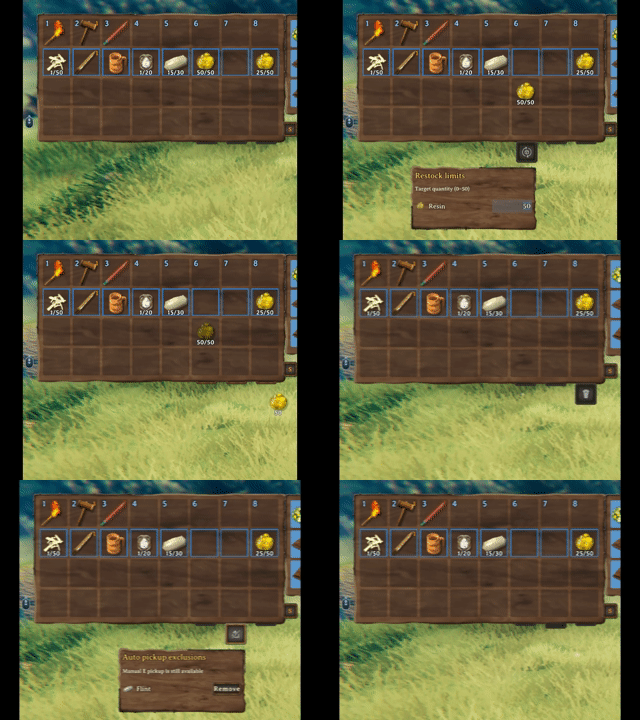
Hover a button or select it with a controller to set restock targets, manage automatic pickup, or delete an unwanted item with confirmation.
| Quick stack | Restock favorites |
|---|---|
 |
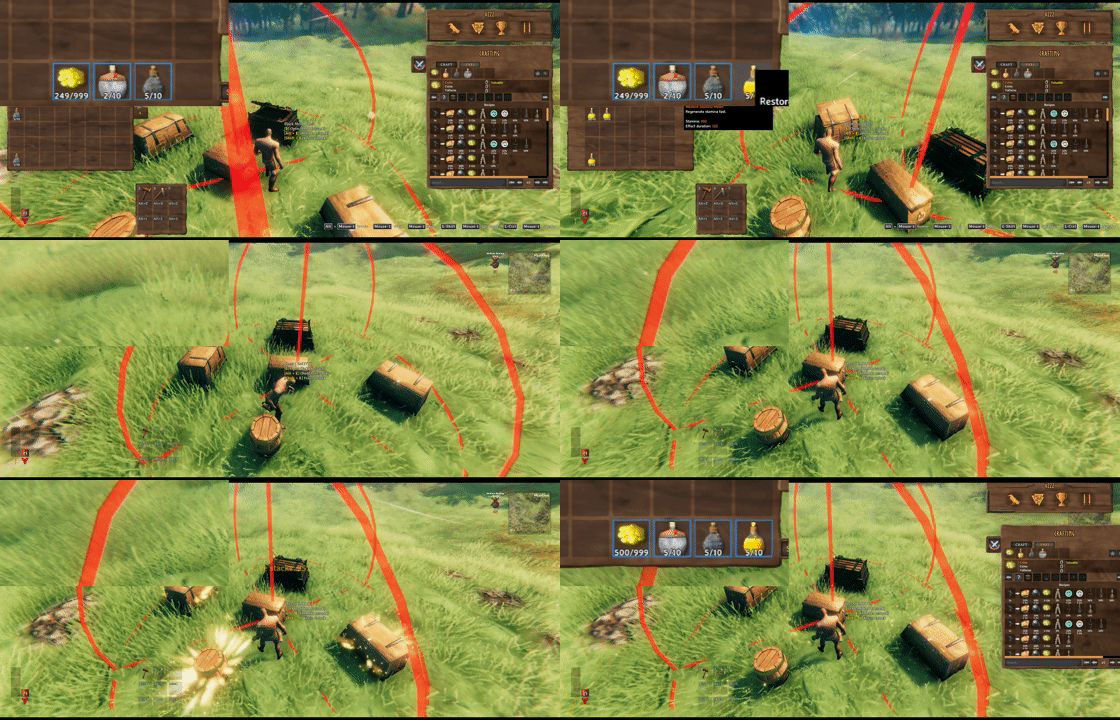 |
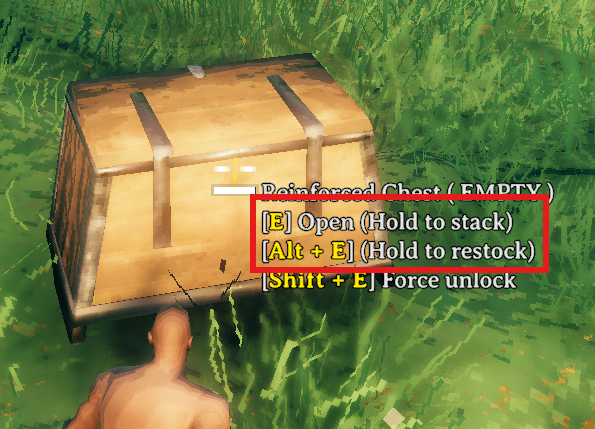
Look at a chest and hold E to store matching items, or hold Alt + E to refill favorites. Both actions include that chest and nearby eligible chests.
| Chest actions | Restock targets |
|---|---|
 |
 |
Choose a target quantity for each item and whether to restore its remembered empty favorite slots.
What you get
| Feature | What it does |
|---|---|
| Favorite slots | Protect selected slots from quick stack and mark their items for restock. |
| Sorting | Top up existing favorite stacks, then merge and sort eligible ordinary stacks. Favorite slots stay in place and never donate to one another. |
| Nearby chest actions | Hold the normal Use key at a chest to quick stack; add the restock modifier to refill favorites. |
| Restock targets | Set a quantity per favorite stack and choose Off, Existing, or Include empty for each item. |
| Pickup exclusions | Turn automatic pickup off for an item without blocking manual pickup. |
| Trash | Delete a held player-inventory item after confirmation. |
Start here
Path of Valheiman: InventoryActions-managed actions protect PoV equipment and storage cells and use the ordinary backpack. PoV's own sort and quick stack also respect favorites. The adapter was checked against PoV 5.0.8 and 5.0.9 and uses its public inventory API plus native safety hooks, with method-contract checks instead of an exact-version lock. It requires those API/hook contracts; versions without them fail closed. Player actions pause during loading and when an external PoV Storage API provider is registered or suspended, because empty reserved provider cells cannot be verified. With MultiUserChest, use InventoryActions' chest quick stack instead of PoV's nearby quick stack. Native/external UI transfers retain their providers' placement rules. See compatibility details and validation limits.
These are the default keyboard and mouse controls. In-game hints follow your configured bindings.
| To… | Do this |
|---|---|
| Favorite a player inventory slot | Left Alt + left click the slot. |
| Sort an inventory | Click its S button. |
| Quick stack nearby | Look at a chest and hold E. |
| Restock favorites nearby | Look at a chest and hold Left Alt + E. |
| Set a restock target | Pick up an item and drop it on Restock. The item stays in your inventory. |
| Exclude an item from auto pickup | Drop it on Exclude. Uncheck its entry to allow pickup again without removing it. |
| Delete an item | Drop it on Trash, then confirm. |
On a controller: open the inventory, select a slot without picking up its item, and briefly click and release the right stick to open the Favorite/Sort menu. Move down from the last inventory row to reach Restock, Exclude, and Trash. See the controller guide for panel navigation and optional shortcuts.
Restock, your way
Each target accepts a positive whole-number quantity and one of three modes. Actual restocking is capped by the item's current maximum stack size, including changes from other mods:
| Mode | Behavior |
|---|---|
| Off | Disable restocking for this item while keeping its target quantity. |
| Existing | Refill favorite stacks that still contain the item. The default for new targets. |
| Include empty | Also restore the item to its remembered empty favorite slots. Occupied slots are never replaced. |
Favorites do not stop crafting, building, or other normal item consumption. Include empty helps restore a favorite slot after its stack runs out. Restock Leave One Item, enabled by default, keeps one item of each kind in each source chest so future quick stack can still recognize it.
The open-chest Take stacks button fills matching non-favorite stacks. It is separate from favorite restock. Full rules and examples.
Installation
Install with a Valheim mod manager, or place InventoryActions.dll in BepInEx/plugins. Requires BepInExPack Valheim 5.4.2351. Launch once to generate the config.
Guide state and character-specific favorites are saved in BepInEx/config/InventoryActions.ClientState.yml. Previous InventoryActions.Favorites.<playerId>.txt files are not imported; re-register favorites when updating from that format.
- Client only: you can join a vanilla server. Other players do not need InventoryActions; your local settings apply.
- Installed on the server: all clients need the same InventoryActions version, and server-synced settings follow the server.
- Do not install alongside InventorySlots or Quick Stack Store. InventorySlots already includes these tools.
ExtraSlots, Equipment and Quick Slots, and AzuExtendedPlayerInventory have optional integrations. MultiUserChest supports area Quick Stack and favorite Restock when its required API is compatible, including configured empty favorite slots, with one transfer request at a time. Version numbers alone do not disable these actions; API or hook failures are logged. Concurrent changes still carry risks under MUC's protocol; see the compatibility guide for reviewed versions and limitations.
EpicLoot materials, tokens, Runestones, and ShardStones support compatible stack merging, favorite filling, and container actions without a separate stacking add-on. Different effects and incompatible item data stay separate.
Settings and help
Press F6 to cycle the quick guide: Expanded → Collapsed → Hidden → Expanded, with the inventory open or closed. Or choose Feature Guide State directly under 2 - Client. Your choice is saved in the config. Change or unset Toggle Feature Guide Key in the same section; Configuration Manager is optional. Guide controls.
The three buttons default to Auto: each appears on hover or controller focus. Choose On to keep a button visible or Off to hide it. Saved restock and pickup rules remain active when their button is hidden.
Look under 3 - Inventory Buttons for button display, restock targets, pickup exclusions, and rule tooltip settings. These preferences are client-side.
GitHub · Report an issue · Discord · Changelog
Credits
Quick stack, restock, and inventory favorite code is based on QuickStackStore.
CHANGELOG
Changelog
1.2.2
- Simplified the Restock targets and Auto pickup exclusions headers by removing repeated explanatory text and reclaiming unused space. Quantity-registration prompts and active controller instructions remain visible when needed.
- Clarified the English and Korean mouse/controller guides: restock targets and surplus Quick Stack apply separately to each favorite stack. Existing transfer, target and exclusion rules are unchanged.
1.2.1
- Quick Stack now stores only the surplus above an explicitly enabled restock target from eligible favorite stacks, including nearby and supported MultiUserChest transfers. Targets protect each favorite stack separately; with 150 Stone and a target of 100, up to 50 can be stored. Off, unlisted or invalid targets keep favorites fully protected, and hotbar/equipment/special-cell exclusions remain unchanged.
- Added Row/Page scrolling for Restock targets and Auto pickup exclusions, defaulting to Row. Long lists show a thin scrollbar, wheel input works over the panel and scrollbar, and redundant Saved/Registered messages no longer reserve footer space. Updated the panel and guide hints for favorite surplus.
- Updated Path of Valheiman stack compatibility to run its current native metadata comparison and implicit settlement before applying registered metadata-owner rules. Item identity, unrelated metadata, partial-transfer accounting and conservative fallback remain protected.
- Leave PoV Rune Chests and Runic Anvils to their native ledger handling instead of ordinary container sorting and transfers. Delegated PoV bulk actions retain favorite, equipped-item and reserved-cell protection; normal chest access and ownership rules remain unchanged.
- Added regression coverage for favorite-surplus transfers, panel scrolling and current PoV contracts. Build and isolated checks are separate from actual game UI and multiplayer validation.
1.2.0
- Restored EpicLoot material stacking with the modern MagicItemData contract, including EpicLoot 0.15.6, while retaining the legacy adapter. EpicLoot must approve the pair and additional metadata must match; this does not broaden InventoryActions' metadata policy or delete item data.
- Preserved item identity, favorites, native transfer vetoes and partial-transfer accounting. Missing or incomplete EpicLoot contracts disable only this integration, with no hard EpicLoot dependency.
- Restock, Auto Pickup Exclude and Trash buttons now default to On, keeping all three visible. Auto and Off remain available, and existing saved choices are respected.
- Updated the BepInExPack dependency to 5.4.2360 and checked compiled contracts against original Valheim 1.0.21 assemblies. Added modern and legacy stacking regression coverage and isolated Mono checks against the original EpicLoot DLL; actual game UI and multiplayer validation remain required.
1.1.24
- Updated release version metadata and rebuilt the packages. No gameplay, configuration or compatibility logic changes from 1.1.23.
1.1.23
- Updated Path of Valheiman stack compatibility for 5.3.2 / API 1.6.0. InventoryActions Quick Stack and Restock transfers now compose PoV's revised comparisons with registered metadata-owner rules, including FineDining freshness. Ordinary manual transfers outside InventoryActions retain PoV's native rules.
- Preserved variants, cheat markers, item bonuses, unknown metadata protection and partial-transfer freshness. Unverified comparison behavior falls back to conservative native checks without disabling unrelated InventoryActions features.
- Added a quick-guide hint after restocking that locates the bottom-right inventory buttons and lists only enabled buttons. Hover-to-expand help appears only when an enabled button uses Auto mode, followed by the existing item-drop instructions. Updated English and Korean text; controller instructions remain separate.
- Verified Debug builds and original-DLL Mono checks with PoV present, absent and registered in either patch order. Actual game UI and multiplayer validation remain required.
1.1.22
- Updated Path of Valheiman compatibility for 5.1.1, removing dependence on its changed private quick-stack response finalizer signature.
- Made InventoryActions responsible for sorting and nearby Quick Stack while PoV supplies the Tidy Pack unlock. Disabled PoV's separate action inputs, buttons and execution, and detached its ownership/save response handlers from the shared chest-response channel.
- Retained PoV's reserved-item protection on delegated vanilla stack transfers, along with existing favorites, inventory boundaries, access checks, native/MultiUserChest transfer safeguards and node-query fallback. PoV continues to manage its equipment and storage layout.
- Added original-DLL isolated checks for response guards, suppressed duplicate actions, exception recovery and handler restoration. Actual game UI and multiplayer validation remain required.
1.1.21
- If Path of Valheiman's Tidy Pack unlock API is missing or throws, nearby Quick Stack and player inventory sorting now use their normal InventoryActions settings. A successful query reporting a locked node still blocks these actions. PoV reserved-cell boundaries, loading checks and transfer safeguards remain unchanged.
- Show the player inventory S-button hover tooltip only while its PoV node is locked. Removed the title and ordinary usage description, as well as the on-screen unlock-query failure notice; query failures log one diagnostic warning instead.
- Expanded isolated checks for missing/failing unlock APIs, live unlock/refund behavior and pending-transfer handling. Actual game UI and multiplayer validation remain required.
1.1.20
- Allowed otherwise compatible Path of Valheiman brew batches and bonus harvest drops to stack while retaining destination provenance and preserving partially transferred sources. Food strength, aging clocks and other gameplay metadata remain protected.
- Added public
InventoryActionsApi.RegisterStackMetadataPolicyoverloads for item-data owners, independent of PoV. Registered policies now support Sort and favorite-stack filling without requiring PoV, and FineDining's guarded freshness composition also initializes when PoV is absent. - Allowed local Quick Stack, Restock and native transfers to merge stacks with exactly matching unknown metadata. Different or missing values still require an explicit owner policy; direct Sort/favorite quantity merges require policies for every field. MultiUserChest retains its separate conservative restrictions.
- Expanded isolated checks for owner policies, FineDining without PoV, partial transfers, failed transfers and post-mutation exceptions. Existing PoV unlock gates, favorites and EpicLoot rules remain in effect; actual game and multiplayer verification remain required.
1.1.19
- Added guarded Path of Valheiman metadata support to InventoryActions sorting, favorite-stack filling, local Quick Stack and Restock. Crafting time and ID differences alone no longer block these actions; actual item bonuses and other metadata remain protected.
- Reuse FineDining's own freshness rules for compatible stacks, preserving earlier expiry, completed spoilage and the untouched remainder after partial transfers. Failed transfers do not change metadata, and confirmed movement is reconciled even if a later hook throws. Unavailable FineDining callbacks keep its metadata protected.
- Retained existing PoV node gates, favorites, EpicLoot rules and MultiUserChest remote-transfer restrictions. PoV's own native Sort and ordinary manual crafting/dragging are unchanged. Added isolated regression checks against original PoV 5.0.10, FineDining 1.1.7 and Valheim 1.0.20; actual game and multiplayer verification is still required.
1.1.18
- When Path of Valheiman is installed, nearby Quick Stack (Hold E) and player inventory sorting now require its Tidy Pack mastery, using the public unlock API. Opened-container Place stacks, container sorting and Restock retain their existing rules; availability without PoV is unchanged.
- Apply unlocks and refunds immediately, and stop a revoked nearby-transfer batch before its next transfer. Pending MultiUserChest responses retain their original tracking so they can finish without restarting the batch. Missing or failing unlock APIs keep these actions locked and log one warning.
- Show the lock reason in the sort button, controller menus, chest hover text and quick guide, with English and Korean text. Added isolated checks against original PoV 5.0.10; actual game UI and multiplayer timing still require verification.
1.1.17
- Disabled Path of Valheiman's Delete button and deletion mode while InventoryActions is active. InventoryActions' own trash controls remain available, and PoV continues to manage its inventory and equipment slots.
- Clear any active PoV deletion selection or confirmation when applying the compatibility patch, and release the UI patch when InventoryActions unloads. Checked the original PoV 5.0.9 methods in isolated Mono tests; actual game verification is still required.
1.1.16
- Updated Path of Valheiman compatibility to use its public API for backpack boundaries, reserved cells and equipment state, checked against PoV 5.0.8 and 5.0.9. Required API 1.x capabilities and native safety hooks are verified without an exact mod-version lock.
- Paused player inventory actions during loading and while an external PoV storage provider is registered or suspended, preventing unknown reserved cells from being treated as ordinary backpack space. Live boundary changes and delayed release after Equipment system is turned Off remain protected.
- Retained favorite protection for PoV sorting/quick stack, native response handling and MultiUserChest safeguards. Expanded isolated checks for API rejection, unavailable storage, empty favorites and response ordering; actual game and multiplayer behavior still require verification.
1.1.15
- Added optional Path of Valheiman compatibility, checked against PoV 5.0.5. InventoryActions-managed actions and button placement follow PoV's live backpack boundary while protecting its equipment, food, arrow, tool and wallet cells, including the delayed release after switching Equipment system Off. UI transfers delegated to native or external container handlers retain their providers' placement rules.
- Made PoV's Tidy Pack sort and nearby quick stack respect InventoryActions favorite slots. Protected equipped items awaiting PoV placement and kept automatic transfers out of its reserved storage cells.
- Coordinated PoV's native quick-stack response hooks with InventoryActions transfer handling. With MultiUserChest installed, PoV's nearby quick stack is disabled; use InventoryActions' chest quick-stack shortcut instead.
- The adapter checks required method contracts rather than an exact PoV version. Unsupported contracts block InventoryActions player actions with a warning. Isolated checks passed; actual game and multiplayer behavior still require verification.
1.1.14
- Quick Stack now moves non-stackable materials, including mead bases, into free cells in chests that already contain the same item, including supported MultiUserChest requests. Non-stackable equipment remains excluded; favorite, protected-slot, access, and metadata checks still apply. Restock behavior is unchanged.
- Added client-only Sort Button Side under 2 - Client, defaulting to Left, for both inventory and container S buttons. It applies immediately and updates controller navigation. Sort Button Position remains an additional player-button offset from the selected side, preserving existing values and supported inventory-mod layouts.
- Kept the quick guide at an independent screen-relative position. Moving or resizing inventory or crafting panels no longer changes its position or width; panels may overlap the guide.
- Simplified client-state text saving and centralized MultiUserChest session teardown without changing transfer requests, late-response handling, refund rules, or compatibility requirements.
1.1.13
- Kept the feature guide stationary during inventory opening/closing animations. Guide spacing still follows settled panel layout, sizes, resolution, and UI scale.
- Avoided restoring and rebuilding container action-button geometry on unchanged frames. Layout changes, replaced controls, ownership changes, closing the inventory, and UI teardown still refresh or restore the controls as needed.
- Reduced repeated slot-coordinate searches when refreshing favorite borders. The native mapping remains in use when other mods patch it, preserving slot eligibility and click behavior.
- These caches remain in memory and create no additional configuration files. No in-game frame-rate improvement has been measured.
1.1.12
- Added client-only Feature Guide State under 2 - Client: Expanded, Collapsed, or Hidden. Configure it directly without assigning a hotkey; F6, LT + R3, and the mouse triangle update the same saved config setting.
- Guide preferences are no longer stored in ClientState YAML and are not migrated. After updating, select Hidden once again if desired. Favorite slots and remembered item types remain unchanged.
1.1.11
- Kept the quick guide anchored in the upper gap to the left of the crafting panel. Opening or closing the inventory with Tab no longer moves it beside the hotbar; hidden inventory panels still reserve their layout space.
- Kept the guide's top-right corner and mouse triangle in place when expanding or collapsing. Position and available space still follow resolution, UI scale, and panel layout changes. F6, controller controls, and saved guide state are unchanged.
- Replaced the exact MultiUserChest version gate for area Quick Stack/Restock with checks of the required API contracts. Compatible versions can activate the adapter; missing APIs or hook failures disable it with a diagnostic log. Existing transfer safeguards and documented multiplayer limitations remain in effect.
1.1.10
- Added optional compatibility with MultiUserChest 0.6.1 and 0.6.2 for area Quick Stack and favorite Restock through MUC's own transfer requests. Existing favorite/hotbar protection, restock targets, chest range, and access checks remain in effect.
- Added MUC restocking for Include empty targets using remembered favorite slots. Unexpected items delivered after a concurrent slot change do not overwrite the remembered item or become targets for subsequent MUC restock.
- Processed transfers one request at a time, disabled item swaps for automatic Quick Stack requests, and checked partial deposit returns before ending a batch. Timeouts stop further requests without resending or issuing a separate refund; pending requests remain with MUC.
- Limited compatibility: MUC's existing protocol still permits concurrent slot/metadata changes and may drop returned items if they no longer fit. This does not guarantee atomic transfers or eliminate item-loss/duplication risks. Actual multiplayer contention and disconnect behavior remain unverified; see the compatibility guide.
1.1.9
- Fixed Restock Targets rejecting quantities above the prefab's stack size when another mod increases the maximum for live items, such as AzuMiscPatches. Keyboard and controller edits now accept positive target quantities consistently with F1 settings.
- Preserved configured quantities when editing existing targets or registering an item covered by an existing rule, including targets for empty favorite slots. New targets still default to the held item's current maximum stack size.
- Actual restocking continues to respect each live item's maximum stack size. Updated English/Korean input hints and target documentation.
1.1.8
- Added built-in EpicLoot stacking support for compatible crafting materials, Forest/Iron/Gold tokens, Runestones, and ShardStones during Ctrl-click transfers, Take All, Store All, Quick Stack, and Restock.
- Sort now consolidates these ordinary stacks and fills matching favorite stacks from non-favorite items while preserving favorite positions. Transfers use EpicLoot's metadata handling; different effects, quality, variants, cheat markers, and incompatible third-party data remain separate.
- EpicLoot remains optional, and enchanted equipment is not opted into material stacking. Unsupported or failing API paths keep custom-data stacks protected.
- When EpicLootAdventureTools 0.8.4 is installed, its overlapping InventoryActions stacking patches are replaced by the built-in support. Its adventure tracker and other features remain enabled.
1.1.7
- Added F6 to cycle the quick guide through Expanded → Collapsed → Hidden → Expanded during gameplay, with the inventory open or closed. The client-only Toggle Feature Guide Key setting under 2 - Client can be rebound or set to None; Configuration Manager is optional.
- Updated LT + R3 to use the same cycle while the inventory is open, including restoring a hidden guide. The mouse triangle continues to expand/collapse the visible guide.
- Replaced the Show Feature Guide and Feature Guide Collapsed config options with local state saved in
BepInEx/config/InventoryActions.ClientState.yml. The same file now stores favorite slots and remembered item types separately for each character. - Save-format change: old
InventoryActions.Favorites.<playerId>.txtfiles are left untouched but are no longer read or imported. Re-register favorite slots after updating. Restock and pickup-exclusion rules remain in their existing config settings. - Updated English/Korean guide hints and the packaged English translation. The header shows the next action, controller hints explain that the inventory must be open, and hiding the guide briefly shows how to restore it. Removed the obsolete F1 hide-guide instructions.
- Updated the BepInExPack dependency to 5.4.2351.
1.1.6
- Fixed a startup path that could fail with
Steamworks is not initializedon clients without a saved language setting. Localization now waits for platform initialization, allowing settings and inventory patches to load normally.
1.1.5
- Centralized AzuExtendedPlayerInventory panel-setting cleanup while preserving special-slot protection, live layout changes, and existing fallback behavior.
- Reused the same favorite-slot checks for controller shortcuts and the item action menu. Controls, slot restrictions, settings, and saved data are unchanged.
1.1.4
- Fixed repeated favorite-memory save failures when launchers such as NucleusCoop expose the per-player favorites file through a Windows symbolic link. InventoryActions now keeps normal atomic replacement for regular files and writes through the existing link only when Windows reports that link replacement is unsupported.
- Gave each save attempt a unique temporary file so concurrent local instances do not collide on a shared
.tmpname. A successful link-compatible fallback is reported once and no longer retries every few seconds.
1.1.3
- Added direct controller navigation for Restock, Auto Pickup Exclude, Trash, and player/container Sort. Move down from the final inventory row or right from an edge slot, then use A to activate and B or a return direction to restore the original cell. Auto buttons expand only while focused.
- Added a short right-stick click menu for Favorite and Sort without picking up an item. Existing optional modifier chords remain available, while menu/button focus suppresses conflicting pickup, close, submit, and world actions.
- Reworked controller rule editing: up/down selects an item, left/right selects Mode, Quantity, or Remove, A activates or edits, X removes, and B closes or finishes quantity editing. Added focused-control highlights, safe trash confirmation navigation, and localized live help.
- Added LT + right-stick click to collapse or expand the quick guide while the inventory is open. The controller chord appears in the guide header and does not open the item action menu on release.
- Moved the open-inventory quick guide into the free upper area between the player and crafting panels. It adapts to active panels and UI scale, keeps clear of the inventory and crafting UI, and hides when no readable space remains.
- Fixed raw localization tokens and duplicated labels in controller help and confirmation buttons. Controller help follows the selected inventory button closely and moves above it near the screen edge.
- Reworked the package README into a shorter visual overview and added linked guides for inventory actions, controllers, and multiplayer compatibility.
1.1.2
- Allowed client-only installation when joining vanilla servers, using local settings. If the server installs InventoryActions, all connecting clients must still use the same version and receive its synced settings.
- Added vanilla chest ownership requests for area quick stack and favorite restock on unmodded servers. Transfers run one chest at a time, preserve favorites and restock rules, skip occupied or inaccessible chests, and guard against stale replies and duplicate actions. Container action effects remain local on vanilla servers.
- Added checkboxes to Auto pickup exclusions: uncheck to allow pickup while keeping the entry, or remove it to delete the rule. Changes save immediately; duplicate prefab entries are handled together, and controller A toggles the selected checkbox.
- Added the client-only Show Rule Tooltips setting under 3 - Inventory Buttons, enabled by default. It controls help in both rule panels and the F1 restock editor without hiding item information or Configuration Manager setting descriptions.
1.1.1
- Added configurable controller inventory actions: hold the right-stick click by default, then press A to toggle the selected player slot's favorite protection, X to sort the focused inventory, Y to open Restock targets, or B to open Auto Pickup Exclude. Opening a rules panel with a picked-up player item registers that item.
- Added controller favorite restock by holding the game's alternate-action modifier with Use while looking at a chest. This follows the selected controller layout and preserves target quantities, restock modes, remembered empty slots, chest access checks, and the leave-one-item setting. Holding Use alone continues to quick stack.
- Added controller navigation to both rules panels: up/down selects an entry, left/right adjusts its quantity, A changes its mode, X removes it, and B closes the panel. Changes save immediately, and the quick guide and chest hints show the active bindings.
- Prevented controller actions from also triggering native pickup, use, submit, close, or Stack All commands. Input dialogs block the new shortcuts, and cloned action buttons no longer inherit Take All shortcuts.
- Made the Configuration Manager restock editor fit the available width with compact item, mode, quantity, and remove controls. Narrow views wrap without forcing horizontal scrolling, and long item names stay inside their fields.
1.1.0
- Remembered favorite-slot item types per character in
InventoryActions.Favorites.<playerId>.txt. IncludeEmpty restock restores items to their remembered empty slots instead of assigning them by chest order, including multiple remembered slots of the same item. Occupied slots and slots remembered for other items are never replaced. Replacing an item updates its association; removing favorite protection clears it. - Replaced the Refill empty checkbox with three modes: Off preserves the target quantity without restocking, Existing tops up remaining favorite stacks, and IncludeEmpty also restores empty favorite slots. New entries default to Existing. Quantity editing now clamps to
1..current max stackand does not change the selected mode. - Added compact yellow mode icons: a dash for Off, circular arrows for Existing, and the same arrows with a central box for IncludeEmpty. Both the panel and F1 editor support the modes, and visible panel tooltips update immediately when a mode changes.
- Configuration change: rules now require a positive quantity and explicit mode, for example
Wood: 30 | IncludeEmpty. Old numeric-only rules, zero targets, and| refillare ignored without migration. Re-register old rules or edit their config text. Without a valid rule, existing favorite stacks refill to the normal maximum, so an old zero rule no longer disables restocking. - Favorite memory records only items observed in eligible slots; it cannot identify items consumed before they were observed. Unassigned empty favorite fallback, current stack compatibility, special-slot exclusions, chest access/ownership checks, and Restock Leave One Item remain in effect.
1.0.19
- Added a per-item Refill empty checkbox to Restock targets, unchecked by default. When enabled, Alt+E can refill one eligible empty favorite slot up to the target quantity after that item's favorite stack has been completely consumed. Existing favorite stacks keep their positions and prevent additional stacks from being created.
- Condensed Restock targets into single-line rows with a checkbox immediately left of the quantity field. Checkbox hover explanations are separate from item-name tooltips, long names use ellipsis, and changes save immediately. The F1 rule editor also supports the option.
- Saved the option with each client-side target rule, for example
Wood: 30 | refill. A quantity of 0 still disables restocking. Current maximum-stack limits, item compatibility, special-slot exclusions, chest access/ownership checks, and Restock Leave One Item continue to apply.
1.0.18
- Updated stack identity handling for Valheim 1.0.14. Quick stack and restock no longer combine normal items with otherwise matching cheat-marked items, matching the game's new native stacking rule.
- Retained matching-origin sorting and favorite filling, compatible custom-data protection, container authorization, ownership leases, saved favorites, settings, and network contracts.
1.0.17
- Player inventory Sort now fills existing favorite stacks from compatible non-favorite stacks in the sortable inventory area before merging and sorting the remaining ordinary stacks. Favorites are filled from top to bottom, left to right, up to the current maximum stack size.
- Favorite stacks stay in their original slots and never donate to or merge with each other. This behavior is always enabled; restock limits do not apply. Items moved into favorite slots gain the existing favorite quick-stack protection. Container sorting, quick stack, and restock rules are unchanged.
1.0.16
- Added independent Auto slide-out behavior for the Restock, Auto Pickup Exclude, and Trash buttons. Each button now shows only its bottom edge until hovered, stays open with its own editor, follows the inventory closing animation, and no longer expands merely because an item is being dragged.
- Grouped the related client settings under
3 - Inventory Buttons. Each button now supportsOff,Auto, andOn, defaults toAuto, and enabled buttons fill empty positions from the right. The existing synchronizedEnable Inventory Trash Panelsetting still controls whether trash is permitted. No legacy setting migration is included. - Kept button input disabled as soon as the inventory starts closing while allowing all three controls to leave with the same player-inventory animation.
1.0.15
- Added the client-only
Restock Leave One Itemoption, enabled by default. Favorite restock (Alt+E by default) leaves one item per kind in each source chest, counting all stacks with the same internal item name together, so the chest remains a quick-stack destination. - Turning the option Off allows restock to take the last item. In-game setting changes apply to subsequent transfers immediately.
Take stacks,Take All, and manual moves retain their existing behavior. - Each client controls its own restock setting; another player or mod may still remove the last item. Existing ownership, access, and stack-compatibility checks are unchanged.
1.0.14
- Added an optional compact InventoryActions quick guide beside the hotbar. It displays the active favorite, Use, and Restock bindings, adapts to available screen space, can be collapsed, and stores its visibility and collapsed state as client-only settings.
- Moved Restock and Auto Pickup Exclude controls into the player-grid render hierarchy used by Trash, so container panels and native dialogs remain above all three controls. External toolbar listeners and objects are also released with the inventory UI lifecycle.
- Changed the Restock limit editor to keep an in-progress numeric buffer and clamp it to
0..max stackwhen editing ends. For example, an item with a maximum stack of 30 now saves both40and230as30instead of restoring4or23. - Removed the redundant automatic-save status and empty-hand Trash hover tooltip, and added a localized title to the delete confirmation dialog.
1.0.13
- Added optional Equipment and Quick Slots 3.x and AzuExtendedPlayerInventory 2.4.14 compatibility. Automatic sorting, quick stack, restock, favorites, trash, and Safe Take All now stay within regular player inventory rows instead of treating equipment, quick, reserved, or custom-slot rows as storage.
- Kept bottom action buttons aligned with each provider's visible inventory rows. AzuEPI's live separate-panel setting switches between the regular inventory bottom and the full inline grid without restarting.
- Removed the Favorite Border Color configuration option and fixed favorite borders to the previous default blue color.
1.0.12
- Added client-side Restock and Auto Pickup Exclude controls below the player inventory. Dropping an item registers its rule without moving it; valid restock quantities and removals save immediately, while excluded items remain available through manual pickup.
- Positioned Restock, Auto Pickup Exclude, and Trash under the last regular inventory row as vanilla pocket upgrades or the optional ExtraSlots mod add rows. The two new controls can be hidden independently, and Restock shifts toward Trash when exclusions are hidden.
- Added wooden downward-opening rule lists with scrolling and screen-edge clamping. The panels use Valheim's Craft button and inventory-slot visuals, remain below native dialogs, and no longer require Save or Cancel buttons.
- Fixed repeated missing LiberationSans font warnings by assigning an initialized Valheim font before activating generated text. Invalid quantities restore the last saved value, while config conflicts and save failures leave the previous rule active.
- Reduced redundant per-frame UI work and retained existing favorite, quick stack, restock, sorting, trash, ownership-handoff, and optional MultiUserChest policies.
1.0.11
- Fixed vanilla Hold E quick stack skipping the container being interacted with. The opened container is now processed first, then any remaining eligible items are extended to nearby containers.
- If an area transfer cannot start, InventoryActions now leaves Valheim's original
StackAllpath available instead of suppressing the current-container action. Nearby containers that are in use remain excluded, and the existing access, ownership-lease, revision, timeout, and duplicate-processing guards are retained.
1.0.10
- Maintenance release verifying that area ownership-lease rejection replies use Valheim 1.0.7's registered
RPC_OpenResponseandRPC_TakeAllResponsemethods in the final package. Access, ownership, timeout, revision, and duplicate-request behavior is unchanged from 1.0.9.
1.0.9
- Updated InventoryActions for Valheim 1.0.7 and fixed the repeated
MissingMethodExceptioncaused by the changed private inventory notification signature. - Added support for Valheim's purchased inventory rows. Favorites, sorting, quick stack, restock, trash positioning, and action-button layout now follow the loaded inventory height while continuing to protect the hotbar.
- Updated favorite input and grid element handling for the current inventory UI, moved trash confirmation to the current Split Dialog lifecycle, and corrected open/take-all rejection response RPC names while preserving access, ownership-lease, revision, timeout, and duplicate-request checks.
- Preserved the cheated-item marker when sort consolidates compatible stacks, while retaining the existing fail-closed behavior for unrecognized external custom item data.
- Updated the build to use the current original Valheim assemblies with compiler-only publicized references, retained the reviewed ServerSync compatibility build, and corrected the BepInEx package dependency to 5.4.2350.
1.0.8
- Reduced redundant UI updates by keeping the active Sort and Trash buttons enabled instead of toggling them off and on during each refresh.
- Optimized favorite borders by reusing loaded favorite state and cached UI components, updating colors and layout only when needed, and recovering replaced border components.
- Removed per-refresh trash-icon layout strings and redundant visual-state caches. The icon now checks its actual layout and color, preserving recovery from external UI changes.
- Multiplayer servers and clients must update to the same InventoryActions version, as before.
1.0.7
- Hardened area quick stack/restock completion and cancellation by finalizing handoff state before ownership-lease cleanup and inventory callbacks, preventing callback failures from leaving an action stuck or eligible for duplicate continuation.
- Fixed the tooltip fallback so it handles only InventoryActions-owned buttons, leaving vanilla and other-mod tooltips untouched, and stopped relabeling or tagging Valheim's built-in Take All and Place Stacks buttons.
- Fixed the Restock Target Limits editor changing negative values such as
-5into5; comments, separators, and negative amounts now use the same parsing rules as runtime, where negative limits normalize to0. - Ignored stale favorite coordinates outside the supported vanilla player rows so they no longer remain protected or display favorite borders.
- Unified current-container and area candidate selection and removed unused cell-policy, single-container transfer, hold-action, localization-cache, and UI paths without intended feature changes.
1.0.6
- Shared hover hold area quick stack/restock success effects with nearby players who also enable the client setting, while retaining VFX at up to 10 changed containers and one SFX at the interacted container.
- Kept shared effects transient and locally rendered with dedicated-server, distance, and receive-rate guards so completed actions are not replayed to players entering the zone later.
1.0.5
- Fixed area quick stack/restock on dedicated servers so nearby players can use eligible closed containers even when another peer owns them, processing containers one at a time through validated ownership handoffs.
- Added lease, revision, access, range, idle-state, timeout, and vanilla request guards to prevent stale or concurrent container mutations during ownership handoff.
- Disabled area quick stack/restock while MultiUserChest is active and delegated non-owner Take All to MultiUserChest 0.6.1 or newer.
- Required the same InventoryActions version on the dedicated server and clients for multiplayer container actions.
- Made area action success effects local-only and short-lived so completed effects are not replayed to players entering the zone later.
1.0.4
- Simplified container action success effects to one On/Off option and fixed the hover hold duration at 0.5 seconds.
- Area quick stack/restock now shows VFX at up to 10 changed containers while playing its SFX only once at the interacted container.
1.0.3
- Fixed container action buttons potentially restoring stale positions after closing and reopening the inventory or container UI.
- Unified Safe Take All and top-first item movement through one path while preserving hotbar and favorite protections.
- Centralized cross-container transfer bookkeeping and added source/behavior parity tests with InventorySlots to reduce drift.
- Fixed container action success sound volume scaling to apply the configured value once, removed unused localization tokens, and simplified project source discovery.
1.0.2
- Kept the center-screen result counts for container quick stack and container restock actions.
- Removed the other action success/result messages, including take all, place all, sort, and trash, while keeping failure and warning messages.
- Restored only the quick stack/restock result localization tokens and removed unused result tokens for the quieter actions.
1.0.1
- Mirrored InventorySlots action-cell and container action helper policies with tests to reduce drift risk.
- Refactored favorite/restock eligibility and container move/grid-order helpers without intended behavior changes.
- Added client config options to adjust the player inventory Sort and Trash button positions live with x/y text values.
1.0.0
- Initial standalone InventoryActions release.
