
Please disclose if any significant portion of your mod was created using AI tools by adding the 'AI Generated' category. Failing to do so may result in the mod being removed from Thunderstore.

ZoneSavior
Archive inactive-player structures and tamed animals per zone, save/load/restore zone bundles, track player activity, configure archive exclusions, and enforce per-zone WearNTear limits.
| Date uploaded | 6 days ago |
| Version | 1.3.0 |
| Download link | sighsorry-ZoneSavior-1.3.0.zip |
| Downloads | 54 |
| Dependency string | sighsorry-ZoneSavior-1.3.0 |
This mod requires the following mods to function

denikson-BepInExPack_Valheim
BepInEx pack for Valheim. Preconfigured with the correct entry point for mods and preferred defaults for the community.
Preferred version: 5.4.2351README
ZoneSavior
Archive inactive-player structures and tamed animals per zone, save/load/restore zone bundles, track player activity, configure archive exclusions, and enforce per-zone WearNTear limits.
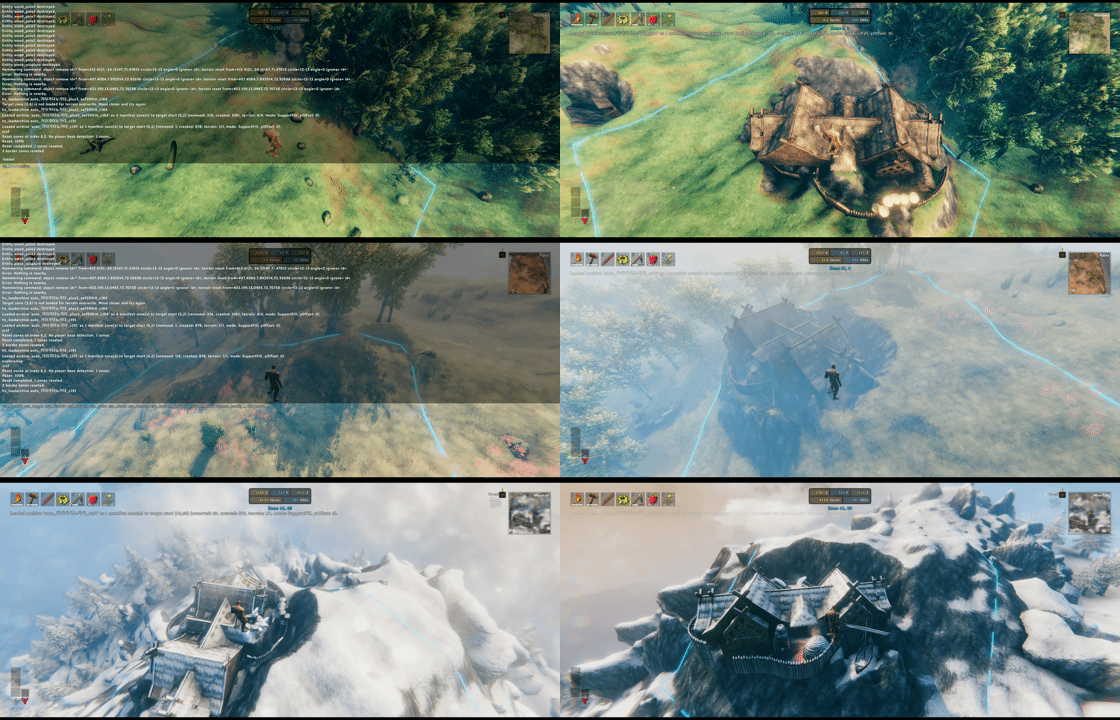

ZoneSavior is a Valheim server maintenance mod for zone-based cleanup, archive, restore, and build-count control.
ZoneSavior 1.3.0 builds against original Valheim 1.0.16 game assemblies and requires BepInExPack Valheim 5.4.2351. It includes a pinned ServerSync compatibility build. Existing ZoneSavior config keys, RPC formats and bundle payload format remain unchanged. New automatic archives use manifest version 3 to distinguish saved zones from reset zones; these manifests require ZoneSavior 1.3.0 or later. Manual archives keep manifest version 2, and existing manifest version 2/bundle version 3 archives remain readable. Update the server and clients running ZoneSavior together to satisfy the existing synchronized-version requirement.
It can:
- archive inactive player structures into zone bundle files
- restore saved bundles to the original place or a new zone
- optionally reset archived source zones
- enforce per-zone WearNTear limits from
zones.yml - track player activity for inactive-owner cleanup
- provide an optional client zone UI
The zone UI hotkey (F8 by default) displays the current zone boundary with eight 64m corner extensions. The lines follow the terrain, with height samples every 4m, to help estimate neighboring zones.
Files
ZoneSavior uses one BepInEx config file and one data folder:
BepInEx/config/
  sighsorry.ZoneSavior.cfg
  ZoneSavior/
    activity.yml
    zones.yml
    Diagnostics/
    ZoneBundles/
      tag_name/
        manifest.yml
        bundle001_<generation>.zonebundle.yml.gz
activity.yml stores player activity, scan state, and recent scan records. ZoneSavior reloads it conservatively at runtime: broken YAML, dirty runtime state, and active scans are ignored.
zones.yml stores zone limits and archive protection rules. Every rule must declare a non-negative limit. Steam IDs are the best long-term protection key; player names are convenient but can change.
ZoneBundles/<tag>/manifest.yml records the archive shape. Each bundleNNN_<generation>.zonebundle.yml.gz stores one source zone as a compact, gzip-compressed YAML bundle. ZoneSavior reads and writes these files directly; no manual extraction is required. New bundle files are committed by replacing the manifest only after every zone is saved successfully.
Previous manifest and bundle versions, including uncompressed legacy zone bundles, are not loaded or converted. If the original world data is still available, create a new archive from the live world with the current ZoneSavior version before restoring it.
Diagnostics/ contains YAML reports written by zs_debugzone.
Config
Config sections:
01 - GeneralLock Configuration: lets the server control synced settings.
02 - ZoneSaviorWearNTear Save Mode: controls whether zone bundle saves include creatorless WearNTear.Zone WearNTear Limit: enables zone limits fromzones.yml.Zone UI Toggle Hotkey: toggles the client zone overlay.Build Counter Visible Seconds: controls how long the placement counter stays visible.Support Fill Contact Tolerance: terrain contact capture tolerance. Source terrain must be loaded to capture exact contacts.Zone Bundle Support Fill Feather Width: blend width around restored support terrain.
03 - Auto ArchiveDry Run: report only.Reset After Save: reset source zones whose creators are all eligible after saving. Connected mixed-owner zones are saved and kept.Minimum Pieces Per Cluster: counts only eligible owners' structures. Small mixed-owner clusters are skipped; small clusters containing only eligible owners retain reset-without-save behavior during reset runs.Inactive Days: owner inactivity threshold.Scan Interval Minutes: automatic scan interval.0disables scheduled scans.Scanner Batch Size: ZDOs inspected before yielding a frame.Max Zones Per Run: maximum number of zones reserved for work in one automatic scan. Failed save/reset attempts still consume this budget.
What Gets Archived
ZoneSavior saves player-build structures, not arbitrary world clutter.
Saved:
- player-build WearNTear objects with normal build recipes/resource costs
- tamed monsters with
MonsterAIandTameable - creator metadata when present
- terrain support data for saved structures
Skipped:
- players, tombstones, loose item drops, projectiles, ragdolls, fish
- location objects and volatile world objects
- vanilla terrain comps and most raw terrain modifiers
- WearNTear prefabs without normal build recipes/resource costs
Auto archive candidate detection only starts from creator-linked WearNTear with creator != 0. WearNTear Save Mode = IncludeCreatorless can include nearby creatorless WearNTear during the save step, but creatorless structures alone do not make a zone eligible for inactive-owner cleanup.
Automatic archives keep structures together across owner boundaries. Adjacent zones (including diagonals) containing only eligible creators form the reset core. Mixed-owner neighbors join the same archive when they share an eligible creator with a connected zone. This can continue across several mixed zones, but an active or protected creator alone cannot connect additional zones. A normal scan requires at least one core zone, so retained mixed zones do not create a fresh archive after the core has been reset. There is no separate aggressive mode.
For adjacent zones [A+B] [B+C] [C], with A/B eligible and C active, one tag saves both [A+B] and [B+C]. Only [A+B] is reset; [B+C] and [C] remain. The saved [B+C] snapshot contains all normally saved structures and tamed animals in that zone, including C's objects. Eligibility, recipe/save filters, minimum count and per-run limits still apply.
Before and during a saved reset, the server rechecks eligibility and the saved state of creator-owned objects and tamed animals. A reconnect, added/changed object, changed container payload or unexplained disappearance stops the affected reset. Spawned-object chains cannot delete outside the reset zone. The manifest records intent immediately before mutation and records each successfully reset zone separately. A failed preflight leaves the zone intact; an interrupted reset after mutation leaves a pending marker and blocks loading that tag until the partial world state has been reviewed. This is a conservative stop, not an automatic rollback.
Terrain Restore
ZoneSavior uses SupportFill terrain restore.
When saving a loaded zone, it samples the lower footprint of saved structures and records terrain contacts where terrain is close enough to the structure bottom. When loading, those contacts can raise or cut terrain so structures regain support.
New saves also record one lowest valid contact height per touching piece and the lowest non-positive height difference from the original, unmodified terrain. For relocation, the most frequent piece contact height band (0.25m bands; ties prefer the lower band) selects the representative floor. The bundle is aligned at the first contact between that floor and the destination's unmodified terrain, then the saved negative terrain offset is applied. A large piece receives one vote, just like a small piece. Contacts in overlapping height bands are retained for alignment; support terrain still uses the lowest contact in each cell. All zones loaded together share one placement height; offset=Y adds a further adjustment.
Existing version 3 bundles remain readable. If any participating support zone lacks the new placement metadata, the entire load keeps its previous placement calculation; re-save the live structures to use the new rule. Original-location restore keeps the saved coordinates. The terrain's existing +/-8m limit still applies, so a different slope can leave some structures buried or unsupported.
If exact contacts are missing, ZoneSavior falls back to saved collider/footprint data and places terrain near the lowest reasonable support plane. The fallback is clamped to avoid extreme spikes.
Terrain Editing and Blueprints
ZoneSavior no longer provides terrain proxy prefabs or replays terrain operations. Use Infinity Hammer to edit and save the final terrain snapshot in a blueprint, and Expand World Data to place that blueprint as a location. InfinityHammerAddon is a separate client-side addon for Infinity Hammer's existing tools; it does not depend on ZoneSavior or create saved terrain proxy objects.
This is a breaking removal, without legacy aliases, replay support, or automatic world cleanup. Preserve an external backup of existing worlds and blueprints before upgrading. While the previous ZoneSavior version is still installed, capture the final terrain with Infinity Hammer and remove the old ZoneSavior proxy entries from replacement blueprints. ZoneSavior does not migrate or clean up old proxy data; the game itself may discard unknown-prefab ZDOs when those areas load.
ZoneSavior also no longer increases the game's terrain height limit. Previously saved changes beyond the game's normal limit can look different unless every relevant client uses a compatible separate height-limit mod. Saving a terrain snapshot does not remove that requirement.
Zone bundle SupportFill terrain restoration remains part of ZoneSavior and is independent of blueprint terrain snapshots.
Commands
zs_savezone
Save one source zone or a rectangular source range.
zs_savezone (x,z) tag
zs_savezone (x~x,z~z) tag
Examples:
zs_savezone (-21,-4) test_base
zs_savezone (-21~-20,-4) old_base
A manual save command accepts at most 1,024 zones. zs_savezone does not accept a target or vertical offset.
zs_loadzone
Load a saved tag.
zs_loadzone tag [to (x,z)] [offset=Y]
zs_loadzone tag restore
zs_loadzone tag source (x,z) [to (x,z)] [offset=Y]
Examples:
zs_loadzone auto_halla_c178 restore
zs_loadzone auto_halla_c178 to (-4,0)
zs_loadzone auto_halla_c178 source (-21,-4) to (10,3)
zs_loadzone test_base to (10,3) offset=2
Notes:
- Without
source, ZoneSavior loads every bundle in the tag manifest and preserves the saved shape. source (x,z)loads only one saved source zone from the manifest.restoreloads manual and older archives back to all saved source zones. For new automatic reset archives it restores only zones recorded as successfully reset, leaving saved-only mixed zones intact. For new automatic save-only archives it restores only the eligible core zones.to (x,z)is the target anchor.- If
to (x,z)is omitted, ZoneSavior uses the local player's current zone. offset=Yadds a vertical offset after the support anchor is calculated.restoredoes not acceptto (x,z)or an offset.- Relocating a new automatic archive still loads the whole saved shape, including mixed zones and their other owners' objects. It is a copy: the retained source zones remain. Choose the destination with that in mind, especially for containers and tamed animals. Loading onto a retained source zone in the same world is rejected, including single-source loads; world identity uses the world UID.
- New automatic archives reject clearing a target when its Spawned-object chain extends outside the complete load target set. Normal structural stability and terrain effects at a zone edge still require in-game verification.
zs_scan
Run the inactive-player archive scanner manually.
zs_scan [steamID] [dry|save|reset]
Examples:
zs_scan dry
zs_scan save
zs_scan reset
zs_scan 76561198000000000 dry
zs_scan steam:76561198000000000 reset
Modes:
dry: report candidates only.save: save matching archives but do not reset.reset: save matching archives and reset eligible source zones.
Without a Steam ID, inactive days, archive protection, minimum cluster size, and auto archive config apply. With a Steam ID, the scan is an admin override for that owner; mixed-owner zones are protected from targeted reset.
zs_status
Write a YAML report with recent auto archive runs.
zs_status
The console prints a short summary and the generated report path.
Cluster records distinguish zones (saved scope), resetZones (planned reset scope), backupOnlyZones, resetCompletedZones and resetSkippedZones. zs_scan dry reports the planned save/reset/keep counts without changing the world.
zs_debugzone
Write a YAML diagnostic report explaining one zone's auto archive eligibility.
zs_debugzone (x,z)
Example:
zs_debugzone (-7,12)
Reports are written under BepInEx/config/ZoneSavior/Diagnostics/.
The zone report distinguishes a reset candidate (wouldBeCandidateZone) from a possible saved-only neighbor (mayBeBackupOnlyZone). A single-zone report cannot establish the connecting cluster; use zs_scan dry for that decision.
Common Workflows
Test one save/load:
zs_savezone (-21,-4) test_base
zs_loadzone test_base to (10,3)
Dry-run inactive cleanup:
zs_scan dry
zs_status
Save inactive clusters without reset:
zs_scan save
zs_status
Save and reset inactive clusters:
zs_scan reset
Restore an archive elsewhere:
zs_loadzone auto_halla_c178 to (20,-3)
Restore an archive to its original zones:
zs_loadzone auto_halla_c178 restore
Development verification
Build and update the local game plugin after merging:
dotnet build ZoneSavior.csproj -c Debug -p:DeployToGame=true
powershell.exe -NoProfile -ExecutionPolicy Bypass -File tests/Run-GameCompatibility.ps1
Run-GameCompatibility.ps1 runs the existing 155 structure and 560 terrain-placement assertions, automatic-archive planning/manifest/restore and state-change regressions, plus original-API, Harmony-binding, cached-access and ZDO-codec checks in a disposable process using the installed Unity Mono runtime. Use -GameManaged <original dedicated-server Managed directory> for the server assembly set. Temporary test artifacts are retained and their path is printed. No Unity scene, real socket, world or native Harmony detour is started. Windows PowerShell's CLR cannot load every new game type; use this Mono runner for the complete suite rather than the older standalone terrain test host.
The separate ServerSync source/build provenance is in Libs/ServerSync.Compatibility.md. Actual client/host/dedicated gameplay still needs confirmation: startup, F8, build limits, save/reset/restore including portals and container contents, terrain placement on both slope directions, non-admin rejection, reconnect and settings synchronization.
For mixed-owner archives, verify the [A+B] [B+C] [C] case on a disposable world copy: compare the saved entries, retained container contents and tamed animals, reset exactly the first zone, then restore only that zone. Also check source and full relocation, a reconnect/content change during saving, cross-zone Spawned links, and interruption before/after the first deletion. A retained building may depend on support in the reset zone; automatic-archive membership does not identify structural dependencies or freeze the game's collapse simulation.
Github
CHANGELOG
Changelog
1.3.0
- Automatic archives now include connected mixed-owner zones that share an eligible inactive creator, keeping structures together across zone boundaries. For adjacent
[A+B] [B+C] [C]zones with A/B inactive and C active, one archive saves the first two zones and resets only[A+B]. This is the default policy; no separate aggressive setting is needed. - Keep active/protected creators from expanding the archive into unrelated zones. Minimum cluster size counts only eligible owners' pieces; mixed-owner clusters below that minimum are skipped instead of reset without a backup.
- Record planned, completed and pending resets separately in automatic manifest version 3, together with the source world UID. Original-location restore of a reset archive only restores successfully reset zones; save-only archives restore their eligible core. Preserved mixed zones are not overwritten, including through single-zone and relocation commands aimed at their source coordinates.
- Recheck owner eligibility and saved object contents before and during reset. Reconnects, object changes, container-content changes and unexplained object movement/removal stop the affected reset. Validate each captured object against the pre-save snapshot before allowing deletion.
- Stop reset and automatic-archive target clearing when a Spawned-object destruction chain crosses the allowed zone boundary. Write reset intent immediately before the first mutation; incomplete resets block loading until their partial world state has been reviewed.
- Add separate saved-only, planned reset, completed reset and skipped reset scopes to archive reports and mixed-zone eligibility diagnostics.
- Keep manual manifest version 2 and existing bundle version 3 files readable. New automatic manifest version 3 files require ZoneSavior 1.3.0 or later. Full relocation includes the saved mixed-zone objects and contents while leaving the retained source zone in place.
- Require BepInExPack Valheim 5.4.2351. Build against original Valheim 1.0.16 game assemblies with the pinned ServerSync compatibility build and the existing config/RPC contracts.
- Add automated archive planning, manifest, restore-target and snapshot-change regression coverage to the Unity Mono compatibility suite. Original client and dedicated-server DLL checks are separate from live gameplay validation; boundary support collapse and multiplayer world mutation still require in-game testing.
1.2.11
- Target Valheim 1.0.7 using original game assemblies and cached access to required private members.
- Update embedded ServerSync for the new RPC constant and login message ordering; require BepInExPack Valheim 5.4.2350.
- Preserve typed ZDO snapshots through the new GetData API, include the separate portal store in scans and zone queries, and prevent out-of-range coordinates from wrapping onto another zone.
- Adapt terrain save/rebuild calls and console command registration while preserving existing placement, config, bundle and RPC formats.
1.2.10
- New zone bundle saves record one valid bottom-contact height per piece and the deepest negative offset from the original base terrain. Relocation selects the most common 0.25m contact-height band, aligns its first contact with destination base terrain, then applies the saved negative offset. All loaded zones share one placement height; manual offsets remain additive.
- Preserved overlapping contact-height bands so stacked pieces do not hide the representative floor's first contact. Terrain support still uses the lowest contact in each cell and retains the existing +/-8m terrain limit.
- Kept existing version 3 bundles readable with their previous placement behavior when the new metadata is missing. Re-save live structures to use the new placement rule. Original-location restore keeps the saved coordinates.
- Extended the F8 zone outline with eight terrain-following, 64m corner extensions to make neighboring zone boundaries easier to estimate.
- Simplified archive merging and zone bundle command flow, reduced support-grace cleanup allocations, and avoided redundant zone HUD text updates.
- Added terrain-placement and serialization regression coverage, plus opt-in Debug deployment through
DeployToGame=truewith SHA-256 verification after DLL merging.
1.2.9
- Breaking: Removed all ZoneSavior terrain proxy tools and prefab registrations, with no legacy aliases, replay support, automatic conversion, or world cleanup. Back up existing worlds and replace proxy-based blueprints with final-terrain snapshots captured using Infinity Hammer before upgrading.
- Removed proxy ordering metadata, replay batches, executor assignment, terrain-commit RPCs, checkpoints, and proxy-specific Infinity Hammer, Expand World Data, TerrainMistile, and VeiledRecipes integration.
- Removed the terrain-tool config section and the global terrain height-limit extension. Existing terrain beyond the game's normal limit needs a compatible separate height-limit mod on every relevant client to retain its previous appearance.
- Terrain tool improvements are provided separately by the client-side InfinityHammerAddon, using Infinity Hammer's existing buttons instead of persistent proxy prefabs.
- Kept zone bundle SupportFill terrain restoration, archiving, and zone maintenance unchanged.
1.2.8
- Breaking: Terrain proxy data now requires the new ordered-replay format; proxies and blueprints saved by earlier ZoneSavior versions are intentionally not replayed. Re-place the proxies and re-save affected blueprints.
- Added deterministic terrain-proxy batches for direct placement, Infinity Hammer blueprint placement, and Expand World Data blueprint locations. Overlapping height, slope, and paint proxies are replayed in their original canonical application order after the complete batch is registered.
- Added a server-coordinated single-executor terrain controller for multiplayer and dedicated servers. It validates proxy and terrain manifests and revisions, commits canonical multi-zone
_TerrainCompilerdata with retry checkpoints, and prevents concurrent proxy resets or zone-bundle loads from racing the active batch. - Reduced the initial visible placement delay by probing newly loaded replay terrain every frame during the first second, while retaining slower retries for terrain streaming and commit replication.
- Hardened Infinity Hammer and Expand World Data integration so failed or incomplete blueprint placement cannot partially replay ZoneSavior proxies; Expand World Data ghost locations remain deferred until a player streams their terrain.
- Terrain replay now rejects client-prepared results unless they exactly match the server-recomputed ZoneSavior proxy transition. Legacy or third-party terrain modifiers affecting the same heightmap can therefore make a batch fail closed.
- Terrain batches fail closed: if the assigned executor disconnects before completion, restart the server world session before retrying.
1.2.7
- Added an optional read-only admin RPC that resolves one creator player ID to its last known name from server activity data.
- Kept integrations soft through a versioned named RPC with no direct assembly dependency and no bulk activity-registry transfer.
- Bounded lookups to one ID per request and added server, admin, sender, world, payload, and rate-limit validation.
1.2.6
- Terrain Reset, Paint Proxy, and Paint Only Reset range outlines now follow the loaded terrain surface; Terrain Proxy retains its flat target-height outline.
- Reset preflight now detects known intersecting proxy ZDOs whose live objects are not loaded and aborts without changing terrain.
- Paint grid preview now falls back to the range outline while a required heightmap is still loading.
1.2.5
- Breaking: Removed the
ZoneSaviorPaintResetprefab without a legacy alias;ZoneSaviorTerrainResetis now the single reset tool and defaults to resetting both terrain height and paint. - Added a terrain-tool modifier-key toggle (Alt by default) for Paint Only Reset mode, including a current-mode tooltip, TopLeft notification, and exact affected-node grid preview.
- Reset mode returns to Terrain + Paint when the reset tool is deselected or the world is left.
- Reset now preflights loaded terrain coverage, known intersecting proxy footprints, and ownership before changing terrain or removing proxies, preventing partial mutation when a known requirement is unavailable.
1.2.4
- Added an exact affected-node grid preview and circular range outline for directly placed Paint Proxy tools, with an outline-only fallback for very large ranges.
- Fixed deferred placement ghosts and early location spawning so proxy ZDOs unregister safely and terrain application retries after heightmaps become ready.
- Fixed terrain-only proxy resets clearing unrelated terrain paint.
1.2.3
- Breaking: Previous manifest and bundle versions are no longer loaded or converted; every
zones.ymlrule now requires an explicit non-negativelimit. - Removed
zones.ymlversion handling; the current schema is parsed directly and existing version fields are ignored. - Added strict save/load/restore limits, complete preflight validation, and safer coroutine, RPC, and archive failure cleanup.
- Simplified auto-archive, terrain-tool, and bundle internals by removing redundant wrappers and co-locating code that changes together.
1.2.2
- Improved SupportFill contact capture with actual collider and mesh support points, preventing invalid lower overlaps from hiding valid terrain contacts.
- Moved the generic creature-removal tracker, status-effect teardown guard, and
Character.OnDestroyrepair to the standalone InteropFixes mod. - Kept stale Character and HUD cleanup local to completed zone bundle loads.
1.2.1
- Added destructive-load preflight validation and generation-based atomic zone bundle commits.
- Made activity reloads fully validated and atomic.
- Reduced terrain witness payloads, repeated bundle scans, and stale recipe-index risk.
1.2.0
- Added strict zone bundle preflight validation, safe tag paths, and atomic activity/archive commits.
- Reduced terrain witness RPC payloads and hardened RPC sender/session handling.
- Simplified terrain and archive internals; older zone bundle files must be re-saved.
1.1.0
- Added runtime support grace for zones loaded with
zs_loadzone, with Zone UI countdown display. - Improved zone bundle restore stability for tamed animals and missing prefab entries.
1.0.10
- Allowed RCON and dedicated server zone loads/restores to use nearby ZoneSavior clients as terrain witnesses when the server has not loaded the target terrain.
1.0.9
- Removed admin terrain tool pieces from build tables when the player is not in the allowed admin/debug state.
1.0.8
- Added safer Expand World Data and TerrainMistile compatibility for ZoneSavior terrain proxies.
- Cleaned watcher reload handling, terrain reset placement, and zone bundle capture/load internals.
1.0.7
- Kept admin terrain proxy prefabs alive across scene/world reloads.
- Sanitized dead piece table references before recipe refreshes to prevent Jotunn/Unity null-reference errors.
1.0.6
- Added a safe text-input visibility fallback so the zone boundary overlay no longer logs repeated errors when another mod patches
TextInput.IsVisiblebefore its UI is ready.
1.0.5
- Fixed admin terrain tools on dedicated servers with ServerDevcommands.
- Reduced optional Infinity Hammer and WorldEditCommands compatibility noise.
- Registered terrain tool pieces with VeiledRecipes when available.
1.0.4
- Cleaned release packaging and synced package version from the DLL assembly version.
1.0.3
- Added terrain proxies that can be saved in blueprints.
- Refactored internals and cleaned up configuration.
1.0.2
- Fixed
zs_loadarchivenot working on dedicated servers.
1.0.1
- Fixed ZoneSavior commands not working for admins on dedicated servers.
1.0.0
- Initial release.
