

FusionPresence
Posts to a Discord webhook when you join, host or leave a Fusion lobby, with the map, player count and who's in the lobby.
By Quartz
| Last updated | 2 months ago |
| Total downloads | 396 |
| Total rating | 0 |
| Categories | Code Mods AI Generated Mods |
| Dependency string | Quartz-FusionPresence-1.0.1 |
| Dependants | 0 other packages depend on this package |
This mod requires the following mods to function

bonelib-BoneLib
A BONELAB mod for making life easier for other mod creators.
Preferred version: 3.2.2
Lakatrazz-Fusion
A multiplayer mod for BONELAB, taking advantage of its physical interaction.
Preferred version: 1.14.2README
Fusion Presence
Posts to a Discord webhook whenever you join, host, or leave a Fusion lobby.
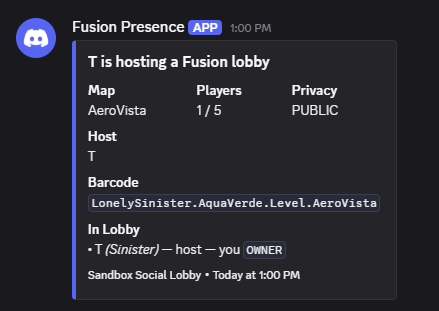
Each post carries the lobby name, the current map, the live player count, and who's in there with you. Works with modded maps — the level title and barcode come from whatever's actually loaded, not a hardcoded list.
Useful if you run a Fusion community and want a channel that shows when someone's lobby is live, or if you just like having a log of where you've been playing.
Setup
- In Discord: Server Settings → Integrations → Webhooks → New Webhook, then copy the URL.
- In game: BoneMenu → Fusion Presence → Webhook → Set URL, paste it with the VR keyboard, then press Save URL.
- Press Send test message. The status line right underneath tells you whether it landed.
That's it. Join a lobby and a post appears.
The menu never redisplays the full URL — it's a credential, so only the last six characters are shown.
What gets posted
| Event | Default |
|---|---|
| You join a lobby | on |
| You start hosting | on |
| You leave | on |
| A player joins or leaves | off |
| The lobby changes map | on |
Player join/leave is off by default because it's chatty. When on, a burst of joins is debounced into one post rather than spamming the channel.
Everything in the message is individually toggleable under Message Contents: your own name, the player list, nicknames, permission levels, the level barcode, and the lobby join code.
Things worth knowing
The join code is off by default. Anyone who can read the channel your webhook posts to could use it to walk into your lobby. Turn it on only if that channel is private.
Other players' names are included. They're visible to anyone in the lobby already, but they're going somewhere those players didn't choose. If that matters for where your webhook points, turn off Player list — the lobby name, map and headcount still work.
Nothing is sent until you configure a URL. There's no default endpoint and nothing phones home. The only address this mod ever contacts is the one you type in.
Notes
- No HTTP touches the game thread. Posts go through a queue drained by a background thread, so a slow or dead webhook can't cost you a frame in VR.
- Requests are spaced out and back off automatically on Discord's rate limit.
- The join post is deliberately delayed a few seconds so the host's lobby info has arrived first — otherwise you'd get a blank lobby name and a player count of 1. Tunable under Timing.
- Names and lobby titles are stripped of rich text and escaped before sending, so someone with colour tags in their name can't mangle your posts.
- Settings live in
UserData/MelonPreferences.cfgunder[FusionPresence]if you'd rather edit them outside VR. Don't paste that file anywhere — your webhook URL is in it. - There's a flat-JSON mode if you want to point this at your own endpoint instead of Discord.
Requirements
- BONELAB Patch 6
- MelonLoader
- BoneLib
- Fusion
Fusion is a soft dependency — the mod loads and the menu works without it, it just has nothing to report.
Credits
Made by Quartz.
