
Blood System
Realistic blood splatter from bullet exit wounds. Animated flying dots, spray, and drip stains. Real penetration detection — armor stops and ricochets produce no splatter.
By invent60
| Last updated | 2 months ago |
| Total downloads | 13465 |
| Total rating | 3 |
| Categories | Mods |
| Dependency string | invent60-Blood_System-3.4.1 |
| Dependants | 3 other packages depend on this package |
This mod requires the following mods to function

BepInEx-BepInExPack_H3VR
BepInEx pack for H3VR. Preconfigured and ready to use.
Preferred version: 5.4.1700README
Blood System
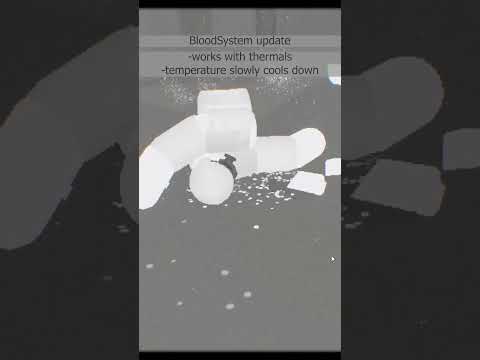
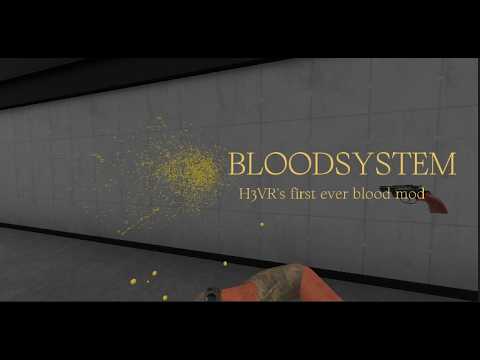
Stupidly exaggerated blood visuals! When a bullet physically exits a sosig, it projects blood from the exit wound onto any surface behind it — walls, floors, other sosigs. Real penetration detection means blunt hits, armored stops, and ricochets produce nothing.
Effects
- Splash — Raycast-based blood dots projected from the exit wound. Spread pattern sampled from included blood PNGs. Each dot gets individual brightness from
noise.png(10 levels, 0.7–1.0 range) so the splatter looks dimensional rather than flat. Dots scale with distance and stretch along the bullet path. - Spray — Quick particle burst at the exit wound. Gib explosions fire a 360° burst with lifetime and velocity scaled to bullet entry speed.
- Drip stain — Vanilla sosig blood drip particles are hooked at runtime. When a drip lands on a static surface (floor, wall) it spawns a cluster of blood drops with a smoothstep soft edge. Drips landing on dynamic objects (guns, other sosigs, moving RBs) are skipped.
Blood color
Blood color is read from the sosig's actual body color, not hardcoded. Priority order:
- Color Override (if set) — see below, applied before or after NGA depending on Soft/Hard mode.
- NGA SosigIntegrity config — if the NGA Sosig Integrity mod is installed, the plugin reads that sosig's configured body color directly from its config values (
Mustard Colourhex string,Ketchupbool). - Sosig.Mustard field — the vanilla per-instance color H3VR assigns to each sosig.
- Fallback — default mustard yellow if neither is available.
This means alien-colored sosigs from custom scripts, and any sosig whose color NGA overrides, will bleed the right color automatically.
Color Override
Set a custom blood color instead of each sosig's natural color, using Color Override (hex, e.g. #8C1A1A) and Color Override Mode:
| Mode value | Behavior |
|---|---|
1 |
Soft — replaces the default blood color, but sosigs with a color specifically set via NGA SosigIntegrityConfigs (e.g. zombies) keep their own color |
2 |
Hard — replaces blood color for every sosig, no exceptions |
| anything else (spaces ignored) | Unset — no override, vanilla per-sosig color behavior described above |
How it works
- Blunt hit / ricochet / armor deflect / faceshield → no splatter
- Bullet punches through and continues → splatter on whatever is behind the exit wound
- Splatter direction and animation speed follow bullet exit speed and direction
- Segment explosions fire blood in all directions
- Splash stains on dynamic rigidbodies (dropped guns, ragdolled gibs) are parented to that object and move with it — stains won't float in the air after the body falls
- Drop custom blood shape PNGs or a greyscale noise PNG into the plugin folder and they are loaded and normalized at startup automatically
Config
All settings in F1 (ConfigurationManager) or the .cfg file in BepInEx/config.
| Setting | Default | Description |
|---|---|---|
| Enabled | true | Toggle all blood effects |
| Lifetime seconds | 30 | How long splash stains persist |
| Max rays per shot | 3000 | Raycasts per penetration event (capped to image pixel count) |
| Cone half-angle | 10 | Half-angle in degrees of the splash spread cone |
| Dot base radius | 0.008 | Base radius of each splash dot in metres |
| Range metres | 40 | Maximum splash cast distance |
| Projection Mode | Animated | How dots appear: Animated / Delayed / Immediate |
| Projection Speed Ratio | 2 | Bullet speed multiplier for dot travel speed in Animated mode |
| Projection Speed Bias | 10 | Flat m/s added to dot travel speed |
| Dot Max Scale | 5 | Maximum size multiplier for dots at full range |
| Dot Scale Range metres | 50 | Distance at which dots reach maximum size |
| Gib Ray Count | 200 | Rays fired on segment explosion |
| Color Override | #8C1A1A | Hex blood color used when Color Override Mode is Soft or Hard |
| Color Override Mode | 0 | 1 = Soft override, 2 = Hard override, anything else = Unset (see Color Override section above) |
| Splatter Enabled | true | Toggle the wall/floor splash effect on its own |
| Spray Enabled | true | Toggle the wound particle burst on its own |
| Vanilla Particle Staining Enabled | true | Toggle whether vanilla sosig bleed-out particles get intercepted and made to leave a stain |
| Blood Drip Stains Enabled | true | Toggle the dripping-wound floor stains on their own |
Aiyke Compatibility
The "Aiyke code mod pack" rewrites bullet-penetration physics, which can make this mod's splatter almost never appear if left unhandled. If Aiyke is detected, this mod automatically removes Aiyke's own penetration-physics and output-damage-multiplier patches on startup, so this mod's normal precise penetration detection runs as intended. In exchange you lose Aiyke's "Modified bullet penetration" and "Output damage multiplier" features specifically — its other features (aim assist, red blood, enemy alertness, hit sounds, etc) are untouched.
No config needed — this is automatic whenever Aiyke is installed, and does nothing if it isn't.
Performance Tips
Blood only spawns from bullets fired by the player — sosig-vs-sosig gunfire never triggers blood effects, since that crossfire is what causes the worst frame spikes in big fights. This is automatic, no config needed.
Splash is the most CPU/GPU intensive effect. If you are dropping frames, apply these fixes in order of impact.
Highest impact
1. Switch Projection Mode to Immediate
The default Animated mode keeps a live particle system running with thousands of in-flight dots. Immediate removes all flight animation — dots appear the instant the bullet exits. This is the single biggest FPS win. No visual difference in stain placement, only the flying animation is removed.
2. Reduce Max rays per shot
Default 3000 is high. Try 1000 or 500. Below ~200 the splatter starts to look sparse. This directly controls how many raycasts happen per shot and how many dot quads build up per second.
Moderate impact
3. Reduce Lifetime seconds
Fewer accumulated stain meshes = fewer draw calls per frame across a long fight. 10–15 seconds keeps the scene looking fresh without piling up hundreds of meshes.
4. Reduce Gib Ray Count
Segment explosions fire rays in 360°. High gib fights (shotguns, explosives, multiple sosigs) multiply this cost fast. Cutting from 200 to 100 helps significantly in those scenarios.
Lower impact
5. Reduce Dot Max Scale
Smaller maximum dot size = less GPU fragment overdraw from large-radius quads at range.
6. Reduce Range metres
Caps the maximum raycast distance. Combined with reduced Max rays per shot, limits the worst-case cost per shot.
Low-end preset
Projection Mode = Immediate, Max rays per shot = 500, Lifetime seconds = 10, Gib Ray Count = 100
Credits where it's due
THANK YOU tosiek and VRVoyager for the awesome icon and video!
