
BunnyHop
Adds bunny-hopping to How To Fish: auto-jump while holding the jump key and a speed boost while airborne, plus a simple speed/status HUD.
By NekoTeam
| Last updated | 2 months ago |
| Total downloads | 5214 |
| Total rating | 1 |
| Categories | Mods Misc |
| Dependency string | NekoTeam-BunnyHop-1.0.0 |
| Dependants | 0 other packages depend on this package |
This mod requires the following mods to function

BepInEx-BepInExPack
BepInEx pack for Mono Unity games. Preconfigured and ready to use.
Preferred version: 5.4.2100README
🐇 Bunny Hop
Bunny-hop your way across the map in How To Fish.
Auto-jump while holding the jump key, get a speed boost while airborne or mid-chain, and keep an eye on your speed with a lightweight HUD.
✨ Features
- 🐇 Auto bhop — hold the jump key and it jumps for you the instant you land, no manual timing needed
- 🚀 Airborne speed boost — a configurable speed cap that only applies while airborne or during the landing "grace window," so normal ground movement stays untouched
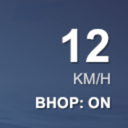
- 📊 Speed HUD — current speed in km/h plus a BHOP ON/OFF status, shown top-right
- ⚙️ Fully configurable — tune the speed cap, grace window, auto-jump, and HUD independently
- 🔑 In-game toggle key — turn the whole mod on/off instantly without touching menus
🎮 How it works
- Hold your jump key while moving.
- The mod auto-jumps you the moment you touch ground (if
AutoBhopis enabled). - While airborne — and briefly after landing — your speed cap is raised above normal sprint speed, letting good strafing chain into real speed gains.
- Watch the top-right HUD: the big number is your current speed in km/h, and the line below shows whether bhop is currently active.
💡 Tip: Press F7 (default, configurable) any time to toggle the whole mod on/off — handy if you want to play normally for a bit.
💡 Tip: If the speed boost feels too strong or too weak, tune
AirSpeedCapin the config — it's the hard ceiling applied while airborne/chaining.
💡 Tip: If jumps feel like they cut off your chain too easily, raise
BhopGraceWindowslightly (e.g.0.15–0.2) to give yourself more leeway after landing.
⚙️ Configuration
Config file generated on first launch at:
BepInEx/config/neko.howtofish.bunnyhop.cfg
| Section | Setting | Default | Description |
|---|---|---|---|
General |
Enabled |
true |
Master on/off switch for the mod. |
General |
ToggleKey |
F7 |
Hotkey to toggle the mod on/off in-game. |
Bhop |
AutoBhop |
true |
Automatically jump while the jump key is held. |
Bhop |
AirSpeedCap |
14 |
Horizontal speed cap while airborne/mid-chain. Set higher than your normal sprint speed to feel a real boost. |
Bhop |
BhopGraceWindow |
0.12 |
Seconds after landing during which the raised speed cap still applies — your timing window to chain the next jump. |
Hud |
HudEnabled |
true |
Shows the speed/status HUD in the top-right corner. |
📥 Installation
Via Thunderstore Mod Manager / r2modman: just click Install — dependencies are handled automatically.
Manual install:
- Install BepInEx for How To Fish, if you haven't already.
- Drop the mod's
.dllintoBepInEx/plugins/. - Launch the game once to generate the config file, then tune settings to taste.
🧩 Compatibility & known issues
- Speed boost only applies while airborne or briefly after landing — normal ground walking/sprinting is untouched.
- HUD shows
--until your local player has fully spawned in. - This mod only affects your own local movement, not other players' clients.
🐛 Found a bug?
Please report it with as much detail as possible (a BepInEx log helps a lot) — happy to take a look!
🙏 Credits
Made by Neko (NekoCuteJs).
Happy hopping! 🐇
