
HTFFriendList
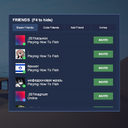
The friends panel for How To Fish: adds a list of Steam friends, status (online/in-game/in the lobby), JOIN and INVITE buttons, as well as a system of friends by code for non-Steam friends.
By NekoTeam
| Last updated | 2 months ago |
| Total downloads | 1472 |
| Total rating | 0 |
| Categories | Mods Tools Misc |
| Dependency string | NekoTeam-HTFFriendList-0.0.1 |
| Dependants | 1 other package depends on this package |
This mod requires the following mods to function

BepInEx-BepInExPack
BepInEx pack for Mono Unity games. Preconfigured and ready to use.
Preferred version: 5.4.2100README
How To Fish Social Panel
A pop-up friends panel for How To Fish: see your Steam friends and their status, quickly join or invite them to your lobby, and add friends who aren't on your Steam friends list via a shareable code.

Features
- Steam Friends — tab showing your Steam friends list: avatar, status (in-game / online / offline), and
JOIN/INVITEbuttons whenever a friend is currently in this game's lobby. - Code Friends — for players who aren't on your Steam friends list. Every player gets a unique code like
nekocode-XXXX-XXXXthat can be copied and shared — sending it lets another player friend-request you directly in-game (P2P, no server required). - Friend Requests — tab for incoming and outgoing requests: accept, decline, or cancel.
- Lobby Invites — separate tab with an unread-count badge and a one-click join button.
- Notifications — toast pop-ups in the corner of the screen for new requests and invites.
- Draggable panel — position is saved between sessions.
F4— show/hide the panel.
Installation
Via Thunderstore Mod Manager / r2modman
- Find How To Fish FriendList in the mod list and click Install.
Manual
- Make sure BepInEx 5.4.2100 is installed for How To Fish.
- Extract the mod archive into
BepInEx/plugins/. - Launch the game.
Usage
- Launch the game — a tabbed panel appears in the bottom-right corner of the screen.
- The Steam Friends tab populates automatically with your Steam friends.
- To add a friend who isn't on Steam: open the Add Friend tab, copy your code with the
Copybutton, and send it to your friend. They paste your code into the field and hitSend Request. - Accept the request under Add Friend → Pending Requests.
- Press
F4to toggle the panel.
Requirements
Known Limitations
- The code-friend system only works while both players are online at the same time (requests are sent as Steam P2P packets, no central server) — an offline player only receives the request/acceptance notification the next time they launch the game and a P2P session is re-established.
INVITE/JOINonly work while you or your friend are currently in a lobby for this game.
Disclaimer
This mod is not affiliated with the developers of How To Fish. Use at your own risk.
Changelog
0.0.1-BETA
- Added the code-based friend system.
- Added friend requests and notifications.
Feedback & Bug Reports
Please describe the issue and attach your BepInEx log (BepInEx/LogOutput.log) in the mod's repository issues.
