
Please disclose if any significant portion of your mod was created using AI tools by adding the 'AI Generated' category. Failing to do so may result in the mod being removed from Thunderstore.

ShipSystems
Fuel system, a ship battery, ship upgrades such as turrets and paint jobs, and an optional custom terminal layout.
| Date uploaded | a day ago |
| Version | 1.0.1 |
| Download link | Y4NGZ313-ShipSystems-1.0.1.zip |
| Downloads | 196 |
| Dependency string | Y4NGZ313-ShipSystems-1.0.1 |
This mod requires the following mods to function

BepInEx-BepInExPack
BepInEx pack for Mono Unity games. Preconfigured and ready to use.
Preferred version: 5.4.2305
TeamXiaolan-DawnLib
A modern API for Lethal Company content and all sizes of mods [V81]
Preferred version: 0.9.25
Y4NGZ313-Y4NGZCore
Shared library for Y4NGZ mods. Adds nothing on its own.
Preferred version: 1.0.14README
ShipSystems




I am Y4NGZ, an up and coming rapper out of NYC/Detroit. All of my mods are inspired by the music I write. I want to thank all of you in the Lethal Company Modding Community for your kind words and support of all of my music. Without you I would never have been able to accomplish my dream of becoming a full time musician. I will be touring across the global southern hemisphere in Summer 2027. Dates and cities TBA. If there is somewhere you want me to visit please contact me on my Soundcloud.
Generative AI usage
The entire code base of this mod was created with generative AI. Assets are
free, licensed, paid for, or generated with AI tools. If you do not wish to play
with AI-generated content, do not install this mod.

What ShipSystems does
ShipSystems is directly inspired by my hit song: lifesnotsobad as well as the life story and teachings of University of Michigan's Coach Sherrone Moore, someone who I personally credit with not only saving my life, but helping me start afresh. ShipSystems overhauls the Company Ship by adding new mechanics which can be separated into four different modules: fuel, power, ship upgrades, and an enhanced terminal. Each of these modules can be disabled individually.
Ship upgrades
The enhanced terminal's SHIP UPGRADES page lists the upgrades below as well as any other upgrades added by other mods.
No enhanced terminal? With it turned off, type upgrades in the normal terminal to see every upgrade with its level and price, then buy <upgrade> (for example buy wider ship) and confirm. Paint Jobs takes a scheme number from that list, for example buy paint jobs 3.
| Upgrade and default price | Effect |
|---|---|
| Wider Ship — 500 credits | Expands the ship. Offered with Wider Ship Mod installed. |
| Two-Story Ship — 600 credits | Adds an upper deck. Offered with 2 Story Ship installed. |
| Paint Jobs — 250 credits | Seven new paint schemes. Switching is free after the first purchase. |
| Battery Shield — 400 credits | Softens every hit the battery takes. |
| Reserve Cell — 600 credits | Allows one extra battery break per landing. |
| Fuel Efficiency — 400 credits | Reduces fuel cost by 10%, 20%, 30%. |
| Door Capacitor — 300 credits | The ship door stays shut 1.5x, 2x or 2.5x as long on one charge. |
| Ship Cameras — 300 credits | Four mounted camera feeds on the CCTV station. Offered with LethalCCTV installed. |
| Flashlight Shelf — 200 credits | A shelf with four flashlights. It refills whenever one goes missing. |
| Brighter Floodlights — 250 credits | Brighter floodlights that sweep around the ship. |
| Turret — 900 credits | Twin mounted turrets controlled by a new terminal. |
| Surge Guard — 500 credits | Stops one battery-breaking monster hit per landing. Kills that monster if it can die. The Stranger survives. |
Fuel
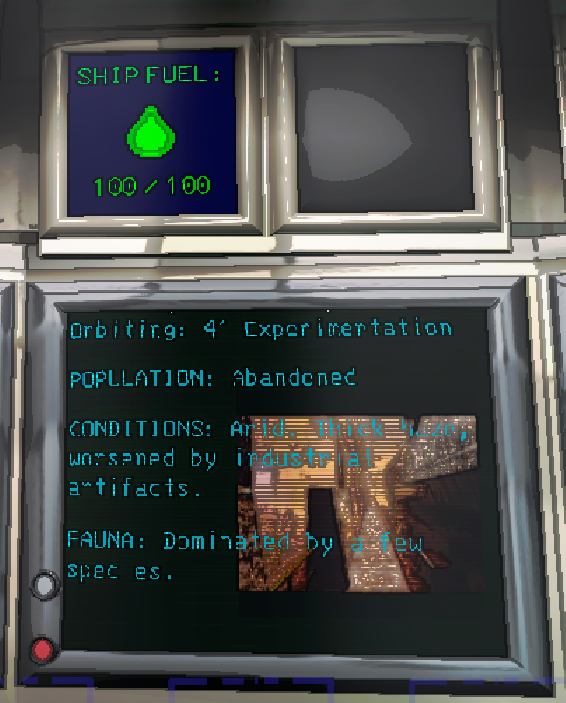
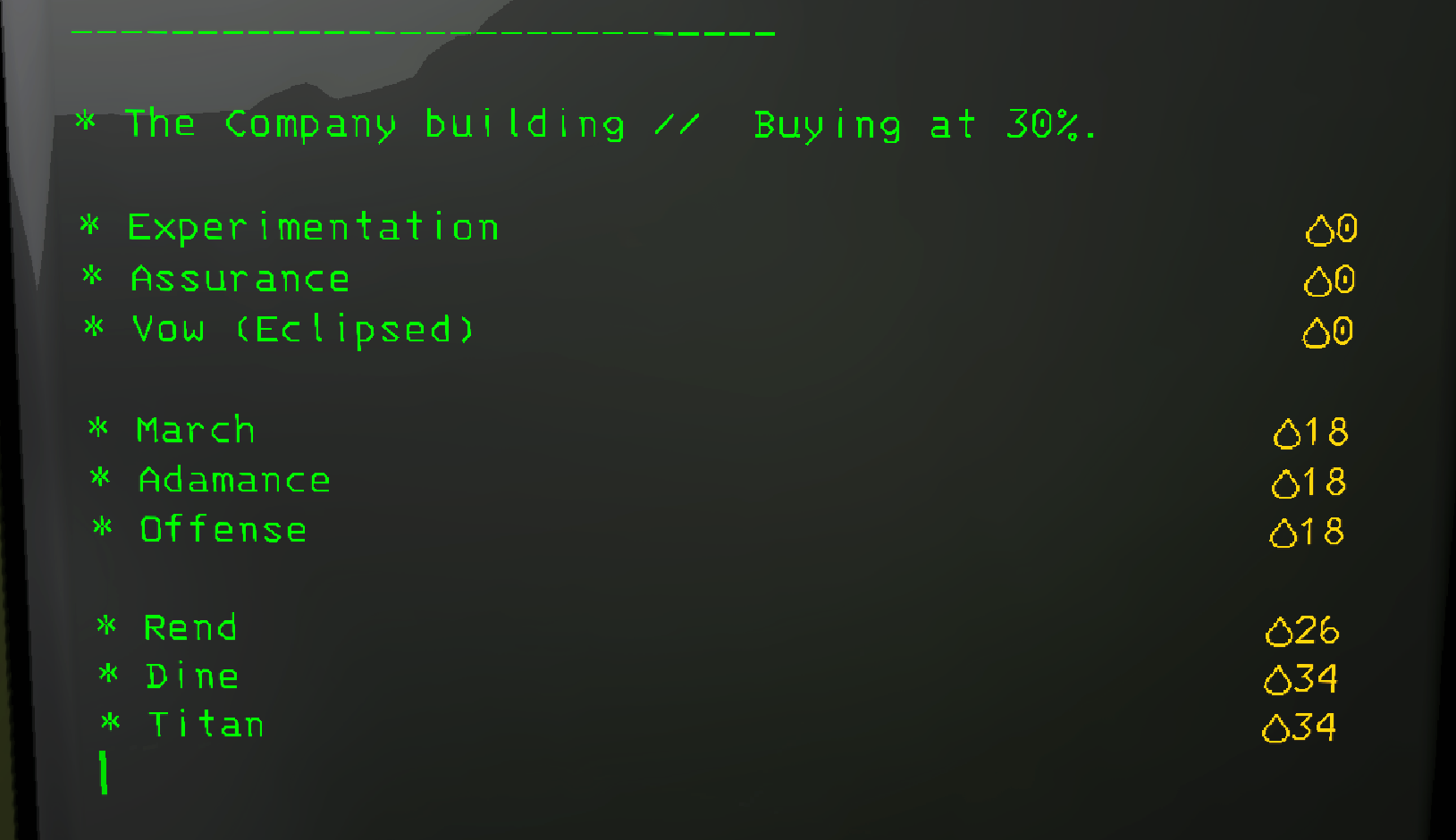
Traveling to a moon or a constellation costs fuel. You can collect fuel as scrap on moons and deposit it into the ship fuel chute. Upon the successful completion of a quota the ships fuel reserves will automatically refill. The ships current fuel is viewable on the fuel monitor. Moon and constellation fuel costs are displayed on the terminal and set in the config.
Battery
The company ship now gets its power from the ship battery. Outside enemies, Masked especially, will try to destroy the battery to prevent players from leaving. The first time the battery is destroyed it will only be disabled, players can hold down their interact key to repair it to 50% health. If it is disabled once again the battery will be destroyed requiring a replacement to restore power to the ship. Once the battery is destroyed, players must wait for the ship's auto-pilot to automatically depart at midnight unless power is restored. There are two ways to restore power once the battery is destroyed without Y4NGZUpgrades, you can either restore power by using an Apparatus as found within the facility of the moon, or in the event of a facility without an Apparatus, you can use a spare battery that will be guaranteed to spawn within the facility in the event of an interior without an Apparatus. With Y4NGZUpgrades installed, the Field Mechanic perk lets you repair the broken battery by interacting with it.
Terminal
The enhanced terminal shows the moon list with fuel costs, special moons and the ship upgrade catalogue. The terminal has full arrow key navigation and will automatically import any other terminal menus created by other mods. At the bottom is a persistent terminal that you can type into if that is an easier way to navigate. The terminal is mostly useful if you have my other mods like LethalCCTV and Contracted installed as contract and security information are integrated into the terminal. If you have LethalConstellations setup, constellations will be sorted into sub-menus within the terminal making them feel more distinct from one another.
| Mod | Optional integration |
|---|---|
| Contracted | The Stranger can attack the battery; contract tags, briefs and rewards on the terminal's MOONS page |
| Y4NGZ Upgrades | Field Mechanic battery repairs |
| LethalConstellations | Constellation grouping in terminal and constellation fuel entry fees |
| LethalCCTV | Ship Cameras upgrade. |
| Wider Ship Mod / 2 Story Ship | With either installed, its upgrade applies when purchased rather than at the start of the game. |

Report bugs at https://github.com/y4ngz313/ShipSystems/issues.
- Wolf: wrote the hook walking home at night. had to keep repeating it so i wouldn't forget.
- L.M.D: i still don't tell people what the letters stand for.
- all alone [prod. 44]: posted it new year's eve 2021. says a lot about how that year went.
CHANGELOG
ShipSystems changelog
1.0.1
- With the enhanced terminal off, the store lists every ship upgrade with its price, LOCKED, or its owned state once fully bought (#1878).
- With the enhanced terminal on, other mods' ship upgrades (such as Beanies Ship Upgrades and the CCTV Terminal) are listed under SHIP; SYSTEMS keeps the vanilla upgrades (#1878).
- Without General Improvements, the ship fuel monitor's text and tank icon fit inside the screen with a margin on every side (#1878).
- New host setting Starting Upgrades: every save starts with the listed ship upgrades for free, added each time the save loads and again after the crew is fired (#1904).
- New host setting Fuel Only Travel: routing to any moon costs no credits, only fuel, in both terminals and on modded moons (#1904).
- With the enhanced terminal off, the upgrades page, buy and confirm keep working for the whole session, also with LethalLevelLoader installed, and confirm shows the purchase result (#1904).
- With the enhanced terminal off, the upgrades page lists every upgrade first so all of them fit on screen; locked reasons and paint schemes follow below (#1904).
- With the enhanced terminal on, pressing Enter on another mod's ship upgrade, such as Ship Inventory, buys that upgrade instead of a different one (#1904).
- The enhanced terminal's moon list and detail panel use one format: labelled values, no cut-off words, blanks for zero costs, IN ORBIT on the current moon's list row (#1904).
- On the enhanced terminal's moon list, a route the crew cannot afford is refused at the first ENTER, naming the route's cost and the crew's credits (#1904).
- With ClickableTerminal installed, the enhanced terminal turns itself off and your saved setting is kept (#1904).
- With the enhanced terminal on, the Constellations tab's moon count and moon list leave out moons LethalConstellations keeps hidden; they stay reachable by typing their name (#2110).
- A crewmate's route request no longer mentions fuel when the ship's fuel system is switched off (#2110).
- Ship Systems now needs Core 1.0.14, which frees the ship monitors when you leave a game #1955
- With ClickableTerminal installed, ship upgrades are listed in its SHIP UPGRADES store page and can be bought there, by click or typed confirm (#1904).
- The Fuel Chute is always in the ship and usable: after loading a save, after the crew is fired and after Wider Ship or 2-Story Ship changes the hull, also for players who join later (#1904).
- A Fuel Chute you moved keeps its place after loading; build mode accepts only spots on the ship's ground floor, where the chute belongs (#1904).
- The Wider Ship upgrade builds the side set in Wider Ship's Extended Side setting (Left, Right or Both) for every player; the battery bay, turret console and shelf fit each side (#1904).
- With 2-Story Ship also installed, the Wider Ship upgrade always builds both sides, because 2-Story Ship has no one-sided hull (#1904).
- Players on ShipSystems 1.0.0 can no longer join a host on this version, so host and players never build different hulls (#1904).
- With LethalConstellations, the MOONS page lists the mod's real constellations with price, fuel and lock in a second list beside a full moon table (#1904).
- Routing to a constellation uses the mod's own route, shows its credit and fuel cost before the second ENTER, and refuses a locked or unaffordable one at once (#1904).
- Typing the LethalConstellations command opens the MOONS page on its constellation list instead of the mod's own page while the enhanced terminal is on (#1904).
- The enhanced terminal's moon detail panel shows risk and weather on the left and cost and fuel in the middle; a constellation's shows arrival and weather on the left (#1904).
- The moon and constellation detail panels no longer repeat the selected name or IN ORBIT; the highlighted list row shows both (#1904).
- The moon detail panel leaves a blank line under its stats and between the contract text and the moon description (#1904).
- Ship upgrade details show only the upgrade's description; the green flavour line is gone, also in ClickableTerminal's store page (#1904).
- Ship Systems' log lines for a failure name what failed and what to check; one start-up line lists its version, files and optional mods #1955
- The fuel tank no longer refills when another mod skips the quota rollover; it refills at the real rollover #1955
- The Undetected Constellation Entry Fees setting is gone; a constellation without its own price now costs the Default Constellation Entry Fee #1955
- The Battery Placement Dev Tool setting and the battery placement editor are gone; the battery always uses its authored mount #1955
- The fuel tank refills to full when the crew is fired #1955
- The MOONS page REWARD place shows the first reward plus a count of the rest instead of cutting the text mid-word, and never cuts a number #1955
1.0.0
- Initial Thunderstore release (#1760).
- Four modules, each of which can be turned off on its own: fuel, power, ship upgrades and an enhanced terminal (#1760).
- With the enhanced terminal off, type
upgradesin the normal terminal to list the ship upgrades, thenbuyand an upgrade's name (for examplebuy wider ship) to buy one (#1760).
