

Quads Upgrade Cost Preview
Upgrade cost preview: see what turbocharging an upgrade costs before you hold the key, and every cost against how much you have (40 / 125). Quality of life, UI, client only.
| Last updated | a day ago |
| Total downloads | 23 |
| Total rating | 1 |
| Categories | Quality Of Life Client-Side |
| Dependency string | Quads_Lab-Quads_Upgrade_Cost_Preview-0.1.0 |
| Dependants | 0 other packages depend on this package |
This mod requires the following mods to function

BepInEx-BepInExPack_Mycopunk
BepInEx pack for Mycopunk. Preconfigured and ready to use.
Preferred version: 5.4.2403README
🔍 Quad's Upgrade Cost Preview

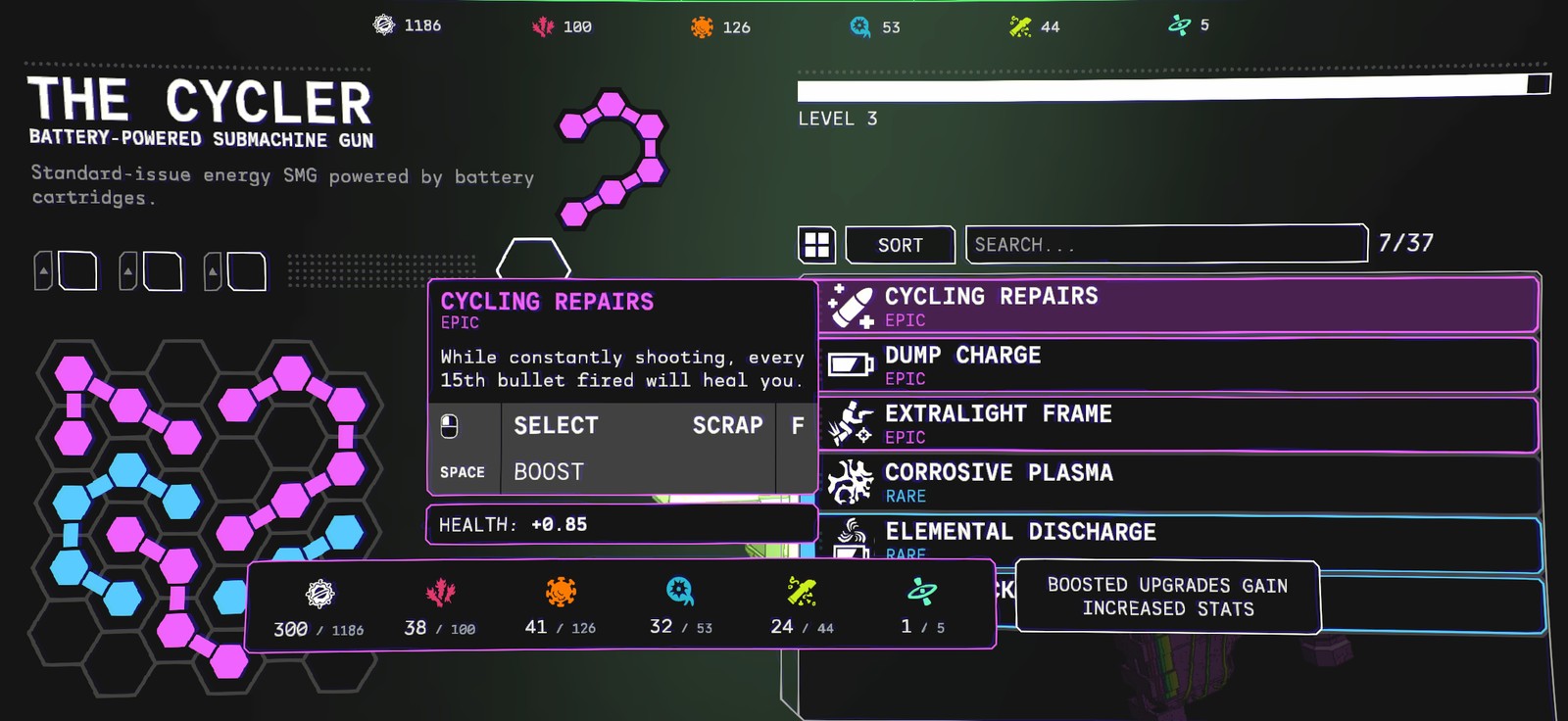
See what an upgrade costs before you spend it: the turbocharge cost shows as soon as you point at an upgrade, and every cost shows against how much you have ("300 / 1186").



Source code · Report a bug · Discord


✨ Features
In the Gear screen, turbocharging (boosting) an upgrade means holding a key, and the game hides what it costs until you start holding: then it just counts your resources down. With this mod you see the price first.
How it works
- The turbocharge cost shows straight away. Point at an upgrade you own and its boost cost is in the info panel, before you press anything.
- Every cost against what you have. Each resource reads like 300 / 1186: what it costs, then a smaller grey "/ what you have". The cost still turns red when you can't afford it. This applies to every hold-to-spend cost in the info panel (unlocking, boosting), not only turbocharging.
- Room to read. The costs are spread out so the numbers don't run into each other; big amounts are shortened (12.3k, 1.2M).
- Holding works as before. Hold the key and the cost counts down as usual.
📸 Screenshots
Pointing at an Epic upgrade: the boost cost is already showing, each resource against what you have
👥 Multiplayer
Who needs it: Only you. It only changes what your screen shows.
⚙️ Settings
In BepInEx\config\quadslab.mycopunk.upgradecostpreview.cfg, made the first time the game runs with the mod. r2modman and Gale edit it under Config editor.
General
| Setting | Default | What it does |
|---|---|---|
ShowTurbochargeCost |
true |
Show the turbocharge cost as soon as you point at an upgrade. |
ShowOwned |
true |
Show each cost against how much you have ("300 / 1186"). |
Something not showing right, or clashing with another mod's upgrade screen? Tell us.
🤖 Made with AI
Made with the help of Claude (Anthropic), with Claude Code: designed, written and checked together, and tried in the game. Its cover and icon were made with AI image generation; the screenshot is from the game.
💬 Join us on Discord

Come hang out with the people who make and play these mods. In the Quads Lab Discord you can:
- 🛠️ Get help and report bugs straight to us
- 👀 See new mods first, and help test them before they're released
- 🗳️ Suggest ideas and vote on what we make next
- 🎮 Find people to play with, and share your adventures
- 🤖 Talk AI coding and vibe coding with people building things with AI, the way these mods are made
🧪 About Quads Lab
Quads Lab is where Quad H (HardHeadHackerHead) builds software with AI, of every kind: these Mycopunk mods are one of its projects. Each mod is designed by a player, written with Claude Code and tested in the game.
- 🌐 quadslab.io
- 🧰 All my Mycopunk mods
- 💬 Discord
- ☕ Buy me a coffee
- 🐞 Found a bug? Open an issue on GitHub
☕ Support my mods

Every Quads Lab mod is free, and it stays that way. If one of them made your game better and you'd like to say thanks, a coffee helps me make new mods and keep improving the ones you already play. It's 100% optional, and always appreciated!
📜 Recent changes
- 0.1.0 First release: the turbocharge cost shown before you hold the key, and every cost against how much you have.
Unofficial fan mod, not affiliated with Pigeons at Play. License: source-available (see LICENSE.md).
