

SyncDiskLabels
Inventory squares show the real sync disk name instead of the generic SyncDisk label. Works with vanilla disks, split disks and disks from other mods. No config, no save data.
| Last updated | 2 weeks ago |
| Total downloads | 214 |
| Total rating | 0 |
| Categories | Misc |
| Dependency string | Sm3gm-SyncDiskLabels-1.0.0 |
| Dependants | 0 other packages depend on this package |
This mod requires the following mods to function

BepInEx-BepInExPack_IL2CPP
BepInEx pack for IL2CPP x64 Unity games. Preconfigured and ready to use.
Preferred version: 6.0.755README
Sync Disk Labels
Every sync disk in your inventory is labelled SyncDisk. Twelve disks in a bag look like twelve identical squares, and the only way to tell which is which is to drop one and read the label on the floor.
This mod puts the real name on the square.
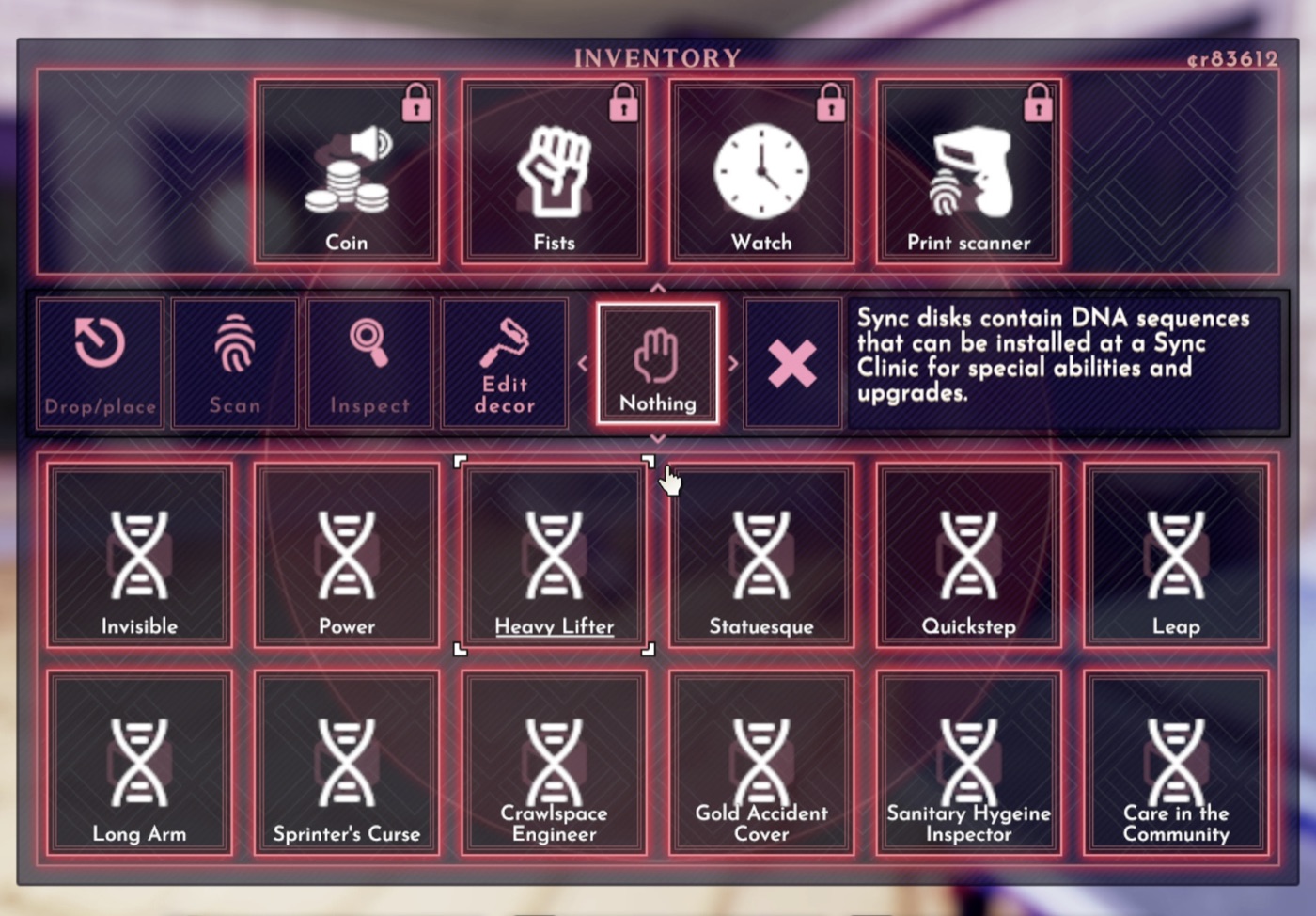
Without the mod, every one of those squares says SyncDisk.
If this saves you some squinting, a like on the Thunderstore page is appreciated. It keeps me motivated to make more mods. Donations are welcome too:


What it does
The name comes from the game's own name table, the same one the ground label reads. The mod does not invent names, strip text or guess. It looks up the name the disk was registered under and puts it on the square.
That has one useful consequence: it works for disks this mod has never heard of. Vanilla disks, disks from other mods, and the split disks from SyncDiskSuite all come out right, because they all register their names the same way.
Long names wrap to two lines inside the square and stay readable. Sanitary Hygeine Inspector is the longest one in the game, typo and all, and it fits.
Installing
Install with a mod manager and it works. There is nothing to configure and no keys to press.
If you install by hand, the BepInEx folder in the zip merges into your game folder, so that SoDDiskLabels.dll ends up in BepInEx/plugins/SoDDiskLabels/. Do not nest a second BepInEx folder inside the one already there. That is the most common manual install mistake.
What it does not change
- The label on a disk lying on the ground. That one already shows the real name.
- The title in the Inspect window.
- The description strip that appears when you hover a disk. It still reads the generic text about DNA sequences. Fixing that is the next thing I want to do, and it is a harder problem than the label was.
Known limitations
- Only the inventory square is relabelled. Everything else is untouched.
- If the lookup returns nothing sensible for a disk, the square is left exactly as the game drew it. A missing name gives you the old generic label back rather than something broken.
- The hover underline the game draws on a selected square still works, because the mod replaces the word inside the existing text rather than rewriting the square.
Compatibility
- No dependency on SOD.Common, and no dependency on any other mod of mine.
- No config file.
- Nothing is written to your save. Installing or removing this mod mid-run is safe, and removing it just puts the generic labels back.
- It does not touch sync disk behaviour, prices, stock or spawning. It changes text on a square.
Also by sm3gm
- SyncDiskSuite, twelve new sync disks, thirty-seven vanilla branches split into standalone disks, and rotating vendor stock.
- Black Market Passwords, writes the current black market and weapons dealer passwords into a sticky note so you are not hunting for the graffiti.
Support
This mod is free and always will be.
If you like it, a like on the Thunderstore page helps more than you would think. Likes are given on the page while logged in, so if you installed through a mod manager, open the page in a browser to leave one.
And if you love what I do and want to support future projects, or just want to send a friendly thought, you can do so here:
Bugs and suggestions go to GitHub issues. The source is there too, under MIT.
Thanks for playing.
