

SyncDiskLabels
Every sync disk shows its real name and what it does, in your inventory, the Inspect window and shops. Disks you already have installed are marked, and a Sort button orders yours by newest, name or upgrades.
| Date uploaded | 18 hours ago |
| Version | 1.3.1 |
| Download link | Sm3gm-SyncDiskLabels-1.3.1.zip |
| Downloads | 67 |
| Dependency string | Sm3gm-SyncDiskLabels-1.3.1 |
This mod requires the following mods to function

BepInEx-BepInExPack_IL2CPP
BepInEx pack for IL2CPP x64 Unity games. Preconfigured and ready to use.
Preferred version: 6.0.755README
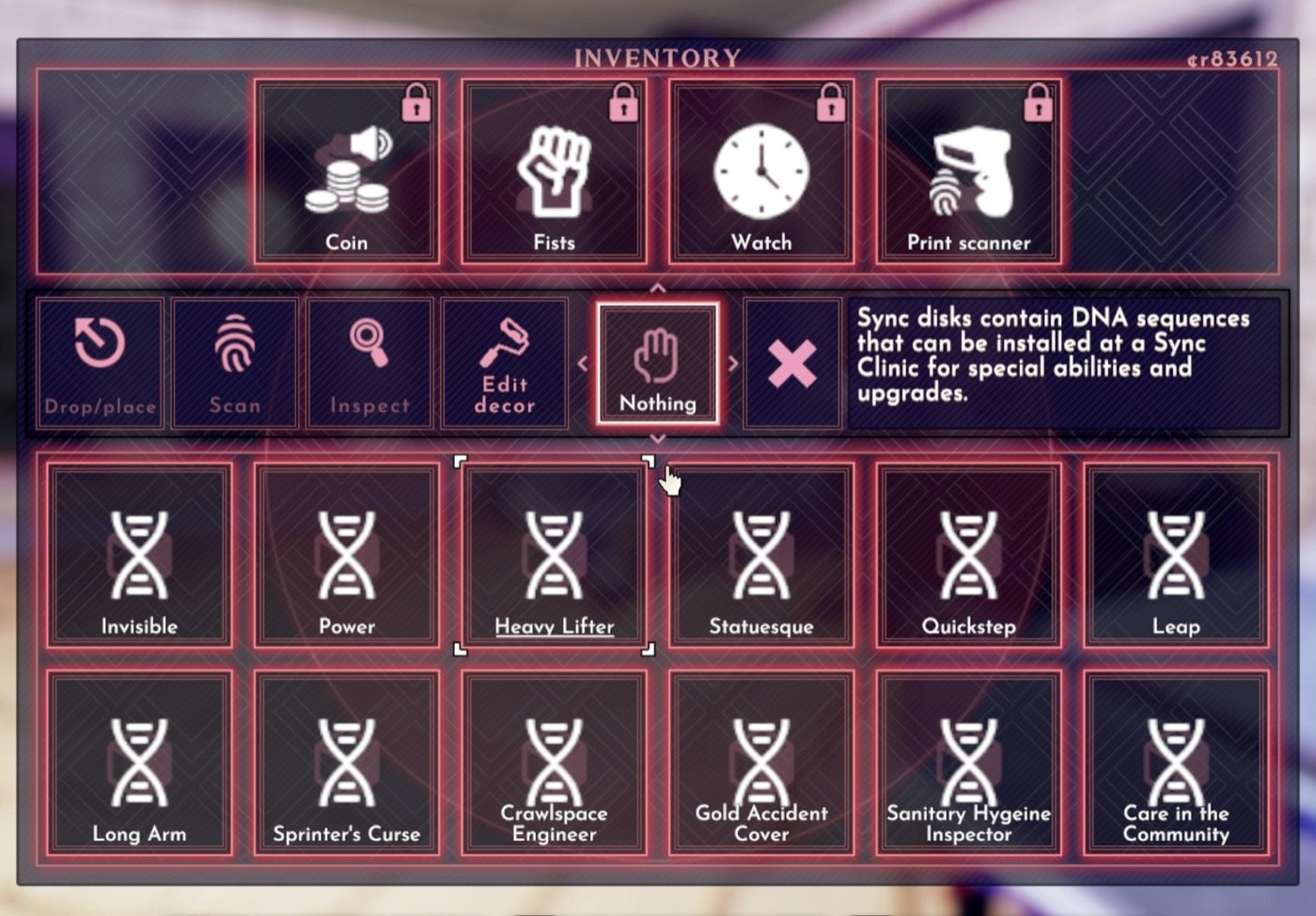
A BepInEx (mod loader) plugin for Shadows of Doubt. Every sync disk shows its real name and what it does: in your inventory, in the Inspect window and in the shops.
If this saves you some squinting, please leave a like on the mod's Thunderstore page. It keeps me motivated to make more mods. Donations are welcome too:


What it does
Every sync disk in your inventory is labelled SyncDisk. Twelve disks in a bag look like twelve identical squares, and the only way to tell which is which is to drop one and read the label on the floor. This mod puts the real name on the square, and the real name and description everywhere else you look at a disk.
Features
- Inventory: each square shows the disk's real name. Long names wrap to two lines inside the square
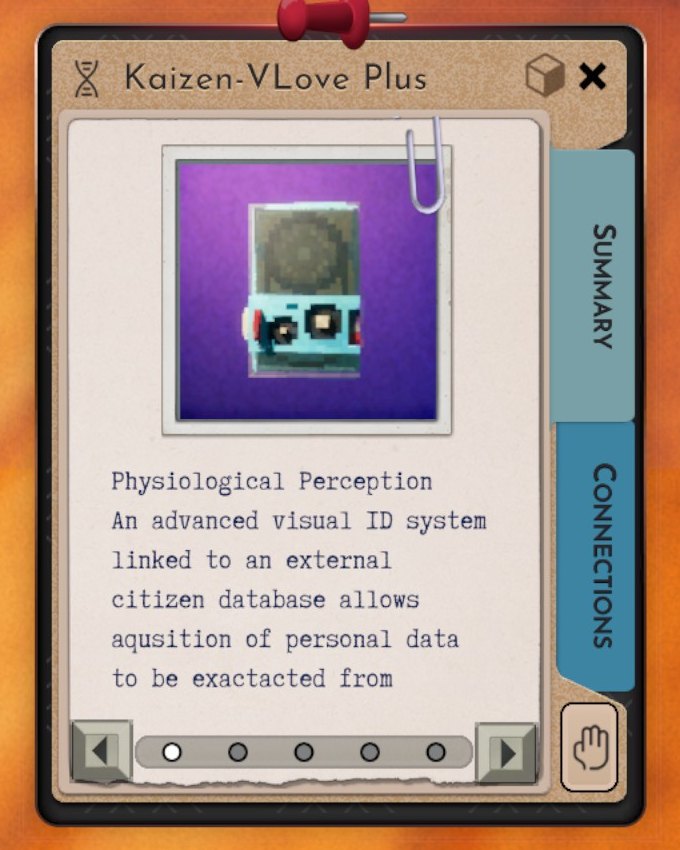
- Inspect window: the real name in the title, and every effect with its description and numbers filled in, plus the side effect. Long text is split into pages by the game's own page buttons
- Shops: the buy and sell lists show the real names, and hovering a disk shows what it does instead of the generic sentence about DNA sequences
- Names come from the game's own name table, the same one the label on the ground reads. So vanilla disks, disks from other mods and the split disks from Sync Disk Suite all come out right
- If a lookup returns nothing usable, the game's own text is left exactly as it was
- Sync disk screen: a Sort button lists your installed disks newest first, oldest first, by name, or by most or least upgraded. Newest first is the default, so a disk you just installed is at the top, and the order you pick is remembered
- Already installed? In a shop's buy list, disks you already have installed are greyed out and marked "(installed)". In the sync disk screen, a spare copy of a disk you already have installed is marked "(already installed)", so you see straight away that you picked up a duplicate
- Works with the base game, no other mods needed
Config
After one launch, edit BepInEx/config/sm3gm.sod.disklabels.cfg with the game closed. Everything works without changing anything.
| Setting | Default | Meaning |
|---|---|---|
| Sort / Enabled | true | Show the sort button on the sync disk screen. |
| Sort / Order | Newest | How installed disks are listed: Newest, Oldest, Name, MostUpgraded or LeastUpgraded. The button changes it. |
| Shop / MarkInstalled | true | Grey out and mark disks you already have installed, in shops and in the sync disk screen. |
Good to know
- Only text and order change: the label on a square, the Inspect window, the shop buttons and the order of the rows on the sync disk screen. Sync disk behaviour, prices, stock and spawning are untouched.
- Nothing is written to your save. Installing or removing the mod mid-run is safe, and removing it just puts the generic labels back.
Install
Thunderstore (the public SoD mod shop) plus BepInExPack IL2CPP. Enable this mod in your profile and launch from the manager.
Also by sm3gm
All my mods are on Thunderstore.
Support
This mod is free and always will be.
Likes are greatly appreciated and keep me motivated to release more mods, so if you enjoy it, please leave one. You give a like on the mod's Thunderstore page while logged in to Thunderstore. If you installed through a mod manager, open that page in your browser to find the button.
And if you love what I do and want to support future projects, or just want to send a friendly thought, you can do so here:
Bug reports and ideas help as well. Post them in this mod's thread in the mod-releases channel on the official Shadows of Doubt Discord: https://discord.gg/shadows
Thanks for playing.
CHANGELOG
Changelog
1.3.1
- Page text only, no code changes: links to my other mods, and "All my mods" now shows the modpacks too. Updated short description.
1.3.0
- Disks you already have installed are greyed out and marked "(installed)" in a shop's buy list, so you do not buy one twice.
- In the sync disk screen, a spare copy of a disk you already have installed is marked "(already installed)".
- New config:
Shop / MarkInstalled.
1.2.0
- New Sort button on the sync disk screen, in the middle of the "Installed Disks" line. Click it to switch between newest first, oldest first, name, most upgraded and least upgraded.
- The game lists disks oldest first, so a disk you just installed ends up at the bottom. Newest first is the default, so it is at the top.
- The order you pick is remembered.
- New config:
Sort / EnabledandSort / Order.
1.1.2
- Shop hover text for sync disks added by other mods (such as Sync Disk Suite) shows the description instead of an internal text key like "424039432_3486932829_You move faster on foot.", and no longer repeats it underneath.
1.1.1
- Internal plugin ID renamed. Nothing changes in game; no settings or saves are affected.
1.1.0
- The Inspect window shows the disk's real name, and every effect with its description, numbers and side effect
- Shops show the real names in the buy and sell lists, and hovering a disk there shows what it does
1.0.0
- First release. Inventory squares show the real sync disk name instead of the generic SyncDisk label.
