
Please disclose if any significant portion of your mod was created using AI tools by adding the 'AI Generated' category. Failing to do so may result in the mod being removed from Thunderstore.

NewtCraftHub
All-in-one base mod: craft from chests up to 100 m, self-feeding stations, /find glowing chests, extra slots with hotkeys, item recycling, eternal fires, ores through portals, /tp markers, shared chests, area repair, health numbers, ship status.
By Anatta_Labs
| Last updated | 5 minutes ago |
| Total downloads | 1400 |
| Total rating | 2 |
| Categories | Crafting Client-side Utility Building AI Generated |
| Dependency string | Anatta_Labs-NewtCraftHub-1.3.0 |
| Dependants | 1 other package depends on this package |
This mod requires the following mods to function

denikson-BepInExPack_Valheim
BepInEx pack for Valheim. Preconfigured with the correct entry point for mods and preferred defaults for the community.
Preferred version: 5.4.2350
Azumatt-Official_BepInEx_ConfigurationManager
Mod to assist with configuration of BepInEx mods
Preferred version: 18.4.1README
NewtCraftHub
Your base, working for you. Craft, build, smelt, cook, farm, repair, travel, find anything and share storage without running back and forth to your chests, with your gear always at hand.
Valheim is at its best when you are out exploring, fighting and building, not sorting boxes. NewtCraftHub
turns the storage around you into one big inventory: the workbench, the forge and the hammer see everything
in your chests up to 100 m away, smelters and ovens refill themselves from them, friends can use the same
chest at the same time, ores travel through portals, /tp takes you back to the places you saved, and
/find lights up the chests holding what you need. Extra slots keep your armour, potions, food, arrows and
keys out of the way and one hotkey away. Small everyday helpers (a world clock, cooking timers, a farm grid,
one-press harvesting, area repair, a Trash button that recycles items back into materials, torches and fires that never go out, the health of trees, rocks, walls and creatures, a readout for your ship)
keep the game flowing.
Every feature has its own on/off switch, everything can be changed in game with F1 (also online), and the mod is built to stay light: nothing runs when you are not using it, and the whole mod costs a fraction of a millisecond per frame even in large bases. Built for Valheim 1.0, safe in multiplayer.
New features and bug fixes
1.3.0: recycling
New features
- Recycle: a Trash button beside the inventory turns the items you drop on it back into all the materials they cost, upgrades included (or less, if you prefer). Upgraded items and uneven stacks ask first, and items without a recipe are deleted only after a confirmation; materials that don't fit go to the nearest chest. See Recycle.
1.2.3
Bug fixes
- Creature health: a creature's bar shows only while your crosshair is on it and fades out over half a second
when you look away, instead of staying up for a while; a pen full of animals no longer fills the screen.
Bosses, players and your mount keep theirs. Options in
K - Creature Health. - Performance: creature health goes over the game's bars 10 times a second instead of every frame, so many animals nearby cost almost nothing.
1.2.2
Bug fixes
- Potion bar: the amount of each potion (
6/10) sits above its box, on the same line and in the same size as the Forsaken power's name. - Extra slots: slot labels (Head, Chest, Utility...) and the potion bar hotkeys are white instead of light blue.
1.2.1
Bug fixes
- Mod list: the short description now mentions eternal torches and fires.
1.2.0: eternal fires
New features
- Eternal fires: torches, sconces, braziers, campfires, hearths, bonfires and the hot tub you built never run out of fuel once lit.
Bug fixes
- Performance: a base with many chests no longer rescans them from scratch twice a second (about 40 times cheaper, no more small hitches); creature health numbers, item tooltips and the extra slots cost far less.
- The world clock and the ship readout are drawn as HUD text in the game's font (same look), with no hitch when they first appear; no hitch either when the inventory opens for the first time.
- Mod page: Ship status and Shift harvest screenshots.
1.1.1
Bug fixes
- Mod page: a
/findscreenshot; the introduction, Quick start and feature switches now include/findand the extra slots; the old NewtCraftBoxes notes are gone; a new short description.
1.1.0: extra slots, /find, creature health and ship status
New features
- Extra slots: a panel beside the inventory with your worn equipment, 3 extra utility slots, 3 quick slots for potions, 3 food, 3 ammo and 2 key slots, with Alt hotkeys and a potion bar next to the Forsaken power. Coming from ExtraSlots? Your items appear in place.
- /find <item>: every container around you holding it glows red for a few seconds.
- Creature health: creature and boss health under their health bar.
- Damaged walls and pieces: a building piece that has been hit shows its health.
- Ship status: speed, sail, heading, wind and position while you are on a boat.
Bug fixes
- Mod page: new world clock screenshot showing the day above the time; the ship status example and the clock
Textsetting now display correctly.
1.0.1
Bug fixes
- Teleport markers are kept only in NewtCraftHub's own file (
BepInEx/config/NewtCraftHub/teleport-markers.txt); nothing is read from other mods' folders.
1.0: portals, teleport markers and berry picking
- Shift harvest on berry bushes: Shift + use on a raspberry, blueberry or cloudberry bush picks every berry and fruit bush around it.
- Portal items: ores, metals, dragon eggs and other restricted items go through portals, without the "cannot teleport" warning.
- Teleport markers: save places with
/tp create Main Baseand go back with/tp mainfrom anywhere;/tp player Annatakes you next to a friend.
0.9: object health and area repair
- Area repair: repair one piece with the hammer and every damaged piece around it is repaired too.
- Object health: look at a tree, log, rock or ore deposit to see how much health it has left: its name with the health right below it (Fir / 47/60, Rock / 3582/6500), under the crosshair in the game's own text, the health 2 points bigger, green, amber or red by how much is left. Big rocks and deposits count every piece still standing.
0.8: world clock, farm grid and one-press harvest
- World clock: the day of your world and the in-game time at the top of the screen, in 24 h, 12 h or as the time of day ("Late morning"). Press Home to show or hide it.
- Farm grid: crops you plant with the cultivator snap into a neat grid lined up with the crops next to them, spaced exactly as much as they need to grow, with faint grid lines on the ground. The grid stays put while you plant. Hold Shift to plant anywhere.
- Shift harvest: Shift + use on a ripe crop harvests the whole field around it, nearest first. Each crop costs a little stamina, and you harvest as much as your stamina allows.
0.5–0.7: stations, cooking and sharing
- Shift-fill stations: one press fills a smelter, furnace, kiln or oven to its limit, and never beyond it, even while another player's game controls the station.
- Cooking timers: every item on a cooking station or oven shows the time until it is cooked, then until it burns.
- Shared chests: several players can use the same chest at the same time. No more "in use", and no duplicated items.
- In-game settings: press F1 to change anything while playing.
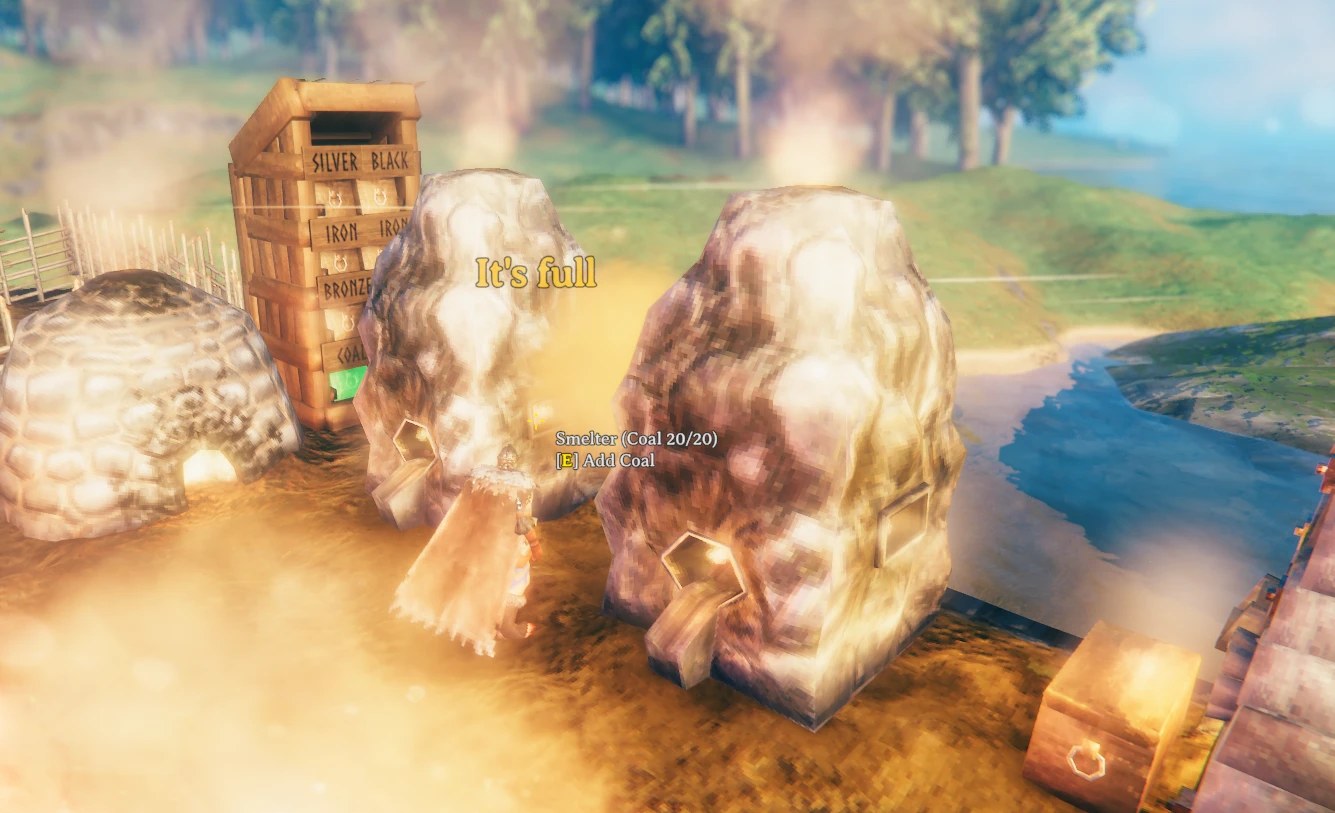
One Shift-press filled the smelter with coal up to 20/20; the next press only says "It's full".
Features
Craft and build from your chests
- Building (hammer, hoe, cultivator), crafting at any station and upgrading items use the materials stored in the containers around you: chests, barrels, and the storage of carts and ships.
- Your inventory is always used first; only what is missing is taken, nearest container first.
- Requirement slots show
available/required, and item tooltips show how many your chests hold. - The game itself decides what every recipe needs (craft ×N, upgrades, item quality, world level), so recipes behave exactly like vanilla.
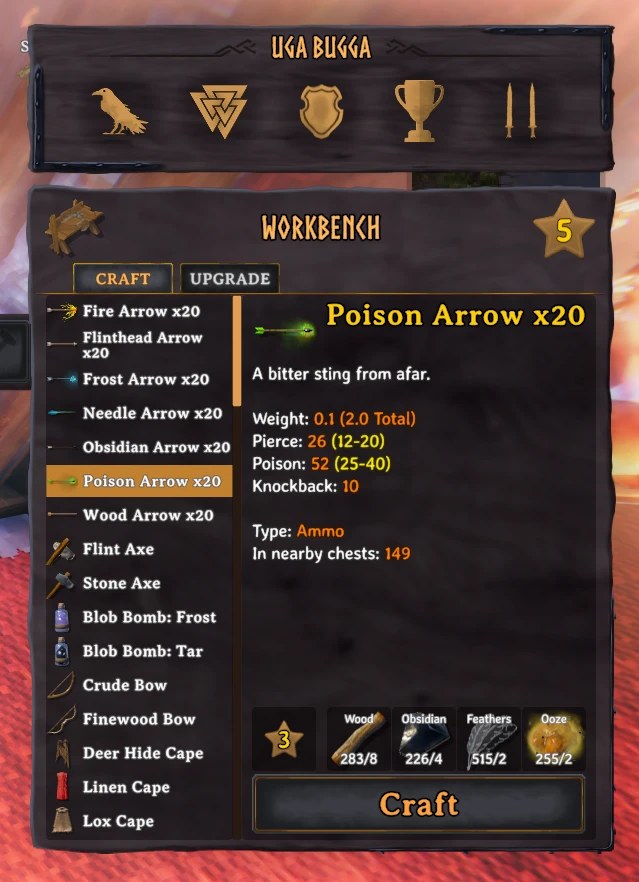
At the workbench the poison arrows need 8 wood, 4 obsidian, 2 feathers and 2 ooze: all of it comes from the chests, and the tooltip shows 149 more arrows stored nearby.
Up to 100 m away
- Every container within 100 m counts (the
Rangesetting), so the whole base is one storage. Private chests of other players, chests inside wards you can't open, dungeon chests and tombstones are ignored.
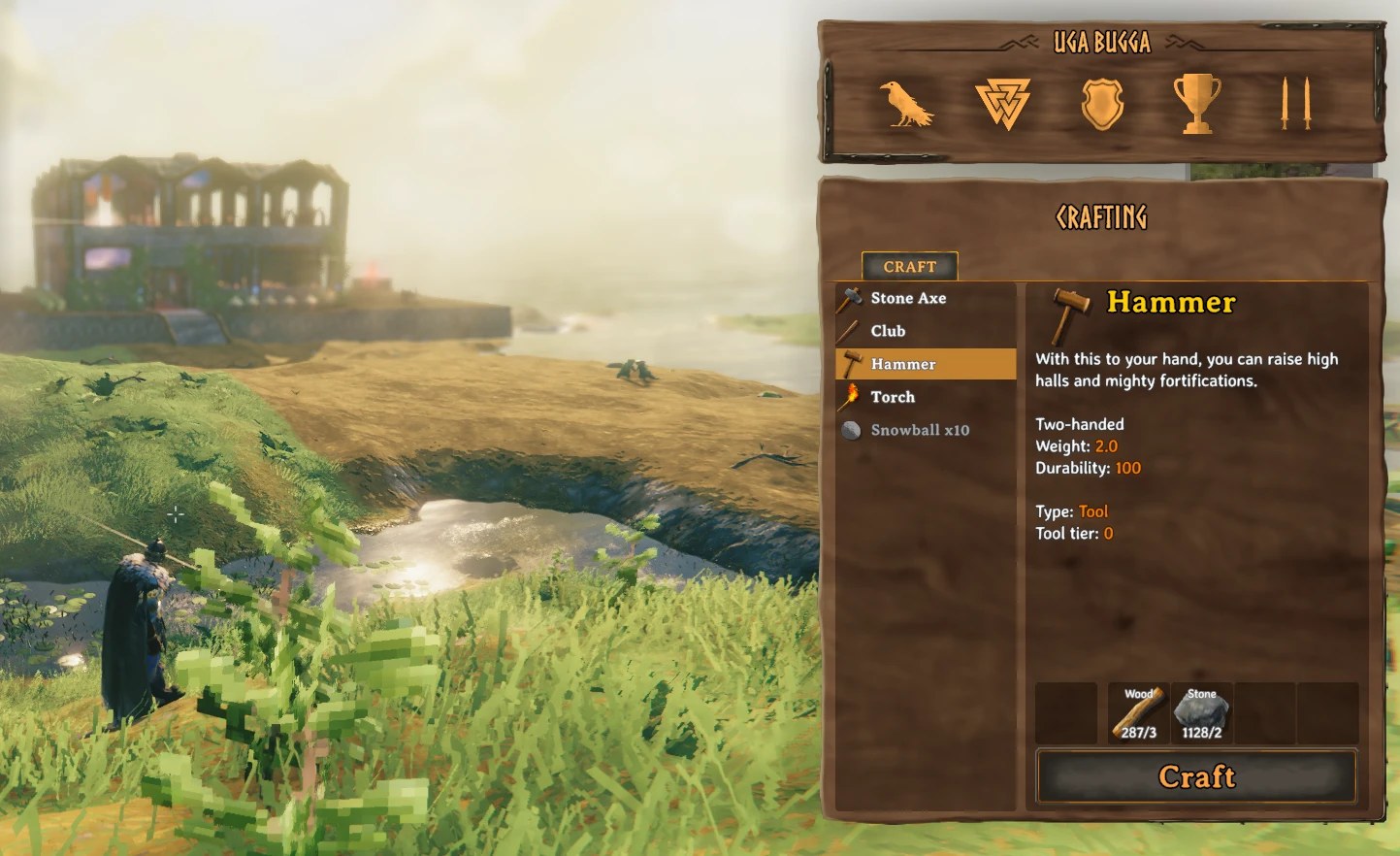
The base is in the distance, yet the hammer's 3 wood and 2 stone are covered: 287 wood and 1128 stone are counted from chests up to 100 m away, with nothing in your pockets.
Stations that feed themselves
- Smelter, blast furnace, charcoal kiln, windmill, spinning wheel, eitr refinery take ore and fuel, the fermenter mead bases, ovens and cooking stations raw food and fuel, straight from your chests when you don't carry any. Press use as usual (hold to keep adding); a unit the station can't take goes back to its chest.
- Shift + use fills the station to its limit in one press. Limits are respected for every press and every station, even when another player's game controls it: nothing is overfilled or destroyed.
- Cauldron recipes use the crafting feature above.
Cooking timers
- Look at a cooking station, iron cooking station or stone oven: each item shows
ready in 0:12, thenready, burns in 0:20. A timer that stopped (fire out, no fuel) is marked (no heat). Every player near the station sees the same numbers.
Farming
- Farm grid: plant the first crop anywhere; the next ones snap to an even grid lined up with the crops around them, spaced by the room each crop needs to grow, so none of them is ever blocked. Grid lines show where the next crops go. The grid is set by your first snap and stays steady while you plant (even next to a field planted by hand); it starts over when you switch crop, walk away, pause for 30 s, or hold Shift to place freely.
- Shift harvest: Shift + use on a ripe crop picks the crops around it, nearest first, until your stamina runs out. On a berry or fruit bush (raspberries, blueberries, cloudberries...) it picks every fruit bush around it, of any kind, leaving mushrooms and other plants alone. Drops, skill gains and bonus yields are the game's own.
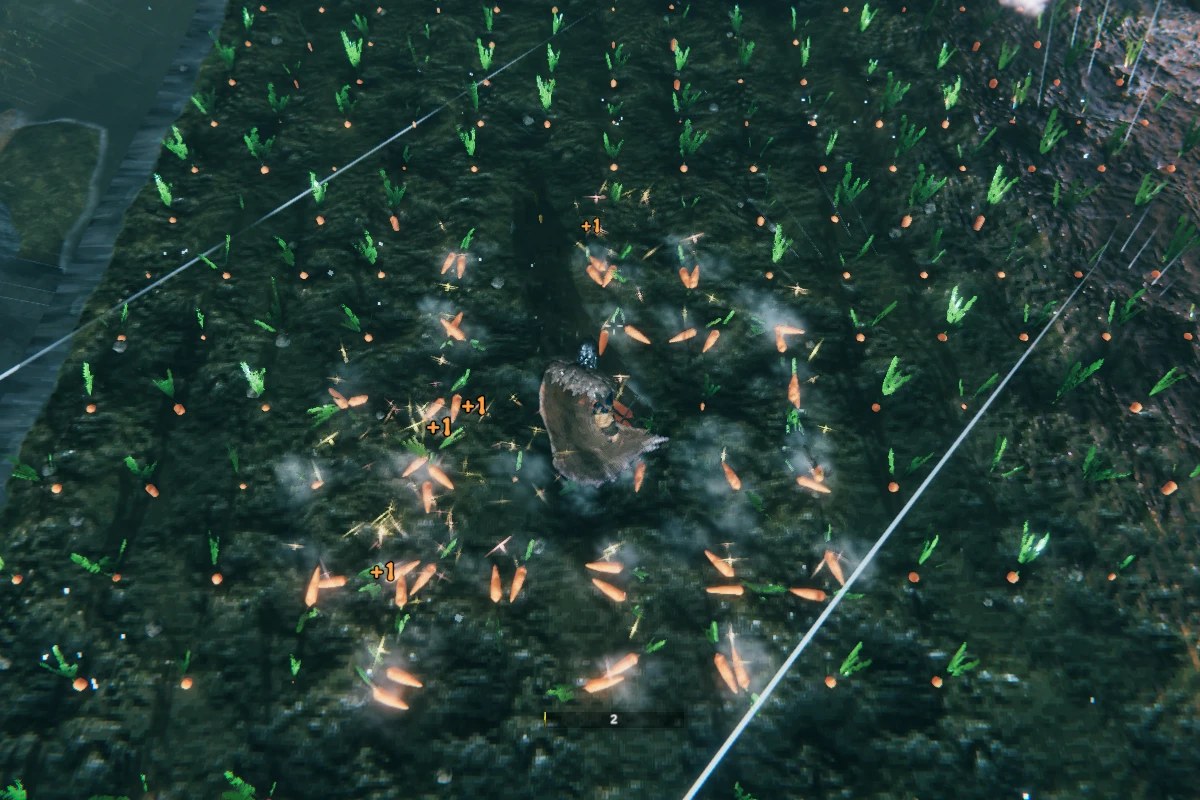
One Shift press in a carrot field: every ripe carrot around you is picked at once, nearest first, until your stamina runs out.
Object health
- The tree, log, stump, rock or ore deposit under your crosshair shows its name with its health right below it, 2 points bigger: Fir / 47/60, Copper deposit / 1840/2400, Rock / 3582/6500. Big rocks and deposits add up every piece still standing, so you see how much work is left before it breaks. World level is included, like the game.
- Shown in the game's own hover text and font, only at the distance you can hit it, coloured green, amber or
red by how much is left. Choose which kinds of objects and turn the colours off in
D - Object Health.
Portals and teleport markers
-
Portal items: ores, metals, dragon eggs and other items the game keeps out of portals travel with you. The warning in their tooltip and the icon in your inventory go away too, because NewtCraftHub turns on the game's own "teleport everything" rule for your game only.
-
Teleport markers with
/tpin chat (or the F5 console):Command What it does /tp create Main BaseSaves where you stand (position, altitude and facing). /tp Main Baseor/tp mainTeleports there; part of the name is enough, capitals and accents don't matter. /tp listYour markers in this world, with their distance. /tp delete Main BaseRemoves a marker. /tp player AnnaTeleports next to a player who shares their position on the map. Tab suggests marker and player names. Far destinations show the game's loading screen and you land on the floor once the area is loaded. Markers are per character and per world, kept on your computer (
BepInEx/config/NewtCraftHub/teleport-markers.txt).
Extra slots
- A panel beside your inventory, in the game's own style, holds what you reach for in a hurry: your worn equipment (head, chest, legs, back, utility, trinket) with 3 extra utility slots beside it, 3 food, 3 ammo, 3 quick slots for potions and meads and 2 key slots. Each empty slot shows a faint pictogram of what goes there.
- The slots are for gear, not extra storage: each takes only its own kind of item, picking things up never fills them, and "place stacks" leaves them alone. They still count for weight, crafting and ammo.
- Items in the extra utility slots work like the one you wear (a belt's carry weight, a wishbone...).
- Alt + Z / X / C drinks your potions, Alt + 1 / 2 / 3 picks your ammo, Alt + Q / E / R eats your food. Your potions also sit on a small bar right of the Forsaken power, with how many you have above each one.
- Drag and drop, tooltips and right-click to eat, drink or equip work exactly like in the inventory; equipping armour moves it into its slot. When you die, the grave shows everything and taking it puts each item back in its slot and wears your equipment again.
- Coming from ExtraSlots (by shudnal): the slots are at the same places, so your items appear where they were, and anything ExtraSlots kept aside comes back too. An item with no room anywhere is kept safe with your character and returns by itself as soon as there is space: nothing is dropped or lost. Remove ExtraSlots to use these slots (while it is installed, NewtCraftHub's stay off).
Find anything: /find
- Type
/find copper orein chat: every chest, cart or ship around you (100 m) holding it glows red for 5 seconds, and the chat tells you how many you have, in how many containers and how far the nearest one is. - Part of a name finds every match (
/find orelights up all your ores); an exact name finds just that item (/find wooddoesn't light up fine wood). Tab suggests the items stored around you. - Only containers you may open are searched, and nothing is sent over the network: it reads what your game already knows, once per command.
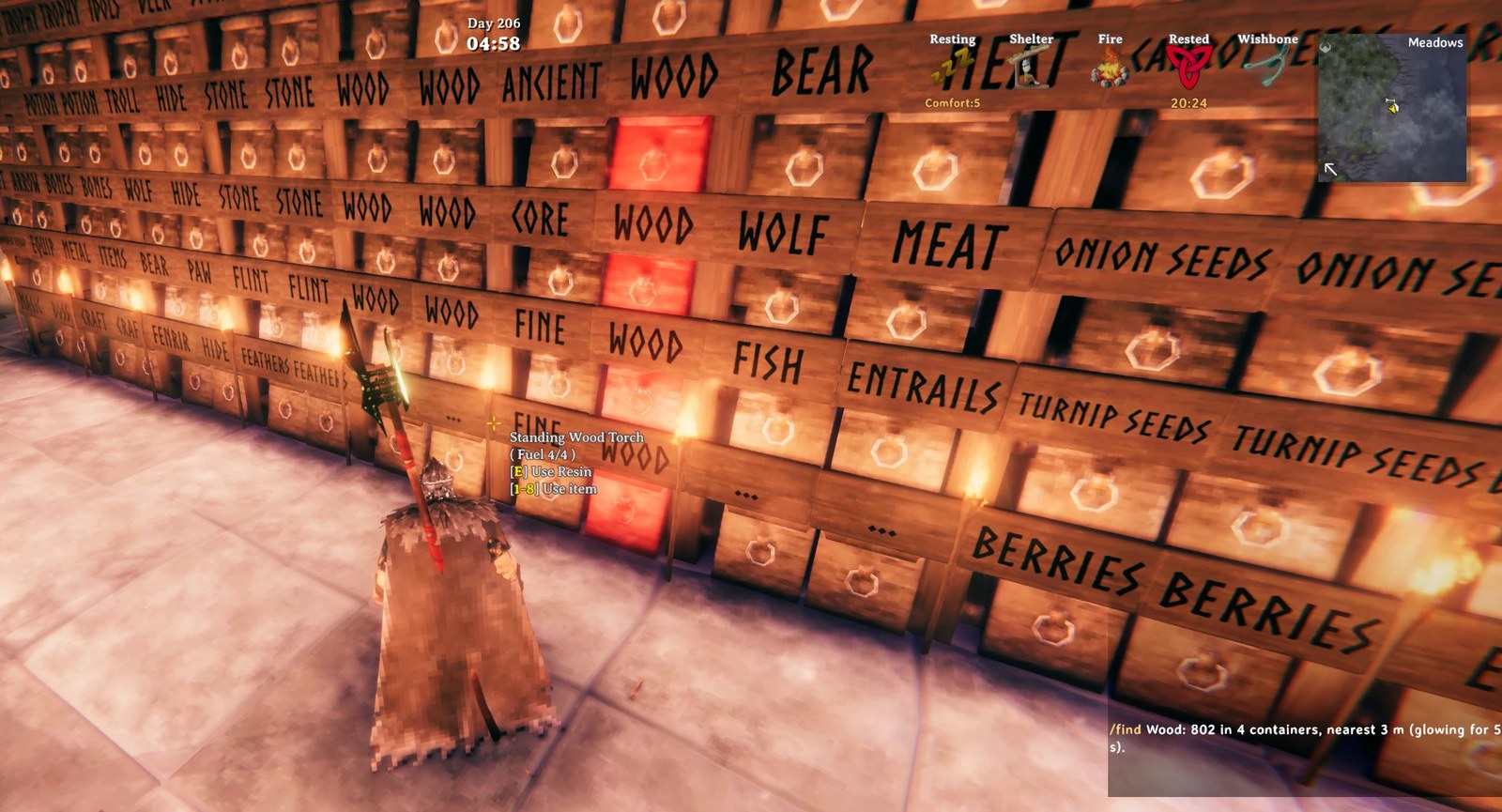
/find wood in a storage wall of 50 labelled chests: the four holding wood glow red, and the chat counts
802 wood in 4 containers, the nearest 3 m away.
Creature health and damaged walls
- Creature and boss health bars show the health right under the bar (60/200), a bit bigger than the name, green, amber or red by how much is left.
- Only the creature under your crosshair keeps its bar: look away and it fades out in half a second, so a pen full of animals never fills your screen. Bosses, other players and your mount keep theirs, like the game.
- A wall, floor, door or any building piece that has been hit shows its name with its health below it, like trees and rocks. Intact pieces show nothing extra, so your base stays clean.
Ship status
-
On a boat, whether you steer or ride along, a readout above the sailing HUD stacks the sail (oars, half sail, full sail...), your speed and heading, how well the wind fills the sail (the game's own formula: fair wind, side wind, headwind) and your position:
Full sail
7.9 m/s · 045° NE
Wind 92% (fair wind)
X 1234 Z -568
Position, size and which lines appear are set in
H - Ship Status.
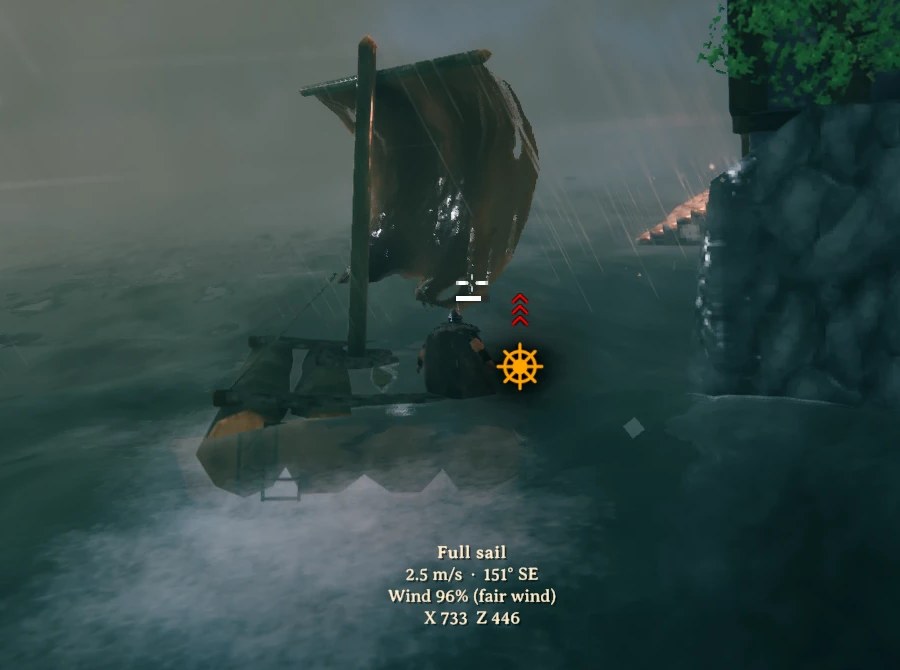
Sailing a raft through a storm at full sail: 2.5 m/s heading 151° south-east, the wind filling the sail at 96%, and your position below.
Area repair
- Repair a piece with the hammer and every damaged piece within 15 m of it is repaired as well, nearest first: after a troll visit or a storm, a few swings fix the whole wall. The game's own rules apply to each piece (you need access to its ward and its crafting station nearby), and pieces another player's game controls are repaired too.
- Costs one repair's stamina and hammer durability per swing, or per piece if you prefer
(
E - Area Repair). Swinging at an intact piece still repairs the damaged ones around it.
Eternal fires
- Torches, sconces and braziers, campfires, hearths, bonfires and the hot tub you built never run out of fuel once lit: no more dark bases after a long trip, no resin runs for the lights. Fires that are out stay out until you add fuel; from then on they burn forever.
- A lit fire is topped up to full once and then simply stops burning fuel, using the game's own rule for everlasting fires, so nothing extra is sent over the network. Dungeon and world fires are left as they are.
- Torches and other fires have their own switches in
J - Eternal Fires.
Recycle
- A Trash button sits below the armour and weight boxes of your inventory, with an icon in the game's own
style. Drop an item on it, or press Delete while dragging it, and you get back every material it
cost, each upgrade level included: a level 3 sword returns what crafting it and upgrading it twice took.
Too generous? Lower the percentage in
L - Recycle → ReturnPercent. - Stacks are recycled in whole crafts. Arrows are made 20 at a time, so 35 arrows ask first, then 20 are recycled and the other 15 stay in your inventory. Upgraded items ask first too, showing their level and what comes back, so the work you put into them isn't lost by a slip of the mouse.
- Nothing is thrown away by accident: fewer than one craft (15 arrows) and items without a recipe (trophies, ores, food) are deleted only after the game's "Delete item?" box, or never, if you choose so.
- Materials that don't fit in your inventory go into the nearest chest with room, or at your feet. Equipped items are unequipped first; quest items can't be thrown away.
- The button's label, its colour, the hotkey and the button itself can be changed in
L - Recycle.
World clock
- Not just the time: the clock also shows the date of your world, the day you have reached since it began, so you always know how long your saga has run and how long until night falls.
- The day sits on top in a smaller font, the time right below it, readable over snow, sky and night. Choose 24 h (
14:05), 12 h (02:05 PM) or the time of day ("Late morning"), the text, position, size and colour. Home shows or hides it.
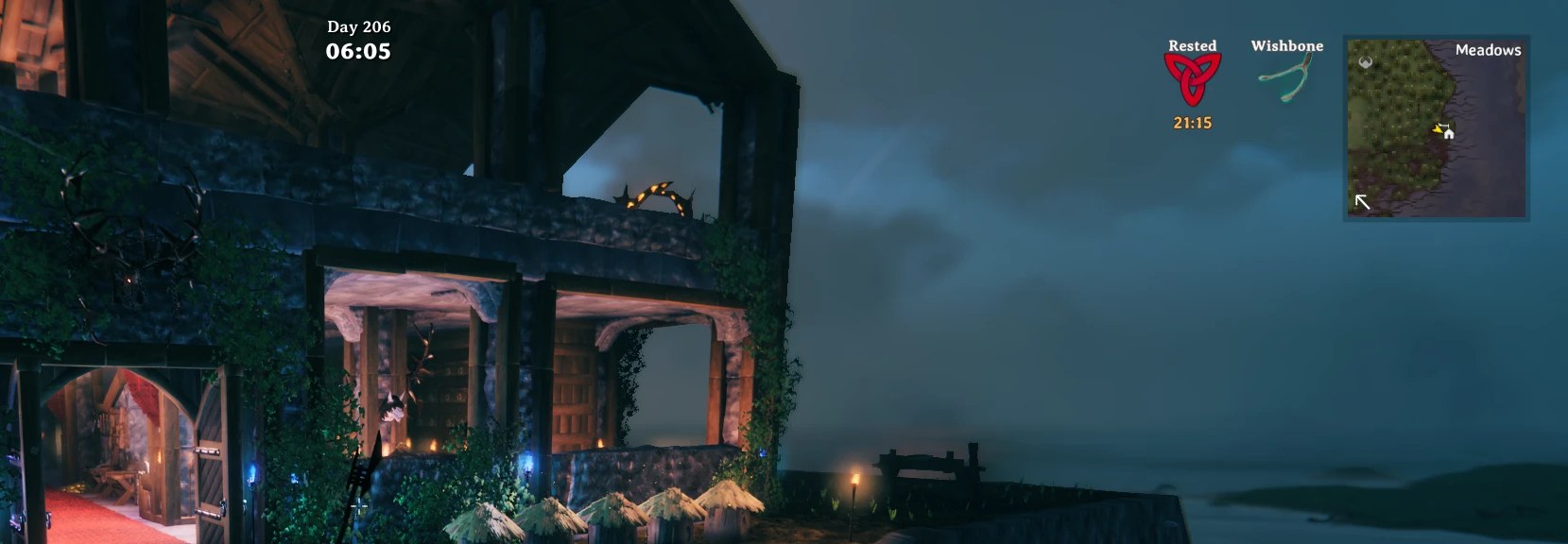
Day 206 of this world, just after six in the morning: the day on top, the time right below it, next to the usual HUD.
Shared chests
- A friend can open a chest you already have open; you both see its contents change live and can take and store items at the same time. Only one game changes the chest at any moment: a click that changes it waits a fraction of a second until the chest is handed over with its latest contents, so nothing is duplicated or lost. Everyone at the chest needs the mod; carts and ships are not shared.
See what's inside
- Look at a chest, cart or ship to see what it holds, summed and sorted, plus the slots in use.
- Item tooltips gain the item type, tool tier, stack size and how many your nearby chests hold.
Multiplayer safe and light
- Every chest in range counts at once, including chests near other players, from the contents the game keeps in sync. Looking at recipes never sends anything over the network, and when a chest another player's game controls is needed, it is asked for exactly like the game does when you open it: no duplicated or reappearing items, and two players with the mod never fight over chests.
- Client-side: only the players who want it install it; no server install needed.
- Each feature is installed independently: if a game update breaks one, only that one is switched off and the log says why.
More to come
NewtCraftHub keeps growing into an all-in-one base mod. New features arrive with their own switch, so you keep only what you use. Suggestions are welcome: send them to Anatta Labs.
Quick start
- Install with r2modman or the Thunderstore Mod Manager; BepInExPack Valheim and the in-game settings window come with it.
- Start the game, stand near your chests, open the workbench or the hammer menu: requirements now show
available/required(e.g.34/10). Craft and build as usual. - At a smelter, kiln or oven press use as usual, or Shift + use to fill it completely.
- Look at a cooking station to see how long until the food is ready.
- Plant with the cultivator next to an existing crop: it snaps into the grid. Shift + use on a ripe crop harvests the field.
- Open a chest a friend already has open: you both use it at the same time.
- Look at a tree or a rock to see how much health it has left; repair one damaged wall piece with the hammer to fix the whole wall.
- Type
/find copper orein chat: the chests holding it glow. - Open your inventory: drag a potion, food and arrows into the extra slots, then use them with Alt + Z, Alt + Q and Alt + 1.
- Type
/tp create Homein chat, then/tp homefrom anywhere to come back. - Light a torch or a campfire: it never goes out.
- Drag an item you no longer need onto Trash, below the armour box: its materials come back.
- Press Home to show or hide the clock, F1 to change any setting or switch features on and off.
No setup is needed: every feature works out of the box.
Installation
Requirements
- Valheim 1.0 or newer, on PC. Console players can't use mods; PC players with the mod can still join crossplay worlds.
- BepInExPack Valheim and Official BepInEx ConfigurationManager, installed automatically by mod managers.
Mod manager (recommended)
- Install r2modman or the Thunderstore Mod Manager.
- Select Valheim and a profile, go to Online, search for NewtCraftHub (by Anatta Labs) and click Download.
- Click Start modded. Always start the game from the mod manager, not from Steam.
From a .zip file (a friend sent you the mod): Settings → Profile → Import local mod, select
NewtCraftHub-X.Y.Z.zip, then Start modded.
Manual installation
- Install BepInEx: copy everything inside the
BepInExPack_Valheimfolder of BepInExPack Valheim into your Valheim folder (Steam → right-click Valheim → Manage → Browse local files), start the game once and close it. Linux / Steam Deck: set the launch options to./start_game_bepinex.sh %command%. - Copy
plugins/NewtCraftHub.dllfrom the zip toValheim/BepInEx/plugins/NewtCraftHub/. - Start the game.
BepInEx/LogOutput.logshould containNewtCraftHub X.Y.Z loaded (50/50 patch groups active).
Updating and uninstalling
- Mod manager: Update or Uninstall on the mod. Manual: replace or delete
BepInEx/plugins/NewtCraftHub/. - Your settings stay in
BepInEx/config/(deletenewton.newtcraftboxes.cfgandnewton.NewtCraftHub.ymlto reset them). - Before uninstalling, take your items out of the extra slots: without the mod the game drops items it can't show at your feet when you log in.
Configuration
- In game, also online: press F1 and open NewtCraftHub; changes apply at once and are yours only.
- Config file:
BepInEx/config/newton.newtcraftboxes.cfg(in a mod manager: Config editor). Changes saved while playing are applied a moment later.
Turning features on and off
Each feature is one line in section 0 - Features (true = on, false = off); 1 - General → Enabled = false switches the whole mod off.
[0 - Features]
CraftFromContainers = true    # craft, build and upgrade with materials from nearby containers
FeedStations = true           # smelters, kilns, fermenters, ovens take ore / fuel / food from containers
ShiftFillsStations = true     # Shift + use fills a station to its limit
SharedContainers = true       # several players at the same chest
CookingTimers = true          # time until cooked / burnt on cooking stations and ovens
WorldClock = true             # in-game time and day on screen
FarmGrid = true               # crops snap to an even grid
ShiftHarvest = true           # Shift + use on a crop harvests the field
ObjectHealth = true           # health of the tree / rock / deposit under the crosshair
AreaRepair = true             # a hammer repair also repairs the damaged pieces around
PortalItems = true            # ores, metals and other restricted items go through portals
TeleportMarkers = true        # /tp markers and /tp player
FindItems = true              # /find <item>: containers holding it glow
CreatureHealth = true         # numbers on creature and boss health bars
ShipStatus = true             # speed, sail, heading, wind and position on boats
ExtraSlots = true             # extra slots for gear, hotkeys and the potion bar
EternalFires = true           # torches and fires you built never run out
Recycle = true                # a Trash button that turns items back into their materials
ChestContentsOnHover = true   # what a chest holds, when you look at it
ItemTooltipInfo = true        # extra item tooltip lines
AvailableAmountText = true    # "available/required" on requirements
Container rules (optional)
BepInEx/config/newton.NewtCraftHub.yml (created on first start with examples, reloaded live) chooses which
items may never be taken from a kind of container. By default every item can be taken from every container.
groups:
  Valuables: [Coins, Ruby, Amber, AmberPearl]

piece_chest_private:        # personal chests: never take anything
  exclude: [All]

piece_chest_wood:           # wood chests: no valuables or food... except coins
  exclude: [Valuables, Food]
  includeOverride: [Coins]
- The key is the container prefab name:
piece_chest_wood,piece_chest,piece_chest_private,piece_chest_blackmetal,piece_chest_barrel; carts and ships use the vehicle's name (Cart,Karve,VikingShip).DebugLoggingwrites the name of every container items are taken from. excludelists items or groups never taken;includeOverridelists items always allowed and wins overexclude. Items are prefab names (Wood,Bronze,TrophyDeer; see the item list).- Built-in groups:
All,Food,Potion,Fish,Swords,Axes,Clubs,Knives,Pickaxes,Polearms,Spears,Bows,Crossbows,Equipment,Trophy,Boss Trophy,Ores,Metals,Woods,Seeds,Crops(calculated from the game's items, modded items included). - Indent with 2 spaces. If the file has an error, the log shows the line and the previous rules stay active.
All settings available
| Section | Setting | Default | What it does |
|---|---|---|---|
| 0 - Features | CraftFromContainers | true |
Craft, build and upgrade using materials from nearby containers. |
| 0 - Features | FeedStations | true |
Stations take ore, fuel, mead bases and raw food from nearby containers when you carry none. |
| 0 - Features | ShiftFillsStations | true |
Shift + use fills a smelter, furnace, kiln, windmill, spinning wheel, eitr refinery or oven to its limit. |
| 0 - Features | SharedContainers | true |
Several players can use the same chest at once (everyone at it needs the mod). |
| 0 - Features | CookingTimers | true |
Time until cooked / burnt on cooking stations and ovens. |
| 0 - Features | WorldClock | true |
In-game time and day on screen. |
| 0 - Features | FarmGrid | true |
Crops planted with the cultivator snap to an even grid. |
| 0 - Features | ShiftHarvest | true |
Shift + use on a ripe crop harvests the crops around it, as many as your stamina allows. |
| 0 - Features | ObjectHealth | true |
Health of the tree, log, rock or ore deposit under the crosshair, under its name (e.g. Fir / 47/60). |
| 0 - Features | AreaRepair | true |
Repairing a piece with the hammer also repairs the damaged pieces around it. |
| 0 - Features | PortalItems | true |
Ores, metals, dragon eggs and other restricted items go through portals (for you). |
| 0 - Features | TeleportMarkers | true |
/tp markers and /tp player in chat. |
| 0 - Features | FindItems | true |
/find <item>: containers around you holding it glow for a few seconds. |
| 0 - Features | CreatureHealth | true |
Creature and boss health bars show their health as numbers. |
| 0 - Features | ShipStatus | true |
Speed, sail, heading, wind and position while on a boat. |
| 0 - Features | EternalFires | true |
Torches, braziers, campfires and hearths you built never run out of fuel once lit. |
| 0 - Features | Recycle | true |
A Trash button beside the inventory recycles the item you drop on it (off while RecyclePlus is installed). |
| 0 - Features | ExtraSlots | true |
The extra slots panel, hotkeys and potion bar (off while shudnal's ExtraSlots is installed). |
| 0 - Features | ChestContentsOnHover | true |
What a chest, cart or ship holds, in its hover text. |
| 0 - Features | ItemTooltipInfo | true |
Extra item tooltip lines. |
| 0 - Features | AvailableAmountText | true |
available/required on requirement slots when containers contribute. |
| 1 - General | Enabled | true |
Master switch for the whole mod. |
| 1 - General | Range | 100 |
Metres (1–100) between you and a container for it to be used. |
| 1 - General | ToggleKey | (none) | Hotkey switching crafting from containers on/off while playing (e.g. F8). |
| 2 - Containers | OnlyPlayerBuilt | true |
Ignore dungeon and treasure chests. |
| 2 - Containers | IncludeShipsAndCarts | true |
Also use cart and ship storage. |
| 2 - Containers | RespectWards | true |
Skip containers inside wards you can't open. |
| 2 - Containers | SkipContainersInUse | true |
Skip chests another player has open. |
| 2 - Containers | TakeNetworkOwnership | true |
Ask the player whose game controls a chest to hand it over before using it (needed for chests near other players). |
| 3 - Performance | RefreshInterval | 0.5 |
Seconds between rescans of nearby containers while standing still (0.1–5). |
| 5 - Debug | DebugLogging | false |
Detailed log in BepInEx/LogOutput.log, plus a Perf: line every minute. |
| 6 - Chest Contents | MaxEntries | 8 |
Lines listed; -1 = all. |
| 6 - Chest Contents | SortBy / SortAscending | Amount / false |
Amount, Name, Weight or Value; reverse order. |
| 6 - Chest Contents | EntryFormat / OverflowFormat / CapacityFormat | {0} amount, {1} name / +{0} more / {0}/{1} slots. Colours allowed; empty = no line. |
|
| 7 - Item Tooltip | ShowItemType / ShowToolTier / ShowStackSize / ShowNearbyCount | true |
Each extra tooltip line. |
| 7 - Item Tooltip | ShowPrefabName | false |
The internal name to use in the rules file. |
| 8 - Cooking Timers | ShowBurnTime | true |
Once cooked, also show the time until it burns. |
| 8 - Cooking Timers | ReadyInFormat / DoneFormat / BurnsFormat / BurntFormat | {0} item, {1} time (m:ss). Colours allowed. |
|
| 8 - Cooking Timers | PausedText | (no heat) |
Added when a timer stopped. Empty = nothing. |
| A - World Clock | ToggleKey | Home |
Shows / hides the clock. |
| A - World Clock | TimeFormat | HH:mm |
HH:mm (24 h), hh:mm tt (12 h) or fuzzy (time of day). |
| A - World Clock | Text | day (small) above the time | {0} time, {1} time of day, {2} day, {3} a smaller size (¾ of FontSize); \n = new line. Rich text allowed. |
| A - World Clock | Position / FontSize / Color / Shadow | 50%,2% / 24 / white / true |
Where and how it is drawn (pixels or % of the screen). |
| A - World Clock | PeriodNames | Midnight, Night, Dawn… | Time-of-day names, comma-separated, spread evenly from midnight. |
| B - Farm Grid | GridLines | 2 |
Grid cells drawn around the crop you place (0 = snap without lines). |
| B - Farm Grid | ExtraSpacing | 0.01 |
Metres added between crops. |
| B - Farm Grid | LineColor | FFFFFF40 |
Line colour, RRGGBBAA. |
| C - Shift Harvest | Radius | 15 |
Metres around the crop you press on. |
| C - Shift Harvest | StaminaPerCrop | 4 |
Stamina per crop; the harvest stops when you run out (0 = free). |
| C - Shift Harvest | MaxCrops | 100 |
Most crops one press harvests. |
| C - Shift Harvest | BerryBushes | true |
Shift + use on a berry or fruit bush picks every fruit bush around it. |
| D - Object Health | Trees / RocksAndDeposits / OtherObjects | true |
Which objects show their health (other = small rocks, bushes, stones...). |
| D - Object Health | Colours | true |
Current health in green, amber or red by how much is left. |
| D - Object Health | DamagedPieces | true |
Walls, floors, doors and other pieces show their health once damaged. |
| H - Ship Status | Position / FontSize | 50%,74% / 18 |
Where and how big the boat readout is. |
| H - Ship Status | ShowWind / ShowPosition | true |
The wind and the X / Z lines. |
| E - Area Repair | Radius | 15 |
Metres (1–50) around the piece you repair. At most 200 pieces per swing, nearest first. |
| F - Teleports | CooldownSeconds | 3 |
Seconds between two /tp teleports. |
| F - Teleports | MaxMarkersPerWorld | 50 |
Most markers per character in one world. |
| F - Teleports | ToPlayers | true |
Allow /tp player. |
| F - Teleports | AllowInMultiplayer | true |
Allow /tp while other players are connected. |
| F - Teleports | FollowPortalRules | true |
With PortalItems off, /tp refuses like a portal while you carry ores. |
| G - Find | Range / GlowSeconds / GlowColor | 100 / 5 / bright red |
How far /find searches, how long and in which colour containers glow. |
| J - Eternal Fires | Torches / CampfiresAndHearths | true |
Which fires never run out: torches, sconces and braziers / campfires, hearths, bonfires, the hot tub and other fires. |
| K - Creature Health | OnlyWhileFocused | true |
A creature's bar shows only while your crosshair is on it (bosses, players and your mount keep theirs); false = the game's own delay. |
| K - Creature Health | FadeOutSeconds | 0.5 |
How long a bar takes to fade out after you look away (0 = at once). |
| L - Recycle | ReturnPercent | 100 |
How much of an item's materials come back, every upgrade level included (0–100). |
| L - Recycle | ItemsWithoutRecipe | Ask |
Items that give nothing back (no recipe, or fewer than one craft): Ask = delete after a confirmation, Delete = at once, Never = keep them. |
| L - Recycle | WhenInventoryFull | NearestChest |
Materials that don't fit: into the nearest chest with room (else at your feet), or DropAtFeet. |
| L - Recycle | Hotkey | Delete |
Recycles the item you are dragging (None = only the Trash button). |
| L - Recycle | ShowTrashButton / TrashLabel / TrashLabelColor | true / Trash / FFD800FF |
The button, its label and the label colour (RRGGBBAA). |
| I - Extra Slots | QuickSlots | 3 |
Quick slots for potions and meads (0–3). |
| I - Extra Slots | ExtraUtilitySlots | 3 |
Extra utility slots beside the equipment (0–3); their items work like the one you wear. |
| I - Extra Slots | AmmoSlots / FoodSlots / MiscSlots | true |
3 ammo, 3 food and 2 key slots. |
| I - Extra Slots | Hotbars | true |
The potion bar right of the Forsaken power. |
| I - Extra Slots | Quick1Key–Quick3Key / Ammo1Key–Ammo3Key / Food1Key–Food3Key | Alt + Z/X/C, 1/2/3, Q/E/R | The slot hotkeys. |
| E - Area Repair | ChargePerPiece | false |
false = one repair's stamina and durability per swing; true = per piece repaired. |
Compatibility
- Client-side: servers don't need it; players without the mod play normally next to you.
- Other clock and farm grid mods (Clock, AzuClock, Venture Farm Grid, Farm Grid Remake): while one of them is active, NewtCraftHub's clock or grid stays off, so nothing appears twice. The log says so.
- Portal Ores & Teleport Markers: while it is installed, NewtCraftHub leaves
/tpto it (portal items still work, and they also work on Valheim 1.0.15, where that mod's portal part no longer starts). Remove it to use NewtCraftHub's markers. - AzuAreaRepair: while its area repair is on, NewtCraftHub's stays off, so pieces aren't repaired twice.
- TorchesEternal: while it is installed, NewtCraftHub's eternal fires stay off. Remove it to switch; your fires keep burning.
- RecyclePlus: while it is installed, NewtCraftHub's Trash button stays off. Remove it to switch.
- ExtraSlots (shudnal): while it is installed, NewtCraftHub's extra slots stay off. Remove it to switch: your items appear in the same slots (see Extra slots).
- AzuHoverStats: while its chest list or tooltip lines are on, NewtCraftHub leaves them to it.
- Other "craft from containers" mods (e.g. AzuCraftyBoxes): use only one; two would both take items.
- Modded containers and crops built on the game's own systems are supported automatically.
Troubleshooting
| Problem | What to check |
|---|---|
| Nothing happens | Started with Start modded? Does the log contain NewtCraftHub … loaded? Is Enabled on, and wasn't the mod toggled off with ToggleKey? |
| A chest is not used | Distance (Range), open by someone else, inside a ward, another player's private chest, excluded in the rules file? |
| No clock / no grid | Another clock or farm grid mod is active (see above), or the switch is off. Home toggles the clock. |
| A friend still gets "in use" | Both of you need NewtCraftHub with SharedContainers = true. Carts and ships are never shared. |
Log shows fewer than 50/50 patch groups active |
A game update changed something: that feature is off, the rest keeps working. Please report it with your log. |
The log: in the mod manager, Settings → Debugging → Browse profile folder → BepInEx/LogOutput.log.
To report a problem, set DebugLogging = true, reproduce it and send that file to Anatta Labs.
Credits
- Newt / Anatta Labs: author.
- Ideas that inspired features, each rewritten from scratch for NewtCraftHub: Clock by aedenthorn (published on Thunderstore by Pineapple), Venture Farm Grid by VentureValheim (after Sarcen's Farm Grid), AzuHoverStats, AzuAreaRepair and AzuCraftyBoxes by Azumatt, Portal Ores & Teleport Markers by Masukito (Anderson David), ExtraSlots by shudnal, TorchesEternal by Xenofell, RecyclePlus by TastyChickenLegs.
- Built on BepInEx and HarmonyX; in-game settings by Official BepInEx ConfigurationManager.
- The icon was generated with AI.
For developers
- Plugin GUID
newton.newtcraftboxes. Each feature is a separate Harmony patch group, applied independently and found by name, so a game update only disables the part it touches; the log lineloaded (N/50 patch groups active)shows how many are working. - Crafting from containers never re-implements game logic: while the game checks or consumes requirements, counts include nearby containers and the missing amount is taken from them, so vanilla rules always apply.
- Multiplayer: containers are only written by the game that owns them; other players' chests are requested with the vanilla ownership request, shared chests hand ownership over per click, and station inputs count units still in flight to their owner.
- Performance: no allocations on the game's inventory calls, hover texts and timers cached until their data
changes, the clock text rebuilt once per game minute. With
DebugLogging, aPerf:line reports the mod's cost every minute. - Source and issue reports: contact Anatta Labs.
License
MIT. You may use, modify and share it; keep the copyright notice.
Complete the experience: pair NewtCraftHub with SargamAutoStore, also by Anatta Labs. It stores what you pick up in the right chests automatically (by chest contents, matching signs or new-item chests), so your base stays organised while NewtCraftHub puts it to work. Together they put you fully in control of your game.
