
Please disclose if any significant portion of your mod was created using AI tools by adding the 'AI Generated' category. Failing to do so may result in the mod being removed from Thunderstore.

TooManyLags Server Side
Less connection lag, no client mod. Ownership optimisation for Dedicated Simulation: local nearby interactions, server-owned shared fields and smarter Hostile Mobs. Beta.
| Last updated | a week ago |
| Total downloads | 116 |
| Total rating | 1 |
| Categories | Utility Mods Tweaks AI Generated Server-side |
| Dependency string | Botaniclas-TooManyLags_Server_Side-0.13.2 |
| Dependants | 0 other packages depend on this package |
This mod requires the following mods to function

denikson-BepInExPack_Valheim
BepInEx pack for Valheim. Preconfigured with the correct entry point for mods and preferred defaults for the community.
Preferred version: 5.4.2351
Sarkastic_gg-Dedicated_Simulation
Server-side BepInEx plugin for Valheim dedicated servers: the server simulates the world itself. Character guard, item ledger, portal lock, fire control, location icons, network limits. Fork of Serverside Simulations by ddormer; clients stay vanilla.
Preferred version: 1.18.0README
TooManyLags - Server Side
Less connection lag, no client mod. A multiplayer ownership optimisation addon. Nearby supported interactions run on your own client; shared fields use the server. Hostile Mobs use grid and forward-cone ownership to bring their simulation closer to the action.
Currently built on Sarkastic.gg Dedicated Simulation. Compatibility with as many server-side simulation mods as possible is planned. Please suggest the mods you'd like supported through GitHub Issues to help guide future integrations. Thank you!
Beta: real-world testing is limited. Server-only attack and handoff observations have limits; this edition does not promise the same safeguards or features as the client-assisted addon.
Choose your version
| Your setup | Recommended edition and mode |
|---|---|
| Dedicated server; players should need no client mod | This mod with Sarkastic.gg Dedicated Simulation. Beta. |
| Dedicated server, strong CPU; client mods are welcome | TooManyLags - FiresGhettoNetworking Addon with Server-Side Simulation. Most-tested option. |
| Dedicated server, weak CPU, with FiresGhettoNetworking | The FiresGhettoNetworking Addon with NoServerSideSimulation=true. |
| Dedicated server, weak CPU, without a simulation backend | TooManyLags - Standalone. |
| Locally hosted multiplayer | TooManyLags - Standalone. |
Quick install
- Install BepInEx, Sarkastic.gg Dedicated Simulation and this mod on the dedicated server only. Players need neither addon nor simulation mod.
- For manual installation, put
TooManyLagsServerSide.dllinBepInEx/plugins/TooManyLagsServerSide/, alongside the separately installed dependency. - Start the server. Begin with the defaults; edit
BepInEx/config/botanic.toomanylags.dedicatedaddon.cfgand restart when changing settings.
Server-Side Simulation needs server CPU and RAM. This addon shares some work with nearby clients; it is not a mode for running without server simulation. Do not combine it with FiresGhettoNetworking or another TooManyLags edition.
See the grid concept
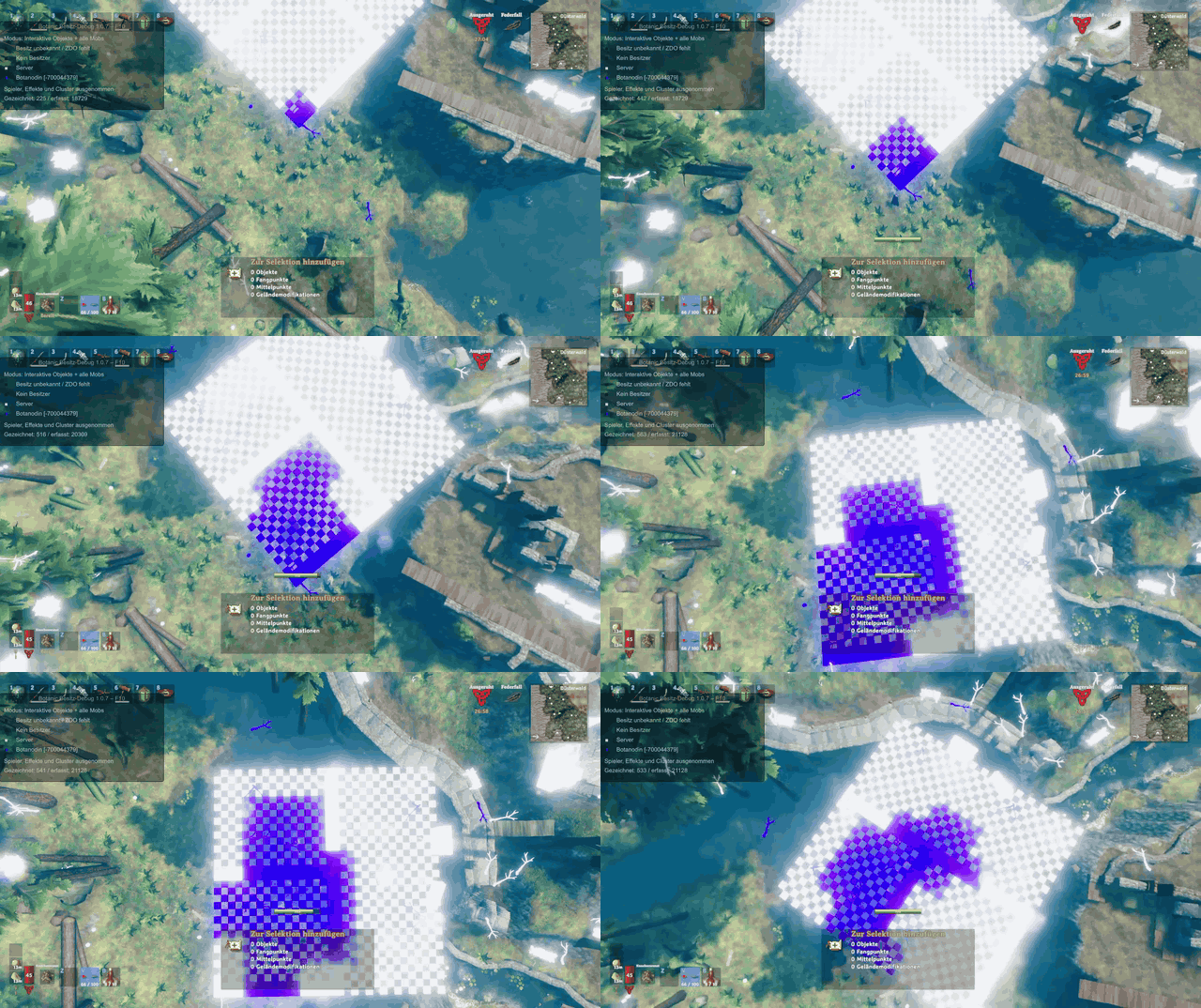
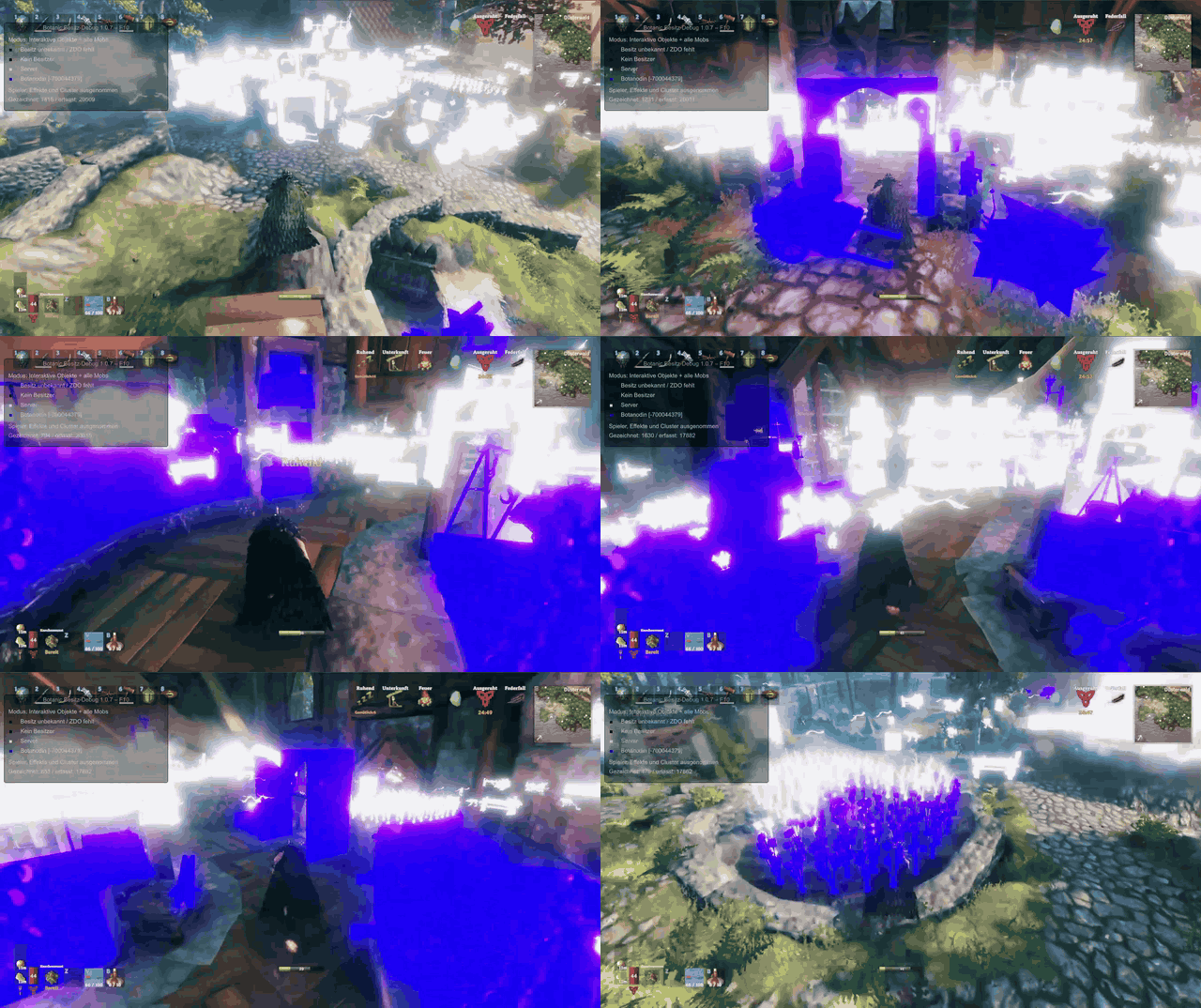
White objects belong to the server; purple objects belong to a player. Recorded with the FiresGhettoNetworking Addon and the optional BotanicOwnerDebug overlay. Server Side uses character direction and a different default footprint; these recordings illustrate the ownership concept.
Ownership from above
Ownership while moving
Example settings
White means the server; colours identify players. These animations use Server Side's actual default grid: full rear 3x3, three forward cells, yellow cells off and character direction. Fast movement makes the forward row immediate. Both retention modes use the same footprint and player routes.
| Default: return on exit — CPU: mostly server | Retain ownership — CPU: shared |
|---|---|
KeepOwnershipOnCellExit=false |
KeepOwnershipOnCellExit=true |
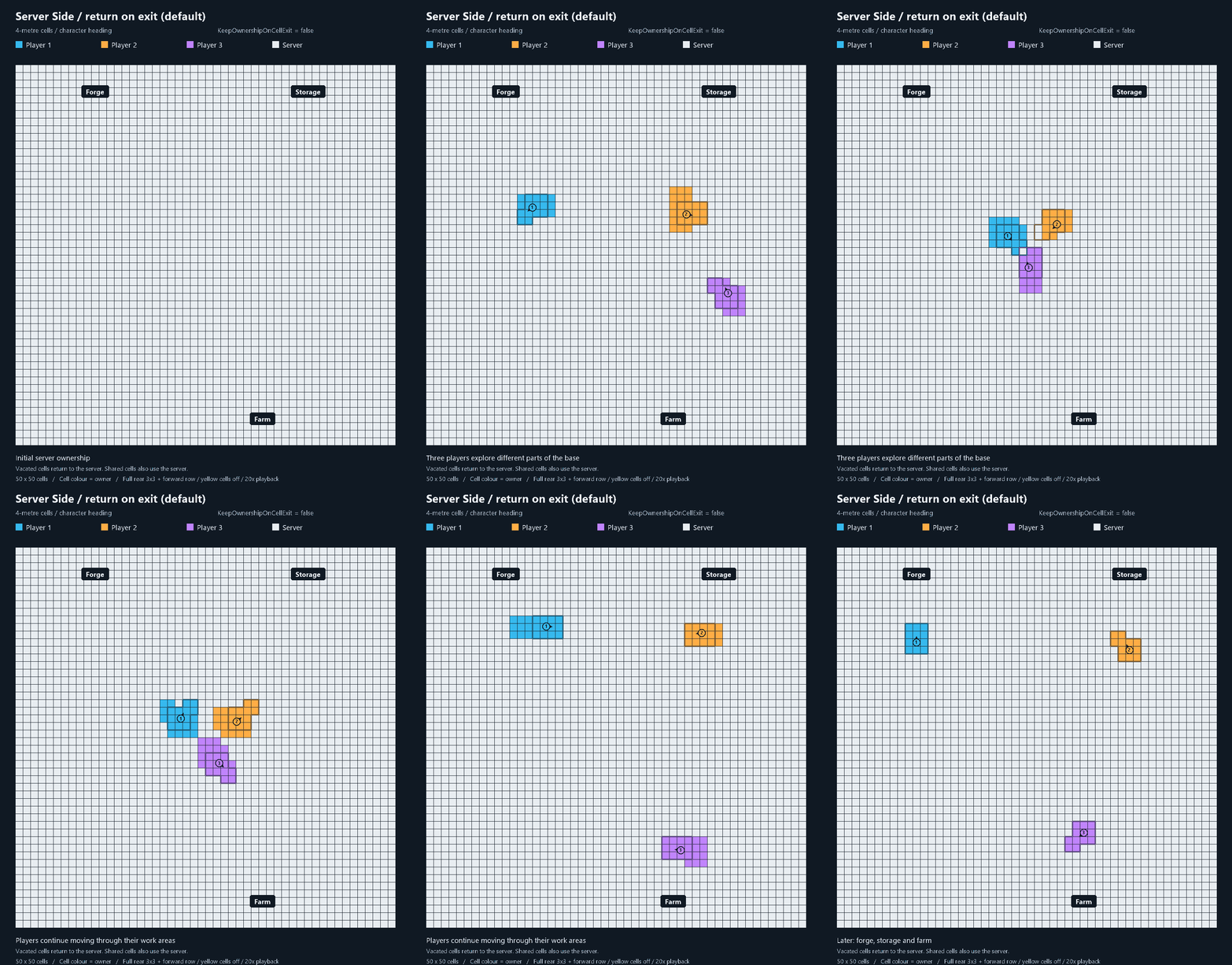 |
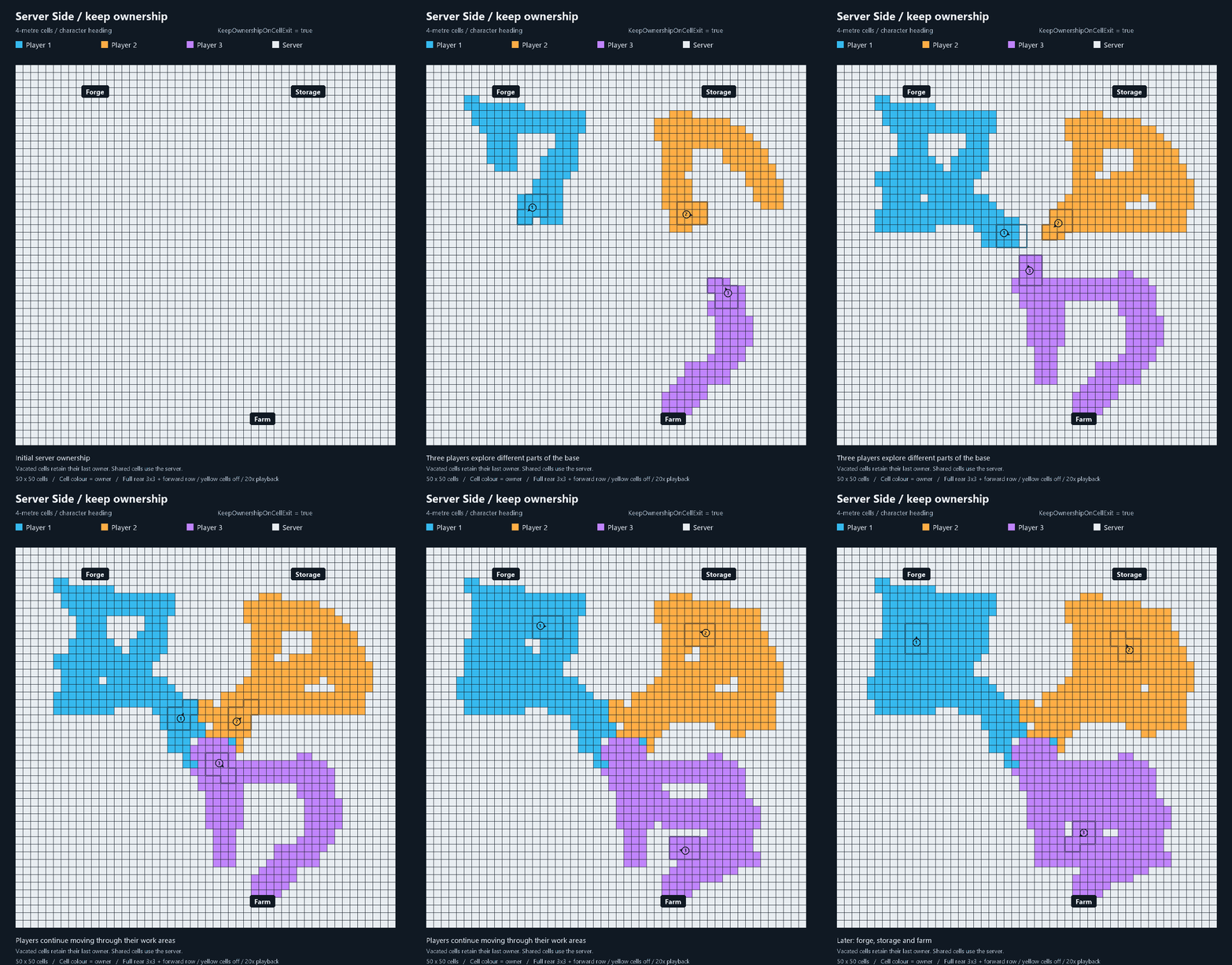 |
Click a preview for the full-size animation. CPU notes refer to simulation of managed objects. Idle, ready objects are illustrated; loading and active-use safeguards can delay real handoffs.
Configuration
Use the Thunderstore Wiki for configuration, supported interactions and compatibility. All settings are server-side and require a server restart. Vanilla clients need no configuration.
For an optional solo combat ownership stress test, see Solo combat handoff test on the Configuration Wiki page. It defaults off, runs on one selected mob and keeps normal safeguards active.
How it works and what to expect
Vanilla can let a distant player simulate objects you are trying to use. This addon prepares supported objects through small nearby fields: exclusive fields select their player, overlapping fields select the server, and vacant fields return to the server by default. Public chests, boats, idle carts, harvestables, loose drops and idle tamed animals have their own native-use rules.
Hostile Mobs follow exclusive player fields. In shared fields, one eligible player in the mob's forward cone takes ownership; zero or multiple players select the server by default. Normal cone range is 8 metres, bosses 10 metres. Observed attacks delay transfers; the cone does not read or change the actual attack target. An optional ability forecast adds a conservative check for possible follow-up attacks before player-owned mobs change owner; combat can retain their owner longer.
The goal is local responsiveness wherever supported ownership can be prepared in time. Shared/server-owned objects still depend on your connection, and loading, protected use or remote attack observations can delay a handoff. Signs, portal editing, deferred actions and unsupported modded controls retain their native/dependency handling. This edition has no client-camera data or PUP collider guards.
Report bugs and ideas
Real-world testing is still limited. Please share bugs and ideas through GitHub Issues. Include Server Side and the version; the Wiki explains how to isolate a reproducible issue.
