
Please disclose if any significant portion of your mod was created using AI tools by adding the 'AI Generated' category. Failing to do so may result in the mod being removed from Thunderstore.

Oof
Feel your inventory's weight at a glance. Client-side patterns, a visual preset gallery and live controls for Valheim inventories and chests.
By DJ_Lifecoach
| Last updated | 5 days ago |
| Total downloads | 197 |
| Total rating | 0 |
| Categories | Mods Client-side Utility AI Generated |
| Dependency string | DJ_Lifecoach-Oof-0.7.1 |
| Dependants | 0 other packages depend on this package |
This mod requires the following mods to function

denikson-BepInExPack_Valheim
BepInEx pack for Valheim. Preconfigured with the correct entry point for mods and preferred defaults for the community.
Preferred version: 5.4.2351README
Oof
See the weight. Feel the load.
Early release · 0.7.0
A pocketful of feathers and a stack of iron take up the same space in your inventory. Oof makes their weight easier to see.
Patterns behind your items change with stack weight: heavier stacks can have denser lines, stronger colour or deeper waves. Choose a look you like, then adjust it while looking at your actual inventory.
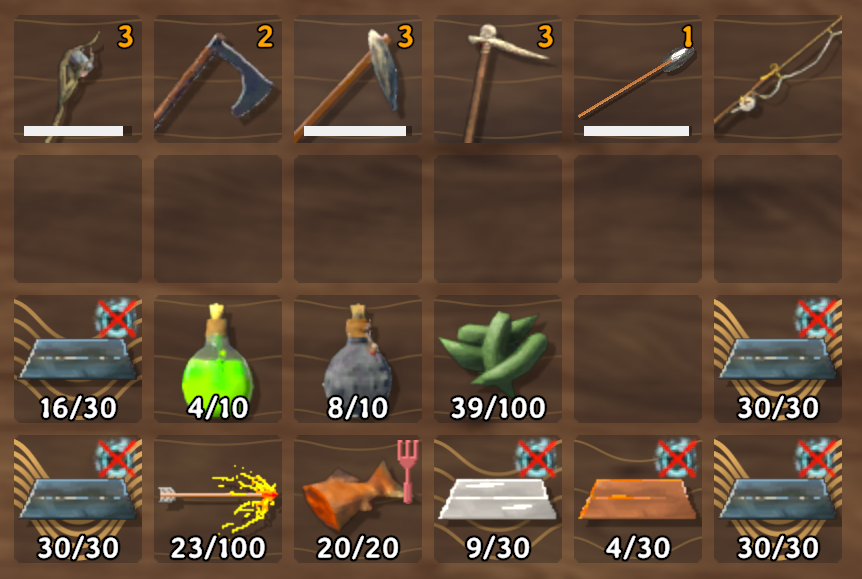
See the weight at a glance. Heavy metal stacks stand out while lighter items keep a quieter background.
Features
- Weight patterns in your inventory and open chests.
- A gallery of ready-made looks, including Designer’s picks, Shape-aware looks and Featured looks.
- Waves, dots, woven lines, colour fields, rings and more.
- Shape-aware looks whose lines follow each item's own outline.
- Optional labels showing the exact weight of each stack.
- Live controls for pattern density, opacity, thickness and wave depth.
- Personal presets you can name, save and export.
Client-side only. Install Oof on your own PC. Your server and friends do not need it. Item weights, stack sizes and gameplay are unchanged.
New in 0.7.0: shape-aware looks
Five new looks follow the outline of each item instead of filling the slot evenly. You find them in the new Shape-aware section, right under Designer’s picks in the Oof gallery.
- White Knuckle: rings around the item. Stacks under 20 wt stay clean, and under a heavy load the inner rings turn pale.
- Death Grip: the same rings, on every item, even the lightest.
- Gravity Well: rings that reach further out and warm from amber to copper as the stack gets heavier.
- Overburdened: lines pressed down under the item, as if the stack sinks into the slot.
- Heave: fewer, softer lines pressed down under the item.
Apart from Death Grip, every shape-aware look leaves stacks under 20 wt clean, so light odds and ends stay quiet.
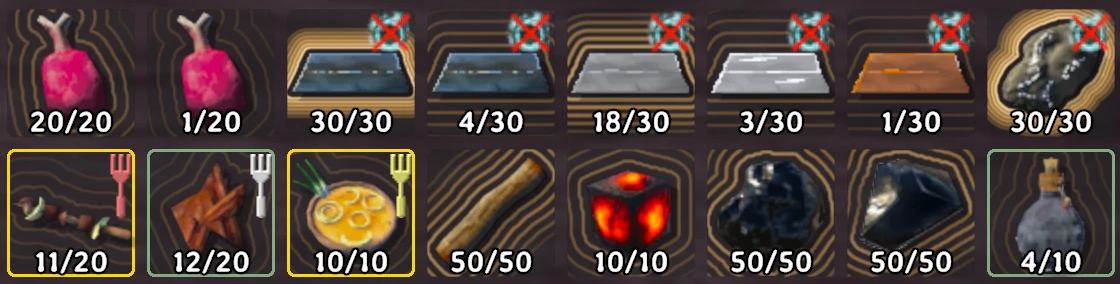
Death Grip. Rings around every stack, faint ones even around a single piece of meat.
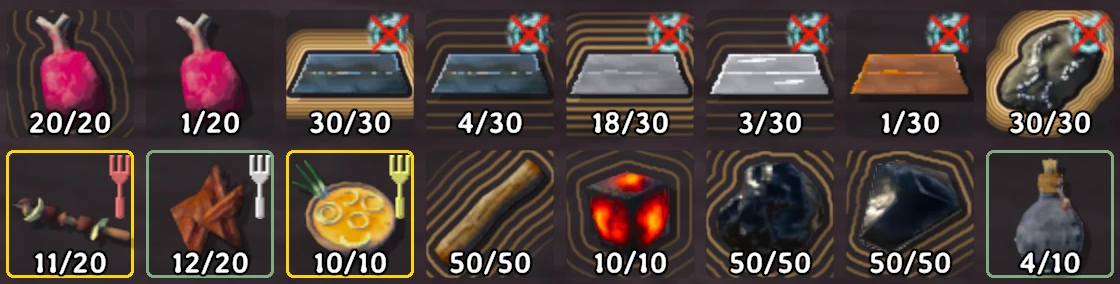
White Knuckle. Light stacks stay clean while heavier ones gather rings.
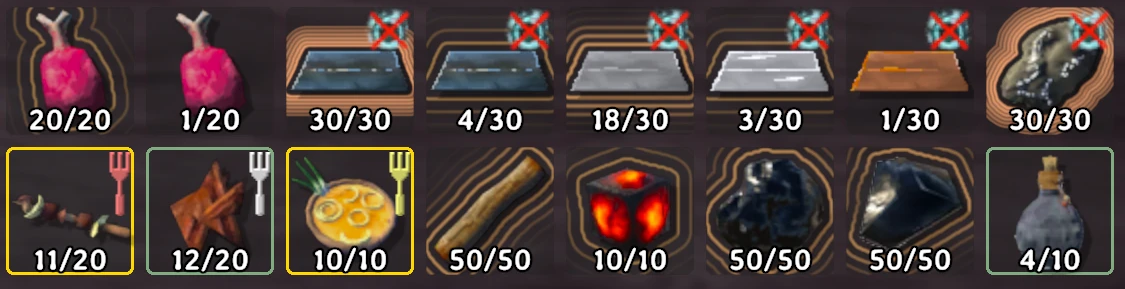
Gravity Well. Wider rings that warm toward copper as the load grows.
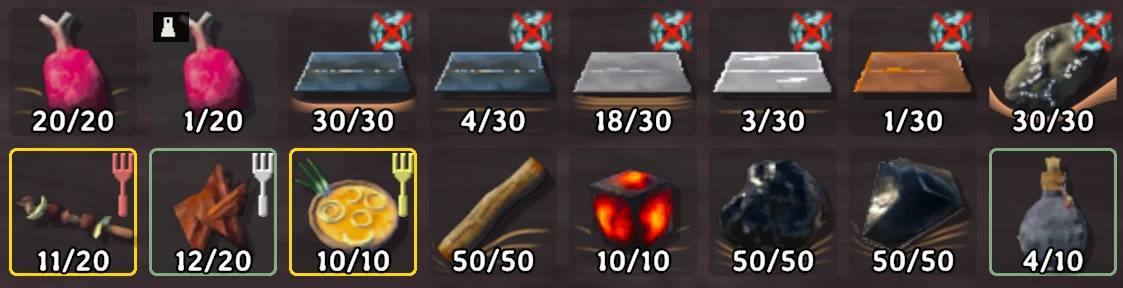
Heave. A few soft lines bend under the items that weigh the most.
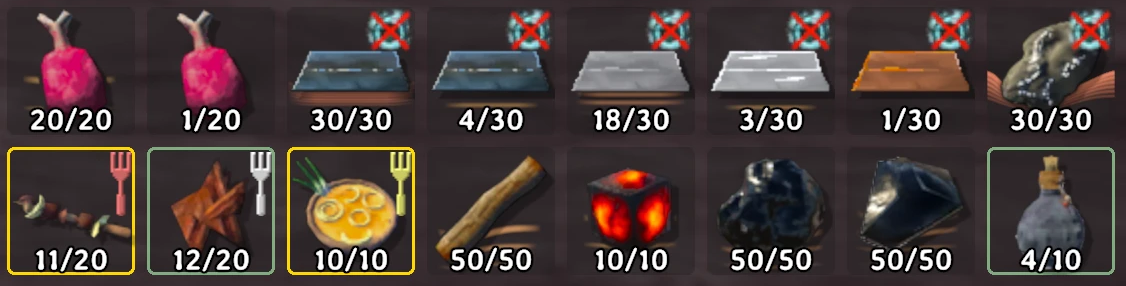
Overburdened. Lines sag under the heavy metal and ore.
These patterns are worked out in the background, away from the game's main thread, so opening a full inventory should not stutter. The first time you open a big inventory they can appear a moment after the items.
Install
Oof requires BepInExPack_Valheim.
Install from the mod catalogue: select your Valheim profile in Gale, search for Oof by DJ_Lifecoach and install it with its dependencies. Use Launch modded to start the game.
Using r2modman or Thunderstore Mod Manager? Install Oof from the catalogue the same way, in your Valheim profile. Your Oof settings are in that profile's BepInEx/config folder.
Have the ZIP instead? Quit Valheim, select your usual Valheim profile in Gale, then choose Import > ...local mod and open Oof-0.7.0.zip without extracting it. For a new profile, install BepInExPack_Valheim first. The same ZIP updates an existing local entry named Oof.
Keep exactly one Oof enabled. If you copied the DLL in by hand, tested a preview build, or are moving between a local ZIP and the catalogue version, disable the other copy in Gale (or move it out of BepInEx/plugins) before you launch. Keep your configuration and presets.
Updates in the same profile preserve your settings and saved looks. On its first start, Oof 0.7.0 also saves a copy of your looks and settings in BepInEx/config/FinnWeightUI/backups/. The BepInEx log names the folder. It never overwrites an earlier copy and never stops the game from starting.
Choose a look
- Open your inventory.
- Click the small Oof icon above it.
- Select a preset. The pattern changes on your inventory items.
- Open Advanced settings to customise the look.
Gallery tiles show each pattern at the same example weight. Your inventory uses each stack’s actual weight. Tiles in the Shape-aware section use a stand-in shape, because they have no item to follow.
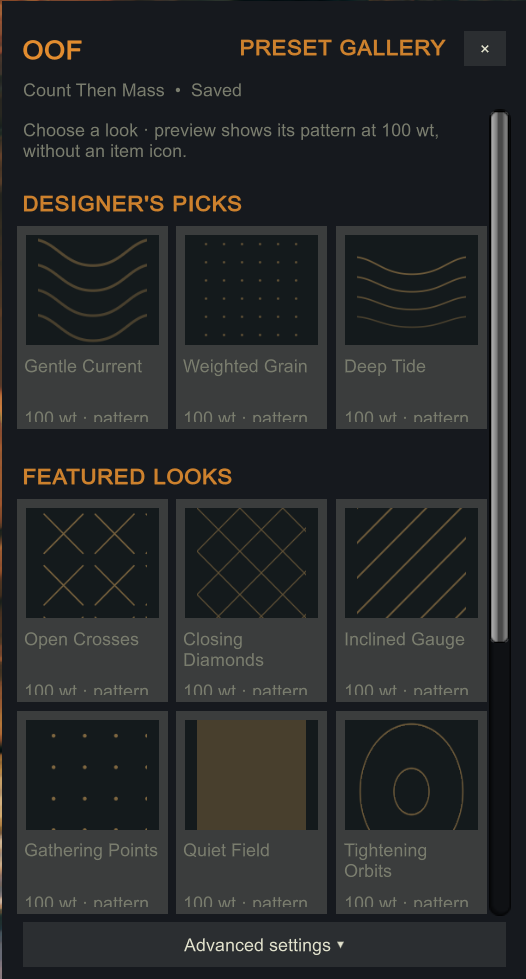
Choose your look. Browse waves, dots, woven lines and more, then open Advanced settings to make it your own.
More looks
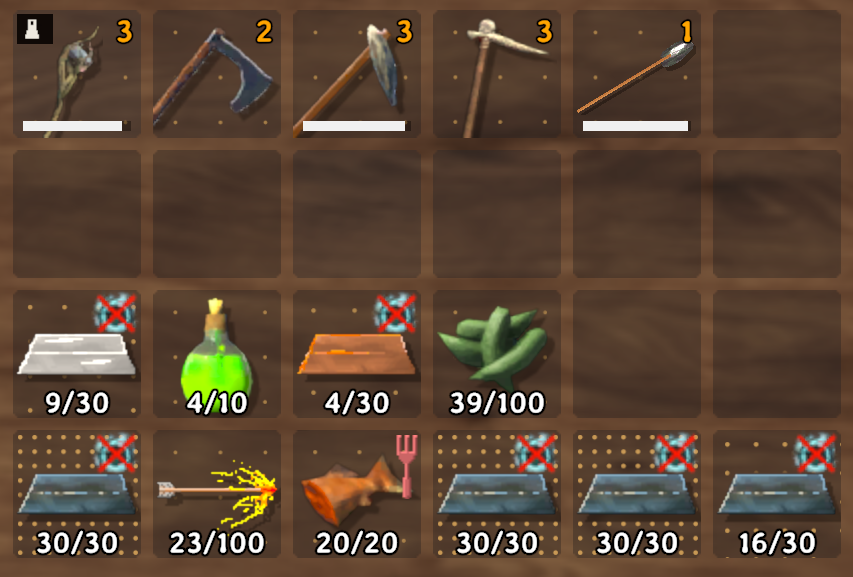
More weight, more dots. Compare the full metal stacks with the lighter items above them.
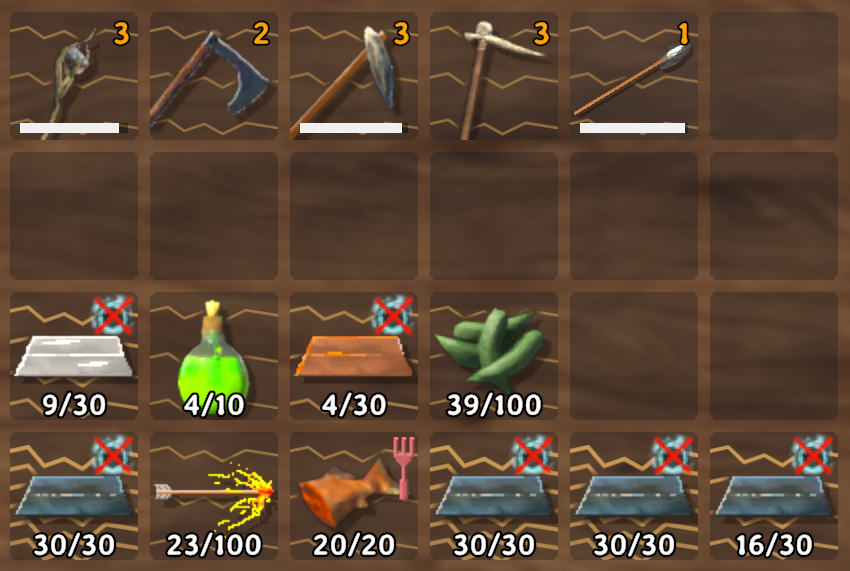
A different feel. Angular lines offer another way to show stack weight.
Save and export a look
In Advanced settings, adjust the look, enter a name and choose Save as new. Use Update selected to change a personal preset. To customise a built-in look, save your own copy.
Save your changes before exporting. Export selected and Export all save your designs as JSON files. Oof 0.7.0 cannot import or merge these files in-game, so another player cannot apply an exported look directly from the menu. In Gale, choose File > Open profile folder, then open:
- Exports:
BepInEx/config/FinnWeightUI/exports/ - Your saved presets:
BepInEx/config/FinnWeightUI/presets.json
Exports reuse the same filenames, so copy them elsewhere if you want to keep several versions.
Known limits
- Shape-aware looks cannot be fine-tuned in game yet. In Advanced settings you can change their opacity, the weight labels and the clear space around the icon. The lines, depth and colour come with the look and are kept when you save a copy.
- Gallery tiles for shape-aware looks use a stand-in shape instead of a real item.
Going back to 0.6.4
Oof 0.6.4 cannot read a look library that selects or contains a shape-aware look. Before you switch back:
- In Oof 0.7.0, select one of the older looks, for example a Designer’s pick.
- Quit Valheim, then switch Oof back to 0.6.4 without uninstalling it, so your Oof settings stay in
BepInEx/config:- Installed from the catalogue: in your Gale profile, right-click Oof, choose Change version and pick 0.6.4. In r2modman or Thunderstore Mod Manager, use that manager's own option to install an older version.
- Installed from the ZIP: disable the local Oof 0.7.0 entry in Gale, then choose Import > ...local mod and open the Oof 0.6.4 ZIP. Check that exactly one Oof, version 0.6.4, is enabled.
- If you saved your own copies of shape-aware looks, put back
presets.jsonfrom the automatic backup folder before you launch 0.6.4. Restoring the backup also removes looks you saved while using 0.7.0.
Compatibility
- Oof 0.7.0 is an early release. Compatibility with every inventory or UI mod is not established.
- Patterns appear in the player inventory and open chests. The HUD hotbar and special backpack inventories are not supported.
- AdventureBackpacks: works with any version that keeps its backpack list readable (checked on 2.1.3 and 2.2.11). Backpacks never get a guessed weight. If a future version hides that list, Oof keeps running and leaves backpacks unlabeled; the BepInEx log says so once.
Troubleshooting
No Oof icon or patterns? Check that exactly one Oof is enabled in Gale. If you previously disabled Oof in its config, quit Valheim, choose File > Open profile folder, and open BepInEx/config/finn.valheim.weightui.cfg. Under [Safety], set both Enabled and EnableRenderer to true.
Shape-aware looks feel slow on your PC? In the same file, under [Performance], set ShapeBackgroundThread to false. Oof then draws these patterns on the main thread, a few at a time, and you can compare.
Editor too small? In Advanced settings, find Editor size > Panel size (%). If Oof reports there is not enough room, close the chest or reduce Valheim’s UI scale.
Reporting a problem? Include your Oof version, Valheim version, other inventory/UI mods, a screenshot and the relevant error from BepInEx/LogOutput.log. Remove personal information before sharing logs.
Made by DJ Life Coach. An independent community mod, not affiliated with Iron Gate.
