
Please disclose if any significant portion of your mod was created using AI tools by adding the 'AI Generated' category. Failing to do so may result in the mod being removed from Thunderstore.

Game Clock
HUD clock with 12-hour or 24-hour time, day, weather, wind, and world status.
| Last updated | a day ago |
| Total downloads | 169 |
| Total rating | 0 |
| Categories | Mods Tweaks Server-side Client-side AI Generated Deep North Update |
| Dependency string | FrizzQOL-Game_Clock-0.1.0 |
| Dependants | 0 other packages depend on this package |
This mod requires the following mods to function

denikson-BepInExPack_Valheim
BepInEx pack for Valheim. Preconfigured with the correct entry point for mods and preferred defaults for the community.
Preferred version: 5.4.2333README
Game Clock
| GitHub |
|---|
| github.com/frizzlebeard/FrizzQOL.GameClock |
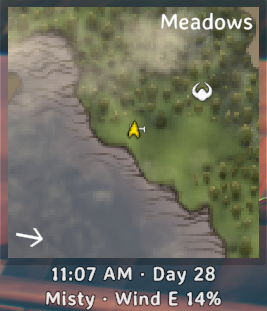
The in-game time on your HUD, in the game's own font. 🕐
What it does
A small clock sits under the minimap. It can also show the day, the weather name, the wind, and whether the world is cold, wet, or freezing.
The clock is yours alone. It does not change the world for anyone else.
Config
BepInEx/config/com.frizzqol.gameclock.cfg
| Setting | Default | What it does |
|---|---|---|
| ClockFormat | 12h | 12h or 24h. Example: 6:42 PM or 18:42. |
| ShowAmPm | true | Adds AM or PM in 12-hour mode. Unused in 24-hour mode. |
| ShowDay | true | Shows the day number. |
| ShowWeather | true | Shows the current weather name. |
| ShowWind | true | Shows wind direction and strength. |
| ShowCold | true | Shows Cold while the world is cold. |
| ShowWet | true | Shows Wet while the world is wet. |
| ShowFreezing | true | Shows Freezing while the world is freezing. |
| Corner | TopRight | TopRight sits under the minimap. TopLeft and TopCenter use that corner of the HUD. |
| OffsetX | 0 | Pixels. Positive moves the label right. |
| OffsetY | 0 | Pixels. Positive moves the label up. |
Multiplayer
Each player installs it and can use their own settings. A dedicated server does not need it.
Install
Install with r2modman or the Thunderstore Mod Manager.
To install by hand, copy FrizzQOL.GameClock.dll into BepInEx/plugins.
Requirements
- Valheim
- BepInExPack for Valheim
Support
☕ If you enjoy my work, please buy me a coffee.
Cash App: $FrizzleFry4
License
MIT License. You can use, copy, change, and share this mod. The LICENSE file shipped with the package has the full text.
