
Please disclose if any significant portion of your mod was created using AI tools by adding the 'AI Generated' category. Failing to do so may result in the mod being removed from Thunderstore.

Earshot
Closed captions for Valheim's important sounds: enemies, raids, bosses, smelters and more, each with a live direction arrow. For deaf and hard-of-hearing players, or anyone playing quietly. Client-side.
| Last updated | 4 days ago |
| Total downloads | 41 |
| Total rating | 1 |
| Categories | Mods Client-side AI Generated Deep North Update |
| Dependency string | Jumpingmushroom-Earshot-0.1.0 |
| Dependants | 0 other packages depend on this package |
This mod requires the following mods to function

denikson-BepInExPack_Valheim
BepInEx pack for Valheim. Preconfigured with the correct entry point for mods and preferred defaults for the community.
Preferred version: 5.4.2350README
Earshot
Closed captions for the Valheim sounds worth reacting to. A Greydwarf spotting you, a Troll stomping through the trees, a Boar charging at you, your smelter finishing: each gets a short caption at the bottom of the screen, with an arrow pointing where it came from. Made for deaf and hard-of-hearing players, and for anyone playing with the sound low.
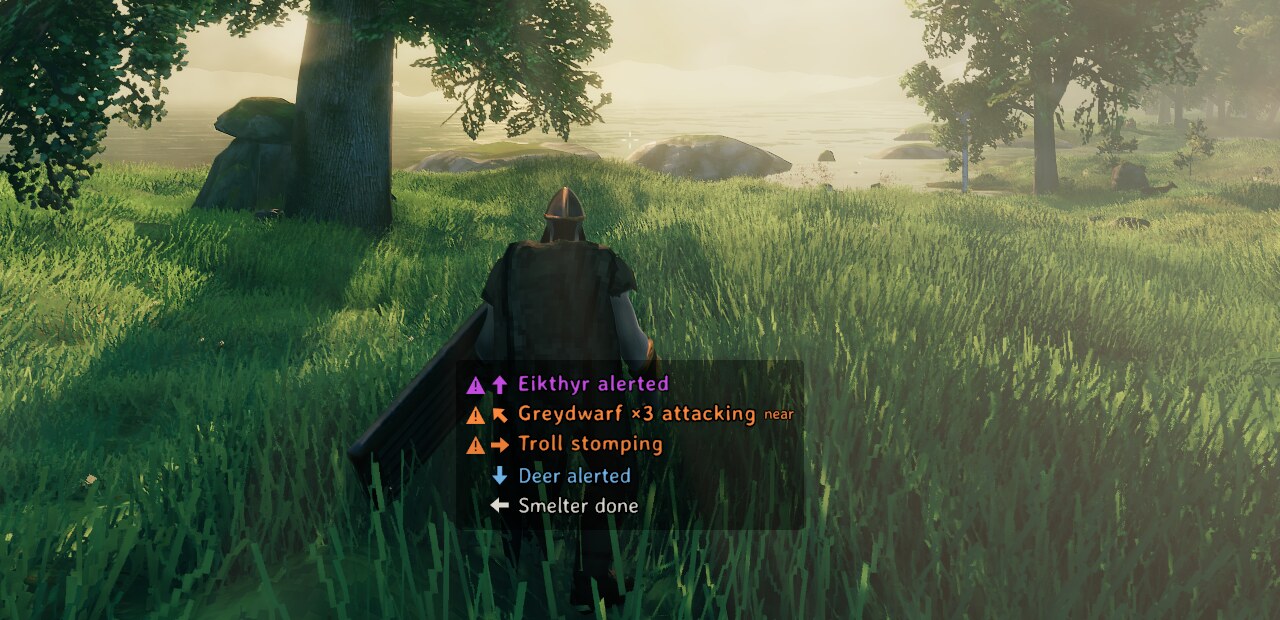
Sample captions from earshot demo in the Meadows: a boss, three Greydwarfs close by, a Troll to
the right, a Deer behind, a smelter to the left.
Features
- Captions with direction. Every line has an arrow pointing at the sound relative to where
you're looking, and it turns as you turn. Close threats get a
neartag; distant sounds are dimmer. - Built not to flood the screen. Five Greydwarfs are one line,
Greydwarf ×5 attacking. When the list is full, bosses and raids push out enemies, enemies push out wildlife, and wildlife pushes out everyday world sounds. Idle chatter is throttled. Sounds you can already see up close are dimmed. - Only what you'd want to react to. Your own actions stay silent: footsteps, swings, chopping, and any chest or door you open — anything within the game's 5 m interaction range. Captions come from the game's own sound data (Valheim ships an unfinished caption system that Earshot brings to life), fixed and extended where it's wrong or missing.
- Works with sound off. Audibility is measured at your position from the sound itself, not from your volume settings. The default cutoff is 0.05, low enough to catch most of a sound's range.
- Settles in after a portal or login. World sounds are ignored for a few seconds after you arrive through a portal or log in, so a door doesn't caption itself replaying its opening sound as the area loads.
- Readable for everyone. Each category has its own colour, chosen to stay distinct with colour blindness, and threats are also bold with a warning mark, so colour is never the only cue.
- Your language. Creature and building names use the game's own translations. Earshot's few words can be translated with a text file (see Translating).
Turning it on and off
Captions are on as soon as the mod is installed. Settings → Accessibility → "Closed captions (Earshot)" turns them off and on. Everything else lives in the BepInEx configuration manager (F1).
Configuration
| Section | Setting | Default | Meaning |
|---|---|---|---|
| General | Enabled | true |
Master switch. The same switch as 'Closed captions' in Settings > Accessibility. |
| General | MinimumVolume | 0.05 |
How loud a sound must be where you stand to get a caption (0 to 1). 0.05 covers most of a sound's range. Ignores your volume sliders, so captions work with sound off. |
| Categories | Boss | true |
Bosses: their alerts, attacks and summons. |
| Categories | Raid | true |
A raid starting and running near you. |
| Categories | Enemy | true |
Hostile creatures: alerted, attacking, footsteps. |
| Categories | Wildlife | true |
Idle creature sounds, throttled so chatter doesn't flood the list. |
| Categories | World | true |
Things that need attention: a smelter finishing, food done or burning, doors you didn't open, a shield generator low on fuel. |
| Categories | Ambient | false |
Constant background: fires, torches, distant thunder. |
| Display | MaxLines | 5 |
Caption lines shown at once. |
| Display | Linger | 3 |
Seconds a line stays after its sound was last heard. |
| Display | IdleCooldown | 20 |
Seconds before the same creature's idle chatter can start a new line. |
| Display | OffsetX | 0 |
Horizontal nudge from bottom centre, in HUD pixels (positive is right). |
| Display | OffsetY | 0 |
Vertical nudge in HUD pixels (positive is up). |
| Display | Scale | 1 |
Size of the caption list. |
| Display | BackgroundOpacity | 0.6 |
Opacity of the dark plate behind the captions. |
| Display | DimOnScreen | true |
Dim lines whose source is close and on screen, and rank them lowest within their category. |
| Display | SnapArrows | true |
Arrows point in 8 directions. Off: they rotate smoothly. |
| Display | NearDistance | 10 |
Metres within which threats get the 'near' tag. |
| Colors | Boss | #E056FF |
Caption colour for Boss. |
| Colors | Raid | #FFD84A |
Caption colour for Raid. |
| Colors | Enemy | #FF8A3D |
Caption colour for Enemy. |
| Colors | Wildlife | #7EC8FF |
Caption colour for Wildlife. |
| Colors | World | #E8E4DA |
Caption colour for World. |
| Colors | Ambient | #B5B0A6 |
Caption colour for Ambient. |
| Debug | LogUnlabelled | false |
Log each audible sound that got no caption, once, so gaps can be reported. |
| Debug | Verbose | false |
Log every caption decision. Noisy. |
Console
earshot— what's on screen right now, plus the last 20 sounds heard and why each did or didn't get a caption.earshot unlabelled(alsounlabeled) — every audible sound this session that had no caption.earshot demo— sample captions for 20 seconds, for screenshots and for previewing colour and size settings.
Reporting a missing caption
Play for a bit, then run earshot unlabelled in the console and include its output in your
report: https://github.com/jumpingmushroom/Earshot/issues. It lists every audible sound that got no
caption this session, whether or not Debug → LogUnlabelled is on; turning LogUnlabelled on (F1)
additionally writes each one to the BepInEx log as it happens.
Translating
Copy src/Earshot/translations/English.txt from this repository to
BepInEx/config/Earshot/translations/<Language>.txt, using the game's own name for the language
(German.txt, Norwegian.txt, ...), and translate the right-hand side of each line. Missing lines
fall back to English. Pull requests with translations are welcome.
Compatibility
Client-side, safe to add or remove at any time, works on vanilla servers, needs nothing on the server. Console players on crossplay servers aren't affected (and can't run mods).
