
Please disclose if any significant portion of your mod was created using AI tools by adding the 'AI Generated' category. Failing to do so may result in the mod being removed from Thunderstore.

SwapGear
Swap what you're wearing with what's on an armor stand.
| Last updated | a week ago |
| Total downloads | 132 |
| Total rating | 0 |
| Categories | Utility Deep North Update AI Generated Gear Client-side |
| Dependency string | Kriona-SwapGear-1.2.1 |
| Dependants | 0 other packages depend on this package |
This mod requires the following mods to function

denikson-BepInExPack_Valheim
BepInEx pack for Valheim. Preconfigured with the correct entry point for mods and preferred defaults for the community.
Preferred version: 5.4.2360README
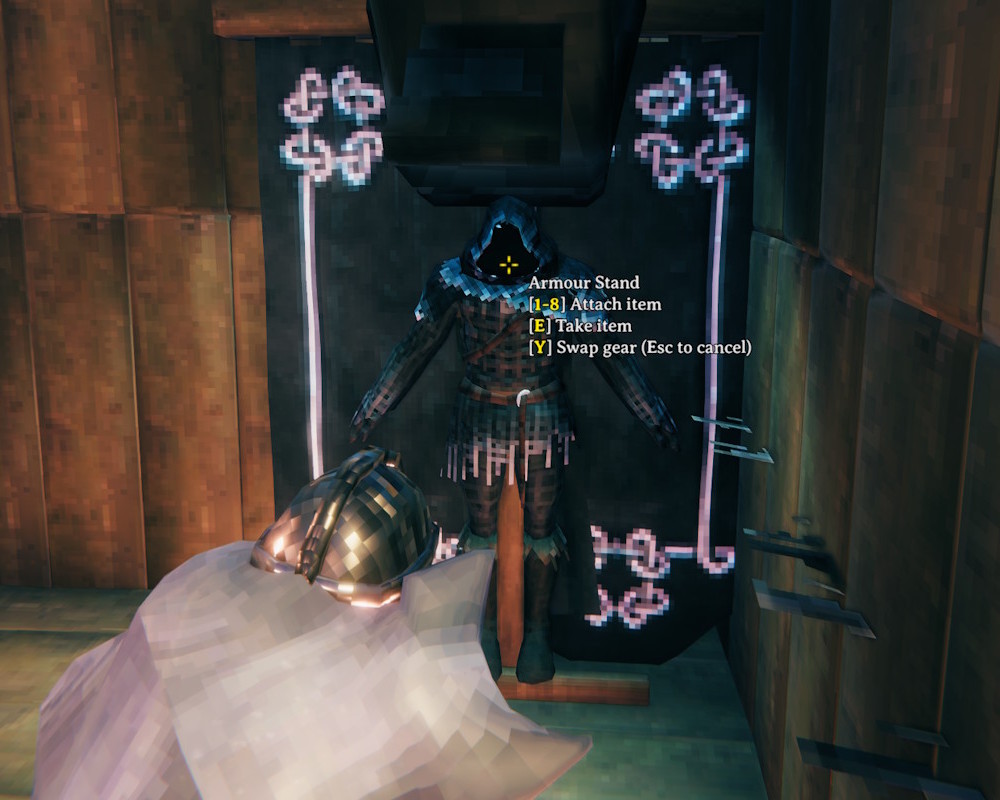
Look at an armor stand and press Y to swap what you're wearing with what's on the stand.
- Only the slots the stand has items in are swapped - your helmet goes on the stand in place of its helmet, your sword in place of its sword, and so on
- The stand's items drop and are picked up automatically, then equipped as they land in your inventory
- Unequipping and equipping take as long as they do from the inventory, unless
InstantEquipis turned on - The hover text shows the key on any armor stand with items on it
- Press Esc to stop a swap partway through
- Respects wards - stands you don't have access to can't be swapped with
Configuration
BepInEx\config\kriona.SwapGear.cfg is created on first run, and changes take effect as soon as the file is saved. You do not need to restart Valheim or rejoin the world.
SwapKey- the key that starts a swap, optionally with modifiers, e.g.LeftControl + Y(defaultY)PickupTimeout- seconds to wait for the stand's items to be picked up before giving up on equipping them (default10)InstantEquip- unequip and equip gear instantly instead of taking the usual time (defaultfalse)
Installation
With a mod manager such as r2modman or the Thunderstore Mod Manager, install Swap Gear - it installs BepInExPack for Valheim too.
By hand:
- Install BepInExPack for Valheim from Thunderstore or Nexus Mods
- Extract the zip into your Valheim folder, or copy
SwapGear.dllintoBepInEx\plugins
Client-side only - other players and the server don't need it.
Other Mods By Me
See all my mods on Thunderstore.
Source
The source code is on GitHub.
