
Please disclose if any significant portion of your mod was created using AI tools by adding the 'AI Generated' category. Failing to do so may result in the mod being removed from Thunderstore.

WorldCrawler
Rebuild a server world locally without admin access or access to its world files.
| Last updated | 20 hours ago |
| Total downloads | 33 |
| Total rating | 0 |
| Categories | Mods Client-side Utility AI Generated Deep North Update |
| Dependency string | Landoria-WorldCrawler-1.0.1 |
| Dependants | 0 other packages depend on this package |
This mod requires the following mods to function

denikson-BepInExPack_Valheim
BepInEx pack for Valheim. Preconfigured with the correct entry point for mods and preferred defaults for the community.
Preferred version: 5.4.2351README
Valheim World Crawler 
World Crawler lets you capture selected regions of a server world, recreate that world locally as an initially empty world, then restore the exported regions. It captures buildings, chests, and terrain modifications. The mod is client-only: you do not need to be a server admin or have access to the server's save files.
Why?
Sometimes, a world is simply too good to lose:
- A dedicated server admin disappears overnight or decides to move on from the project.
- A public or community server is about to shut down or be wiped, and players want to keep a local copy of their bases and builds.
- Players want to continue the adventure in Singleplayer, without having to rely on the server being online.
Controls
| Key | Action |
|---|---|
| F8 | Start or stop recording received world data. |
| F9 | At the main menu, prepare a local world from the latest recording. |
| F10 | Start or stop restoration around you. |
| Alt + map click | Teleport to the clicked location when EnableCheats is enabled. |
Settings
Using cheats can make recording and restoration easier, but it is not required.
| Setting | Default | Effect |
|---|---|---|
EnableCheats |
false |
Enables god mode, ghost mode, cold immunity, unlimited stamina, and Alt + map click teleportation. |
⚠️ It may be detected as cheating by the server, potentially resulting in a ban. Use it responsibly and get the server owner's permission first.
How to use
1. Record the areas you want to export
- Join the source world and press F8, then travel through every area you want to keep. Players and creatures are ignored.
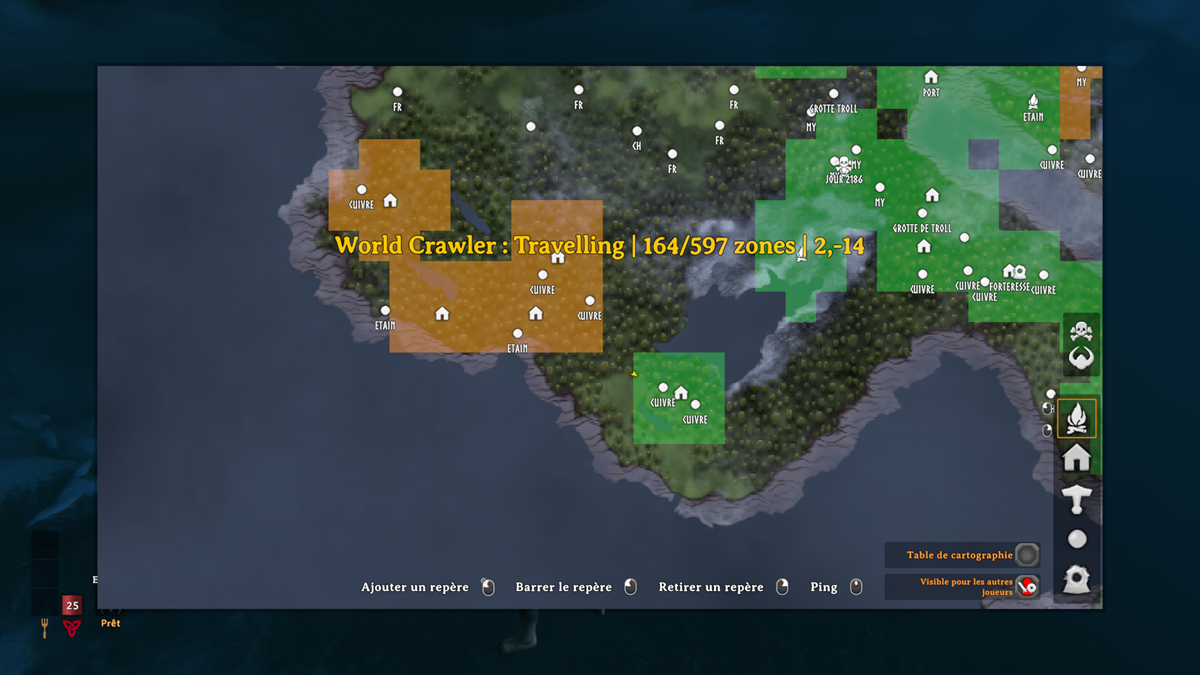
- Green map rectangles are saved; amber rectangles are in progress.
- Press F8 again and wait for the final save confirmation before closing the game.
- Exported world data is stored in
BepInEx/config/WorldCrawler/worlds/<world name>_<UID>.
2. Create the world locally
- Press F9 at the main menu. If no local world matches the latest recording, it shows the exact name and seed to use.
- Create the world in Valheim, make sure the world is saved locally, not in the cloud, then press F9 again.
- Join the new world. Its UID now matches the server world's UID, but the world is still empty at this stage.
- You should now see the same discovered areas on the map as in the original world.
3. Restore the recorded areas
- Press F10 in the new world, then revisit the recorded areas to populate them from the exported files.
- Green zones are restored; amber zones are not restored yet.
- Press F10 again to stop restoration and perform the final save.
Addtional command
New indestructible decorations may get in the way in the reconstructed world. Use the following commands to remove them:
| Command | Action |
|---|---|
indestructible list |
List nearby stone circles, dolmens and other safe indestructible decorations within 30 m. |
indestructible delete 2 |
Delete entry 2 from the list, including the whole monument when listed as a site. |
Screenshot
Contact
Report bugs through GitHub Issues.
