
Please disclose if any significant portion of your mod was created using AI tools by adding the 'AI Generated' category. Failing to do so may result in the mod being removed from Thunderstore.

DynamicStorage Ammunition Piles
Dynamic arrow, bolt and Ballista missile barrels with discovery unlocks, per-barrel appearance editing, selectable visual-fill logic and server-synced capacity.
| Last updated | an hour ago |
| Total downloads | 33 |
| Total rating | 1 |
| Categories | Mods Misc Skins Crafting Server-side Client-side Utility Building |
| Dependency string | Muji-DynamicStorage_Ammunition_Piles-1.0.1 |
| Dependants | 0 other packages depend on this package |
This mod requires the following mods to function

denikson-BepInExPack_Valheim
BepInEx pack for Valheim. Preconfigured with the correct entry point for mods and preferred defaults for the community.
Preferred version: 5.4.2351
ValheimModding-Jotunn
Jötunn (/ˈjɔːtʊn/, 'giant'), the Valheim Library was created with the goal of making the lives of mod developers easier. It enables you to create mods for Valheim using an abstracted API so you can focus on the actual content creation.
Preferred version: 2.30.2README
DynamicStorage Ammunition Piles
Functional ammunition storage that visibly fills as you stock it.
DynamicStorage Ammunition Piles adds dedicated Arrow, Bolt, and Missile Barrels to Valheim.
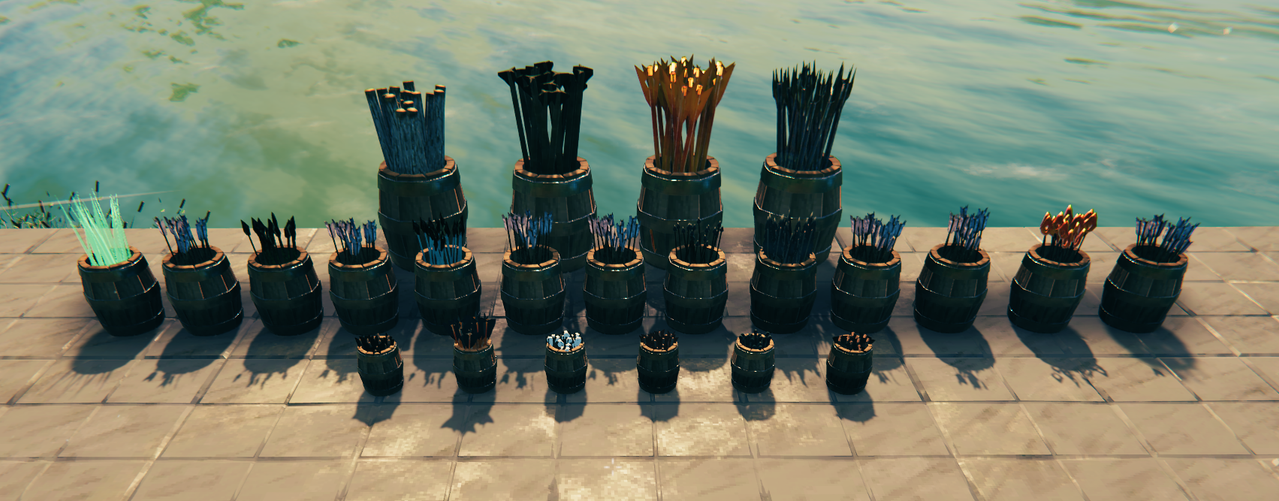
Instead of hiding all of your ammunition inside another chest, your arrows, crossbow bolts and Ballista missiles can be stored in visible barrels that physically fill as ammunition is added.
Storage capacity is server-controlled, while the appearance and visual fill behaviour of each placed barrel can be customised independently.
Dynamic Visual Filling
The core idea is simple:
Your ammunition storage should visibly fill as you use it.
As ammunition is added to a barrel, additional copies of the actual projectile model appear inside it.
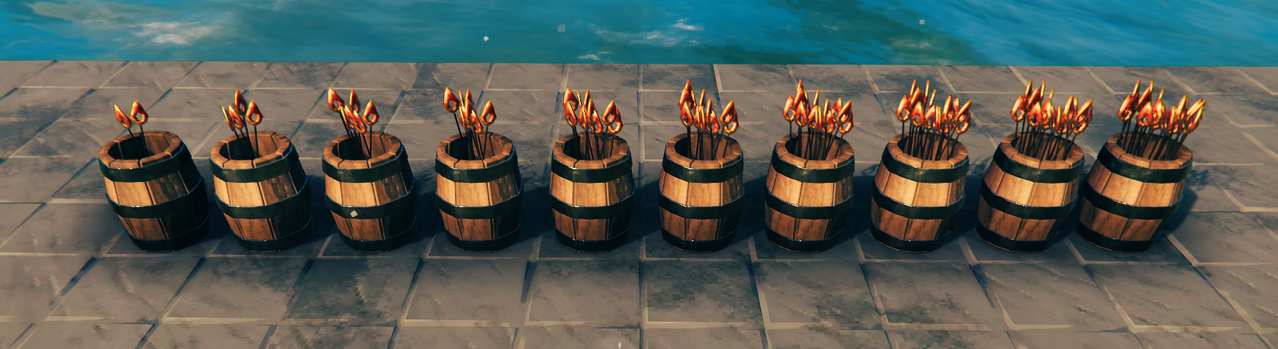
The visual filling system automatically scales with the server's selected 10 / 20 / 40 / 60 slot storage capacity.
By default, barrels use:
- Fill Based On: Occupied Slots
- Looks Full At: 50%
- Maximum Visible Ammunition: 20 models
With the default settings:
| Server Storage | Visually Full At |
|---|---|
| 10 slots | 5 occupied slots |
| 20 slots | 10 occupied slots |
| 40 slots | 20 occupied slots |
| 60 slots | 30 occupied slots |
This means a server can increase the actual storage capacity without requiring an enormous number of rendered projectiles.
The visual barrel can still look satisfyingly full while the underlying storage scales independently.
Both Fill Based On and Looks Full At can be customised separately for Arrow, Bolt and Missile Barrels.
Other DynamicStorage Mods
DynamicStorage Ammunition Piles is part of a growing collection of mods focused on turning stored resources into functional, visible parts of your base.
 |
DynamicStorage Piles — The original DynamicStorage mod, covering wood and stone piles. |
 |
DynamicStorage Forge — Dynamic storage for ores, scraps, metals and forge materials. |
 |
DynamicStorage Materials — Dynamic storage for common crafting materials and resources. |
 |
DynamicStorage Mead Hall — Themed mead storage with dynamic labels and Quick Grab. |
| DynamicStorage Animals | Development in progress. |
| DynamicStorage Food Hall | Development in progress. |
Recommended: BepInEx ConfigDrawers
BepInEx ConfigDrawers by Vapok is not required, but is highly recommended if you want to dive into the customisation options in DynamicStorage Ammunition Piles.
The mod contains separate appearance controls for Arrow, Bolt and Missile Barrels, and ConfigDrawers provides a much cleaner in-game interface for browsing and adjusting them.
It is particularly useful for:
- Searching configuration options
- Collapsing sections you are not currently using
- Adjusting appearance values while in-game
- Quickly finding the settings for a particular barrel family
Main Features
- Three dedicated storage pieces:
- Arrow Barrel
- Bolt Barrel
- Missile Barrel
- Barrel recipes are discovered independently by ammunition family
- Discover any supported arrow to unlock the Arrow Barrel
- Discover any supported bolt to unlock the Bolt Barrel
- Discover any supported Ballista missile to unlock the Missile Barrel
- Each barrel accepts only its matching ammunition family
- Each barrel holds one exact ammunition type at a time
- Dynamic projectile models visibly fill the barrel
- Uses the actual Valheim ammunition models and materials
- Supports 23 currently player-facing vanilla ammunition types
- Server-synchronised storage capacity
- Choose between 10 / 20 / 40 / 60 slots
- Visual filling based on either:
- Occupied inventory slots
- Actual storage capacity
- Configurable Looks Full At thresholds
- Up to 20 visible ammunition models
- Separate appearance settings for each ammunition family
- Per-barrel saved appearance settings
- Built-in Barrel Appearance Editor
- Safe storage downsizing protection
- Incompatible ammunition is safely rejected
Three Dedicated Ammunition Barrels
The three ammunition families use separate barrels so their proportions and visual layouts can be tuned independently.
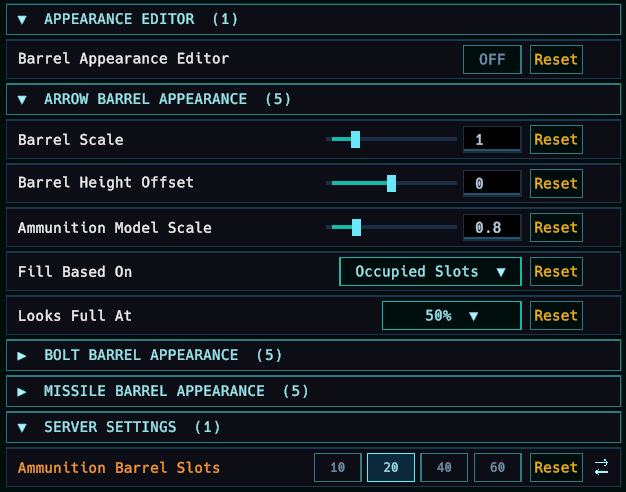
Arrow Barrel
The Arrow Barrel accepts arrows only.
It is unlocked after discovering any supported arrow.
Default appearance:
- Barrel Scale: 1.0x
- Ammunition Model Scale: 0.8x
- Fill Based On: Occupied Slots
- Looks Full At: 50%
The slightly reduced projectile scale keeps Valheim's naturally large arrow models visually balanced inside the barrel.
Bolt Barrel
The Bolt Barrel accepts crossbow bolts only.
It is unlocked after discovering any supported crossbow bolt.
Default appearance:
- Barrel Scale: 0.6x
- Ammunition Model Scale: 1.8x
- Fill Based On: Occupied Slots
- Looks Full At: 50%
The smaller barrel gives bolts a more compact ammunition-container appearance while their model scale keeps them clearly visible.
Missile Barrel
The Missile Barrel accepts Ballista missiles only.
It is unlocked after discovering any supported Ballista missile.
Default appearance:
- Barrel Scale: 1.5x
- Ammunition Model Scale: 0.6x
- Fill Based On: Occupied Slots
- Looks Full At: 50%
The larger barrel gives Ballista ammunition enough space to remain visually distinct without the stored missiles overwhelming the container.
One Ammunition Type Per Barrel
Each barrel family can store any supported ammunition belonging to that family, but an individual placed barrel holds one exact ammunition type at a time.
For example:
An empty Arrow Barrel can accept:
- Wood Arrows
- Flinthead Arrows
- Frost Arrows
- Bloodgold Arrows
- or any other supported arrow
Once Flinthead Arrows are inserted, that particular barrel becomes a Flinthead Arrow Barrel.
Other arrow types will be rejected until the barrel is completely emptied.
Once empty, its ammunition assignment is cleared and it can be used for a different arrow type.
The same behaviour applies to Bolt and Missile Barrels.
Ammunition from the wrong family is always rejected:
- Arrows → Arrow Barrel
- Bolts → Bolt Barrel
- Ballista Missiles → Missile Barrel
Visual Fill Modes
Each barrel can calculate its visible fill in one of two ways.
Occupied Slots
Visual filling is based on the number of inventory slots currently containing ammunition.
This is the default mode.
For example, with:
- 20 storage slots
- Looks Full At 50%
the barrel reaches its maximum visual fill when 10 slots are occupied.
This mode works particularly well when you commonly store full or mostly full ammunition stacks.
Storage Capacity
Visual filling is based on the actual number of ammunition items stored compared with the barrel's total possible item capacity.
The calculation automatically accounts for:
- Server-selected slot capacity
- The ammunition's stack size
- The barrel's Looks Full At setting
This provides a more precise representation of the actual amount of ammunition stored.
Looks Full At
Looks Full At controls how quickly the barrel reaches its maximum visual size.
It does not change the actual storage capacity.
For example:
A 40-slot barrel using:
- Occupied Slots
- Looks Full At 50%
will visually reach full at 20 occupied slots.
Changing Looks Full At allows a barrel to appear:
- Full relatively quickly
- Gradually fill across most of its storage
- Only appear completely full when nearing maximum capacity
This keeps gameplay storage and visual presentation separate.
20-Projectile Visual Limit
A visually full barrel displays a maximum of 20 ammunition models.
This remains consistent regardless of whether the server uses:
- 10 slots
- 20 slots
- 40 slots
- 60 slots
The fill calculation scales the displayed ammunition across those 20 visual positions.
A larger inventory therefore does not require dozens or hundreds of rendered projectile objects to represent its contents.
Built for Customisation
Each ammunition family has its own appearance settings.
Available controls include:
- Barrel Scale
- Barrel Height Offset
- Ammunition Model Scale
- Fill Based On
- Looks Full At
Arrow, Bolt and Missile Barrels can therefore be tuned completely independently.
Ammunition Model Scale
The ammunition visuals preserve the actual Valheim projectile models.
An Ammunition Model Scale of 1.0x represents the vanilla gameplay-model scale before the barrel's own scaling is applied.
The default values are intentionally tuned separately for arrows, bolts and Ballista missiles to better suit their individual barrel sizes.
Per-Barrel Saved Appearances
Configuration values act as placement templates.
When you place a new barrel, its current appearance settings are saved directly to that individual object.
Changing the configuration later does not automatically restyle every existing barrel.
This means two Arrow Barrels can have completely different:
- Barrel sizes
- Ammunition sizes
- Height offsets
- Fill modes
- Looks Full At thresholds
while both still obeying the same server-controlled storage capacity.
Barrel Appearance Editor
Changed your mind after placing a barrel?
DynamicStorage Ammunition Piles includes a built-in Barrel Appearance Editor.
The editor is disabled by default.
Enable:
Appearance Editor → Barrel Appearance Editor
Once enabled:
- Change the appearance settings for the relevant Arrow, Bolt or Missile Barrel.
- Look directly at an existing DynamicStorage Ammunition Piles barrel.
- Its hover text displays the currently saved appearance settings.
- Press R.
- The current configuration values are applied to that individual barrel.
The new appearance is saved directly to the placed object and persists with the world.
You do not need to destroy and rebuild storage simply because you want to change its appearance.
Supported Ammunition
DynamicStorage Ammunition Piles currently advertises support for 23 player-facing vanilla ammunition types.
Arrows — 13
- Wood Arrow
- Flinthead Arrow
- Bronzehead Arrow
- Fire Arrow
- Ironhead Arrow
- Poison Arrow
- Obsidian Arrow
- Frost Arrow
- Silver Arrow
- Needle Arrow
- Carapace Arrow
- Charred Arrow
- Bloodgold Arrow
Crossbow Bolts — 6
- Bone Bolt
- Iron Bolt
- Black Metal Bolt
- Carapace Bolt
- Charred Bolt
- Bloodgold Bolt
Ballista Missiles — 4
- Wooden Missile
- Black Metal Missile
- Flametal Missile
- Bloodgold Missile
Server Configuration
Storage capacity is server-synchronised and shared by all three ammunition barrel families.
Available capacities:
- 10 slots
- 20 slots
- 40 slots
- 60 slots
Default:
20 slots
The server's configured value is authoritative and synchronised to connecting clients.
Clients cannot independently increase their barrel storage beyond the value selected by the server.
Server-Synchronised Settings
| Setting | Default | Allowed Values | Description |
|---|---|---|---|
| Ammunition Barrel Slots | 20 | 10 / 20 / 40 / 60 | Inventory capacity used by Arrow, Bolt and Missile Barrels. |
Appearance settings are separate from the server-controlled storage capacity.
Storage Downsizing Protection
Reducing the configured server capacity will not delete items from existing ammunition barrels.
If an existing barrel currently requires more inventory space than the newly selected limit, it temporarily retains enough space to hold its current contents.
As ammunition is removed and the contents fit inside the newly configured capacity, the barrel can return to the server-selected size.
Multiplayer
DynamicStorage Ammunition Piles is designed with multiplayer use in mind.
Players joining a world containing Ammunition Piles storage should have the mod installed.
Gameplay-affecting storage capacity is controlled by the server.
Appearance information is saved directly to each individual placed barrel, ensuring that players see the intended:
- Barrel size
- Ammunition size
- Fill mode
- Fill threshold
rather than every client applying their own local appearance configuration to existing storage.
Requirements
DynamicStorage Ammunition Piles requires:
- BepInExPack Valheim
- Jötunn
Recommended
ConfigDrawers is optional, but strongly recommended if you intend to make significant use of the appearance customisation system.
Installation
Thunderstore / r2modman
Install DynamicStorage Ammunition Piles through your preferred Thunderstore-compatible mod manager.
Required dependencies should be installed automatically.
Manual Installation
Install BepInEx and Jötunn, then place:
DynamicStorageAmmunitionPiles.dll
inside:
BepInEx/plugins
Compatibility / Updating
Do not install multiple versions of DynamicStorageAmmunitionPiles.dll at the same time.
When updating, replace the previous DLL with the newer version.
Existing placed ammunition barrels are intended to retain their saved storage and appearance information across supported updates.
Version 1.0.0
Initial public release of DynamicStorage Ammunition Piles.
Version 1.0 focuses on:
- Dedicated Arrow, Bolt and Missile Barrels
- Dynamic visual filling
- 23 player-facing vanilla ammunition types
- Server-synchronised storage capacity
- Occupied Slot and Storage Capacity fill modes
- Per-barrel saved appearances
- Built-in Appearance Editor
- Storage downsizing protection
- Multiplayer-safe configuration
Feedback & Community
Found a bug, have a feature request, or made a barrel setup you want to share?
Join Muji's Mods Discord
Bug reports, feature requests, screenshots and feedback are welcome.
More DynamicStorage mods are planned as the framework continues to expand.
