
Please disclose if any significant portion of your mod was created using AI tools by adding the 'AI Generated' category. Failing to do so may result in the mod being removed from Thunderstore.
ValheimFarmerNPC
Autonomous goblin farmers for Valheim. Place a homestead, mark your field, assign chests - farmers plant, harvest, and store crops. Multiplayer-safe; server and clients need the mod.
| Last updated | 3 months ago |
| Total downloads | 1694 |
| Total rating | 6 |
| Categories | Mods Server-side Client-side NPCs AI Generated |
| Dependency string | Pjanky-ValheimFarmerNPC-1.1.1 |
| Dependants | 1 other package depends on this package |
This mod requires the following mods to function

denikson-BepInExPack_Valheim
BepInEx pack for Valheim. Preconfigured with the correct entry point for mods and preferred defaults for the community.
Preferred version: 5.4.2333
ValheimModding-Jotunn
Jötunn (/ˈjɔːtʊn/, 'giant'), the Valheim Library was created with the goal of making the lives of mod developers easier. It enables you to create mods for Valheim using an abstracted API so you can focus on the actual content creation.
Preferred version: 2.27.1README
Valheim Farmer NPC
Put your farm on autopilot. Place a homestead, mark your field, assign a few chests — then let goblin farmers plant, harvest, and store your crops while you get on with raiding, building, and exploring.
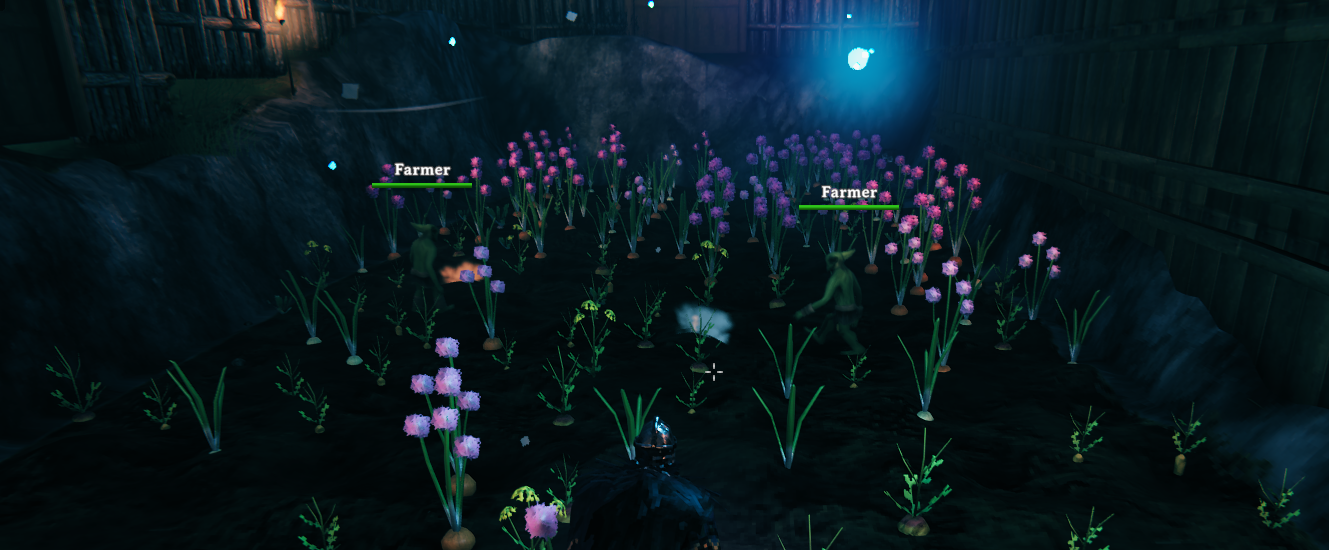
Highlights
- Hands-off farming — farmers harvest mature crops and replant empty plots automatically.
- You decide the mix — set planting ratios and seed reserves per crop, filtered to what actually grows in your biome.
- Storage handled — farmers pull seeds from your chests and deposit the harvest back.
- Multiplayer-safe — works on local worlds, player-hosted games, and dedicated servers.
- Simple in-game menu — everything is driven from one panel on the Homestead piece.
| Version | 1.1.1 |
| Author | Pjanky |
| License | MIT |
| Requires | BepInExPack Valheim + Jötunn |
| Install on | Dedicated server and all clients (same version) |
Install
With r2modman / Thunderstore Mod Manager (recommended)
- Install BepInExPack Valheim and Jötunn.
- Install Valheim Farmer NPC.
- Use the same mods on the dedicated server and every client.
Manual
- Install BepInEx for Valheim and Jötunn.
- Copy
ValheimFarmerNPC.dllintoBepInEx/plugins/ValheimFarmerNPC/on the server and every client. - Launch once so the config file is created under
BepInEx/config/.
The mod adds two hammer build pieces: Farmer Homestead and Farm Boundary Post.
By default only server admins can place farm pieces and open the panel. To let any player manage farms, set
AdminOnlyPlacementandAdminOnlyAccesstofalse(see Configuration).
Quick start
Everything runs from the Farmer Homestead panel — interact with the placed homestead to open it.
- Prepare a field. Till the soil and plant the plots you want farmed (saplings or grown crops both work).
- Place the Homestead near the field. It spawns your first farmer automatically.
- Set the boundary. Place two Farm Boundary Posts at opposite corners of the field, then click Assign Boundary Posts.
- Scan the field. Click Scan Field — the homestead remembers every crop inside the boundary as a work slot.
- Add storage. Place chests nearby and click Add chest for each.
That's it — as long as a player keeps the area loaded, farmers will harvest, replant, restock seeds, and deposit the surplus. Tune what they grow under Crop settings whenever you like.
Farmers vanishing when you leave is normal. They are temporary workers, not permanent creatures. Your homestead, field, and chest contents are saved. When you return, open the panel and click Add Farmer if none are present.
How it works
- The Homestead piece stores all persistent farm data (crop slots, chests, pause state, crop settings) in the world save.
- Farmers only work while a player keeps the farm's area loaded — they are summoned workers, not wandering monsters.
- On multiplayer, the game keeps the farm in sync across everyone; the dedicated server keeps field progress consistent even when several players share one farm.
- Talking to a farmer toggles pause/resume for that homestead.
Full setup walkthrough
1. Plant the initial field (required)
Till the soil and plant every plot you want farmers to work. Scan Field discovers slots from existing crops inside the boundary — it does not create slots from bare tilled ground. After the first scan, farmers harvest and replant those remembered slots on their own.
2. Place the Farmer Homestead
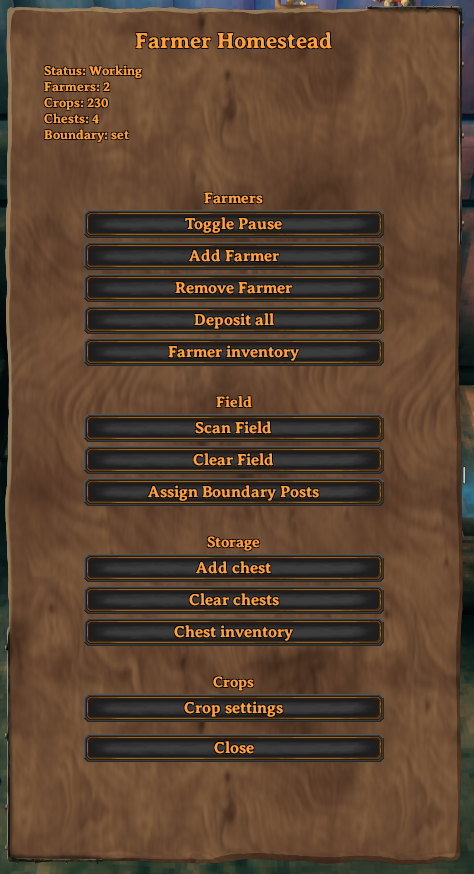
Open the hammer, pick Farmer Homestead, and place it near your farm (exact facing doesn't matter). Interact with it to open the panel. The status line at the top shows pause state, farmer count, crop-slot count, chest count, and whether a boundary is set.
3. Place & assign Boundary Posts
- Place two Farm Boundary Posts at opposite corners of the rectangle covering your farm — just outside the outermost plots so every tile is inside the box.
- Keep each half-width within
MaxFarmRadius(default 64 m), or scanning will fail. - On the panel, click Assign Boundary Posts. Status should then read
Boundary: set. If it fails, move closer, confirm both posts exist, and retry.
4. Scan the field
Click Scan Field. The homestead inventories every crop inside the boundary and remembers those positions as farm slots; the Crops count should rise above zero.
Use Clear Field only to wipe the remembered slot list (for a clean rescan after a big layout change). It does not destroy plants in the world — rescan afterward if you still want that field worked.
5. Assign chests (storage)
- Place normal Valheim chests (or compatible containers) near the homestead.
- Click Add chest to assign the nearest free chest within
ChestAssignRange(default 20 m). Repeat for more storage. - Clear chests unassigns all chests (their contents are never deleted).
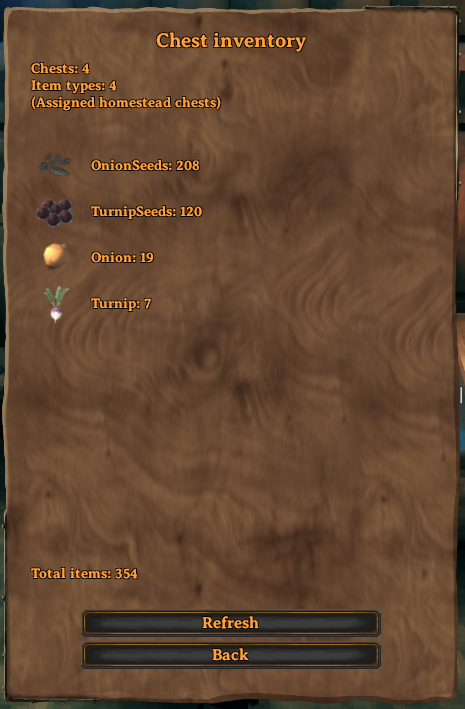
- Chest inventory shows the combined contents of all assigned chests.
6. Configure crop settings
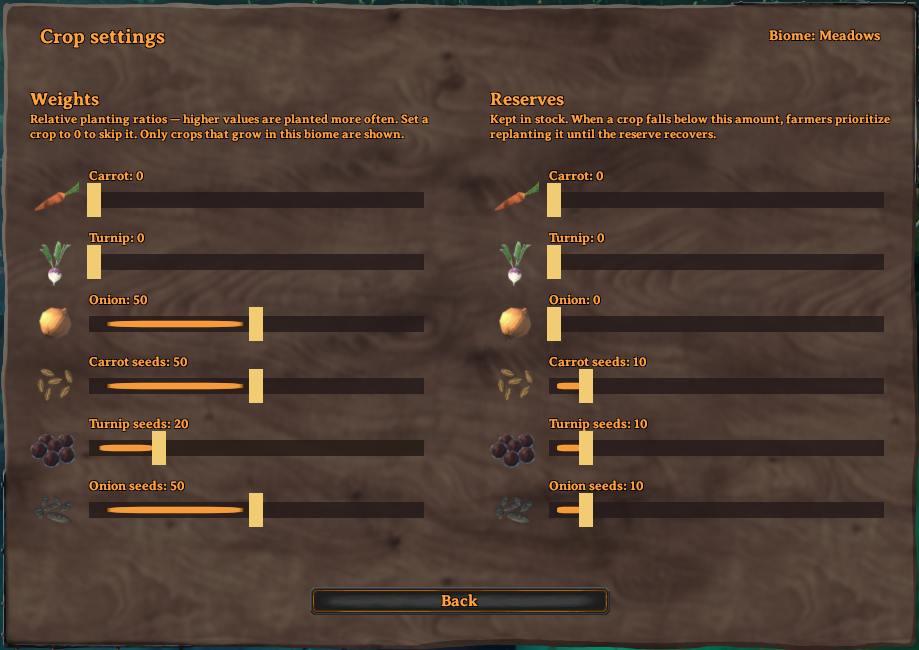
Open Crop settings. Only crops that grow in the homestead's biome (shown top-right) appear; others are skipped automatically. Vegetables are listed first, followed by their seed crops (Carrot seeds, Turnip seeds, Onion seeds); the list scrolls if there are more crops than fit.
- Weights (left) — relative planting ratios. Higher weight = planted more often when filling empty slots. Vegetables and their seed crops each have their own weight, so you can favor seeds (e.g. for chicken feed) or food independently. Set a crop to 0 to never plant it (existing plants are still harvested).
- Reserves (right) — keep at least this many of what the row produces: a Carrot reserve keeps carrots, a "Carrot seeds" reserve keeps carrot seeds, and Barley/Flax/Jotun Puffs/Magecap keep the crop item itself. When stock dips below the reserve, farmers prioritize rebuilding it.
- Always sustainable — even if you set a vegetable's weight to 0, farmers still grow just enough of it to keep its seed crop supplied, so a seeds-focused setup never starves itself.
Click Back when done.
Which crops grow where
| Biome | Plantable crops |
|---|---|
| Meadows, Black Forest, Ocean | Carrot, Turnip, Onion |
| Swamp | Turnip |
| Plains | Carrot, Turnip, Onion, Barley, Flax |
| Mistlands | Jotun Puffs, Magecap |
| Mountains, Deep North, Ashlands | None |
The homestead's position decides the biome. For fields straddling a border, place the homestead on the side you want to farm.
7. Add farmers and go
- Stay near the homestead so the area stays loaded (placing the Homestead already spawned one farmer).
- Use Add Farmer for more workers, or to recover one that vanished after you left.
- Make sure the status is Working (use Toggle Pause if needed).
- Remove Farmer despawns one worker; Deposit all empties carried goods into chests. The world-wide farmer cap is
MaxFarmers(default 16).
The Homestead panel
Main menu
The hub for everything: pause/resume, manage farmers, scan the field, assign storage, and open crop settings.
| Control | What it does |
|---|---|
| Toggle Pause | Pause or resume farming for this homestead |
| Add Farmer | Spawn another farmer, or recover one that disappeared |
| Remove Farmer | Despawn one farmer from this homestead |
| Deposit all | Push carried items into assigned chests |
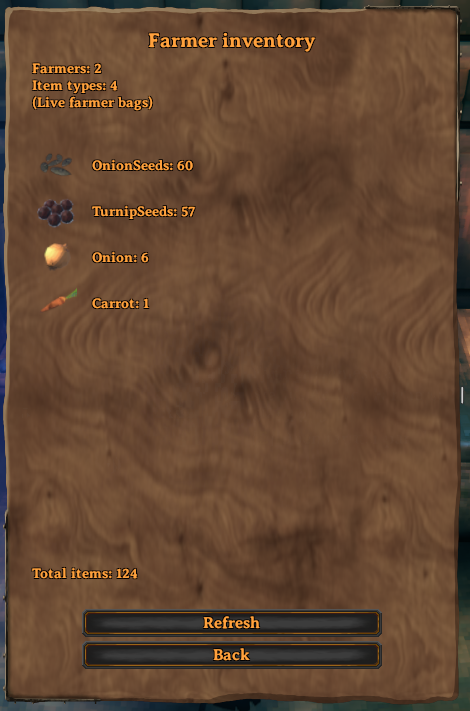
| Farmer inventory | View what nearby farmers are carrying |
| Scan Field | Discover / refresh crop slots inside the boundary |
| Clear Field | Forget remembered slots (rescan afterward) |
| Assign Boundary Posts | Bind the two nearby boundary posts |
| Add chest | Assign the nearest free chest in range |
| Clear chests | Unassign all chests (contents kept) |
| Chest inventory | Browse combined chest contents |
| Crop settings | Weights, reserves, biome-filtered crops |
Farmer inventory & Chest inventory
Quick read-outs of what your farmers are holding and what's in the assigned chests — each with a live item list, a total-items footer, and a Refresh button.
| Farmer inventory | Chest inventory |
|---|---|
 |
 |
Configuration
After first launch, edit BepInEx/config/com.farmerjohn.valheimfarmernpc.cfg. On dedicated servers these values are server-authoritative; reconnect after changing them.
Per-homestead crop weights and reserves are not in this file — they live on each Homestead and are edited in Crop settings.
General
| Setting | Default | Description |
|---|---|---|
| AdminOnlyPlacement | true |
Only admins may place/remove Homestead and Boundary pieces. |
| AdminOnlyAccess | true |
Only admins may open the panel and change settings. Set false for open access. |
| MaxFarmers | 16 |
Hard cap on active farmers across the whole world/server. |
Farming
| Setting | Default | Description |
|---|---|---|
| MaxFarmRadius | 64 |
Max half-width (m) of the boundary on X or Z. Larger fields fail to scan. |
| DefaultLayoutMode | Weighted |
Planting mode for new homesteads: Weighted uses Crop-settings ratios; Fixed replants each slot's original crop. Editing weights in the UI switches that homestead to Weighted. |
| ScanInterval | 2 |
Seconds between background field refreshes while farmers work. |
| ChestAssignRange | 20 |
Max distance (m) from the homestead when using Add chest. |
Inventory
| Setting | Default | Description |
|---|---|---|
| InventoryCapacity | 20 |
Max distinct item stacks a farmer can carry (not total item count). |
Networking
| Setting | Default | Description |
|---|---|---|
| ReservationTimeout | 30 |
Seconds a harvest/plant slot stays reserved before another farmer may take it. |
AI
| Setting | Default | Description |
|---|---|---|
| EnableFarmerSounds | true |
Goblin vocal sounds. Set false to mute farmers. |
| ThinkInterval | 0.5 |
Seconds between AI decision ticks. Lower = snappier, more CPU. |
| MoveSpeed | 2.5 |
Walking speed between tasks. |
| WorkRange | 2 |
Distance (m) to harvest, plant, or use a chest. |
Debug / UI
| Setting | Default | Description |
|---|---|---|
| DebugLogging | false |
Verbose AI logs. Leave off for normal play. |
| LogFeedbackToChat | true |
Also write homestead feedback to chat. Center-screen messages always show. |
Multiplayer notes
- Install the same mod version on the server and all clients.
- Homestead data is saved in the world via the piece.
- Multiple farmers can share one homestead; they coordinate so two won't fight over the same plot.
- Farmers only work while someone keeps the area loaded.
Troubleshooting
| Issue | What to try |
|---|---|
| Can't place Homestead / posts | You're not an admin and AdminOnlyPlacement is true. |
| Can't open the panel | AdminOnlyAccess is true and you're not an admin. |
| Boundary missing / scan fails | Assign two posts; keep the field ≤ MaxFarmRadius; posts must form a real rectangle. |
| No crops in Crop settings | The biome has no farmable crops (e.g. Mountains), or you haven't scanned yet. |
| Farmers idle | Paused; no ripe/empty work; no seeds in bags/chests; or the area is unloaded. |
| Farmers vanished | Normal after you leave — Add Farmer again while nearby. |
| Chests not assigned | Move chests within ChestAssignRange and click Add chest again. |
Development
Repository: github.com/nico8034/FarmerNPC
# Local Debug build → r2modman Default profile plugins
powershell -ExecutionPolicy Bypass -File ValheimFarmerNPC/scripts/deploy-local.ps1

# Thunderstore zip → ValheimFarmerNPC/dist/
# (bump Plugin.PluginVersion first; update Package/CHANGELOG.md)
powershell -ExecutionPolicy Bypass -File ValheimFarmerNPC/scripts/package-thunderstore.ps1
Also copy Environment.props.example → Environment.props and set VALHEIM_INSTALL for the IDE/Jötunn post-build deploy. Version source of truth: Plugin.PluginVersion in Plugin.cs (semantic versioning).
License
Licensed under the MIT License. Valheim is © Iron Gate AB — this mod requires a legitimate copy of the game.
