
Please disclose if any significant portion of your mod was created using AI tools by adding the 'AI Generated' category. Failing to do so may result in the mod being removed from Thunderstore.

Quads Quality Of Life
Small QoL controls, each with its own switch: sort and stack to chests, chests that take what you assign, item locks, quick build sets, a boat push and more.
| Last updated | 4 hours ago |
| Total downloads | 92 |
| Total rating | 2 |
| Categories | Mods Tweaks Client-side Utility Building AI Generated Deep North Update |
| Dependency string | Quads_Lab-Quads_Quality_Of_Life-1.13.0 |
| Dependants | 0 other packages depend on this package |
This mod requires the following mods to function

denikson-BepInExPack_Valheim
BepInEx pack for Valheim. Preconfigured with the correct entry point for mods and preferred defaults for the community.
Preferred version: 5.4.2351README
🎒 Quad's Quality of Life
Small QoL controls, each with its own switch: sort and stack to chests, chests that take what you assign, item locks, quick build sets, a boat push and more.



Source code · Report a bug · Discord
✨ Features
What is in it
- Q: build a quick set from items you hover in your inventory; outside the inventory it swaps to the set and back.
- B: jump into construction mode with your hammer, and back to what you had.
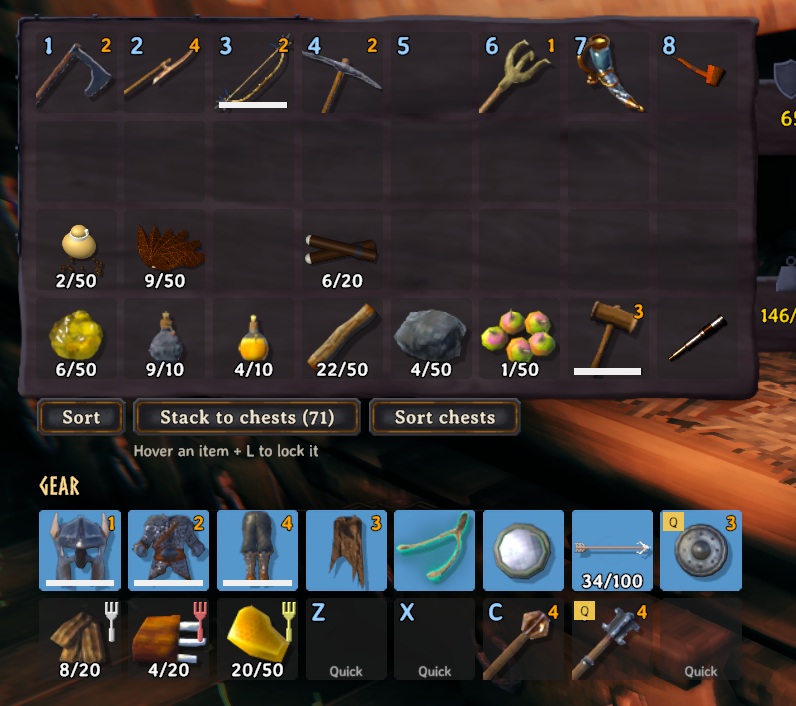
- Sort: a button under your inventory joins split stacks and puts everything in order (hotbar and gear slots stay put).
- Stack to chests: a button under your inventory moves matching items into nearby chests, with Undo and sounds.
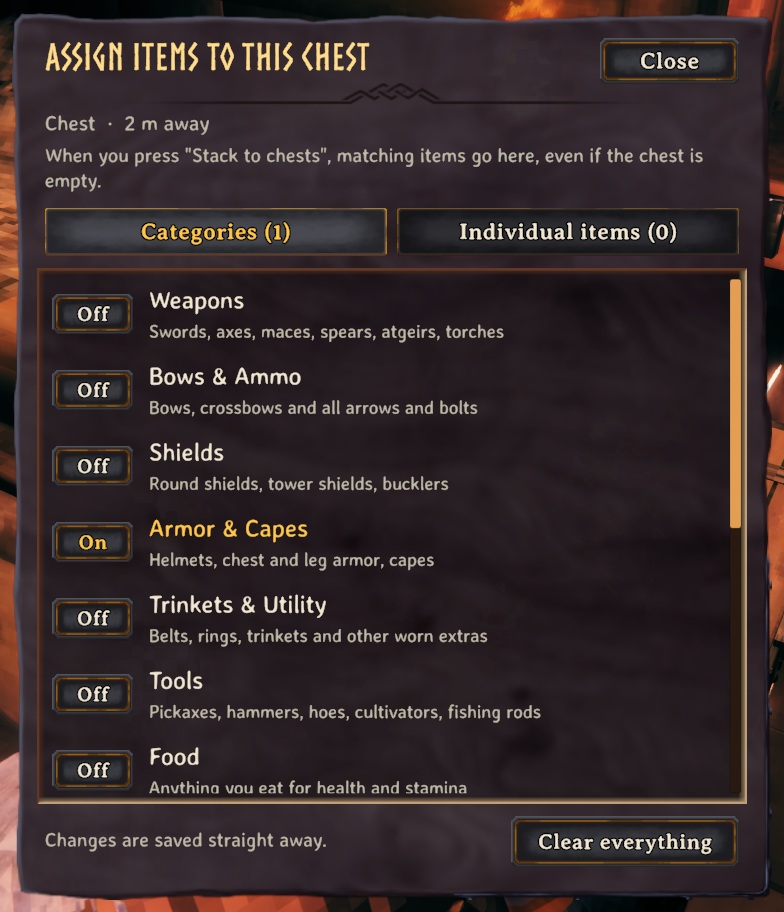
- K opens the chest assignment menu (choose what each chest receives); L locks items so they are never stacked.
- Boat push: tap or hold P next to a boat to shove it where you look (gentle, with a speed cap).
- Far zoom: scroll the camera out to 20 m on foot and 40 m on a boat (the game stops at 6); the steps grow as you zoom out.
- Planting: you cannot plant a seed, sapling or crop where it has no room to grow up (the ghost turns red and says so), instead of finding out after it never grows.
Keys are configurable. Q and B work while you are running.
📸 Screenshots
Choosing what a chest receives (K)
Sort, Stack to chests and Sort chests, under your inventory
🎮 How to use
| Key | What it does |
|---|---|
| Q | Build a quick set (inventory open) / swap to it and back |
| B | Jump into construction mode with your hammer, and back |
| K / L | Assign what a chest receives / lock an item |
| P | Tap or hold next to a boat (not in it) to push it where you look |
🧩 Other mods
Known clashes
- ExtraSlots, Equipment and Quick Slots, AzuExtendedPlayerInventory, Extended Player Inventory, ComfyQuickSlots, BetterArchery (quiver on): the Sort button turns off while one is installed.
- ValheimPlus extra rows count as ordinary bag rows.
Works with our mods
- Its chest assignments (K) are used by Quad's Feed From Chests, Quad's Ledger Chest and Quad's Companion.
- Quad's Gear Slots: Sort and Stack to chests leave the gear slots alone.
- Quad's Recycler: items locked with L can't be recycled.
Removing it: a game key it freed (Q, auto-run) stays unbound; set it again in the game's controls.
Found a clash with another mod? Tell us which one and what happened.
👥 Multiplayer
Who needs it: Only the players who want it.
Chest assignments are saved on the chest, so everyone sees them. It skips chests others have open.
The host decides: how far build stations reach. While you play on their world their values replace yours (your file isn't changed); a host without the mod leaves everyone their own.
🌍 Languages
English, Русский (Russian), Deutsch (German), 简体中文 (Chinese), Português do Brasil (Portuguese), Español (Spanish), Français (French), Polski (Polish), Türkçe (Turkish). It follows the game's own language setting.
The translations were made with AI, so a few words may be off. To correct one, or to add your language, put a file in BepInEx/config/translations/com.quad.qualityoflife/ named after the game's name for the language (German.json, Italian.json, Japanese.json...) with only the lines you change, copied from English.json (it wins over the built-in one). Or tell us the better words and we'll put them in for everyone.
⚙️ Settings
In BepInEx/config/com.quad.qualityoflife.cfg, made the first time the game runs with the mod. r2modman and Thunderstore Mod Manager edit it under Config editor.
BoatPush
| Setting | Default | What it does |
|---|---|---|
Enabled |
true |
Turn boat pushing on or off. |
Key |
P |
Tap (or hold) this next to a boat, not in it, to push it the way you are looking. |
Strength |
3 |
How hard you push (metres per second, per second). Higher gets a heavy boat moving faster. |
MaxSpeed |
2.5 |
The fastest your pushing can move a boat (metres per second). Walking pace is about 5. |
Seconds |
3 |
One tap of the key keeps pushing for this long (holding it keeps pushing as long as you hold). |
Range |
3 |
How close you have to be to the boat's hull (metres). |
Camera
| Setting | Default | What it does |
|---|---|---|
FarZoom |
true |
Let the scroll wheel zoom the camera out further than the game allows. |
MaxDistance |
20 |
How far out the camera can go on foot (metres). The game's own limit is 6. |
MaxDistanceBoat |
40 |
How far out the camera can go while steering a boat (metres). |
General
| Setting | Default | What it does |
|---|---|---|
ShowMessages |
true |
Show a short message in the top-left when something happens. |
Hammer
| Setting | Default | What it does |
|---|---|---|
Enabled |
true |
Turn the hammer shortcut on or off. |
Key |
B |
Press to equip your hammer and start building. Press again to go back to what you had equipped. |
Map
| Setting | Default | What it does |
|---|---|---|
ShowShips |
true |
Show every ship in the world on the minimap and the map, with a longship icon, wherever it is. |
ShipPinType |
Icon4 |
Which of the map's pin kinds the ship pins count as (their picture is the longship either way). Hiding that kind with the map's pin filters hides them too. |
Planting
| Setting | Default | What it does |
|---|---|---|
NeedRoomToGrow |
true |
A seed, sapling or crop can only be planted where it has the room to grow up: the same check the game makes later (a plant with another plant, a rock, a tree or a building too close never grows), made before you plant, so the ghost turns red and you are told. Takes effect at once. |
QuickSet
| Setting | Default | What it does |
|---|---|---|
Enabled |
true |
Turn the quick-set feature on or off. |
Key |
Q |
Inventory open: hover an item and press to add/remove it from your quick set. Inventory closed: press to swap to the quick set, press again to go back to what you had. |
ShowBadges |
true |
Mark quick-set items in your inventory with a small gold badge. |
QuickStack
| Setting | Default | What it does |
|---|---|---|
Enabled |
true |
Turn the quick-stack buttons and item locking on or off. |
Radius |
20 |
How far (in metres) from you a chest can be and still be used by Stack to chests and Sort chests. Raise it to put things away into your storehouse from across a big base: 60 reaches a long way. Chests only count while their area is loaded around you (about 100 m and more). Takes effect at once. |
LockKey |
L |
Inventory open: hover an item and press this to lock it (it will never be moved by the buttons) or unlock it. |
StackKey |
None |
Optional key that does 'Stack to chests' while your inventory is open (useful with a controller). None = off. |
ProtectHotbar |
true |
Never move items in your top inventory row (the hotbar). |
ShowButtons |
true |
Show the buttons under your inventory when a chest is in range. |
PlaySounds |
true |
Play the chests' own sounds when you stack (a thunk from each chest that takes items) and when you undo. |
ShowChestLabels |
true |
Show what a chest is assigned to receive: under its Assign button when it's open, and in the hover text when you look at it. |
AssignKey |
K |
Look at a chest (or have one open) and press this to choose what it should receive when you stack: whole categories or individual items. |
Sort
| Setting | Default | What it does |
|---|---|---|
Enabled |
true |
Show a Sort button under your inventory: it joins split stacks and puts items in order. (Respects ProtectHotbar in the QuickStack settings.) |
Stations
| Setting | Default | What it does |
|---|---|---|
BuildRange |
0 |
How far (in metres) from a crafting station (workbench, stonecutter, forge, ...) you can build with it, when that is more than the station's own range (20 m, more with upgrades). 0 leaves the game's ranges. 60 reaches across a big base. Takes effect at once. In multiplayer the server's value applies. |
🤖 Made with AI
Made with the help of Claude (Anthropic), with Claude Code: designed, written and checked together, and tried in the game.
🧪 About Quads Lab
Quads Lab is where Quad H (HardHeadHackerHead) builds software with AI, of every kind: these Valheim mods are one of its projects. Each mod is designed by a player, written with Claude Code and tested in our own world, with bobisme as our tester.
- 🌐 quadslab.io
- 🧰 All Quads Lab mods on Thunderstore
- 💻 Source code on GitHub
- 💬 Discord
- 🐞 Found a bug? Open an issue on GitHub
📜 Recent changes
- 1.13.0 Now in your language: English, Russian, German, Chinese (Simplified), Portuguese (Brazil), Spanish, French, Polish and Turkish, following the game's own Language setting. The game's own names are used for its things (items, creatures, lands, stations). The translations were made with AI: to correct a line, or add a language, put a file in BepInEx/config/translations/com.quad.qualityoflife/ named after the game's name for the language (German.json...) with only the lines you change, copied from translations/English.json on GitHub. Chest assignments are saved exactly as before; only their names on screen are translated. Its notes about the game's keys name them as the game's Controls settings do.
- 1.12.0 The chest assign menu (K), the Sort, Stack to chests, Undo and Sort chests buttons, the Assign button under an open chest with its tags, and the quick-set and KEEP tags on your items now use the game's own panels, buttons and fonts. Opened from a chest you have open, the assign menu sits where the crafting panel is and the chest stays open, so you can see what's in it while you choose. The search box no longer lets E, Tab, M or other mods' keys react while you type, and K closes the menu again. Fixed: Stack to chests never puts anything into the game's Obliterator, a Ledger Chest or the Arena's chests.
- 1.11.2 A clearer page: what it does, who needs it in multiplayer, how it gets on with other mods, and where to report a bug. The game itself is unchanged.
Every change is on the Changelog tab.
