
Please disclose if any significant portion of your mod was created using AI tools by adding the 'AI Generated' category. Failing to do so may result in the mod being removed from Thunderstore.

ImprovedMagicShield
Refresh a magic shield when the new full protection is at least its remaining protection. Accepted casts restore full protection and duration; weaker casts leave the active shield unchanged.
| Last updated | 2 days ago |
| Total downloads | 60 |
| Total rating | 1 |
| Categories | Mods Tweaks Client-side AI Generated Deep North Update |
| Dependency string | Slikfoul-ImprovedMagicShield-1.2.2 |
| Dependants | 0 other packages depend on this package |
This mod requires the following mods to function

denikson-BepInExPack_Valheim
BepInEx pack for Valheim. Preconfigured with the correct entry point for mods and preferred defaults for the community.
Preferred version: 5.4.2351README
Improved Magic Shield
Improved Magic Shield refreshes a magic shield when the new cast's full protection is at least the protection remaining on the active shield.
- Accepted cast: discard previously absorbed damage, apply the new cast's full protection and item-level duration, and restart its timer.
- Weaker cast: preserve the active shield's capacity, absorbed damage, duration, timer, parameters and source.
- Applies to yourself and any target already eligible for the vanilla shield. Casting costs, range, target eligibility, damage absorption and shield-break behavior follow vanilla.
| Current full protection | Already absorbed | Remaining | New full protection | Result |
|---|---|---|---|---|
| 500 | 450 | 50 | 100 | Full 100 protection and a fresh timer |
| 500 | 200 | 300 | 100 | Active shield unchanged |
| 500 | 200 | 300 | 500 | Absorbs up to 500 damage; duration refreshed |
| 500 | 400 | 100 | 100 | Full 100 protection and a fresh timer |
Incoming skill and item levels come from the new vanilla cast. The world-level bonus follows Valheim's normal shield calculation. Equal protection is accepted.
Screenshot
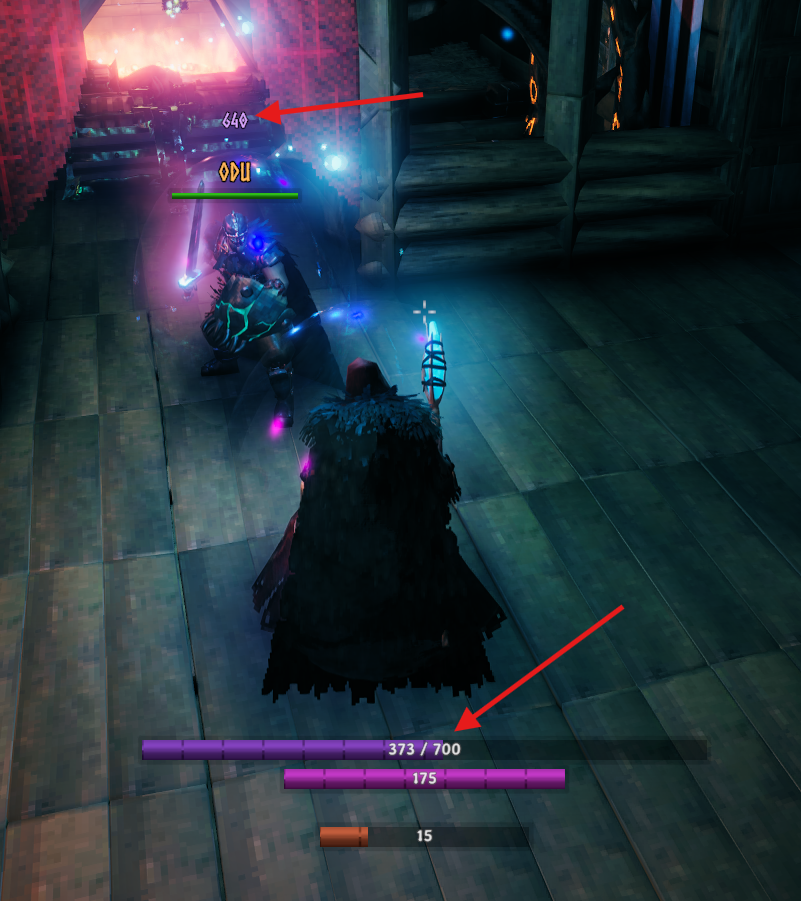
The lower bar shows your remaining and full shield protection. The optional number above another character shows their remaining protection.
Configuration
Open the in-game BepInEx ConfigurationManager (normally F1) and find Improved Magic Shield. Settings are saved in BepInEx/config/Slikfoul.ImprovedMagicShield.cfg; saved values take precedence over defaults.
Display switches are independent:
| Setting | Default | Behavior |
|---|---|---|
| Enabled | On | Master switch for improved refreshes and displays; each display also has its own switch. Turning this off returns subsequent casts to vanilla behavior and hides the mod's displays without removing active shields. |
| Show local shield bar | On | Show your own 250 / 500 bar in a fixed row above the normal lower resource bars. The fill uses the actual remaining/full capacity of your current shield. It fades out after five quiet seconds, even when damaged, and returns on a cast, shield damage or combat activity. |
| Show remaining protection | Off | Show 123 above player and summoned skeleton names and below the visible name/health block of other shielded creatures within 60 metres of the camera. Never shown on your own character, even when the local HUD bar is off. Appears on that character's shield cast, shield damage or combat, then fades after five quiet seconds. Your own combat does not reveal other characters' labels. This does not enable or disable the local HUD bar. |
| Show shield health outline | Off | Draw a purple shell with a semicircular outer edge and a rectangular inner opening around other shielded players' and creatures' visible health bars. The visible contour spans the full bar at full shield protection and its left half at 50%, without drawing a vertical line through health. It does not change native health or enable overhead numbers. |
The health outline uses the current shield's actual remaining/full protection, including another caster's shield: 200 / 200 and 700 / 700 both cover the whole bar, while 150 / 300 covers half. It follows the native health bar's position, scale and visibility, remains visible while that bar and the shield are active, and disappears when the shield runs out. It is independent of the number display's combat fade. The owning peer needs this mod's capacity snapshots (version 1.2.0 or newer); missing or stale data hides the outline rather than inventing a percentage. Its switch is independent of Magic Shield Effect.
Label scale (%) controls the overhead label size: default 80, integer range 50–300. It does not change the lower resource bar's size; that bar inherits the game's HUD canvas scaling.
Label vertical offset moves overhead labels from their automatic position: default −20, integer range −200–200. Positive values move them up; negative values move them down. The offset follows the native header canvas scale and does not move the local shield bar.
Protection per segment controls the lower bar's length: default 50, integer range 10–500. Each native 32-unit HUD segment represents this much full shield protection. At the default scale, a 200-protection shield spans four segments and a 700-protection shield spans fourteen. The bar uses the actual applied shield's maximum, including shields cast by someone else. Damage changes the fill, while an accepted replacement changes the overall length to match the new shield. The frame has no minimum width imposed by the text. On short bars, the caption remains centered at its native font size and may extend beyond the frame; other resource values do not affect the shield bar's length.
Magic Shield appearance
Magic Shield Effect is a separate switch, off by default. It enables all five appearance controls below on this client, including color. There is no separate Change color switch.
| Setting | Default | Range |
|---|---|---|
| Color | 269 | 0–360 hue |
| Glow | 72 | 0–100 |
| Light brightness | 35 | 0–100 |
| Opacity | 30 | 0–100 |
| Ovality | 50 | 0–100 |
All sliders use whole numbers. Glow, light brightness and opacity are percentages of the original appearance. Ovality narrows the bubble horizontally while preserving height and colliders. These controls affect only appearance, including visible shields on other characters; protection, duration and the shield HUD are unchanged. Turning the switch off restores the captured appearance of active effects.
To use this block alongside EffectsControl, turn off Magic shield in EffectsControl, then turn on Magic Shield Effect here. While EffectsControl's shield controls or SubtleShield are active, this block is automatically suspended. Each client chooses its own appearance settings.
Installation and multiplayer
Requires BepInExPack for Valheim. Download the ZIP from GitHub Releases and import it as a local mod in r2modman, or place ImprovedMagicShield.dll under BepInEx/plugins/ImprovedMagicShield. ConfigurationManager is optional and provides the in-game settings UI.
Install on every participating client for consistent player shield behavior. Valheim processes a player's received shield on that player's owning client. Installing only on the caster does not change an unmodified recipient's shield refresh.
For player-owned characters, the recipient's client decides which refresh rules apply:
| Recipient has the mod enabled | Caster has the mod | Result on the recipient |
|---|---|---|
| Yes | Yes or no | Improved refresh rules apply. |
| No | Yes or no | Vanilla refresh rules apply. |
A modded recipient therefore benefits even when the caster has no mod. An unmodified recipient remains vanilla even when the caster has the mod.
The mod adds no custom RPCs or server-enforced version requirement. Unmodified owners retain vanilla refresh behavior. It does not synchronize or transfer the status effect itself.
