
Please disclose if any significant portion of your mod was created using AI tools by adding the 'AI Generated' category. Failing to do so may result in the mod being removed from Thunderstore.

Unfaded
Valheim 1.0-1.0.15 death camera: remove the 9.5s blackout, track killers, free-fly, and respawn on demand.
| Last updated | 2 days ago |
| Total downloads | 626 |
| Total rating | 1 |
| Categories | Mods Misc Client-side Utility AI Generated Deep North Update |
| Dependency string | djcdevelopment-Unfaded-1.0.8 |
| Dependants | 0 other packages depend on this package |
This mod requires the following mods to function

denikson-BepInExPack_Valheim
BepInEx pack for Valheim. Preconfigured and includes unstripped Unity DLLs.
Preferred version: 5.4.2202README
Unfaded
Eliminate the tedious 9.5-second death blackout in Valheim, unlock 360° ragdoll spectator physics, killer tracking, tactical drone scouting, and take control of your respawn.








Compatibility: Valheim 1.0.0-1.0.15; latest build, Harmony target, and isolated boot verification completed on 1.0.15. See the fleet compatibility evidence.
📑 Table of Contents
- 🎯 The Request & Origin
- 🎬 In-Game Showcase Video
- 🏗️ Visual System Architecture (Archify)
- ⚡ Core Features
- 1. Zero Death Blackout
- 2. Triple Spectator Camera Modes
- 3. Cinematic Bullet-Time Slow-Mo
- 4. Death Cause & Attacker Recap Banner
- 5. Instant Manual Respawn (
[Space]) - 6. In-Game CLI & Safe Testing (
unfaded test) - 7. Video Recording Suite (
[F9]/record) - 8. Instant Death & Timber Simulation (
unfaded tree)
- 🎮 Hotkey Quick Reference
- ⚙️ Configuration Reference
- 💻 In-Game Console Commands (
F5) - 🔬 Hardware Verification (OMEN Rig)
- 📋 Changelog
- 📚 Documentation & Guides
- 📦 Installation Guide
- 🛠️ Building from Source
- 📄 License
🎯 The Request & Origin

"Any mods out there to get rid of the annoying fadeout on death? It's the most uninspiring and boring thing ever to watch"
— Draugor
In vanilla Valheim, Iron Gate actually wrote code for the camera to follow your ragdoll body (base.transform.LookAt(averageBodyPosition)). But immediately upon death, the game fades a pitch-black loading canvas (m_loadingScreen.alpha) over the viewport for 9.5 entire seconds while Game.instance.RequestRespawn(10f) counts down.
Instead of watching your Viking ragdoll launch over a mountain, slide into the ocean, or see the troll that crushed you, you are forced to stare into a pitch-black void.
Unfaded transforms the death experience from a punitive blackout into an informative, cinematic spectator tool.
🎬 In-Game Showcase Video
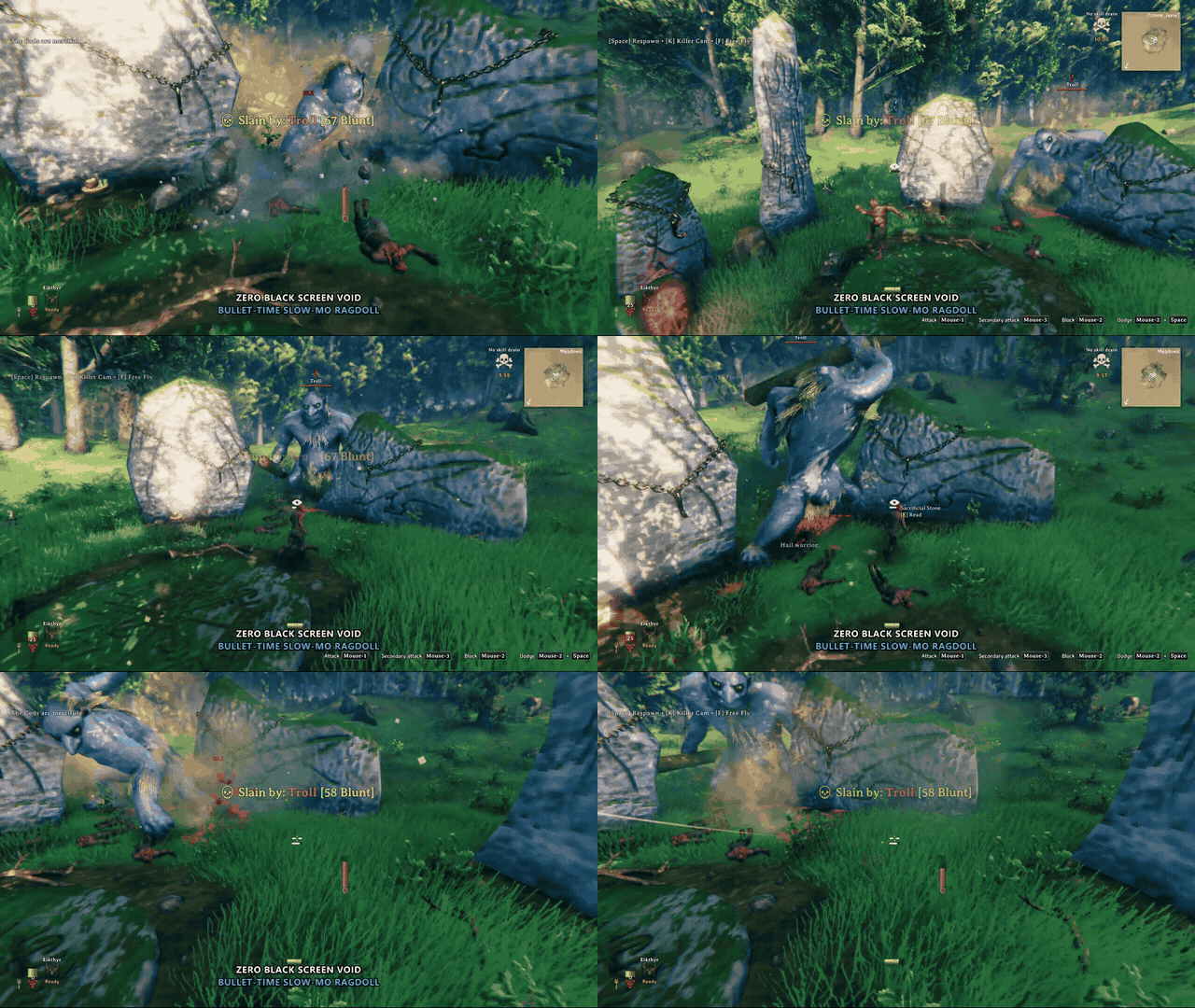
Watch Unfaded in action — zero death blackout, 0.35x bullet-time slow-mo, combat recap banner, killer focus cam ([K]), free-fly drone scouting ([F]), and instant manual respawn ([Space]):
https://github.com/djcdevelopment/Unfaded/raw/main/docs/Unfaded_Showcase_Discord_Web.mp4
▶️ Click to Watch / Download Full 1080p Showcase Video (MP4) • 🎥 Showcase Production Guide & Storyboard
🏗️ Visual System Architecture (Archify)
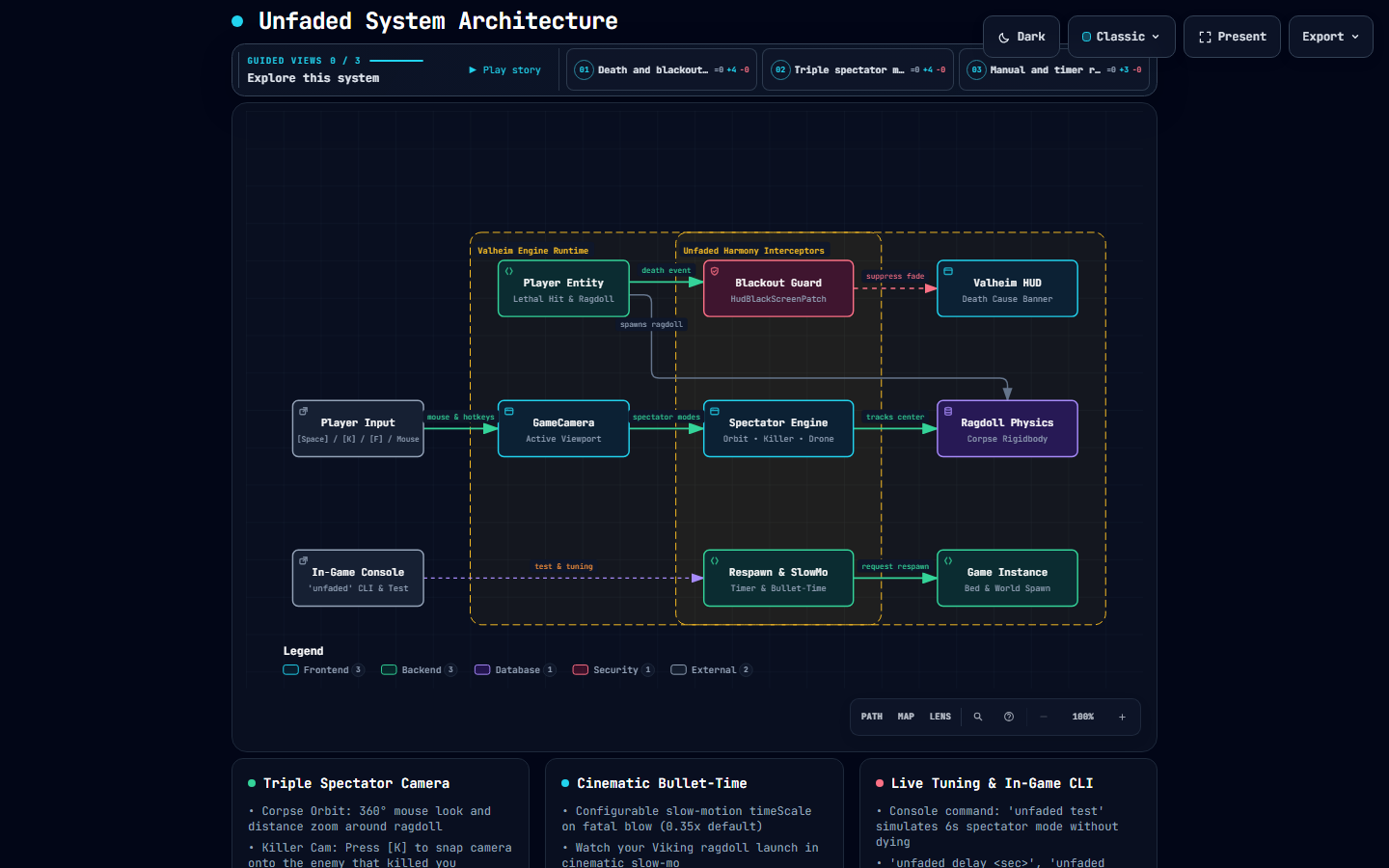
Archify verified showcase map illustrating the engine hooks, spectator modes, and respawn pipeline:
👉 Open Live Interactive Archify Diagram (Live Web Preview) (Dark/Light themes, guided view inspection, and node reachability)
flowchart LR
    subgraph Input ["Player Controls & CLI"]
        PInput["Mouse Look & Zoom<br/>[Space] Respawn • [K] Killer • [F] Drone"]
        Console["F5 Console Command<br/>'unfaded test' | 'unfaded delay'"]
    end

    subgraph Valheim ["Valheim Game Engine"]
        PDeath["Player.OnDeath()<br/>Lethal Hit & Ragdoll Spasm"]
        Ragdoll["Ragdoll Physics<br/>Corpse Rigidbody"]
        VHUD["Valheim HUD<br/>Death Cause Banner"]
        VGame["Game Instance<br/>RequestRespawn & Bed Spawn"]
        Cam["GameCamera<br/>Active Viewport"]
    end

    subgraph Unfaded ["Unfaded Mod (BepInEx)"]
        HGuard["HudBlackScreenPatch<br/>Forces Alpha = 0f (No Blackout)"]
        COrbit["GameCameraDeathPatch<br/>Orbit • Killer Focus • Drone Spectator"]
        RController["GameRespawnPatch<br/>Space Trigger • Delay Override • Slow-Mo"]
    end

    PDeath -->|Death Event| HGuard
    HGuard -->|Bypass Blackout| VHUD
    PDeath -->|Spawns| Ragdoll

    PInput -->|Controls| Cam
    Cam -->|Active Viewport| COrbit
    COrbit -->|Tracks Center| Ragdoll

    Console -->|Live Tuning & Test Sim| RController
    PInput -->|Press Space| RController
    RController -->|Triggers _RequestRespawn| VGame
⚡ Core Features
1. Zero Death Blackout
Keeps the viewport 100% clear when you die. No black screen, no artificial dimming, no forced blindness.
2. Triple Spectator Camera Modes
- Corpse Orbit (Default): Smooth 360° mouse look and scroll wheel distance zoom around your ragdoll body with obstacle raycast protection.
- Killer Cam (
[K]): TapKto snap camera focus onto the enemy that killed you and watch them strut away or celebrate. - Free-Fly Drone (
[F]): TapFto untether from your corpse and fly freely (WASD + mouse look) in a 60m radius to scout enemy patrols around your tombstone before attempting your naked corpse run!
3. Cinematic Bullet-Time Slow-Mo
Upon receiving the fatal blow, game time briefly slows to 0.35x for 1.5 seconds. Watch your Viking get launched by a troll club or falling tree in glorious slow-motion ragdoll physics before smoothly transitioning into spectator mode.
4. Death Cause & Attacker Recap Banner
Displays a clean on-screen summary of exactly what dealt the killing blow:
💀 Slain by: 2★ Fuling Berserker [164 Blunt],💀 Slain by: Falling Tree / Timber [120 Physical], or💀 Slain by: Gravity / Fall Damage [-95 Physical]
5. Instant Manual Respawn ([Space])
Done watching the aftermath or scouted your tombstone? Tap [Space] (or your configured hotkey) to respawn at your bed or spawnpoint immediately.
6. In-Game CLI & Safe Testing (unfaded test)
Never sacrifice a survival character just to test mod settings. Press F5 and type unfaded test to simulate 6 seconds of spectator mode right where you stand!
7. Video Recording Suite ([F9] / record)
One-touch capture workflow for clip creators and bug reporters. Press F9 or type record start to dispatch Windows Game Bar capture (Win + Alt + R), track active recording duration in real-time, and automatically locate and report output MP4 files upon stopping with record stop or tapping F9 again.
8. Instant Death & Timber Simulation (unfaded tree / smite)
Testing ragdoll physics, killer cameras, or recording clips without risking survival characters is effortless:
unfaded tree— Deals simulated lethal timber damage (HitType.Tree), launching your Viking ragdoll forward in 0.35x bullet-time with full combat recap banner.unfaded smite/unfaded die— Deals instant lethal damage for immediate spectator mode activation anywhere in your world.
🎮 Hotkey Quick Reference
| Key | Action | Context |
|---|---|---|
Space |
Instant Respawn | Immediately respawns at your bed or world spawnpoint. |
Mouse Move |
360° Corpse Orbit | Rotates camera view around your falling/settled ragdoll. |
Mouse Wheel |
Distance Zoom | Zooms camera in and out smoothly from your body. |
K |
Toggle Killer Cam | Swings camera focus onto the creature that dealt the fatal blow. |
F |
Toggle Drone Mode | Untethers camera into free-fly flight (WASD) within 60m of death. |
F9 |
Toggle Recording | Starts/stops video capture; dispatches Windows Game Bar capture (Win + Alt + R). |
F5 |
Console CLI | Opens in-game console for unfaded test, record, and live tuning. |
⚙️ Configuration Reference
Configuration file: BepInEx/config/djc.valheim.unfaded.cfg
| Section | Setting | Default | Description |
|---|---|---|---|
1 - General |
Enabled |
true |
Master toggle for Unfaded. |
2 - Visuals |
DisableDeathFade |
true |
Eliminates the 9.5-second black screen canvas fadeout completely. |
2 - Visuals |
CustomDeathFadeDuration |
0.0 |
Custom fade duration in seconds (0 = disabled, 9.5 = vanilla). |
3 - Respawn |
RespawnDelay |
10.0 |
Auto-respawn delay in seconds (range: 0.0 to 120.0). |
3 - Respawn |
EnableManualRespawn |
true |
Enables pressing a hotkey to respawn immediately without waiting. |
3 - Respawn |
ManualRespawnKey |
Space |
Hotkey that triggers immediate respawn. |
4 - Spectator Camera |
EnableCameraOrbit |
true |
Allows free 360° mouse look and orbit around your ragdoll body. |
4 - Spectator Camera |
CameraOrbitSensitivity |
2.0 |
Mouse look sensitivity multiplier while spectating your corpse. |
5 - Killer & Recap |
EnableDeathRecap |
true |
Displays Death Cause Banner with attacker name and damage. |
5 - Killer & Recap |
EnableKillerCam |
true |
Enables Killer Focus mode. |
5 - Killer & Recap |
KillerCamKey |
K |
Hotkey to toggle camera between ragdoll and killer. |
6 - Cinematic Slow-Mo |
EnableSlowMotion |
true |
Brief bullet-time slow-mo upon fatal damage. |
6 - Cinematic Slow-Mo |
SlowMotionScale |
0.35 |
Time scale during fatal blow (0.1 = super slow, 1.0 = normal). |
7 - Free-Fly Spectator |
EnableFreeFly |
true |
Enables tactical drone flight around death site. |
7 - Free-Fly Spectator |
FreeFlyKey |
F |
Hotkey to toggle free-fly mode. |
7 - Free-Fly Spectator |
FreeFlyRadius |
60.0 |
Maximum flight distance in meters from death position. |
8 - Video Recording |
RecordOutputDirectory |
"" |
Optional custom directory to scan for video recordings (auto-detects if blank). |
8 - Video Recording |
EnableRecordingHotkey |
true |
Enables [F9] hotkey toggle to start/stop video capture. |
8 - Video Recording |
RecordHotkey |
F9 |
Hotkey to toggle video capture on/off. |
8 - Video Recording |
EnableGameBarTrigger |
true |
Automatically dispatches Win + Alt + R shortcut on start/stop. |
💻 In-Game Console Commands (F5)
Press F5 in-game and use the unfaded and record command suite:
record start         # Starts recording, dispatches Win+Alt+R, begins session timer
record stop          # Stops recording, scans output folders, logs filename & size
record status        # Shows current recording state and elapsed recording time
record dir [path]    # Displays or sets active video capture output directory
rec <start|stop>     # Shorthand alias for record command
unfaded tree         # Simulates fatal tree fall damage (HitType.Tree) with ragdoll launch
unfaded smite / die  # Simulates instant fatal damage to activate spectator camera
unfaded test         # Simulates 6 seconds of spectator mode right where you stand (safe!)
unfaded delay <sec>  # Adjusts auto-respawn timer dynamically (e.g. unfaded delay 5)
unfaded slowmo       # Toggles cinematic bullet-time slow motion on/off
unfaded killer       # Toggles killer camera tracking on/off
unfaded freefly      # Toggles free-fly drone mode on/off
unfaded orbit        # Toggles 360° mouse orbit on/off
unfaded status       # Prints complete live configuration and active hotkeys
🔬 Hardware Verification (OMEN Rig)
Unfaded was tested and validated on sovereign hardware (OMEN: Intel Core Ultra 9 285K, Dual Intel Arc Pro B70 GPUs) running the automated Deep North Testing harness:
==========================================================
   DeepNorthTesting :: Valheim 1.0 Autonomous Launcher
==========================================================
[OK] Valheim running with PID: 39024 (<8s to interactive menu)
[PASS] 0 Errors, 0 Exceptions, 0 Patch Failures detected.
[PASS] All 63 active BepInEx plugins loaded and patched cleanly.
Verified BepInEx Chainloader Log:
[Info   :   BepInEx] Loading [Unfaded 1.0.5]
[Info   :   Unfaded] Unfaded v1.0.5 loaded successfully. Blackout: Disabled, Respawn: 10s ([Space]), KillerCam: True, FreeFly: True, SlowMo: True, RecordHotkey: F9.
📋 Changelog
v1.0.8 (2026-09-20)
- Verified all death, camera, HUD, and respawn Harmony targets against Valheim 1.0.15.
- Synchronized the DLL, project, manifest, and Thunderstore package versions.
v1.0.5 (2026-09-14)
- Top-Level In-Game Showcase Video: Reordered documentation to place the moving slow-mo action GIF and full 1080p video player immediately beneath the initial mod request for instant proof of features.
- Embedded Showcase Video & GIF: 60 FPS animated preview GIF and full 38-second in-game showcase video hosted directly via repository media.
- Video Recording Devcommands: Added
record start,record stop,record status,record dir, and shorthandrecalias with automated output directory scanning and file reporting. - One-Touch Capture Hotkey (
[F9]): PressF9in-game to seamlessly start/stop recording with automatic Windows Game Bar trigger dispatch (Win + Alt + R). - Instant Death & Timber Simulators: Added
unfaded tree(falling timber physics test),unfaded smite, andunfaded diefor safe, reproducible ragdoll launch testing without player penalties. - Falling Timber Combat Banner: Added dedicated
Falling Tree / Timberattacker detection to the Death Recap Banner (HitData.HitType.Tree).
v1.0.1 (2026-09-13)
- Fixed Thunderstore documentation relative link 404s with absolute repository URLs.
- Initial Thunderstore release packaging.
v1.0.0 (2026-09-13)
- Initial release: Complete death blackout elimination (
HudBlackScreenPatch), 360° corpse orbit camera, killer focus cam ([K]), free-fly drone recon ([F]), 0.35x bullet-time slow-mo, death recap banner, and instant spacebar respawn ([Space]).
📚 Documentation & Guides
- 🔍 Technical Explanation & Engine Decompilation — Deep dive into
Hud.UpdateBlackScreen,GameCamera.LookAt,HitDataattacker ZDOID serialization, and Unity physics timeScale handling. - 📖 Field Workbook & Scenario Playbook — Step-by-step walkthrough of the Request-Snipe methodology, gameplay scenarios (Tree Fails, Fuling Raids, Crypt Recon), and configuration presets.
- 🗺️ Interactive Archify Diagram (Live Web Preview) — Standalone responsive HTML architecture map with theme toggling and guided story perspectives.
📦 Installation Guide
Using a Mod Manager (Recommended)
- Install r2modman or Thunderstore Mod Manager.
- Search for
Unfadedand click Download with Mod Manager.
Manual Installation
- Install BepInExPack Valheim (v5.4.2202 or newer).
- Download
Unfaded.dllfrom the latest GitHub Releases. - Place
Unfaded.dllinto yourValheim/BepInEx/plugins/directory. - Launch Valheim!
🛠️ Building from Source
Requirements:
- .NET SDK (8.0 or newer)
- Valheim installation
# Clone repository
git clone https://github.com/djcdevelopment/Unfaded.git
cd Unfaded

# Build (automatically copies to your Valheim plugins folder)
dotnet build -c Release
🤖 AI Disclosure & Provenance
In accordance with open source transparency and community guidelines:
- AI-Assisted Engineering: Engineered through collaborative human-AI pair programming (Google DeepMind Antigravity / Gemini) under human architectural direction.
- Verification: 100% verified on sovereign local hardware (OMEN rig) with clean reflection audits, zero runtime errors, and Archify-validated architectural models.
📄 License
Distributed under the MIT License. Copyright (c) 2026 djcdevelopment.
