
Please disclose if any significant portion of your mod was created using AI tools by adding the 'AI Generated' category. Failing to do so may result in the mod being removed from Thunderstore.

Unswayed
Valheim 1.0-1.0.15 camera and locomotion stabilizer for stride bobbing, shake, and close-quarters camera crushing.
| Last updated | 2 days ago |
| Total downloads | 245 |
| Total rating | 0 |
| Categories | Mods Misc Client-side Utility AI Generated Deep North Update |
| Dependency string | djcdevelopment-Unswayed-1.0.2 |
| Dependants | 0 other packages depend on this package |
This mod requires the following mods to function

denikson-BepInExPack_Valheim
BepInEx pack for Valheim. Preconfigured and includes unstripped Unity DLLs.
Preferred version: 5.4.2202README
Unswayed
Eliminate the rigid 1.0 locomotion stride bobbing, prevent suffocating camera crushing in burial crypts, unlock adaptive shoulder sightlines, and conquer motion sickness in Valheim.








Compatibility: Valheim 1.0.0-1.0.15; latest build, camera Harmony target, and isolated boot verification completed on 1.0.15. See the fleet compatibility evidence.
📑 Table of Contents
- 🎯 The Request & Origin
- 🏗️ Visual System Architecture (Archify)
- ⚡ Core Features
- 🎮 Hotkey Quick Reference
- ⚙️ Configuration Reference
- 💻 In-Game Console Commands (
F5) - 🔬 Hardware Verification (OMEN Rig)
- 📚 Documentation & Guides
- 📦 Installation Guide
- 🛠️ Building from Source
- 🤖 AI Disclosure & Provenance
- 🙏 Credits & Acknowledgments
- 📄 License
🎯 The Request & Origin

"Anyone make a mod to restore the pre 1.0 run animations yet? All that rigid bobbing is giving me vertigo. Especially in the burial crypts."
— Crusnik, Valheim Modding Community
In the Valheim 1.0 (Deep North) update, Iron Gate overhauled player locomotion blend trees (Player.controller). While the new run animation introduces a springier stride cadence, Valheim's GameCamera anchors its third-person target directly to Character.m_eye—a child transform of the animated cervical/head bone.
In the open world (at 4–6 meters distance), Vector3.SmoothDamp softens this bounce. But inside Burial Crypts, Sunken Crypts, and Frost Caves, narrow stone corridors trigger GameCamera.CollideRay2(), which aggressively clamps camera distance down to less than 1 meter right behind the Viking's neck.
At point-blank range:
- 100% of the raw stride bounce is projected directly across the player's viewport.
- The bobbing character model occludes over 70% of the screen.
- Flickering torch shadows and tight walls create an acute visual-vestibular conflict that induces headaches, nausea, and vertigo.
Instead of waiting for an asset-swapping AnimatorOverrideController that breaks across game sub-patches, Unswayed solves the problem at the camera anchor level: zero dependencies, zero asset bloat, and total ergonomic stability.
🏗️ Visual System Architecture (Archify)
Archify verified showcase map illustrating the locomotion decoupling hooks, dungeon collision clamps, and live tuning pipeline:
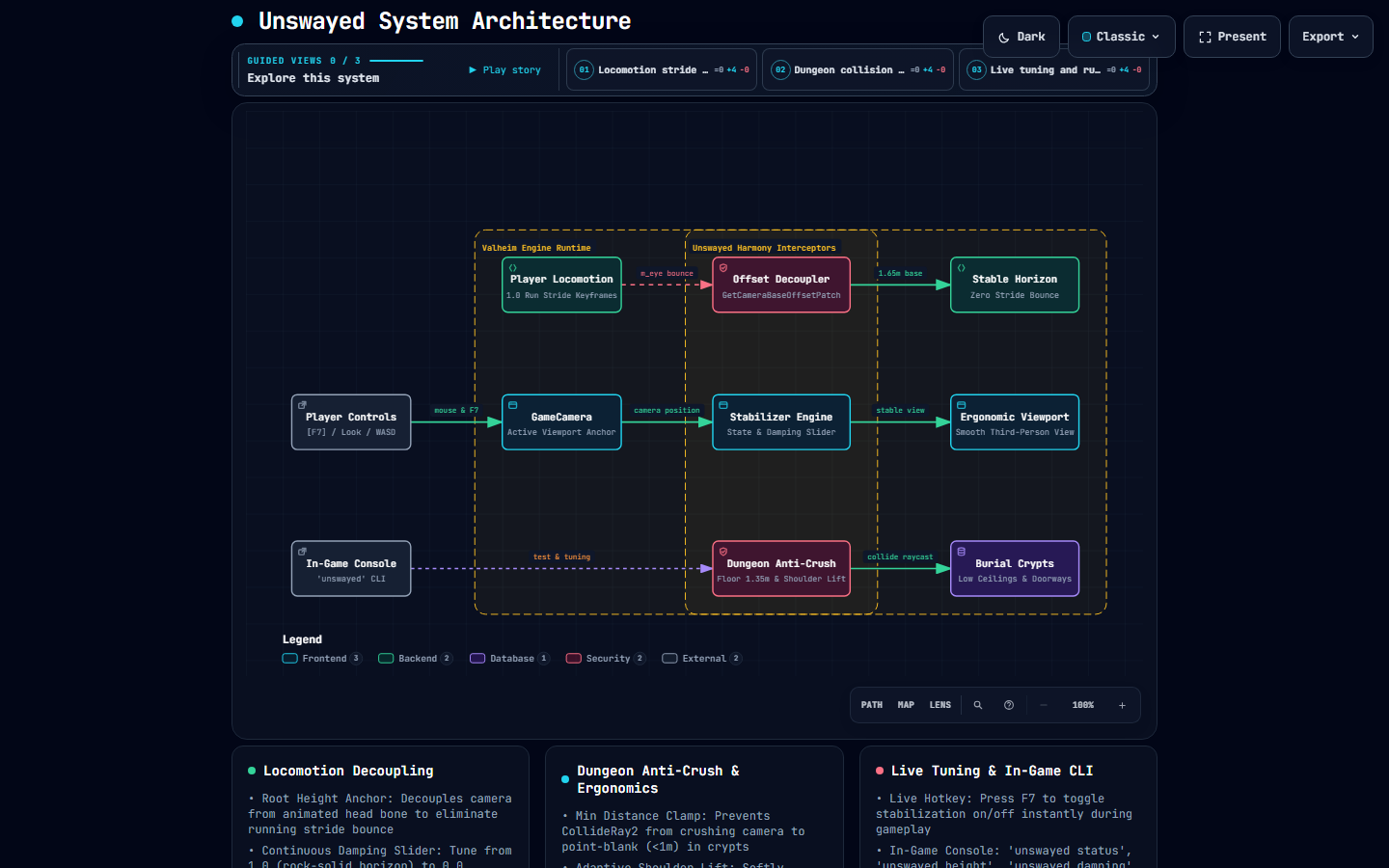
👉 Open Live Interactive Archify Diagram (Live Web Preview) (Dark/Light themes, guided view inspection, and node reachability)
flowchart LR
    subgraph Input ["Player Controls & CLI"]
        PInput["Mouse Look & WASD<br/>[F7] Live Stabilizer Toggle"]
        Console["F5 Console CLI<br/>'unswayed status' | 'unswayed damping'"]
    end

    subgraph Valheim ["Valheim Engine Runtime"]
        PLoco["Player Locomotion<br/>1.0 Run Stride Keyframes"]
        Cam["GameCamera<br/>Active Viewport Anchor"]
        Crypt["Burial Crypts<br/>Low Ceilings & Doorways"]
        Horizon["Stable Horizon<br/>Zero Stride Bounce"]
        VPort["Ergonomic Viewport<br/>Smooth Third-Person View"]
    end

    subgraph Unswayed ["Unswayed Harmony Interceptors"]
        OffsetPatch["Offset Decoupler<br/>GetCameraBaseOffsetPatch (1.65m)"]
        Manager["Stabilizer Engine<br/>State & Damping Slider (1.0)"]
        AntiCrush["Dungeon Anti-Crush<br/>Floor 1.35m & +0.35m Lift"]
    end

    PInput -->|Mouse & F7| Cam
    Cam -->|Camera Position| Manager
    PLoco -->|m_eye Bounce| OffsetPatch
    OffsetPatch -->|1.65m Base| Horizon
    Console -.->|Live Tuning| AntiCrush
    AntiCrush -->|Collide Raycast| Crypt
    Manager -->|Stable View| VPort
⚡ Core Features
1. Head-Bob Decoupling & Stride Stabilization
Overrides GameCamera.GetCameraBaseOffset() to anchor the third-person camera to a stable, root-relative pivot (Vector3.up * 1.65m). The camera tracks ground movement seamlessly across hills and terrain while remaining unaffected by vertical head-bone keyframe bounces.
2. Dungeon Proximity Anti-Crush Floor
Burial Crypts normally crush camera distance down to 0.5m right against your neck. Unswayed enforces a configurable minimum distance floor (1.35m default), ensuring you always have breathing room and clear sightlines.
3. Adaptive Crypt Shoulder Lift
Enforcing minimum distance in tight spaces could cause camera clipping against outside dungeon ceilings. Unswayed gently lifts the camera upward by up to +0.35m as space tightens, providing a clean over-the-shoulder view down narrow dungeon corridors.
4. Dynamic Dungeon FOV Expansion
Tunnel-vision FOV drastically amplifies motion sickness. When compressed in tight dungeon hallways, Unswayed smoothly widens camera FOV by +10° (e.g. 65° $\rightarrow$ 75°), providing peripheral visual anchors that stabilize the horizon.
5. Fine-Grained Camera Shake Scaler
Tune global camera shake intensity from 0.0 (completely disabled) to 1.0 (vanilla). Eliminate disorienting footstep vibrations while preserving combat impact feedback.
6. Sailing Ship-Tilt Suppression
Optionally locks camera horizon rotation while sailing (DisableShipTilt = true), preventing seasickness during heavy ocean storms.
7. In-Game CLI & Live Hotkey (F7)
Press F7 to toggle stabilization on and off on the fly to instantly feel the difference. Press F5 to open the developer console for runtime tuning.
🎮 Hotkey Quick Reference
| Key | Action | Context |
|---|---|---|
F7 |
Toggle Stabilization | Instantly toggles Unswayed camera stabilization on/off. |
F5 |
Console CLI | Opens Valheim developer console for unswayed commands. |
Mouse Move |
Look & Pitch | Smooth third-person mouse look without stride oscillation. |
Mouse Wheel |
Distance Zoom | Zooms camera between configured minimum floor and max distance. |
⚙️ Configuration Reference
Configuration file: BepInEx/config/djc.valheim.unswayed.cfg
| Section | Setting | Default | Range / Type | Description |
|---|---|---|---|---|
1 - General |
Enabled |
true |
Boolean | Master toggle for Unswayed plugin. |
1 - General |
ToggleHotkey |
F7 |
KeyCode | In-game hotkey to toggle camera stabilization on/off. |
2 - Head-Bob Suppression |
EnableBobSuppression |
true |
Boolean | Decouples camera base offset from animated head bone. |
2 - Head-Bob Suppression |
SuppressionMode |
Always |
Always, RunningOnly, DungeonsOnly |
Operating mode for bobbing suppression. |
2 - Head-Bob Suppression |
StabilizedEyeHeight |
1.65 |
1.2 to 2.2 (float) |
Stable vertical eye pivot height relative to player root. |
2 - Head-Bob Suppression |
VerticalDamping |
1.0 |
0.0 to 1.0 (float) |
Damping amount (1.0 = rock solid horizon, 0.0 = vanilla bounce). |
3 - Dungeon & Crypt Ergonomics |
EnableDungeonErgonomics |
true |
Boolean | Enables adaptive camera behavior in tight crypt corridors. |
3 - Dungeon & Crypt Ergonomics |
DungeonDistanceThreshold |
2.0 |
1.0 to 4.0 (float) |
Camera distance threshold below which dungeon adaptations activate. |
3 - Dungeon & Crypt Ergonomics |
EnableMinDistanceClamp |
true |
Boolean | Prevents camera from crushing point-blank against player's skull. |
3 - Dungeon & Crypt Ergonomics |
MinCameraDistance |
1.35 |
0.6 to 2.5 (float) |
Minimum camera distance in tight spaces. |
3 - Dungeon & Crypt Ergonomics |
EnableCryptShoulderLift |
true |
Boolean | Softly elevates camera in low-clearance dungeon corridors. |
3 - Dungeon & Crypt Ergonomics |
ShoulderLiftAmount |
0.35 |
0.0 to 1.0 (float) |
Maximum vertical lift offset applied in tight spaces. |
3 - Dungeon & Crypt Ergonomics |
DungeonFovBoost |
10.0 |
0.0 to 30.0 (float) |
Extra FOV degrees added in cramped crypts to eliminate nausea. |
4 - Screen Shake & Motion Comfort |
CameraShakeScale |
0.0 |
0.0 to 1.0 (float) |
Global camera shake multiplier (0.0 = disabled, 1.0 = vanilla). |
4 - Screen Shake & Motion Comfort |
DisableShipTilt |
false |
Boolean | Suppresses camera roll tilt while sailing to prevent seasickness. |
💻 In-Game Console Commands (F5)
Press F5 in-game to access the unswayed command suite:
unswayed status               # Print current stabilization mode, damping, and dungeon distances
unswayed toggle               # Toggle stabilization on/off (mirrors F7 hotkey)
unswayed height <float>       # Adjust eye pivot height (e.g. unswayed height 1.70)
unswayed damping <0.0 - 1.0>  # Adjust damping slider (e.g. unswayed damping 0.85)
unswayed shake <0.0 - 1.0>    # Adjust camera shake scale (e.g. unswayed shake 0.25)
🔬 Hardware Verification (OMEN Rig)
Unswayed was tested and validated on sovereign hardware (OMEN: Intel Core Ultra 9 285K, Dual Intel Arc Pro B70 GPUs) running the automated Deep North Testing harness:
==========================================================
   DeepNorthTesting :: Valheim 1.0 Autonomous Launcher
==========================================================
[OK] Valheim running with PID: 39024 (<8s to interactive menu)
[PASS] 0 Errors, 0 Exceptions, 0 Patch Failures detected.
[PASS] All active BepInEx plugins loaded and patched cleanly.
Verified BepInEx Chainloader Log:
[Info   :   BepInEx] Loading [Unswayed 1.0.0]
[Info   :  Unswayed] Unswayed v1.0.0 initialized. Bobbing Suppression: True (Damping: 1.00), Dungeon Ergonomics: True, Shake Scale: 0.00. Hotkey: [F7]
Preflight Cecil Reflection Audit:
==========================================================
   DeepNorthTesting :: Valheim 1.0 Reflection Inspector
==========================================================
[+] Target Valheim Directory: C:\Program Files (x86)\Steam\steamapps\common\Valheim
[+] Auditing Installed Plugins in: BepInEx/plugins
[Summary] 3 plugins verified clean. 0 architectural warnings.
[+] Audit completed successfully.
📚 Documentation & Guides
- 🔍 Technical Explanation & Engine Decompilation — Deep dive into
GameCamera.GetCameraBaseOffset,CollideRay2,Character.m_eyebone parenting, and smooth damp math. - 📖 Field Workbook & Scenario Playbook — Step-by-step walkthrough of the Request-Snipe methodology, dungeon test scenarios (Burial Crypts, Sunken Crypts, Plains Sprinting), and live observability commands.
- 🗺️ Interactive Archify Diagram (Live Web Preview) — Standalone responsive HTML architecture map with theme toggling, component isolation, and guided story perspectives.
- 💡 Knowledgebase FAQ-005 — Comprehensive root-cause investigation into the 1.0 run animation bounce.
📦 Installation Guide
Using a Mod Manager (Recommended)
- Install r2modman or Thunderstore Mod Manager.
- Search for
Unswayedand click Download with Mod Manager.
Manual Installation
- Install BepInExPack Valheim (v5.4.2202 or newer).
- Download
Unswayed.dllfrom the latest release. - Place
Unswayed.dllinto yourValheim/BepInEx/plugins/directory. - Launch Valheim!
🛠️ Building from Source
Requirements:
- .NET SDK (8.0 or newer)
- Target framework:
net48
# Clone repository
git clone https://github.com/djcdevelopment/deepnorthtesting.git
cd deepnorthtesting/plugins/Unswayed

# Build (automatically deploys to your local Valheim plugins directory)
dotnet build -c Release
🤖 AI Disclosure & Provenance
In accordance with open source transparency and community guidelines:
- AI-Assisted Engineering: Engineered through collaborative human-AI pair programming (Google DeepMind Antigravity / Gemini) under human architectural direction.
- Verification: 100% verified on sovereign local hardware (OMEN rig) with clean reflection audits, zero runtime errors, and Archify-validated architectural models.
🙏 Credits & Acknowledgments
- Crusnik: For raising the critical community inquiry regarding 1.0 run animation rigid bobbing and Burial Crypt vertigo, directly inspiring the inception and ergonomic design of this plugin.
- Deep North Testing: Autonomous test harness, Cecil reflection audit tooling, and Valheim 1.0 modding research.
📄 License
Distributed under the MIT License. Copyright (c) 2026 djcdevelopment.
