
Please disclose if any significant portion of your mod was created using AI tools by adding the 'AI Generated' category. Failing to do so may result in the mod being removed from Thunderstore.

Scry
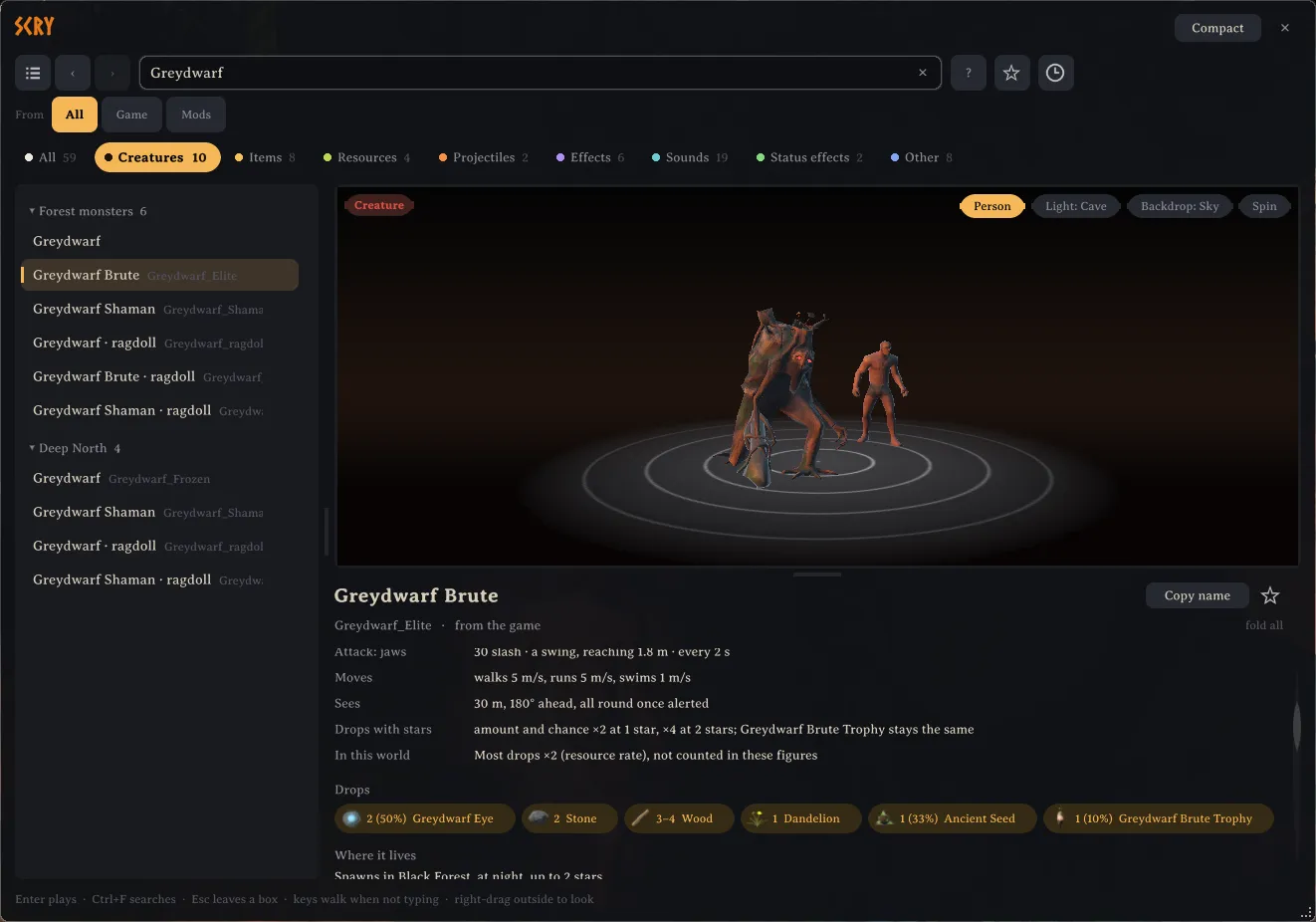
Look up any creature, item, piece, sound or effect in the game and preview it on a turntable, with what the game knows about it. Nothing is spawned.
| Last updated | a day ago |
| Total downloads | 22 |
| Total rating | 0 |
| Categories | Mods Tools Client-side Utility AI Generated Deep North Update |
| Dependency string | isimp-Scry-0.1.0 |
| Dependants | 0 other packages depend on this package |
This mod requires the following mods to function

denikson-BepInExPack_Valheim
BepInEx pack for Valheim. Preconfigured with the correct entry point for mods and preferred defaults for the community.
Preferred version: 5.4.2350README
Scry
Look up anything in Valheim and see it, without spawning a thing. Press F7 or type /scry in chat, search for a creature, item, piece, sound or effect, and it appears on a turntable inside the panel.
AI notice
Most of Scry was written by Claude Code (Anthropic), which did the heavy lifting on implementation and design. Heads-up so you can judge for yourself.
What it does
Creatures can be shown at every star level, in any of their animations and with the gear they can roll, and they attack with their own sounds and effects. Trees can be felled, pieces shown new, worn or broken, sounds and effects played, and projectiles fired where you look. Any model can also be placed in the world in front of you and pinned there to compare with others.
Below the preview, Scry tells what the game knows about it: an item's stats and recipe, a creature's health, attacks and drops, what a station makes, where things spawn and what drops them, and which mod added them. Almost everything named there can be clicked to go to it. Find in locations also reads where things are found in dungeons and other locations, which takes a few minutes in the background.
Everything Scry shows stays on your own screen. Nothing is spawned, saved or seen by other players, it works on any server, and servers do not need it. Clear world at the top of the panel takes back whatever you placed.
Using it
The arrow keys move through the list and Enter plays the selection. The search suggests terms such as kind:creature, biome:swamp and station:forge as you type, and the ? button beside it explains them all. Star an entry to keep it in your favourites, or use Copy name to paste its prefab name into another mod's settings.
Compact moves the panel to the side of the screen, so you can walk and watch a preview in the world. Hold the right mouse button outside the panel to look around.
Settings
All settings are in BepInEx/config/isimp.Scry.cfg, each with a description. They include the key, the panel's size, walking and looking around while it is open, and reading locations by itself in every world. Favourites and the panel's layout are kept in BepInEx/config/isimp.Scry.
More
Technical notes and build instructions are on GitHub at https://github.com/isimp/Scry
