
Please disclose if any significant portion of your mod was created using AI tools by adding the 'AI Generated' category. Failing to do so may result in the mod being removed from Thunderstore.

HudLayout
Move, resize and restyle your HUD with the mouse, right in the game: health, stamina, eitr and adrenaline bars, food, hotbar, minimap, even other mods' HUD. Presets included. Client-side.
| Date uploaded | 2 days ago |
| Version | 1.0.1 |
| Download link | j1gA-HudLayout-1.0.1.zip |
| Downloads | 114 |
| Dependency string | j1gA-HudLayout-1.0.1 |
This mod requires the following mods to function

denikson-BepInExPack_Valheim
BepInEx pack for Valheim. Preconfigured with the correct entry point for mods and preferred defaults for the community.
Preferred version: 5.4.2350README
HudLayout
Put your HUD where you want it.


Drag the health, stamina, eitr and adrenaline bars, the food, the hotbar, the minimap and the rest of the HUD with the mouse, resize them and change how they look — right in the game.
How to use
Press F7 in the game. Every element gets a frame:
- drag it to move it, drag a corner to resize it;
- mouse wheel — size, Ctrl+wheel — bar length, Shift+wheel — bar thickness;
- right click — back to where the game puts it;
- F7 or Esc — done. The – button folds the window out of the way.
What you can change
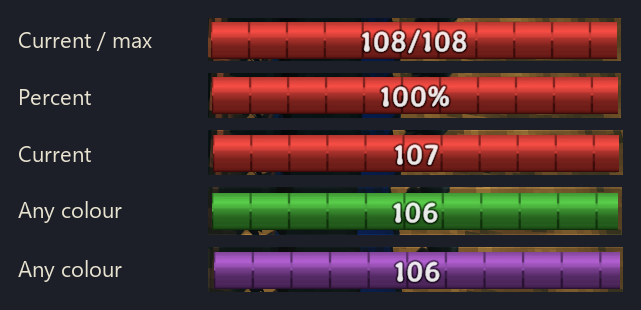
- Bars: horizontal or vertical, length and thickness, a fixed length that doesn't grow with your max (only the number does), cells of 10 points, the number on the bar (none, 75, 75/100, 75%), its size and place, colour, and when the bar shows — as in the game, always, never, or only when it isn't full.
- Food: a column or a row, with or without timers.
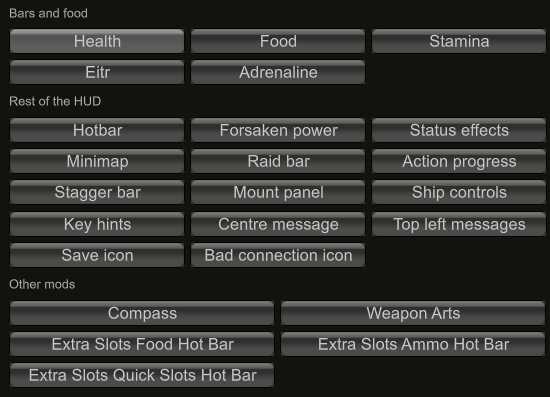
- The rest of the HUD: hotbar, Forsaken power, status effects, minimap, raid bar, mount and ship panels, key hints, messages — move, resize, fade or hide.
- Other mods' HUD is picked up too — for example ExtraSlots' hotbars.
Presets
Ready-made layouts — Vanilla, Centered, Centered minimal, Bottom left, Minimal, Numbers, Author's choice — applied in one click, whole or only the layout or only the look. Save your own, and share one with a friend as a single line of text.
Multiplayer
Only you need it: nothing is sent to other players, and the server doesn't need it.
Settings
Everything is also in ConfigurationManager
(F1 in game) and in BepInEx/config/j1ga.hudlayout.cfg. The editor is in English or
Russian — it follows the game, or pick one in the settings.
Compatibility
Tested with Valheim 1.0.16, BepInEx 5.4.23.5 (BepInExPack_Valheim 5.4.2351).
Mods that replace the HUD entirely (Auga and the like) don't mix with it — use one or
the other. If another mod's element shouldn't be moved, add its name to
IgnoreModElements in the config.
Bugs and feedback
GitHub Issues: https://github.com/tbsj1ga/HudLayoutValheim/issues — please attach
BepInEx/LogOutput.log and a screenshot; the console command hudlayout dump (F5) writes
the HUD layout into that log.
More mods by j1gA
| Mod | |
|---|---|
 |
LivingMap — Your bases, roads, fields and cleared forest on the map and minimap as you build. |
 |
WeaponArts — One key, one active ability per weapon: stagger, taunt, heals, berserk, crits. |
 |
StationSpeed — Faster smelters, kilns, fermenters and crops — consistent even for players without the mod. |
 |
ExtendedBosses — Raid-style boss fights: phases, adds, nests, shields, marks — built from vanilla parts. |
 |
HostOwner — The host takes ownership of stations and bosses near it, so its mods work for everyone. |
Source, full documentation and the changelog: https://github.com/tbsj1ga/HudLayoutValheim
Developed with the help of an AI assistant (Claude by Anthropic); the design decisions, verification against the game code and in-game testing are the author's.
CHANGELOG
Changelog
English · Русский
The version is set in one place — HudLayoutPlugin.Version in src/HudLayoutPlugin.cs.
1.0.1
- A tidier config: options in a sensible order in ConfigurationManager (look, place, size,
details) with plain descriptions; rarely needed ones (
Anchor,FollowBuildShift,EditorOpacity,ModElements,IgnoreModElements) marked advanced. - Removed:
SnapToGrid(the switch is in the editor window),GridStep,LastPreset. - Food and the other simple elements have a plain
Visibleon/off instead of a four-wayVisibilityof which two choices did nothing for them;Hiddencarries over. - Old entries are taken out of existing config files.
1.0.0 — first public release
Everything below, from 0.9.0 on, is what this version contains:
- Move, resize and restyle the health, stamina, eitr and adrenaline bars and the food, in an in-game editor (F7) or the config: orientation, length, thickness, fixed length, cells, numbers, colour, visibility (incl. only when not full), opacity.
- The rest of the vanilla HUD and other mods' HUD elements (e.g. ExtraSlots' hotbars) are
movable too;
HudLayoutApilets other mods register theirs. - Styles per element, built-in presets (incl. AuthorsChoice), your own presets, sharing through the clipboard. English and Russian.
0.12.2
- Editor: the window title is white; the language (as the game / English / Russian) can be
switched in the window too (it was already
00 General / Languagein the config). - Elements left where the game puts them are no longer measured every frame (the simple ones walked all their graphics each frame for nothing).
0.12.1
- Fixed: the folded editor window vanished instead of showing its title bar.
0.12.0
- New built-in preset AuthorsChoice: every bar horizontal in the bottom centre with a fixed length, cells of 10 and cur/max numbers, shown only when not full; the adrenaline bar small and vertical beside the crosshair; food in a row under the bars; places for the Forsaken power, stagger, mount, ship and save icons, and for the compass, WeaponArts and ExtraSlots' hotbars (applied only when those mods are installed).
0.11.2
- Editor window folds to its title bar (the – / + button, or H) to see and drag the HUD under it; still draggable when folded.
0.11.1
- Editor window: the element list is split into groups (bars and food, rest of the HUD, other mods) and long names wrap, so the content fits the window again; other mods' object names are split into words.
0.11.0
HudLayout.HudLayoutApifor other mods:Register(id, RectTransform, name[, wrap]),Unregister(id),IsEditing,ApiVersion. Called through reflection, no hard dependency. For objects outside hudroot (a mod's own canvas) and for a proper name in the editor; the settings go to30 Mod <id>. See the README.
0.10.0
- The rest of the HUD is movable too, as simple elements (position, scale, visibility,
opacity; in the editor, presets and the config like the bars): hotbar, Forsaken power,
status effects, minimap, raid bar, action progress, stagger bar, mount panel, ship
controls, key hints, centre and top left messages, save and bad connection icons.
Sections
10 HotKeyBar…23 BadConnection. - Other mods' HUD elements: anything another mod puts into
hudroot(e.g. ExtraSlots' quick, ammo and food hotbars) is found every two seconds and becomes movable, with a section30 Mod <name>.ModElementsturns this off,IgnoreModElementsskips names. - Elements other code may look up by path — the vanilla hotbar (ExtraSlots copies it via
hudroot.Find("HotKeyBar")) and all other mods' elements — are not wrapped but moved in place: our offset, scale and rotation go on top of their own pose, and a pose their owner writes becomes the new base. - A preset applied before another mod's element appeared still applies to it when it does.
0.9.5
- The edit mode window has a solid dark background (
EditorOpacity, 0.95 by default; also a slider in the window).
0.9.4
- Cells use the game's own pattern. The fill is a tiled 32 px image with a dark edge,
and the game draws 32 px per 25 points, so the bar already has 25-point cells. Segments no
longer draws dividers over it; it scales that pattern so one tile covers
SegmentSizepoints. The fill is kept one tile high and stretched to the thickness, so the pattern never repeats or crops.
0.9.3
- Fixed: the wheel still zoomed the camera in the editor with FirstPersonMode, which reads the wheel in its own camera postfix; our distance restore now runs after every other mod's, and the game's wheel input reads as zero while editing.
- Visibility NotFull for every bar: hidden while full, shown as soon as it drops below 100% (with a short fade).
- Cells (
Segments,SegmentSize): dividers every N points of the maximum (10 by default); a bigger maximum gives more cells, with FixedLength the cells get narrower.
0.9.2
- Fixed: Length of the adrenaline bar did nothing while there was no adrenaline (the game sizes that bar only when it is above zero); it is now sized at zero too.
- Fixed: Thickness repeated or cropped the fill (a tiled image); the fill is now scaled across, the frame and background stretched.
- Fixed: Number size of stamina, eitr and adrenaline did nothing: their number sits in a 40×16 rectangle; the rectangle now grows with the size and never clips "75/100".
- Number position per bar: as in the game, middle of the bar, or middle of the filled part.
- The mouse wheel no longer zooms the camera while the editor is open.
0.9.1
- Fixed: the number styles did nothing. Numeric, Percent and any Text other than Vanilla were replaced by the game's number: the game writes its number every frame, and ours was only written when the value changed. Now it is written every frame after the game.
- Thickness of each bar, independent of Length (the number keeps its size): slider, Shift+wheel, and the blue handles in the middle of the bar's sides in the editor.
- FixedLength: the bar keeps one length whatever the maximum; eating raises only the number (Text = CurrentMax shows it).
- Icon on/off for the heart under the health bar and the food symbol.
- Editor window: fits on the screen (the right part was cut off), long texts wrap, only vertical scrolling, resizable by its bottom right corner.
0.9.0
First version, every stage of the plan in one go; not yet tested in the game.
- Layout from the config: position (fraction of the screen,
-1= the game's), scale, orientation (horizontal / vertical; numbers and icons stay upright), bar length and the point that stays in place while a bar grows, for health, stamina, eitr, adrenaline and food. Applied every frame afterHud.Updateon wrappers of our own, so the game's animations, bar widths and its build-mode lift keep working. - Look: visibility (as in the game / always / hidden), opacity, the number on the bar (as in the game / none / current / current/max / percent) and its size, bar colour, food timers and their size.
- Styles per element: Vanilla, Minimal, Numeric, Percent, Faded, Contrast for bars; Vanilla, IconsOnly, LargeTimers, Faded for food. Editing an option by hand switches the element to Custom (or to the style it now matches).
- Presets of the whole HUD: built-in Vanilla, Centered, CenteredMinimal, BottomLeft,
Minimal, Numbers; applied whole, layout only or look only. Own presets saved as text files
in
BepInEx/config/j1ga.hudlayout.presets/, deleted, exported to and imported from the clipboard as one line. - Edit mode (F7): drag, resize by the corners, wheel and Ctrl+wheel, right click to reset, arrows and Tab, grid and centre snapping, a window with all options and presets, in English or Russian. The character and the camera stand still meanwhile; Esc closes the editor instead of opening the game menu.
- Console command
hudlayout(edit, presets, apply, save, delete, export, import, reset, dump).
