
Please disclose if any significant portion of your mod was created using AI tools by adding the 'AI Generated' category. Failing to do so may result in the mod being removed from Thunderstore.

HudLayout
Move, resize and restyle your HUD with the mouse, right in the game: health, stamina, eitr and adrenaline bars, food, hotbar, minimap, even other mods' HUD. Presets included. Client-side.
| Last updated | 2 days ago |
| Total downloads | 150 |
| Total rating | 1 |
| Categories | Mods Tweaks Client-side Utility AI Generated Deep North Update |
| Dependency string | j1gA-HudLayout-1.0.1 |
| Dependants | 1 other package depends on this package |
This mod requires the following mods to function

denikson-BepInExPack_Valheim
BepInEx pack for Valheim. Preconfigured with the correct entry point for mods and preferred defaults for the community.
Preferred version: 5.4.2350README
HudLayout
Put your HUD where you want it.

Drag the health, stamina, eitr and adrenaline bars, the food, the hotbar, the minimap and the rest of the HUD with the mouse, resize them and change how they look — right in the game.
How to use
Press F7 in the game. Every element gets a frame:
- drag it to move it, drag a corner to resize it;
- mouse wheel — size, Ctrl+wheel — bar length, Shift+wheel — bar thickness;
- right click — back to where the game puts it;
- F7 or Esc — done. The – button folds the window out of the way.
What you can change

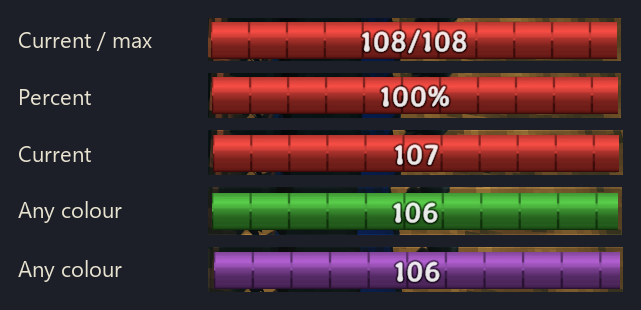
- Bars: horizontal or vertical, length and thickness, a fixed length that doesn't grow with your max (only the number does), cells of 10 points, the number on the bar (none, 75, 75/100, 75%), its size and place, colour, and when the bar shows — as in the game, always, never, or only when it isn't full.
- Food: a column or a row, with or without timers.
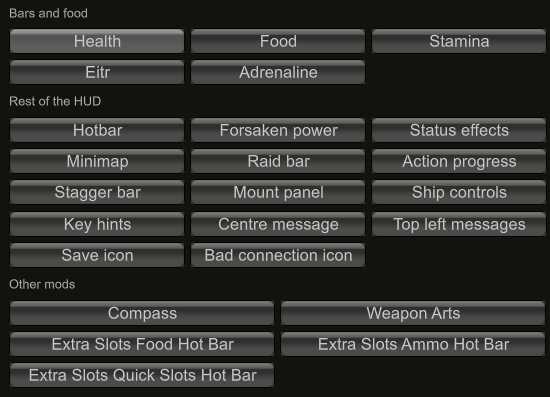
- The rest of the HUD: hotbar, Forsaken power, status effects, minimap, raid bar, mount and ship panels, key hints, messages — move, resize, fade or hide.
- Other mods' HUD is picked up too — for example ExtraSlots' hotbars.
Presets
Ready-made layouts — Vanilla, Centered, Centered minimal, Bottom left, Minimal, Numbers, Author's choice — applied in one click, whole or only the layout or only the look. Save your own, and share one with a friend as a single line of text.
Multiplayer
Only you need it: nothing is sent to other players, and the server doesn't need it.
Settings
Everything is also in ConfigurationManager
(F1 in game) and in BepInEx/config/j1ga.hudlayout.cfg. The editor is in English or
Russian — it follows the game, or pick one in the settings.
Compatibility
Tested with Valheim 1.0.16, BepInEx 5.4.23.5 (BepInExPack_Valheim 5.4.2351).
Mods that replace the HUD entirely (Auga and the like) don't mix with it — use one or
the other. If another mod's element shouldn't be moved, add its name to
IgnoreModElements in the config.
Bugs and feedback
GitHub Issues: https://github.com/tbsj1ga/HudLayoutValheim/issues — please attach
BepInEx/LogOutput.log and a screenshot; the console command hudlayout dump (F5) writes
the HUD layout into that log.
More mods by j1gA
| Mod | |
|---|---|
 |
LivingMap — Your bases, roads, fields and cleared forest on the map and minimap as you build. |
 |
WeaponArts — One key, one active ability per weapon: stagger, taunt, heals, berserk, crits. |
 |
StationSpeed — Faster smelters, kilns, fermenters and crops — consistent even for players without the mod. |
 |
ExtendedBosses — Raid-style boss fights: phases, adds, nests, shields, marks — built from vanilla parts. |
 |
HostOwner — The host takes ownership of stations and bosses near it, so its mods work for everyone. |
Source, full documentation and the changelog: https://github.com/tbsj1ga/HudLayoutValheim
Developed with the help of an AI assistant (Claude by Anthropic); the design decisions, verification against the game code and in-game testing are the author's.
