
Please disclose if any significant portion of your mod was created using AI tools by adding the 'AI Generated' category. Failing to do so may result in the mod being removed from Thunderstore.

FreshWorld
Restore zones, resources, terrain, and locations in your Valheim world on a schedule or with one command. Choose what to reset and protect bases with simple settings. Supports single-player, local hosts, and dedicated servers. Requires only BepInEx.
By sighsorry
| Date uploaded | 2 weeks ago |
| Version | 1.0.8 |
| Download link | sighsorry-FreshWorld-1.0.8.zip |
| Downloads | 108 |
| Dependency string | sighsorry-FreshWorld-1.0.8 |
This mod requires the following mods to function

denikson-BepInExPack_Valheim
BepInEx pack for Valheim. Preconfigured with the correct entry point for mods and preferred defaults for the community.
Preferred version: 5.4.2351README
FreshWorld 1.0.7
FreshWorld restores generated zones, selected resources and terrain, and selected locations in Valheim. It supports single-player worlds, local hosts, and dedicated servers. The cfg has 16 options in three sections and defaults to automatic restoration every 24 game days.
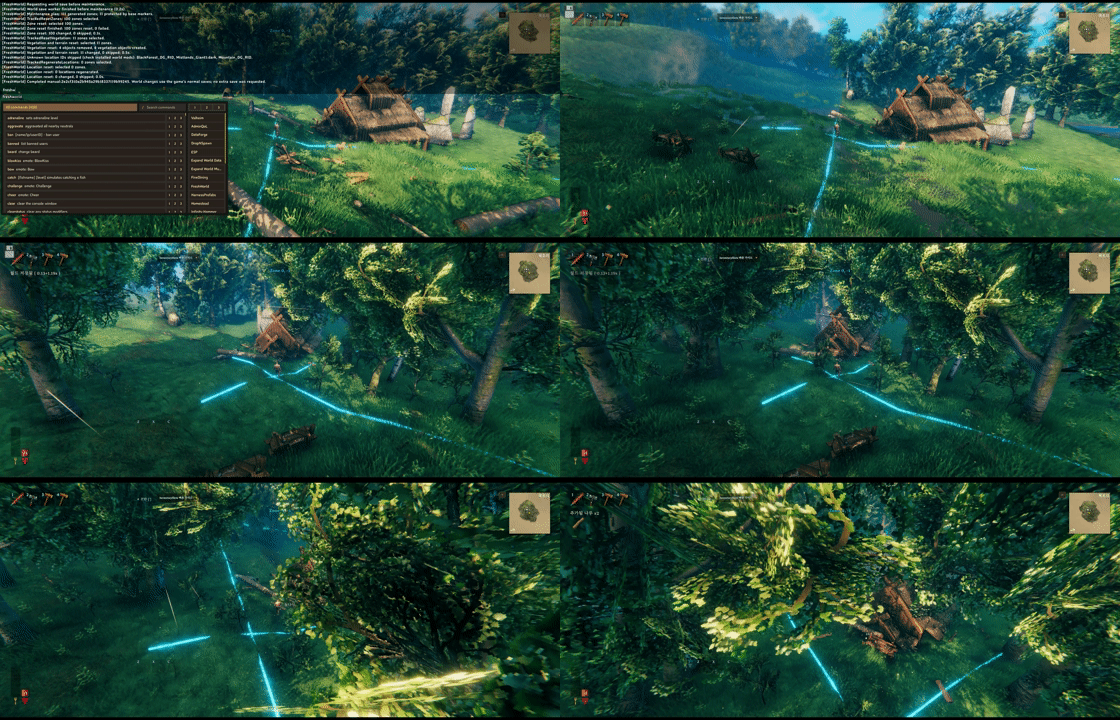
player buildings are protected while vegetations would refresh

locations can be forced to reset even if it have player buildings within radisu, if you turn location reset on config
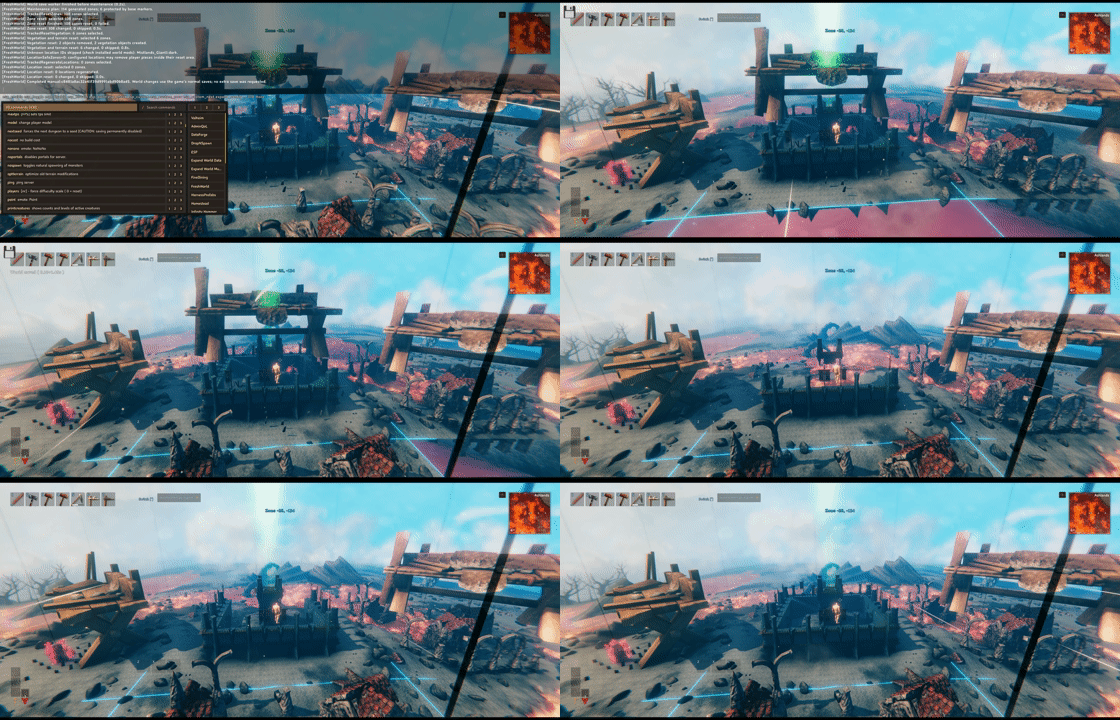
another example of location being forced to reset even with the player buildings within radius


check the image for better understanding of reset
Restoration order
Each run follows this sequence:
Save and wait for completion
-> Reset zones
-> Restore resources with surrounding terrain
-> Restore resources without terrain changes
-> Reset selected locations
-> Finish
Disabled stages are skipped. A stage must finish before the next one starts, and a failure stops the remaining stages. When both resource groups have targets and the terrain radius is positive, FreshWorld yields two frames between them so the game can refresh terrain and collision data. There is no fixed delay in seconds or minutes between stages.
If a zone or location asset is still not ready after 30 seconds, FreshWorld logs its coordinates and loading state, skips that zone, and continues the run. A skipped zone is eligible again on the next run. FreshWorld releases a zone it opened only after loading finishes; a player who enters it keeps the zone loaded. Stage logs include the number of timed-out zones and time spent waiting for loading.
The initial save is mandatory. A save failure or the 180-second save timeout prevents restoration from starting. FreshWorld does not request another save at the end: normal autosaves and a normal shutdown save persist the result. A crash before the next save can lose restoration changes even if the separate execution record says the run completed. FreshWorld does not create a separate backup or automatically restore one.
When hosting a world, FreshWorld includes previously saved chunks that are now completely empty in the game's normal save process. This prevents an old chunk file from restoring deleted objects after a world reload. The correction adds no extra save or cfg option and does not remove duplicates already present in the world.
General: automatic scheduling
[General]
Enabled = true
Mode = GameDays
GameDayInterval = 24
DailyTimes = 05:35,17:35
Enabled controls automatic scheduling only. Manual commands work with either value. Turning it off cancels automatic work that has not started, but preserves accepted manual requests. It does not interrupt running work; configuration reload remains deferred until that work finishes.
| Mode | Schedule |
|---|---|
| GameDays | Run after each GameDayInterval measured from the world's schedule baseline. |
| DailyTimes | Run at the listed HH:mm times in the host operating system's local time zone. |
A normal vanilla game day lasts 30 real minutes, or 0.5 hours. The default 24-day interval is about 12 hours without sleep, pauses, or game-time changes. FreshWorld measures world game time, so sleep and time-changing mods affect the actual elapsed time. It does not measure time since a player visited an area.
Reopening a world with the same enabled schedule preserves its baseline. Changing the active schedule starts a new baseline. Turning automation off and back on also starts fresh: GameDays waits a full interval, while DailyTimes waits for the next scheduled time. Deadlines from the disabled period are not caught up.
DailyTimes does not catch up times missed while the world was closed. An automatic run already observed and queued in an earlier session can remain pending if automation stays enabled with the same schedule. Disabling automation cancels that pending run too.
Only active schedule fields are used. GameDays ignores DailyTimes; DailyTimes ignores GameDayInterval; Enabled=false ignores both. Editing unused fields does not reset an accepted manual request. Mode must still be GameDays or DailyTimes even when automation is disabled.
Every run includes all enabled restoration stages. There is no separate daily slot list for resources: with DailyTimes=05:35,17:35, both slots include resources when Resources=true.
Reset: restoration targets
[Reset]
Zones = true
Resources = true
TerrainResourceIds = rock4_copper,silvervein
ResourceTerrainRadius = 20
ResourceIds =
Locations = false
LocationIds = Hildir_crypt,Hildir_cave,Hildir_plainsfortress,SunkenCrypt4,Crypt2,Crypt3,Crypt4,MountainCave02,Mistlands_Giant1,Mistlands_Excavation1,Mistlands_DvergrTownEntrance1,Mistlands_DvergrTownEntrance2,Mistlands_DvergrBossEntrance1,CharredFortress
Zones, Resources, and Locations switch their respective stages on or off without erasing the ID lists. The extra location stage is disabled by default; set Locations=true to enable it. Existing cfg values are preserved.
| Resource list | Behavior |
|---|---|
| ResourceIds | Restore selected resources without restoring their surrounding terrain. Empty by default. |
| TerrainResourceIds | Restore selected resources and terrain within ResourceTerrainRadius metres. Defaults to copper and silver. |
For example, ResourceIds=Beech1,Birch1 restores those trees without resetting the surrounding terrain. Keep rock4_copper,silvervein in TerrainResourceIds to restore those ores together with their nearby terrain.
Resources and ResourceSafeZones apply to both groups. Either resource list may be empty; if both are empty, the resource stage is skipped. An ID listed in both groups runs once in TerrainResourceIds. Duplicates within a single list, wildcards, and command arguments are rejected.
ResourceTerrainRadius applies only to TerrainResourceIds. A value of 0 restores resources from both lists without this terrain operation. It does not disable terrain changes performed by the zone or location stages.
LocationIds uses exact location IDs, with optional :variant suffixes. The default list contains 14 IDs. An empty location list is invalid; use Locations=false to disable that stage while keeping its selection. Resource or location IDs unavailable in the current game are logged and skipped. If no selected IDs are recognized, their stage or group is skipped. The default selection is not a guarantee that every ID exists in every game or mod setup.
Which zones are affected?
The zone stage considers all previously generated zones, not just zones currently loaded around players. It marks reset zones as ungenerated; the game recreates them when they are loaded again.
With Zones=true, resource and location supplements use only zones protected by base markers in the initial plan that are still generated immediately before the supplemental operation. Zones already reset are not included again, and other failed or skipped zones are not added as fallback targets. A zone-stage failure stops the supplements.
With Zones=false, supplements consider all currently generated zones, then apply their own ID and protection filters. This scope is fixed and has no cfg selector.
All stages also exclude player-protected target zones using the run's player protection described below. This exclusion does not expand the supplemental candidate set.
Resources=false and Locations=false disable only their supplemental stages. They do not exclude resources or locations from the earlier zone reset. Likewise, the resource and location ID lists do not restrict the zone stage's targets.
Protection: players, base markers, and stage boundaries
Each player's zone and its eight neighbors (3 x 3 zones) are always protected, including when SafeZones=0. After the initial save finishes, FreshWorld records the zones of active players known to the hosting server. It adds their current zones again immediately before each target attempt or retry. Each recorded zone protects its surrounding 3 x 3 area from direct zone resets, resource-and-terrain resets, resource-only resets, and location resets for the remainder of that run, even if the player leaves. Moving players can therefore protect additional areas during the run. The next run starts with a fresh set. This fixed protection works in single-player, local-host, and dedicated-server worlds and adds no cfg option or location-visit tracking.
This protection skips direct targets; it does not clip terrain edits to the protected area. A resource or location terrain radius from a target outside the protected area can still reach protected terrain, and a zone reset outside it can still repair shared terrain borders. SafeZones marker protection has the same boundary limitation.
[Protection]
ZoneSafeZones = 1
ResourceSafeZones = 0
LocationSafeZones = 0
EpicLootProtection = true
PieceBlacklist = fire_pit
The three SafeZones settings independently control additional base-marker protection and accept only these values. They do not change the fixed 3 x 3 player protection:
| Value | Protection for that stage |
|---|---|
| 0 | No protection: ignore protection from base markers. |
| 1 | Marker zone: protect the zone containing a marker. |
| 2 | 3 x 3: protect the marker's zone and its eight neighbors. |
Other values, including 3 or higher in an existing cfg, are invalid and prevent new work until corrected. FreshWorld does not convert them automatically.
The default LocationSafeZones=0 can remove player-built pieces inside a selected location. It replaces the old Force behavior; there is no separate Force option. ZoneSafeZones=0 disables marker protection for the entire zone-reset stage, which has a different and broader scope.
ResourceSafeZones=0 allows the selected resource supplements in retained base zones. The resource stage does not directly select arbitrary player-built pieces for deletion, but terrain restoration can change the ground supporting them.
If you choose ZoneSafeZones=1 and LocationSafeZones=1, zero location supplements can be normal: the zone stage already covers unprotected locations, and the remaining base zones are also protected from location restoration. FreshWorld does not automatically lower protection to increase the result count.
Player-built Pieces are detected automatically as base markers. Walls, floors, ships, traps, sap extractors, and modded building pieces do not need individual list entries when their registered prefab has a Piece component and their saved creator is nonzero. This also includes player-placed plants that use Piece. Natural ruins and spawned objects without creator metadata are not automatic markers. Isolated builds can therefore protect additional zones.
PieceBlacklist excludes comma-separated exact prefab IDs from automatic Piece markers. The default fire_pit means a lone campfire does not protect a zone. Other markers can still protect that zone and the campfire within it. An empty value excludes no Pieces. This list changes marker detection, not which objects a reset deletes.
The former PlayerPlacedObjects whitelist is no longer used or converted. Prefabs without a Piece component do not become building markers merely because they have creator metadata.
FreshWorld checks saved world objects without loading their zones. Each protection scan classifies each encountered prefab once and expands each marker zone's protection range once, even if it contains many buildings. The protection result is reused for up to ten seconds during a run; a fresh scan rechecks prefab registration. Objects built or moved during that interval may not be reflected until the next scan.
Ships built with the hammer have creator metadata and qualify automatically unless blacklisted. Ships created with the vanilla spawn command lack that metadata and are not protection markers. Preserving a ship does not guarantee that terrain restoration will preserve the ground around it.
Player_tombstone is a separate built-in marker. Tombstones store a character/profile owner ID in s_owner, while placed buildings use s_creator. FreshWorld therefore checks tombstones without the building-creator requirement. PieceBlacklist does not disable this separate marker, even if it contains Player_tombstone.
All markers, including automatically detected Pieces and tombstones, protect zones only when that stage's SafeZones value is greater than 0. SafeZones=0 bypasses this protection; it does not grant individual objects deletion immunity. Each stage keeps its own SafeZones policy. Terrain edits from outside a protected area can still cross its boundary, as described above.
EpicLoot treasure maps
With EpicLootProtection=true (the default), FreshWorld protects unfound EpicLoot treasure chests and pending treasure spawn controllers. Each protects only its own zone (1x1) from direct zone, resource, and location restoration, even with all SafeZones settings set to 0. Protection does not require a Piece component, creator metadata, a loaded zone, or the owner to be online. EpicLoot is not a required dependency. The setting is server-authoritative through ServerSync; cfg reloads and accepted administrator edits apply to the next run, not an active run.
Neighboring zones remain eligible for restoration, including resource and location placement, terrain edits, and terrain-border repairs that cross into the treasure zone. The chest and pending treasure controller themselves are protected from FreshWorld deletion, but their surrounding terrain can change. Set EpicLootProtection=false to disable both treasure-zone protection and individual treasure-object deletion immunity. Bounty targets, their adds, and bounty spawn controllers receive no special protection. Existing player, base, and tombstone rules remain separate.
FreshWorld takes the initial treasure snapshot after the pre-maintenance save and rechecks saved objects in each target zone before an attempt or loading retry. Once observed, a protected zone remains protected for that run. A found or removed chest no longer triggers this treasure rule on the next run, although ordinary base-marker protection may still apply. A pending controller must contain treasure spawn data, must not be marked as a bounty, and must not have finished placement.
There is no expiry or limit on protected treasure zones: an unfound chest can retain its one zone indefinitely. This does not recreate previously lost chests, clear old map pins, cancel contracts, grant rewards, or alter player progress. The recognized saved markers were checked against EpicLoot 0.14.10. Other reset tools are outside this protection.
Manual commands and permissions
Use the game's F5 console. If it is unavailable, add -console to the game's launch options. Native autocomplete completes the command name and offers only status as its argument. FreshWorld does not require enabling devcommands.
| Command | Action |
|---|---|
| freshworld | Request one restoration using the current host cfg. |
| freshworld status | Show running or pending work, or the applied policy and last recorded result while idle, without starting restoration. |
Only these two command forms are accepted. Reset settings and protection rules are explained above and in the cfg descriptions.
Manual requests do not wait for the automatic schedule polling interval. They still require a ready world, completion of the initial 30-second grace period, an unpaused host, no conflicting save or maintenance, a valid cfg, and valid authority. The grace period starts once when the world becomes ready; it is not added before every run.
An existing pending or active request is not overwritten. Each requester is limited to one command per second; repeated commands within that second, including status, are silently ignored. The requester receives acceptance, waiting reasons, and completion or failure messages.
The person hosting a world inside their own game process can run commands without an administrator entry. A dedicated server's own console can also run them without a connected player. This includes authenticated RCON tools that execute the registered command inside the server process without a Valheim player connection. The RCON provider controls its own authentication; FreshWorld receives no RCON identity and continues to validate the active server, world, session, and run state.
Every requester connected as a game client must be an administrator verified by the server's adminlist.txt. This includes a separate game client connected to a dedicated server on the same PC. Client administrator flags, claimed Steam IDs, and matching IP addresses are not trusted as authorization.
Manual requests belong to the current world, connection, and verified authority. Disconnecting, losing administrator permission, or changing worlds cancels queued or active manual work. Changes already made are not rolled back or automatically retried. The command cannot override the captured IDs or protection values. A request from an earlier session must be submitted again after reconnecting or restarting.
CHANGELOG
Changelog
1.1.2
- Added server-synced
AutomaticResetPercent(0–100, default 100). Automatic runs randomly select a rounded percentage of eligible zones once and share that selection across all reset stages. - Kept manual
freshworldruns at full eligible scope and preserved all protection rules. Later protection skips are not replaced, and reset zones remain outside the candidate pool until generated again. - Documented that each run draws independently: repeated partial runs do not guarantee that every zone will reset.
1.1.1
- Narrowed Jotun invasion protection to the 1x1 zones containing
BlackIce_CoreorBlackIce_Core_outer, including their terrain tiles and border repairs. Both objects remain protected from direct and recursive deletion. - Made objective protection independent of event records. Remaining ice protects its own zone; observed zones stay protected until the current run ends. Missing or invalid event metadata no longer stops maintenance.
- Added
freshworld invasionsto inspect active events and objective objects without changing the world. Results are shown to the requester and written to the host log. - Added
TheHole01andMorkBorgto the default location list. Existing cfg selections are preserved, and location restoration remains disabled by default.
1.1.0
- Restricted
ZoneSafeZonesto 1 or 2. Existing values of 0 must be changed before maintenance can run; resource and location protection still allow 0. - Added server-synced
AlwaysProtectedPrefabs, defaulting toPlayer_tombstone. Listed objects and their own zones are protected regardless of SafeZones or PieceBlacklist, without requiring a Piece component or creator. - Protected listed objects from direct and recursive deletion, and their terrain tiles from restoration and border repairs, including requests from neighboring zones. Native placement from neighboring zones can still cross the boundary.
- Kept observed zones protected until the run ends and applied config changes to the next run. Existing tombstone marker protection and EpicLoot settings remain unchanged.
1.0.10
- Protected active Jotun invasion areas from direct resets, terrain restoration, and border repairs, regardless of SafeZones settings.
- Prevented FreshWorld from deleting invasion cores and their outer ice. Newly started invasions are detected during maintenance; observed areas stay protected until the run ends.
- Stopped maintenance when persistent event data is unavailable or invalid. This update does not restore previously lost invasion objectives.
- Updated the BepInExPack dependency to 5.4.2351.
1.0.9
- Added independent, server-synced
EpicLootBountyProtection, disabled by default. When enabled, pending bounty controllers, targets, and their adds protect their own zones and cannot be deleted by FreshWorld. - Simplified run option selection while preserving accepted manual settings and current automatic settings.
1.0.8
- Protected unfound EpicLoot treasure chests and pending treasure controllers in their own zones, with a server-synced
EpicLootProtectionswitch enabled by default. - Skipped zones that remain unavailable after a bounded load wait, reported their status, and cleaned up deferred zone releases without aborting the rest of maintenance.
1.0.7
- Fixed a startup error caused by Harmony treating ordinary cleanup methods as patch hooks.
- Embedded ServerSync so administrators can apply Configuration Manager edits to the server while keeping ordinary clients optional.
- Protected player-built Pieces automatically and replaced
PlayerPlacedObjectswithPieceBlacklist, defaulting tofire_pit. Existing whitelist entries are not converted. - Kept tombstones as built-in protection markers, independent of the Piece blacklist.
- Simplified internal reset tracking without changing restoration order or stage protection settings.
1.0.6
- Ensured completely cleared chunks replace their old chunk files during normal saves, preventing deleted world objects from returning and stacking after a reload.
1.0.5
- Added
Cartto the defaultPlayerPlacedObjectslist.
1.0.4
- Protected each player's zone and its eight neighbors from direct resets for the rest of a run.
- Added
Raft,Karve,VikingShip, andVikingShip_Ashlandsto the defaultPlayerPlacedObjectslist.
1.0.3
- Simplified reset tracking and removed redundant candidate and state handling.
- Reduced allocations during large zone and world-object resets.
- Hardened plugin shutdown cleanup and pinned Harmony shutdown overloads.
1.0.2
- Added
freshworldcommand support for dedicated server consoles and authenticated RCON tools. - Kept connected-player administrator checks and blocked remote commands from inheriting server-console authority.
1.0.1
- Updated for Valheim 1.0.7.
- Updated zone coordinates, world object lookup, console command registration, and terrain refresh handling for the new game APIs.
- Preserved portal cleanup and prevented zone-coordinate wrapping at world boundaries.
1.0.0
- Initial release.
