
Please disclose if any significant portion of your mod was created using AI tools by adding the 'AI Generated' category. Failing to do so may result in the mod being removed from Thunderstore.

FreshWorld
Restore zones, resources, terrain, and locations in your Valheim world on a schedule or with one command. Choose what to reset and protect bases with simple settings. Supports single-player, local hosts, and dedicated servers. Requires only BepInEx.
By sighsorry
| Last updated | 3 days ago |
| Total downloads | 4835 |
| Total rating | 5 |
| Categories | Mods World Generation Server-side AI Generated Deep North Update |
| Dependency string | sighsorry-FreshWorld-1.2.0 |
| Dependants | 5 other packages depend on this package |
This mod requires the following mods to function

denikson-BepInExPack_Valheim
BepInEx pack for Valheim. Preconfigured with the correct entry point for mods and preferred defaults for the community.
Preferred version: 5.4.2360README
FreshWorld
FreshWorld restores generated zones, selected resources and terrain, and selected locations in Valheim. It supports single-player worlds, local hosts, and dedicated servers. Settings are organized into five sections, with automatic restoration every 24 game days by default.
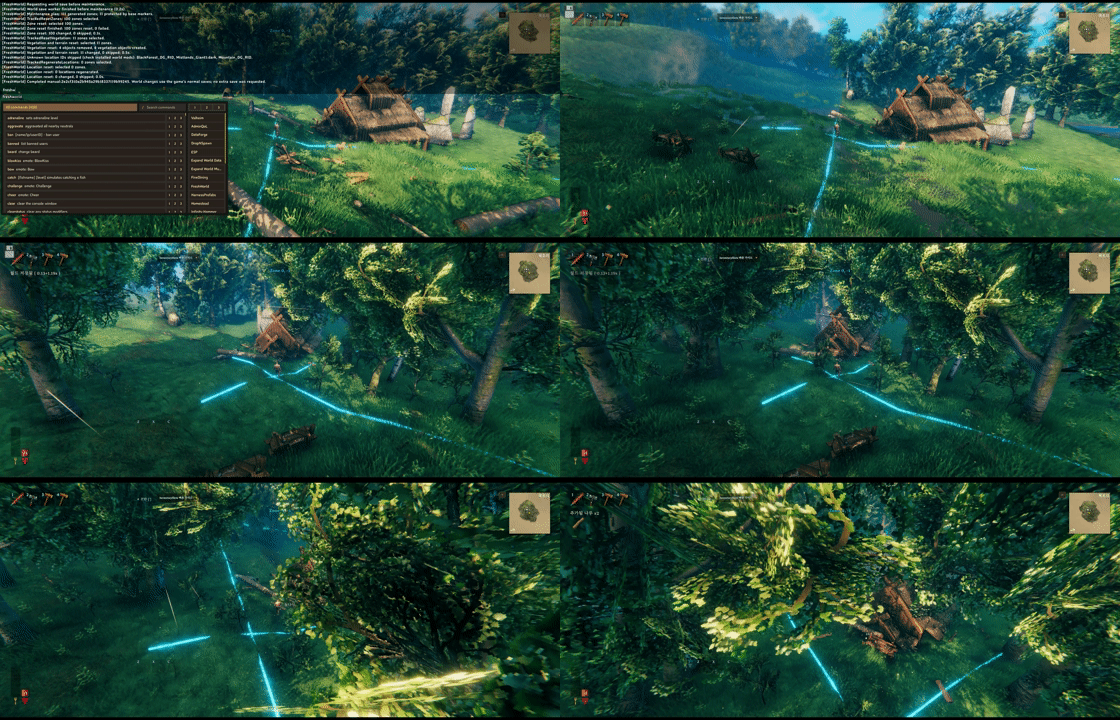
player buildings are protected while vegetations would refresh

locations can be forced to reset even if it have player buildings within radisu, if you turn location reset on config
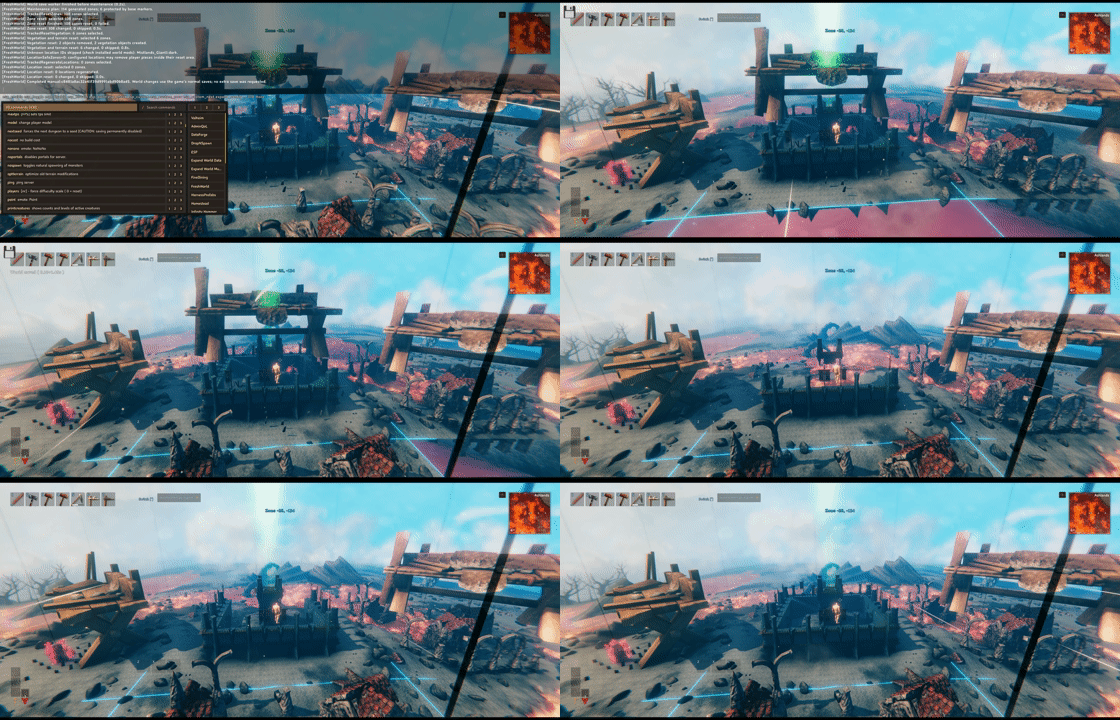
another example of location being forced to reset even with the player buildings within radius


check the image for better understanding of reset
Restoration order
Each run follows this sequence:
Save and wait for completion
-> Resolve location bounds and plan connected zone groups
-> Reset zones
-> Restore resources with surrounding terrain
-> Restore resources without terrain changes
-> Reset selected locations
-> Finish
Disabled stages are skipped. A stage must finish before the next one starts, and a failure stops the remaining stages. When both resource groups have targets and the terrain radius is positive, FreshWorld yields two frames between them so the game can refresh terrain and collision data. There is no fixed delay in seconds or minutes between stages.
When a managed location exists, planning resolves every distinct location prefab type represented in the world before any reset. This includes unselected types because an unloaded custom prefab can report a smaller temporary radius. Prefabs are requested asynchronously and each temporary reference is released; this preflight does not request every possible dungeon room. Worlds with many location mods may take longer to plan. Each prefab has its own 30-second loading timeout, excluding game pauses. There is no overall planning time limit, so successive loads can continue beyond 180 seconds.
If a prefab times out, FreshWorld can continue only when its registered bounds match a unique serialized definition from the original LocationLists or AltBiome lists and no pending or unverified asset resolver can change them. Every instance of that prefab receives at least a 3x3 zone exclusion, including instances outside generated zones. Larger known bounds and connected location footprints expand the exclusion. These areas are excluded from zone, resource, terrain and location resets, regardless of SafeZones settings. They are also left out of the automatic percentage draw. A configured minimum radius alone is not proof of an unloaded prefab's full size.
Unknown bounds, unresolved custom metadata, changed definitions or other planning errors still stop the run before resets begin. FreshWorld never forces a timed-out asset to load synchronously. A run that finishes with planning exclusions is reported as partially completed, with prefab and exclusion counts. It consumes that scheduled occurrence without an immediate automatic retry; exclusions last only for that run, and the next run tries those prefabs again. This does not hide execution or cleanup failures after restoration starts.
The normal Location plan log includes the definition count and planning time. If planning fails or is cancelled, one Location planning stopped warning identifies the stage, current prefab or anchor, completed definitions, elapsed times, last observed readiness, and slowest completed prefab. Stage totals include time spent waiting for later frames, but exclude observed game pauses. Keep this warning together with the original error; the state file retains the original error message. A synchronous call that never returns cannot emit a failure report. Planning diagnostics do not change time limits or start an extra restoration.
While waiting for a native prefab, diagnostics sample isLoading and loadProgress at most once per second, plus a final sample at timeout. Failure and timeout-exclusion warnings include the sample count, sample age, and observed time without a progress change. Unavailable values appear as unknown. Progress is the engine's weighted 0–1 value, not a download percentage or proof of the cause. Sampling never requests the asset, adds no normal-run logs, and does not change the 30-second limit.
During restoration, if a zone or location asset is still not ready after 30 seconds, FreshWorld logs its coordinates and loading state, skips that zone, and continues the run. A skipped zone is eligible again on the next run. FreshWorld releases a zone it opened only after loading finishes; a player who enters it keeps the zone loaded. Stage logs include the number of timed-out zones and time spent waiting for loading.
The initial save is mandatory. A save failure or the 180-second save timeout prevents restoration from starting. FreshWorld does not request another save at the end: normal autosaves and a normal shutdown save persist the result. A crash before the next save can lose restoration changes even if the separate execution record says the run completed. FreshWorld does not create a separate backup or automatically restore one.
When hosting a world, FreshWorld includes previously saved chunks that are now completely empty in the game's normal save process. This prevents an old chunk file from restoring deleted objects after a world reload. The correction adds no extra save or cfg option and does not remove duplicates already present in the world.
With a recognized Upgrade World empty-chunk implementation, FreshWorld leaves that cleanup to Upgrade World. Running both strategies previously could leave a saved chunk entry pointing to a missing file. Recognition checks the active patch set, shared state and relevant method bodies, not the plugin version or whole DLL identity. The implementations supplied in Upgrade World 1.85 and 1.86 pass the same check. No Upgrade World dependency is required.
Incomplete or unrecognized combinations disable FreshWorld maintenance and its save changes. FreshWorld does not cancel world saves. At startup, its operational patches are not installed until compatibility passes. If a conflict appears later, queued work is cancelled and active work stops at its next cleanup boundary. Applied changes remain; pending destruction messages, temporary zone loads and active configuration logins finish before operational patches are removed. New configuration synchronization stops during this cleanup. An unrecognized socket wrapper can defer final removal until that peer disconnects. Authenticated freshworld status remains available and reports the reason.
Resolve the conflicting mod combination and restart to re-enable FreshWorld. A disabled FreshWorld does not verify or repair another mod's save behavior. This fix does not recover previously unsaved progress, missing files or corrupted worlds.
Compatibility is checked after plugin initialization, before maintenance admission and when preparing a save snapshot. Relevant method-body analysis is cached per loaded assembly; active patches are rechecked without reanalyzing IL. Unrelated build changes are allowed, but an unrecognized compiler or algorithm change can still disable FreshWorld. Replacing DLLs or changing save patches during a running save is unsupported.
General: automatic scheduling
[General]
Enabled = true
AutomaticResetPercent = 100
Mode = GameDays
GameDayInterval = 24
DailyTimes = 05:35,17:35
Enabled controls automatic scheduling only. Manual commands work with either value. Turning it off cancels automatic work that has not started, but preserves accepted manual requests. It does not interrupt running work; configuration reload remains deferred until that work finishes.
| Mode | Schedule |
|---|---|
| GameDays | Run after each GameDayInterval measured from the world's schedule baseline. |
| DailyTimes | Run at the listed HH:mm times in the host operating system's local time zone. |
A normal vanilla game day lasts 30 real minutes, or 0.5 hours. The default 24-day interval is about 12 hours without sleep, pauses, or game-time changes. FreshWorld measures world game time, so sleep and time-changing mods affect the actual elapsed time. It does not measure time since a player visited an area.
Reopening a world with the same enabled schedule preserves its baseline. Changing the active schedule starts a new baseline. Turning automation off and back on also starts fresh: GameDays waits a full interval, while DailyTimes waits for the next scheduled time. Deadlines from the disabled period are not caught up.
DailyTimes does not catch up times missed while the world was closed. An automatic run already observed and queued in an earlier session can remain pending if automation stays enabled with the same schedule. Disabling automation cancels that pending run too.
Only active schedule fields are used. GameDays ignores DailyTimes; DailyTimes ignores GameDayInterval; Enabled=false ignores both. Editing unused fields does not reset an accepted manual request. Mode must still be GameDays or DailyTimes even when automation is disabled.
Every run includes all enabled restoration stages. There is no separate daily slot list for resources: with DailyTimes=05:35,17:35, both slots include resources when Resources=true.
AutomaticResetPercent controls how many eligible zones an automatic run selects. It accepts whole numbers from 0 to 100 and defaults to 100, preserving the full reset scope. Manual freshworld commands always process the full eligible scope, regardless of this setting; stage switches, ID lists, and protection still apply. Use Enabled=false to turn off automatic scheduling entirely.
Below 100, FreshWorld takes one candidate snapshot after the initial save, applies the enabled stages and protection rules, then chooses the rounded percentage at random without duplicates. For example, 20% of 600 candidates selects 120 zones; 50% of 5 selects 3. Small candidate sets can round to zero. All reset stages share this selection and retain their own scope and protection rules. Zones skipped by later protection checks are not replaced, so fewer zones may actually reset. New zones generated during a partial run wait for a later run. Terrain radii and border repairs can still reach neighboring unselected zones.
Each run draws again without remembering earlier selections. At 20%, even 5 or 10 runs can leave some zones untouched and select others repeatedly. This is not a rotation or a guarantee that every zone will eventually reset. A selected zone that is reset by the zone stage leaves the candidate pool until the game generates it again. A connected location zone group counts as one candidate; radius-only location restoration counts each managed anchor once, as described below.
Reset: restoration targets
[Reset]
Zones = true
Resources = true
TerrainResourceIds = rock4_copper,silvervein
ResourceTerrainRadius = 20
ResourceIds =
Locations = false
LocationIds = Hildir_crypt,Hildir_cave,Hildir_plainsfortress,SunkenCrypt4,Crypt2,Crypt3,Crypt4,MountainCave02,Mistlands_Giant1,Mistlands_Excavation1,Mistlands_DvergrTownEntrance1,Mistlands_DvergrTownEntrance2,Mistlands_DvergrBossEntrance1,CharredFortress,TheHole01,MorkBorg
LocationResetRadii = MWL_AshlandsFort4=40
Zones, Resources, and Locations switch their respective stages on or off without erasing the ID lists. The extra location stage is disabled by default; set Locations=true to enable it. Existing cfg values are preserved.
| Resource list | Behavior |
|---|---|
| ResourceIds | Restore selected resources without restoring their surrounding terrain. Empty by default. |
| TerrainResourceIds | Restore selected resources and terrain within ResourceTerrainRadius metres. Defaults to copper and silver. |
For example, ResourceIds=Beech1,Birch1 restores those trees without resetting the surrounding terrain. Keep rock4_copper,silvervein in TerrainResourceIds to restore those ores together with their nearby terrain.
Resources and ResourceSafeZones apply to both groups. Either resource list may be empty; if both are empty, the resource stage is skipped. An ID listed in both groups runs once in TerrainResourceIds. Duplicates within a single list, wildcards, and command arguments are rejected.
ResourceTerrainRadius applies only to TerrainResourceIds. A value of 0 restores resources from both lists without this terrain operation. It does not disable terrain changes performed by the zone or location stages.
LocationIds uses exact location IDs, with optional :variant suffixes. The default list contains 16 IDs, including TheHole01 and MorkBorg. Existing cfg selections are preserved; add these IDs to an existing list if wanted. An empty location list is invalid; use Locations=false to disable that stage while keeping its selection. Resource or location IDs unavailable in the current game are logged and skipped. If no selected IDs are recognized, their stage or group is skipped. The default selection is not a guarantee that every ID exists in every game or mod setup.
Which zones are affected?
The zone stage considers all previously generated zones, not just zones currently loaded around players. It marks reset zones as ungenerated; the game recreates them when they are loaded again.
Percentage selection uses only zones still marked as generated. Never-generated zones and already-reset zones that have not generated again are excluded from both the candidate count and the draw. A zone does not need to be loaded at the time of the run to qualify.
With Zones=true, resource and ordinary single-zone location supplements use only zones protected by base markers in the initial plan that are still generated immediately before the supplemental operation. Other skipped zones do not expand this ordinary scope. Managed location groups use the separate rules below: a skipped zone group can still receive selected location restoration. A zone-stage failure stops all supplements. Successfully reset zones are excluded from location restoration for the rest of the run, even if they generate again before that stage.
With Zones=false, supplements consider all currently generated zones, then apply their own ID and protection filters. This scope is fixed and has no cfg selector.
All stages also exclude player-protected target zones using the run's player protection described below. This exclusion does not expand the supplemental candidate set.
Resources=false and Locations=false disable their supplemental stages. Ordinary resources and unreserved locations can still regenerate through zone reset. With Zones=true, explicit LocationResetRadii entries still use grouped zone reset even with Locations=false.
Locations spanning multiple zones
FreshWorld plans the full exterior radius of locations listed in LocationResetRadii, and selected LocationIds that cross zone boundaries when Locations=true. The radius covers object origins, not automatically detected mesh bounds or ownership tags. Neighboring locations that share an affected sector are included transitively, so clearing a whole sector cannot leave another location partly erased. Prefab bounds are resolved before any reset.
With Zones=true, the central and intersecting sectors form one zone-reset group. Every member must pass ZoneSafeZones and the independent player, AlwaysProtectedPrefabs, Jotun and enabled EpicLoot guards. If any member is protected, the entire group is skipped by the zone stage. Selected locations in that group can still proceed through the later location stage using LocationSafeZones. If every member passes, FreshWorld clears all objects across all group sectors, including spillover objects in never-generated neighbors, before marking the group as ungenerated. The game recreates vegetation, terrain and locations when those zones load again. Group reset clears whole sectors, not just the location radius, and completed groups receive no additional location reset in the same run.
Groups are excluded from individual zone/resource resets, recursive deletion from outside, and terrain border repairs from outside, whether selected, skipped or completed. A group requires at least one managed, placed location with a generated anchor. If that anchor has already been reset and has not generated again, it does not trigger another grouped reset. A pending load, partially loading root, or changed location identity, position or enlarged radius skips the entire group. No group member is forcibly loaded just to clear neighboring objects.
Location restoration requires Locations=true and a matching LocationIds entry. It applies with Zones=false and to selected locations in skipped zone groups with Zones=true. FreshWorld clears surface objects across the full exterior radius and places each location once. Every footprint sector must pass LocationSafeZones and the independent guards, including ungenerated sectors. A single protected sector skips the whole location. LocationSafeZones=0 permits deleting player buildings inside the radius even if ZoneSafeZones blocked the zone stage. Elevated dungeon objects are cleared only in the location's own sector; neighboring elevated dungeons are preserved. Terrain edits stay within approved footprint sectors. Overlapping location radii are preserved because radius-only clearing cannot reliably assign shared objects to one location. Changed location definitions and unfinished neighboring loads also prevent radius restoration.
LocationResetRadii uses comma-separated ID=radius entries; radii must be greater than 0 and no more than 512 metres. The larger of the configured minimum and resolved native radius is used. Exact :variant IDs are supported. The default is MWL_AshlandsFort4=40, based on the supplied MWL 5.2.1 location. No MWL dependency is added.
For Fort4, keep LocationResetRadii = MWL_AshlandsFort4=40. With Zones=true, it uses grouped zone reset even when Locations=false or absent from LocationIds. To restore it by radius when the zone group is protected, enable Locations and append MWL_AshlandsFort4 to your existing LocationIds. LocationSafeZones=0 bypasses ordinary base protection for that location and can remove buildings inside its radius; independent protections still apply. The same location settings enable radius restoration with Zones=false. Its area stays reserved from separate resource resets. Empty removes explicit entries; selected multi-zone locations still use their native radii when Locations=true. Unknown IDs have no effect. ServerSync and cfg hot reload apply changes to the next run.
AutomaticResetPercent selects a connected zone group once, alongside ordinary zone candidates. A group qualifies if its zone reset or a selected location restoration is eligible. Its member sectors and locations share the same draw; a skipped zone group does not get another chance in the location stage. With Zones=false, each eligible managed location counts once at its generated anchor. Actual affected sector percentages can differ from the setting because one candidate can cover several sectors. The manual command still ignores this percentage. New multi-zone instances introduced after planning wait for a later run.
Group deletion first captures the affected objects and linked children, then rechecks them before changing ownership or deleting anything. Unexpected protection, object changes, or pending loads stop the run. After deletion, unplanned or remaining objects still block regeneration; they are never force-deleted to make the check pass. Failures log the run, stage, location group and up to eight object details.
Group deletion runs without yielding between members and finishes queued host-side deletions before allowing regeneration. Client deletion notifications retain their normal bounded sending. Large connected groups can take longer than the per-frame budget; logs report their sector counts. This is not a rollback: an exception after deletion starts leaves completed changes in place and stops later stages. A correct radius can cover old stacked pieces, but pieces outside the planned group or radius are not repaired automatically. Unselected locations without an explicit radius entry retain ordinary zone-reset behavior.
Protection: players, base markers, and stage boundaries
Each player's zone and its eight neighbors (3 x 3 zones) are always protected, including when SafeZones=0. After the initial save finishes, FreshWorld records the zones of active players known to the hosting server. It adds their current zones again immediately before each target attempt or retry. Each recorded zone protects its surrounding 3 x 3 area from direct zone resets, resource-and-terrain resets, resource-only resets, and location resets for the remainder of that run, even if the player leaves. Moving players can therefore protect additional areas during the run. The next run starts with a fresh set. This fixed protection works in single-player, local-host, and dedicated-server worlds and adds no cfg option or location-visit tracking.
This protection skips direct targets; it does not clip terrain edits to the protected area. A resource terrain radius from outside the protected area can still reach protected terrain, and an ordinary zone reset outside it can still repair shared terrain borders. Location restoration instead checks every footprint sector and confines its terrain changes to those approved sectors. SafeZones marker protection has the same boundary limitation.
[Protection]
ZoneSafeZones = 1
ResourceSafeZones = 0
ResourceExcludedZones =
LocationSafeZones = 0
AlwaysProtectedPrefabs = Player_tombstone
PieceBlacklist = fire_pit
The three SafeZones settings independently control additional base-marker protection. ZoneSafeZones accepts only 1 or 2; ResourceSafeZones and LocationSafeZones also accept 0. They do not change the fixed 3 x 3 player protection or AlwaysProtectedPrefabs:
| Value | Protection for that stage |
|---|---|
| 0 | Resources and locations only: ignore protection from base markers. |
| 1 | Marker zone: protect the zone containing a marker. |
| 2 | 3 x 3: protect the marker's zone and its eight neighbors. |
ZoneSafeZones=0 is invalid, including in an existing cfg. Set it to 1 or 2 explicitly before running maintenance. Invalid values prevent new work and are not converted or clamped. Configuration Manager offers only 1 and 2 for zones, and server-side validation also rejects 0 from direct cfg edits or administrator clients.
The default LocationSafeZones=0 can remove player-built pieces inside a selected location. It replaces the old Force behavior; there is no separate Force option. AlwaysProtectedPrefabs and the independent player, invasion, and enabled EpicLoot protections still apply.
ResourceSafeZones=0 allows the selected resource supplements in retained base zones. The resource stage does not directly select arbitrary player-built pieces for deletion, but terrain restoration can change the ground supporting them.
ResourceExcludedZones excludes specific zones from both ResourceIds and TerrainResourceIds. For example:
[Protection]
ResourceExcludedZones = 12:-8,13:-8,-3:5
Use zone grid coordinates in x:z pairs, not metre positions. Each coordinate must be an integer from -32768 to 32767. Each entry excludes only that one zone; neighbors are not automatically included. Empty disables the list, duplicate pairs are ignored, and malformed entries prevent new maintenance until corrected. No world UID is used: the same coordinates apply to every world using this cfg.
The list applies to automatic and manual runs even with ResourceSafeZones=0. Excluded resource-only candidates are removed before the automatic percentage draw; a zone still eligible for zone or location reset can remain in that draw. Both resource passes skip the excluded zones, including their terrain tiles and objects reached by recursive deletion from neighboring zones. ServerSync and cfg hot reload apply accepted changes to the next run; an active run keeps its original list.
This is resource-stage protection, not whole-zone preservation. Zone and location resets can still alter vegetation and terrain there. Native vegetation or location placement from a neighboring zone can also cross the border. The list does not clip native placement or change other mods' behavior.
If you choose ZoneSafeZones=1 and LocationSafeZones=1, zero single-zone location supplements can be normal: the zone stage already covers unprotected locations, and the remaining base zones are also protected from location restoration. FreshWorld does not automatically lower protection to increase the result count.
Player-built Pieces are detected automatically as base markers. Walls, floors, ships, traps, sap extractors, and modded building pieces do not need individual list entries when their registered prefab has a Piece component and their saved creator is nonzero. This also includes player-placed plants that use Piece. Natural ruins and spawned objects without creator metadata are not automatic markers. Isolated builds can therefore protect additional zones.
PieceBlacklist excludes comma-separated exact prefab IDs from automatic Piece markers. The default fire_pit means a lone campfire does not protect a zone. Other markers can still protect that zone and the campfire within it. An empty value excludes no Pieces. This list changes marker detection, not which objects a reset deletes.
The former PlayerPlacedObjects whitelist is no longer used or converted. Prefabs without a Piece component do not become building markers merely because they have creator metadata.
FreshWorld checks saved world objects without loading their zones. Each protection scan classifies each encountered prefab once and expands each marker zone's protection range once, even if it contains many buildings. The protection result is reused for up to ten seconds during a run; a fresh scan rechecks prefab registration. Objects built or moved during that interval may not be reflected until the next scan.
Ships built with the hammer have creator metadata and qualify automatically unless blacklisted. Ships created with the vanilla spawn command lack that metadata and are not protection markers. Preserving a ship does not guarantee that terrain restoration will preserve the ground around it.
Player_tombstone is a separate built-in base marker and is also the default AlwaysProtectedPrefabs entry. Tombstones store a character/profile owner ID in s_owner, while placed buildings use s_creator. FreshWorld therefore checks tombstones without the building-creator requirement. PieceBlacklist does not disable either rule. Removing Player_tombstone from AlwaysProtectedPrefabs leaves its existing SafeZones-based marker protection in place, including the 3 x 3 range when SafeZones=2.
Base-marker protection applies when that stage's SafeZones value is greater than 0. ResourceSafeZones=0 and LocationSafeZones=0 bypass base markers, but not AlwaysProtectedPrefabs. Each stage keeps its own SafeZones policy. Base markers alone do not grant individual objects deletion immunity or stop terrain edits from outside their protected area.
Always-protected prefabs
AlwaysProtectedPrefabs is a server-synced list of exact prefab IDs, defaulting to Player_tombstone. Each matching object's own zone (1 x 1) is excluded from direct zone, resource, and location resets, regardless of SafeZones or PieceBlacklist. No Piece component, creator metadata, loaded scene object, or online player is required. Natural and command-spawned instances of a listed prefab qualify too. An empty list disables this additional policy.
Listed objects cannot be directly or recursively deleted by FreshWorld. Their protected terrain tiles also skip FreshWorld terrain restoration and border repairs requested from neighboring zones. Native resource or location placement from outside a protected zone can still cross its boundary; the list does not block other mods, player actions, or ordinary damage.
FreshWorld captures the initial objects after saving and rechecks each target zone before an attempt or loading retry. Observed zones remain protected for the current run, even if the object moves or disappears. The next run starts fresh. Settings changed through cfg hot reload or an administrator's Configuration Manager apply to the next run; they cannot change an active run's protection.
This list is independent of the EpicLoot switches. A listed EpicLoot prefab remains protected by this rule even if its EpicLoot-specific protection is disabled. Ordinary base markers and the built-in Jotun invasion protection remain separate.
EpicLoot
[EpicLoot]
EpicLootProtection = true
EpicLootBountyProtection = false
Configuration Manager shows sections in this order: General, Reset, Protection, EpicLoot, and Path of Valheiman. Existing custom values from [Protection] must be moved to [EpicLoot]; this section change does not migrate them automatically. If using the earlier PoV preview, rename [Path of Valheim] to [Path of Valheiman] while keeping its values.
Treasure maps
With EpicLootProtection=true (the default), FreshWorld protects unfound EpicLoot treasure chests and pending treasure spawn controllers. Each protects only its own zone (1x1) from direct zone, resource, and location restoration, including when ResourceSafeZones or LocationSafeZones is 0. Protection does not require a Piece component, creator metadata, a loaded zone, or the owner to be online. EpicLoot is not a required dependency. The setting is server-authoritative through ServerSync; cfg reloads and accepted administrator edits apply to the next run, not an active run.
Neighboring zones remain eligible for restoration, including resource placement, terrain edits, and terrain-border repairs that cross into the treasure zone. A location whose footprint intersects a protected treasure sector is skipped as a whole. The chest and pending treasure controller themselves are protected from FreshWorld deletion, but their surrounding terrain can change. Set EpicLootProtection=false to disable both treasure-zone protection and individual treasure-object deletion immunity. Bounty protection has its own setting below. Existing player, base, and tombstone rules remain separate.
FreshWorld takes the initial treasure snapshot after the pre-maintenance save and rechecks saved objects in each target zone before an attempt or loading retry. Once observed, a protected zone remains protected for that run. A found or removed chest no longer triggers this treasure rule on the next run, although ordinary base-marker protection may still apply. A pending controller must contain treasure spawn data, must not be marked as a bounty, and must not have finished placement.
There is no expiry or limit on protected treasure zones: an unfound chest can retain its one zone indefinitely. This does not recreate previously lost chests, clear old map pins, cancel contracts, grant rewards, or alter player progress. The recognized saved markers were checked against EpicLoot 0.14.10. Other reset tools are outside this protection.
Bounties
EpicLootBountyProtection is disabled by default. Set it to true to protect pending bounty spawn controllers, bounty targets, and all their adds. Each object's current zone (1x1) is excluded from direct zone, resource, and location resets, even with SafeZones=0. FreshWorld also prevents direct or recursive deletion of those objects. If a target and its adds occupy different zones, each zone is protected; this is not a fixed area around the map pin or the original spawn point.
FreshWorld reads saved world tags, so protection does not require loaded components, creator metadata, or an online quest owner. It captures the initial set after the pre-maintenance save and rechecks each target zone before an attempt or loading retry to detect new or moved objects. Observed zones stay protected until the run ends. The next run starts fresh. Neighboring terrain edits and border repairs can still affect a protected zone, as with treasure protection.
This switch is independent of EpicLootProtection, uses ServerSync, and supports server cfg hot reload. Changes apply to the next run. Set it to false to disable both bounty-zone protection and bounty-object deletion immunity. No EpicLoot dependency is required.
EpicLoot can leave tagged creatures behind when a bounty is abandoned. Those objects continue to protect their zones while the tags remain. FreshWorld does not infer quest status, remove abandoned targets, alter player progress, grant rewards, or repair previously lost targets. Marker recognition was checked against EpicLoot 0.14.10.
Path of Valheiman objectives
[Path of Valheiman]
AltarProtection = true
BlightProtection = true
AzuriteVegetation = false
These options are synchronized by ServerSync and support host cfg hot reload. Protection changes apply to the next run. Disabling a protection option removes only that PoV protection; other protection rules still apply.
With AltarProtection=true, FreshWorld protects PT_WardenAltar and PT_PowerAltar. With BlightProtection=true, it also protects active Blight controllers and their linked altars, monoliths, and warden bosses. Each object's own zone (1x1) is excluded from zone, resource, and location resets, even with SafeZones=0 or an empty AlwaysProtectedPrefabs list. FreshWorld terrain restoration and border repairs also skip these zones. Path of Valheiman is optional; no new mod dependency is required.
Blight protection uses saved controller state and event links, including unloaded objects. It does not reserve the whole event radius. Observed objectives and zones remain protected for the current run. The next run reevaluates them, so orphaned event objects do not receive permanent protection from this rule. Ordinary Blight mobs, all azurite veins, and unrelated natural monoliths do not qualify. PoV can replenish its event veins and still controls event cleanup, progress, and rewards.
Run freshworld pov to restore missing PT_WardenAltar and PT_PowerAltar objects at PoV's recorded map coordinates. It checks saved objects in active and inactive zones, saves before creating anything, and rechecks each position before creation. Existing altars and ambiguous nearby matches are skipped. It does not reset zones or change PoV progression, discovery, or map records. The command is manual and independent of the two protection switches; automatic resets never repair altars.
Lost Warden offerings cannot be recovered. Height is calculated the same way as PoV placement; edited terrain may require a position check. Protection does not prevent native placement from extending across a zone boundary. See PoV compatibility and altar recovery for matching rules and validation limits.
Azurite vegetation
Enable AzuriteVegetation to place natural PT_AzuriteVein through the game's vegetation system. EWD is optional: existing definitions take priority, including disabled entries; otherwise FreshWorld supplies defaults for Mountains and the other PoV resource biomes. Zone resets can then replenish veins when the zones generate again. To replenish them in retained zones through resource reset, add PT_AzuriteVein to ResourceIds. It is not added to resource lists automatically.
PoV's initial world-wide natural placement and timed natural regeneration are disabled while this option is on. The original vein prefab, Divine promotion, mining, and Blight's own vein creation remain in use. New veins start plain and can qualify for promotion again; previous grades are not restored. Blight replenishment pauses during FreshWorld maintenance and resumes after cleanup.
Existing veins are kept when enabling the option. If a live vein remains in a zone or within 6m of its boundary, that vegetation pass skips azurite there while placing other vegetation normally. This includes saved, unloaded veins and Blight veins. Veins already queued for deletion do not block their replacements. This prevents adding a second distribution over PoV's old one; it does not merge existing duplicates. A retained neighboring vein can leave a reset zone without new azurite until a later generation pass.
This is a different placement policy: it does not preserve PoV's exact coordinates, respawn delay, or its seeded-vein 12m building avoidance. Normal vegetation placement and FreshWorld protection rules apply. Turning it off restores PoV's policy and removes only FreshWorld's default definitions. On worlds without PoV's placement-complete key, turning it off can start native world-wide placement. Custom EWD definitions remain yours to manage. Configuration changes wait until current maintenance finishes.
Expand World Data vegetation
Resource reset preserves the original vegetation definitions and their attached EWD metadata, including custom ZDO data, scale, and clearance. It rechecks definitions after zone loading. Disabled definitions are no longer forced on; a prefab with no enabled definition and its fractured form are left untouched.
EWD vegetation entries that mix different prefabs are rejected before deleting objects in that resource zone. Use separate single-prefab entries for supplemental resource reset. This restriction does not change ordinary zone regeneration. Earlier stages or zones in the same maintenance run may already have completed when an unsupported entry is detected.
Jotun invasions
FreshWorld protects the 1x1 zone containing each BlackIce_Core or BlackIce_Core_outer, even with SafeZones=0. If they are on opposite sides of a zone border, both zones are protected. Protection depends on the objective objects, not the event's radius or active state. It does not require a player, creator metadata, a building marker, or Jotunn. There is no additional cfg option, and these fixed prefabs do not need to be added to AlwaysProtectedPrefabs.
FreshWorld captures objective zones after the initial save, including unloaded objects, and checks for arrivals before each target attempt or loading retry. Observed zones stay protected until that run ends. Remaining ice continues to protect its own zone on later runs, even after the event ends. Once the ice is gone, the next run can reset that zone subject to other protection rules. An event record without ice does not protect an area; missing or invalid event metadata does not disable object-based protection or maintenance.
FreshWorld also skips its terrain restoration and border repairs in these protected terrain tiles, including requests from neighboring zones. Existing player, base, and EpicLoot terrain policies are unchanged. Native resource or location placement from outside a protected zone can still extend across its boundary; this protection does not clip generated prefabs or control other mods.
BlackIce_Core and BlackIce_Core_outer have an additional guard against direct and recursive FreshWorld deletion, including when event metadata is missing. Normal player destruction, invasion completion, and rewards are unchanged. The starting ice in Mörkhalla is not part of this separate object guard.
Other zones within an active invasion can reset if no other protection applies. Nearby creatures may be removed and later spawn again under the game's normal conditions; their exact timing and arrangement are not preserved. FreshWorld does not recreate missing ice, repair broken events, finish events, or grant rewards. Remaining active event records and orphaned ice require separate diagnosis; narrowing protection does not repair them.
Use freshworld invasions to inspect a ready host's current invasion state. It reports each active event's ID, center and radius, core and outer ice ZDO counts inside the area, and the nearest core and outer ice coordinates, zones and horizontal distances. The reported event radius is diagnostic information, not FreshWorld's protection range. ZDO counts include objects in unloaded zones; scene counts show instances on the host, not visibility on a client. This reads current host data, not the save files on disk. The report is also written to the host log.
The report matches ice by position, not event ownership. Overlapping event areas may count the same object. A missing core is a reason to investigate, not proof of which mod removed it; a core ZDO does not prove that the objective works. Ice outside active areas is counted without removing it. Inspection scans the host's ZDO registry once per request and does not load zones, save the world, change ownership, end events, or start restoration. An inspection error leaves maintenance state unchanged.
Coordinated server maintenance
A compatible ServerManager automatically shares FreshWorld's maintenance lock for tracked Upgrade World cron jobs. FreshWorld keeps its own schedule; no additional cfg option or cron dependency field is needed. A ready host can participate even when automatic FreshWorld resets are disabled.
This prevents participating maintenance from overlapping; it does not require a particular FreshWorld run to succeed first. A failed reset may be followed by an Upgrade World job after cleanup. While ServerManager holds the lock, automatic resets wait, cfg changes are deferred, and manual reset/PoV repair requests are refused. A timeout does not release work that is still running. Direct Upgrade World commands and other mods do not automatically participate.
The lock adds no saves. FreshWorld still saves and waits before its own maintenance; later persistence uses the game's normal saves or an explicit save command. There is no forced post-maintenance save. A crash before the next successful save can lose recent world changes.
Integration details: maintenance coordination contract. Existing failed or needs_review jobs require operator review; installing the patch does not clear them.
Manual commands and permissions
Use the game's F5 console. If it is unavailable, add -console to the game's launch options. Native autocomplete completes the command name and offers status, invasions, and pov as arguments. FreshWorld does not require enabling devcommands.
| Command | Action |
|---|---|
| freshworld | Request one restoration using the current host cfg. |
| freshworld status | Show running or pending work, or the applied policy and last recorded result while idle, without starting restoration. |
| freshworld invasions | Inspect active Jotun invasions and host objective ZDOs without changing the world. |
| freshworld pov | Save and restore missing Warden and Power altars at PoV's recorded coordinates. |
Only these four command forms are accepted. Reset settings and protection rules are explained above and in the cfg descriptions.
Manual restoration requests do not wait for the automatic schedule polling interval. They still require a ready world, completion of the initial 30-second grace period, an unpaused host, no conflicting save or maintenance, a valid cfg, and valid authority. The grace period starts once when the world becomes ready; it is not added before every run. Invasion inspection requires a ready world and valid authority, remains available when reset settings are invalid, and can run during maintenance. PoV altar repair requires idle maintenance and rejects requests during startup, pause, a world save, pending work, or a session fault. Retry the command after the condition clears. Repair shares the maintenance lock and leaves the automatic reset schedule unchanged.
An existing pending or active request is not overwritten. Each requester is limited to one command per second; repeated commands within that second, including status, invasions, and pov, are silently ignored. The requester receives acceptance, waiting reasons, and completion or failure messages.
The person hosting a world inside their own game process can run commands without an administrator entry. A dedicated server's own console can also run them without a connected player. This includes authenticated RCON tools that execute the registered command inside the server process without a Valheim player connection. The RCON provider controls its own authentication; FreshWorld receives no RCON identity and continues to validate the active server, world, session, and run state.
Every requester connected as a game client must be an administrator verified by the server's adminlist.txt. This includes a separate game client connected to a dedicated server on the same PC. Client administrator flags, claimed Steam IDs, and matching IP addresses are not trusted as authorization.
Manual requests belong to the current world, connection, and verified authority. Disconnecting, losing administrator permission, or changing worlds cancels queued or active manual work. Changes already made are not rolled back or automatically retried. The command cannot override the captured IDs or protection values. A request from an earlier session must be submitted again after reconnecting or restarting.
