
Please disclose if any significant portion of your mod was created using AI tools by adding the 'AI Generated' category. Failing to do so may result in the mod being removed from Thunderstore.
InventorySlots
Custom equipment/quick slots, multicraft, progressive rows, keep-on-death, favorites, scrollable tooltips, crafting grid/search/sort, container stack/restock/sort, item comparison and controller support. Compatible with EpicLoot and Jewelcrafting.
| Date uploaded | 6 days ago |
| Version | 1.2.4 |
| Download link | sighsorry-InventorySlots-1.2.4.zip |
| Downloads | 1253 |
| Dependency string | sighsorry-InventorySlots-1.2.4 |
This mod requires the following mods to function

denikson-BepInExPack_Valheim
BepInEx pack for Valheim. Preconfigured with the correct entry point for mods and preferred defaults for the community.
Preferred version: 5.4.2333README
InventorySlots
InventorySlots is an all-in-one Valheim inventory overhaul focused on stable slots, predictable item movement, and compact UI tools.
It adds progressive inventory rows, equipment slots, quick slots, favorites, keep-on-death rules, scrollable/pinned tooltips, a crafting browser, container tools, sorting, restock, multicraft, and controller support.
Visual Overview
Stable Inventory Growth
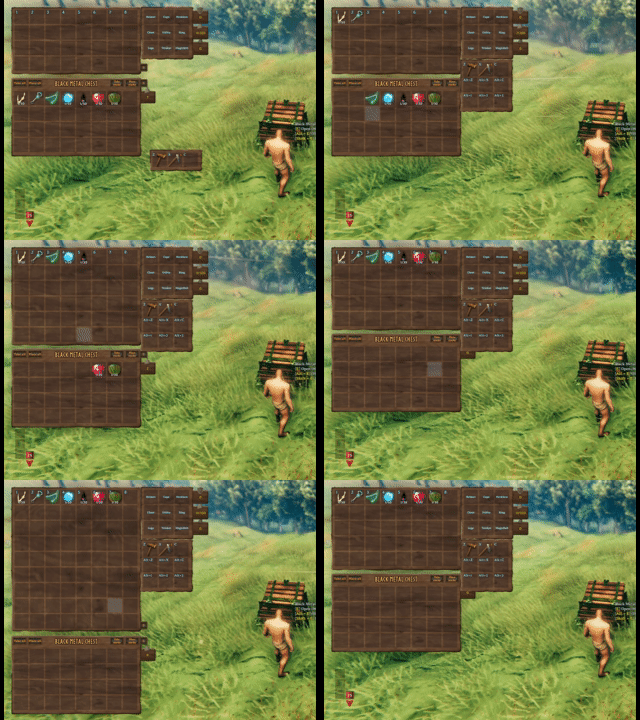
Progressive rows and quick slots unlock over time without reshuffling saved item positions. Clients can expand or collapse the currently visible inventory rows, while equipment slots are defined by InventorySlots.yml.
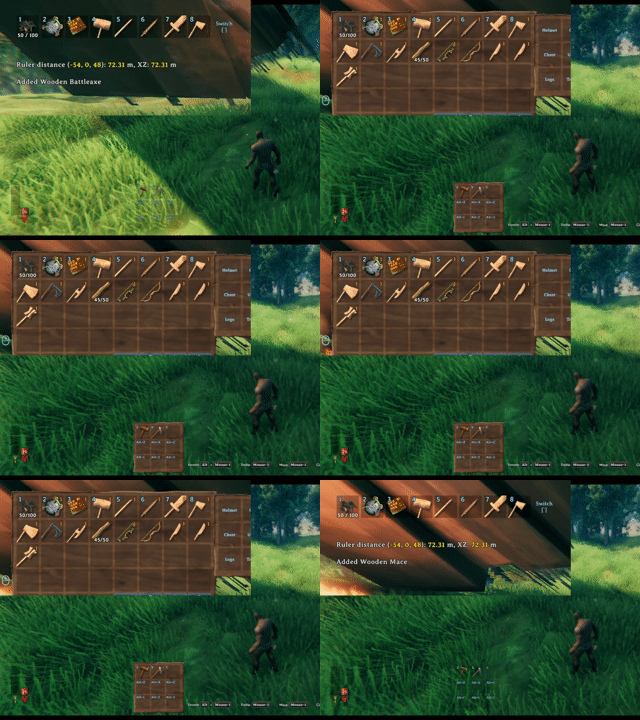
The hotbar switch key rotates the visible hotbar row, keeping a tall inventory practical without moving the underlying item coordinates.
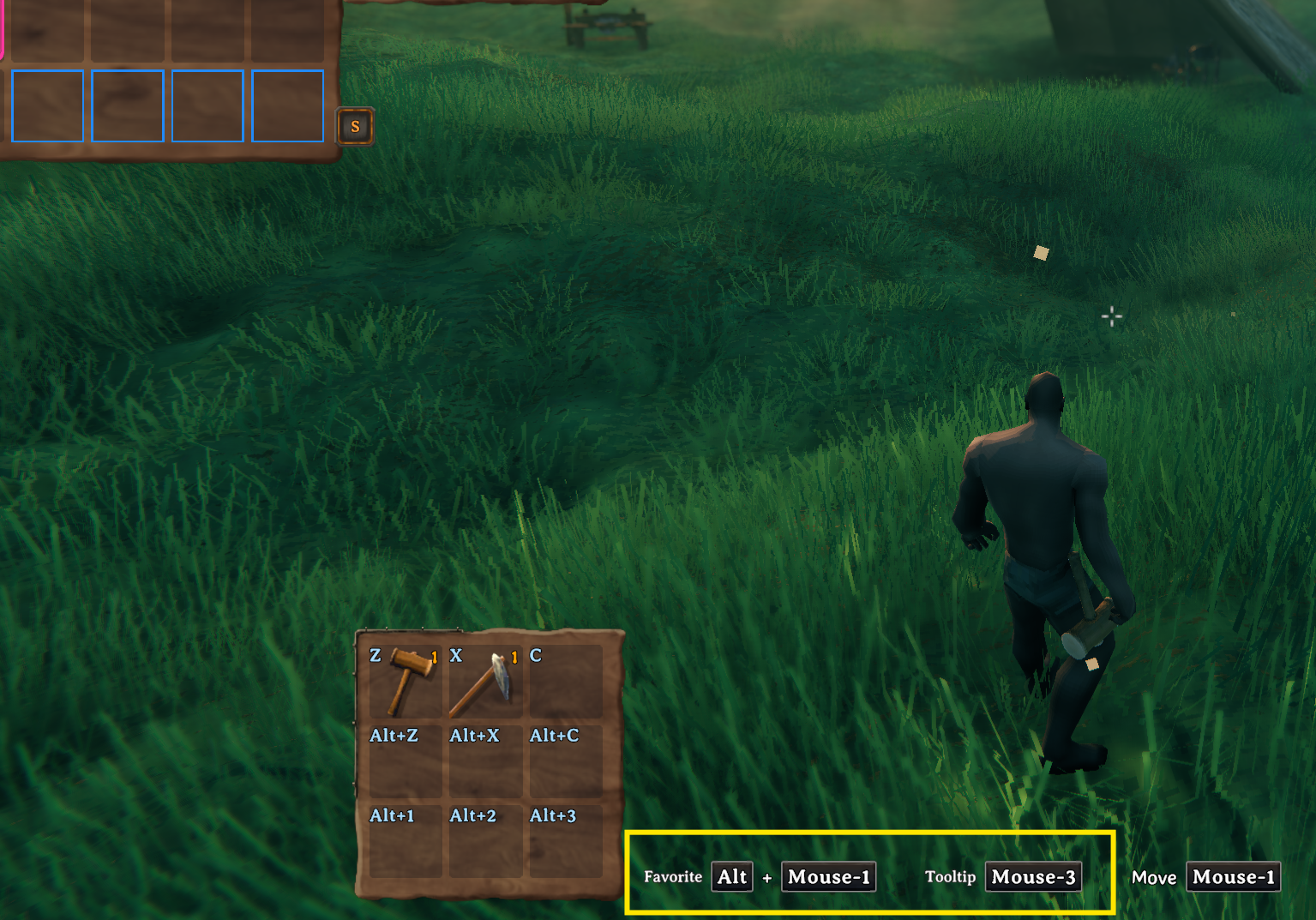
Key hints show the current favorite and tooltip hotkeys, including mouse/controller-aware bindings from the client config.
Crafting Browser

Crafting stations are redesigned into an icon-grid browser with search, group filters, favorites, sorting buttons, page scrolling, and hover/pinned tooltip support.
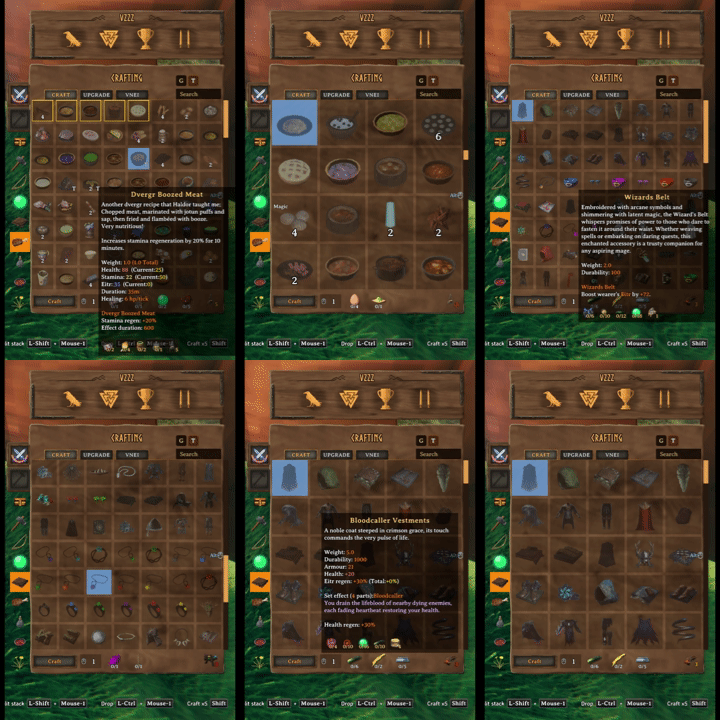
Mark favorite recipes and resize the crafting grid with mouse-wheel zoom.
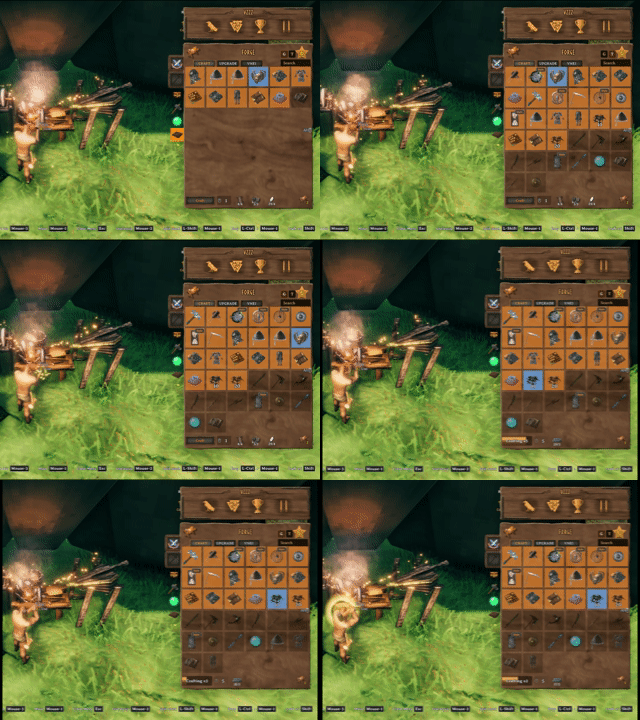
Sort recipes by group and resource tier, then craft multiple items from the same station flow.
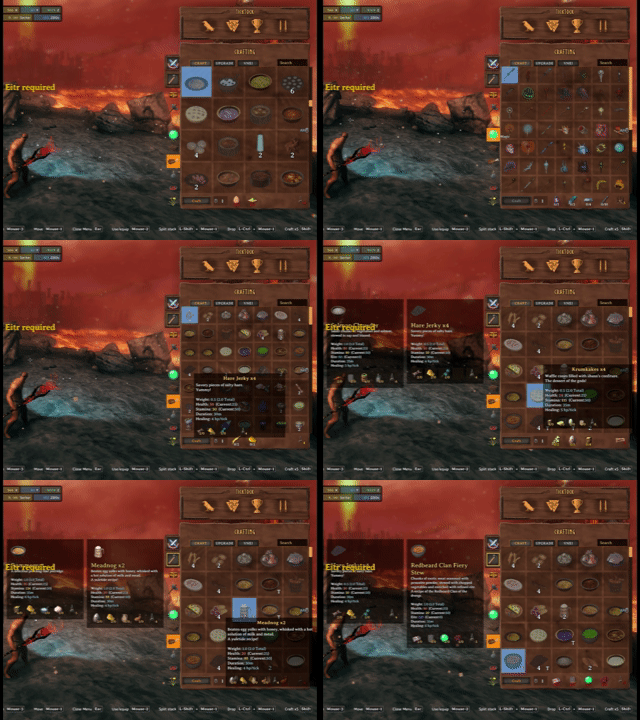
Recipe hover and pinned tooltips stay usable while changing grid size and browsing the crafting station.
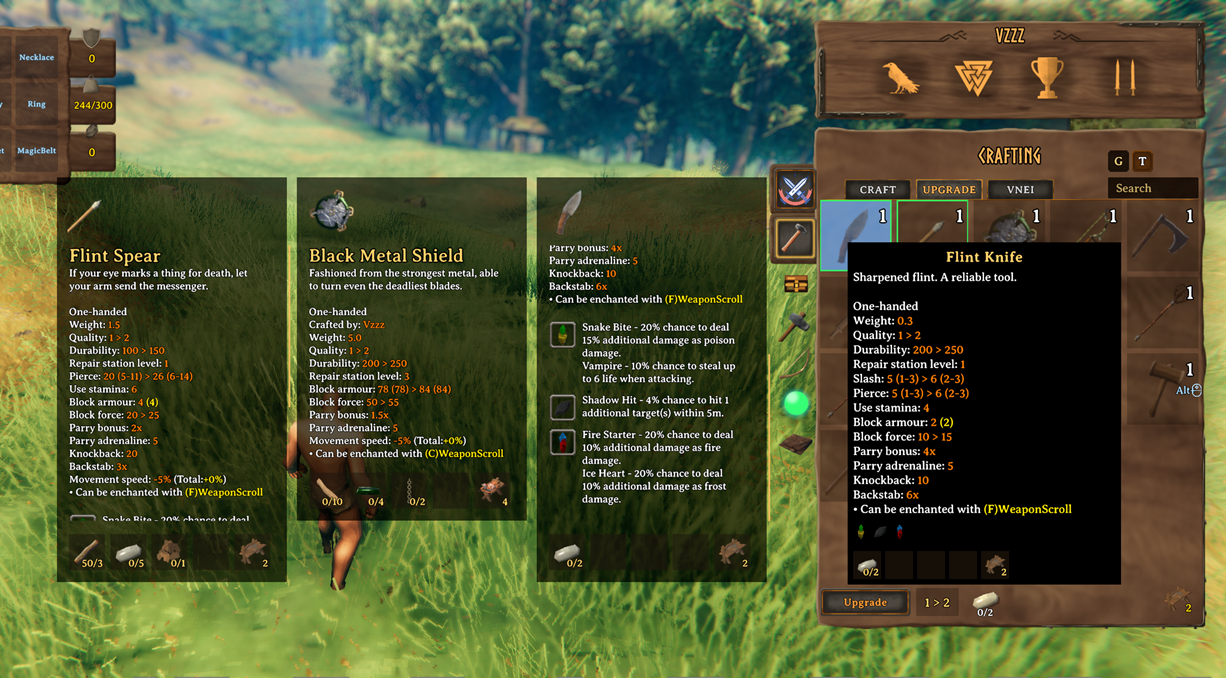
Upgrade views show the stat changes gained from upgrading gear, with upgrade favorites kept separate from crafting favorites.
Scrollable Tooltips And Comparisons
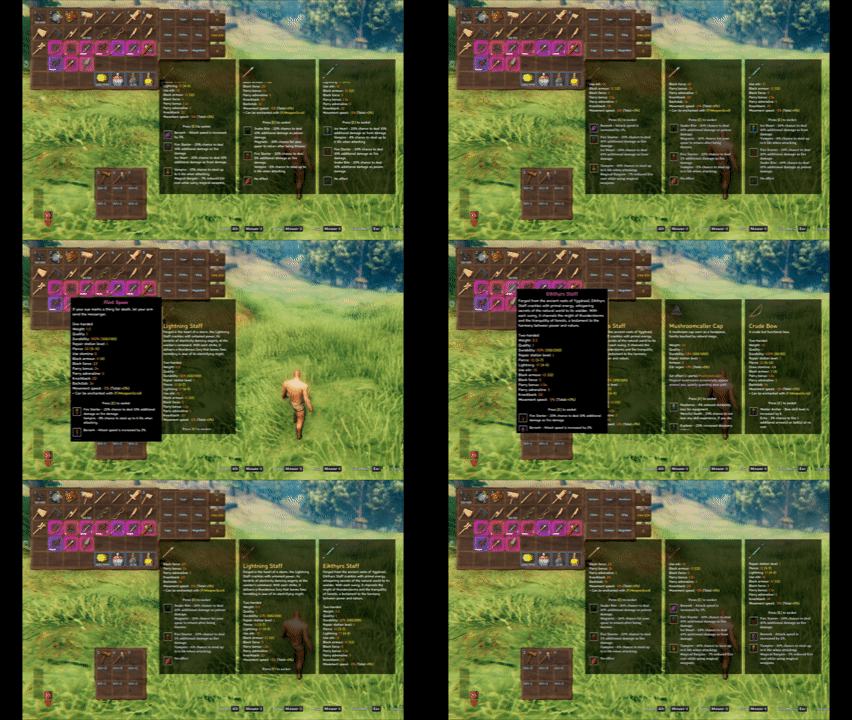
InventorySlots tooltips can expand into scrollable panels and support multiple pinned comparison slots.

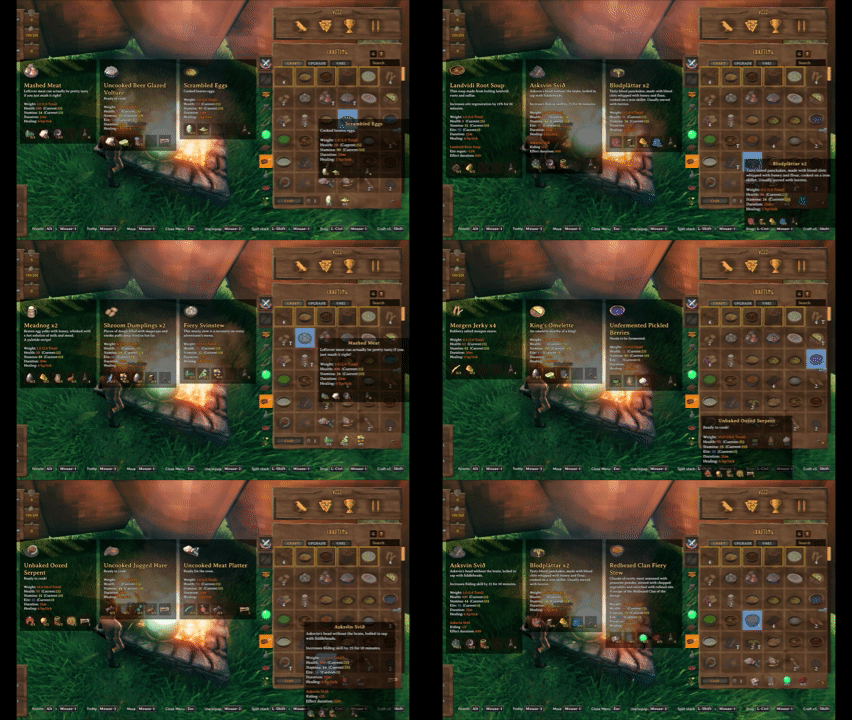
Pin up to three tooltips to compare recipes, meals, potions, and gear without losing your current hover target.
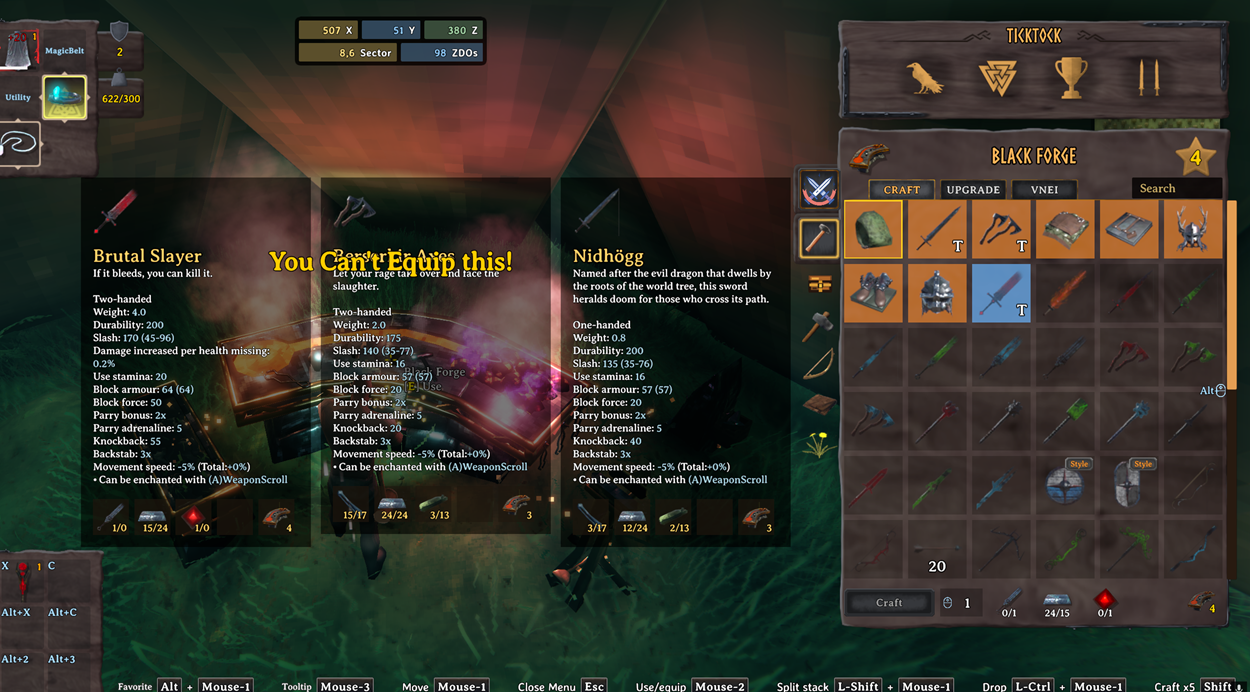
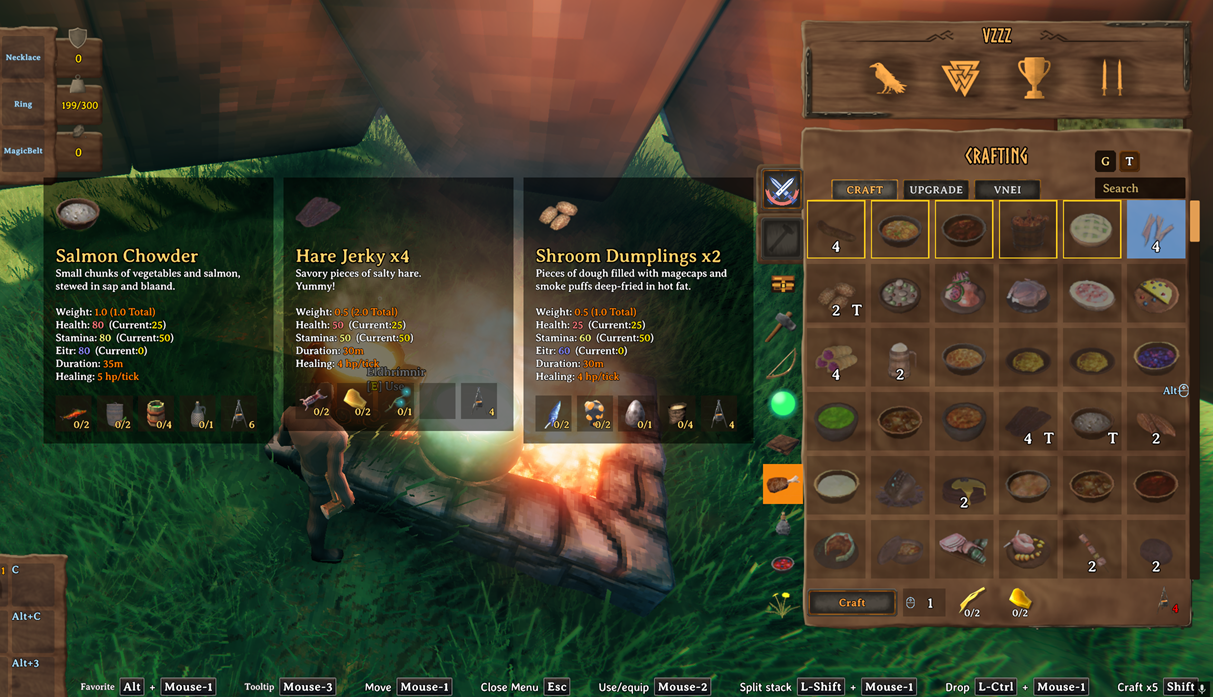
Gear and food comparisons use the same pinned tooltip system.
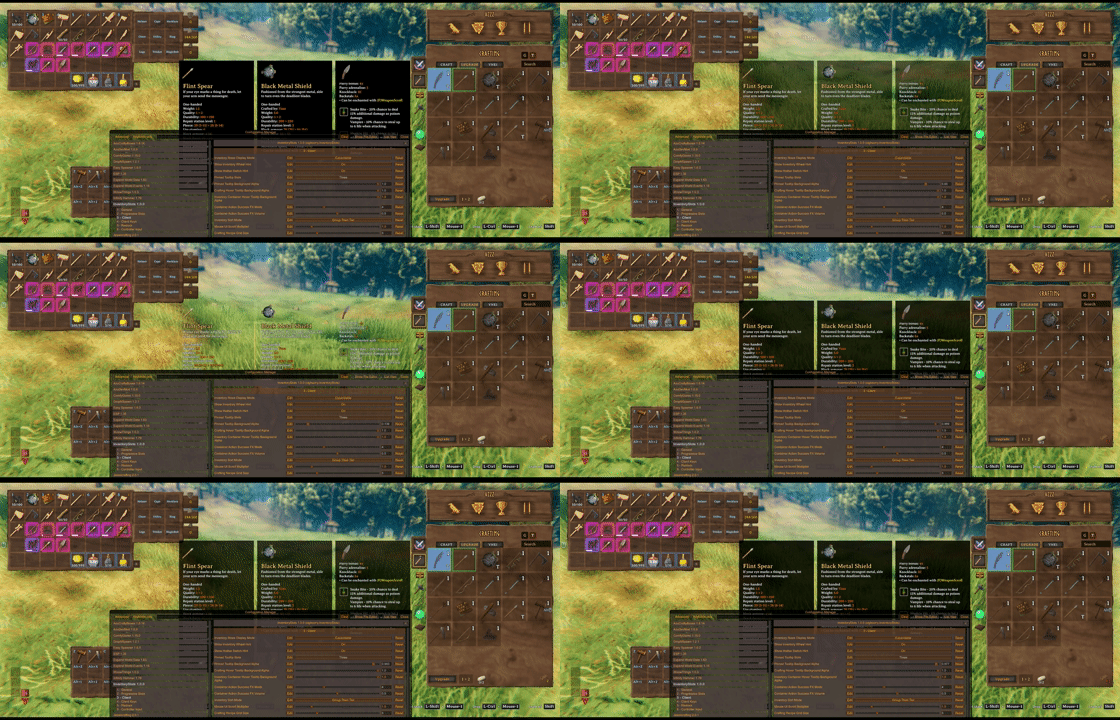
Inventory/container and crafting hover tooltip background opacity are configurable on the client.
Container Tools
Looking at an accessible container can show its contents in a read-only container panel without opening or claiming the container. The preview keeps the last valid grid during its configurable close delay and supports controller-active UI safely. Set the delay to 0 to disable the preview.
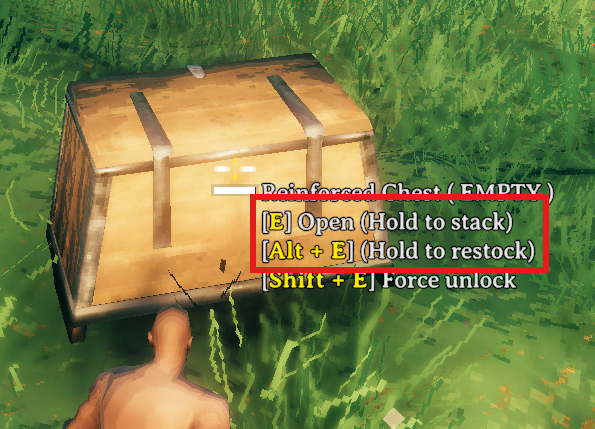
Hovering a container shows hold actions for area quick stack and area restock. Area ranges are centered on the interacted container.

Hold E to quick stack matching non-favorited player items into the hovered container and nearby eligible containers.
Favoriting marks the inventory slot itself, making that slot immune to quick stack while also registering it as a restock target.
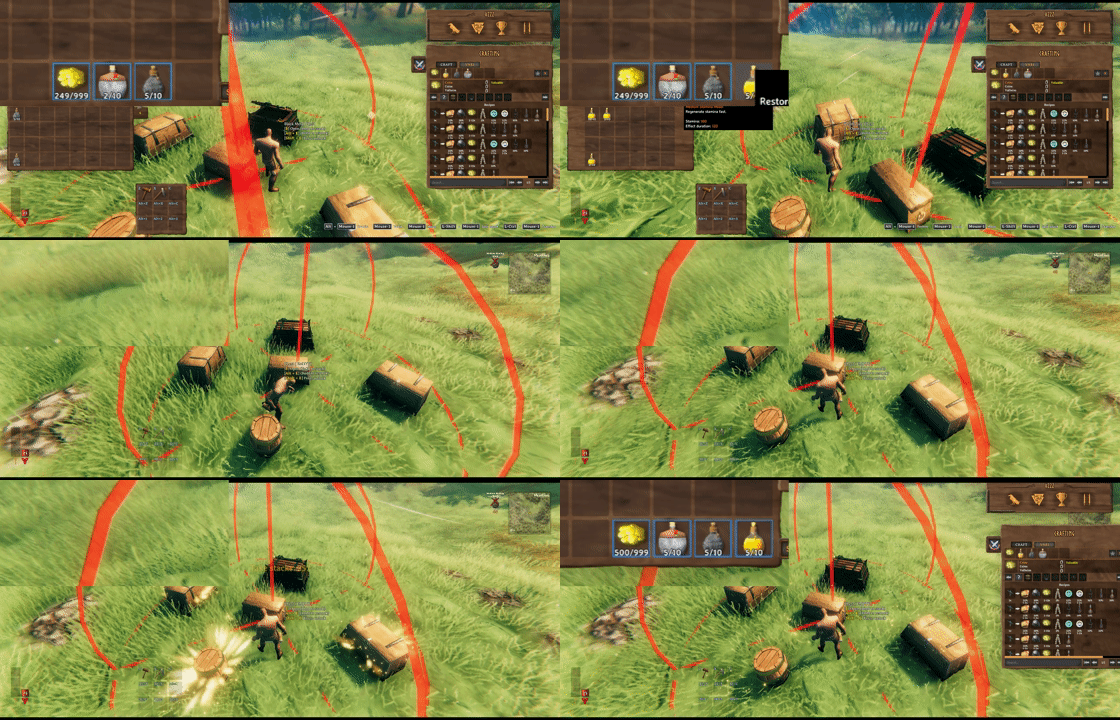
Hold Alt+E by default to restock favorited inventory stacks from the hovered container and nearby eligible containers.
Take stacks pulls only matching stackable items that are not favorited.

Client restock limits can cap favorite restock targets per prefab, such as Stone: 10 or Coins: 500.
Mod Compatibility Examples
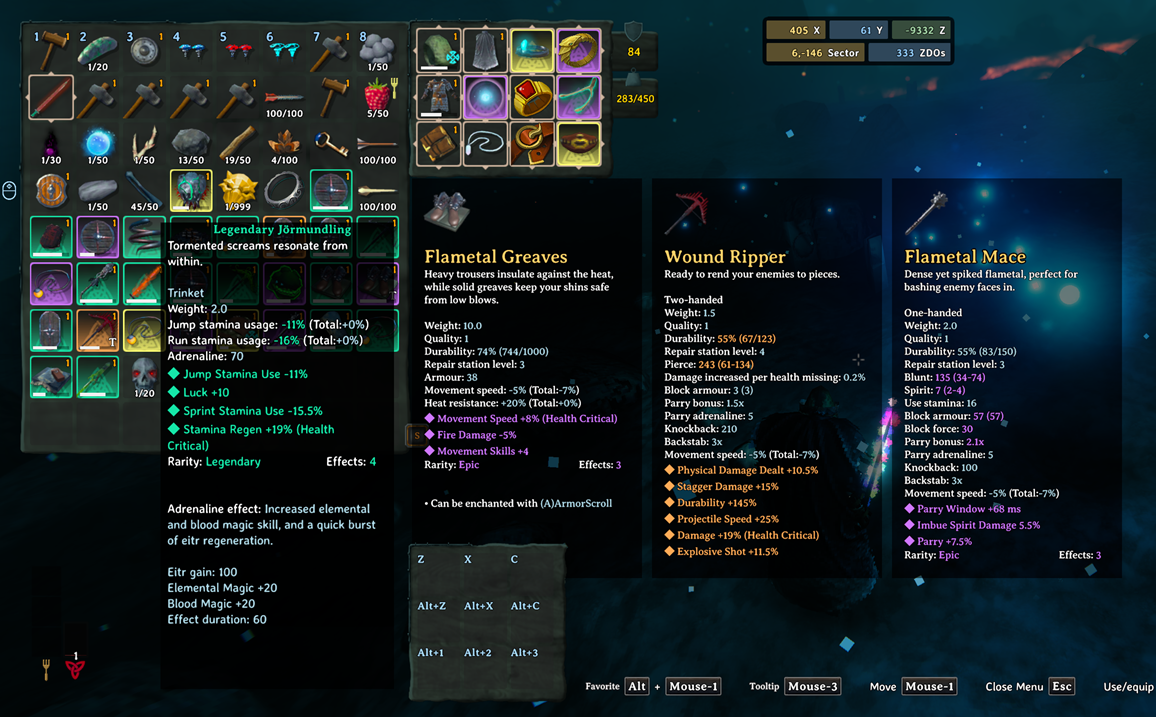
EpicLoot items keep their tooltip data and can use InventorySlots equipment/custom slot routing when configured in InventorySlots.yml.

EpicLoot gear can be compared from upgrade views with InventorySlots pinned tooltips.
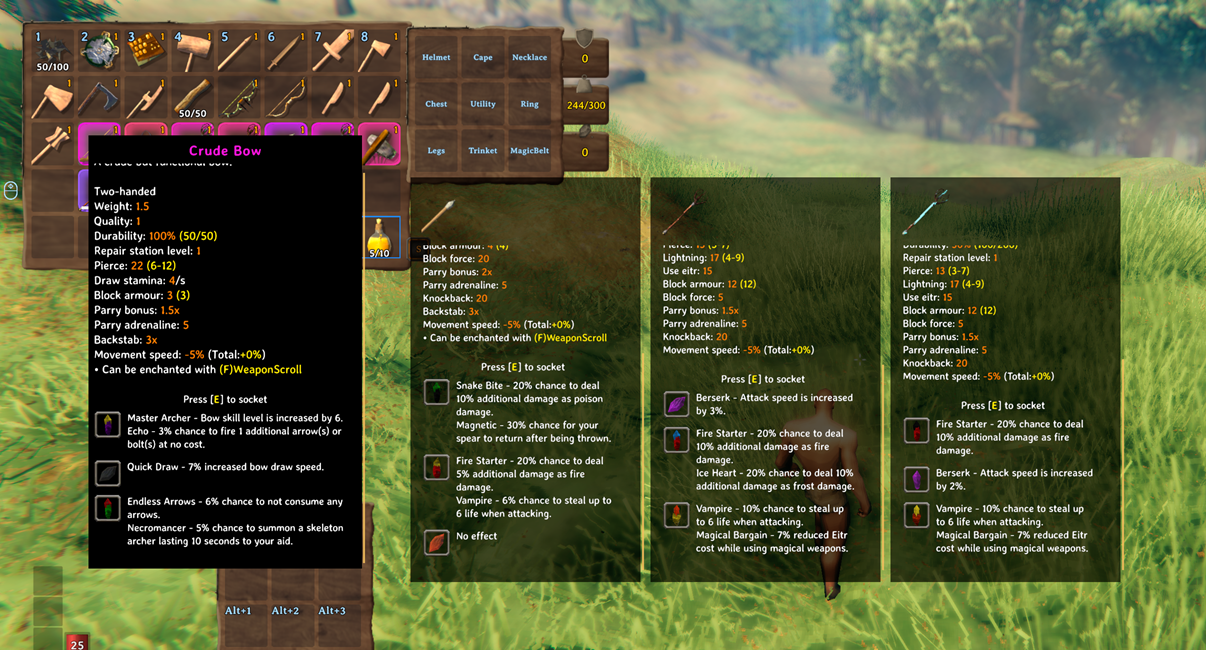
Jewelcrafting sockets and gem tooltip content are supported in InventorySlots tooltip and comparison flows.
Highlights
- Stable inventory growth: locked rows and special slots stay reserved internally, so item coordinates do not reshuffle as progression changes.
- Dedicated equipment and quick slots: built-in equipment slots, YAML-defined custom slots, and a fixed quick slot panel with hotkeys.
- Clean favorite rules: regular rows, hotbar cells, and quick slots can be favorited.
- Container tools: quick stack, take stacks, favorite restock, player/container sort, and safer tombstone take-all behavior.
- Crafting browser: icon grid, search, group filters, recipe favorites, recipe sorting, grid zoom, and multicraft.
- Tooltips: scrollable hover tooltips and pinned comparison panels for inventory, containers, crafting, quick slots, and supported modded tabs.
- Compatibility support for EpicLoot, Jewelcrafting, backpacks, RustyBags, Magic Supremacy, BetterArchery, MultiUserChest, ServerCharacters, TooltipExpansion, and VNEI.
Slot Model
InventorySlots reserves the maximum supported layout internally, then exposes only the cells that are currently usable.
- Regular rows are the normal inventory area.
- The hotbar is the first regular row.
- The hotbar switch row is the second regular row.
- Equipment slots and quick slots are anchored after the reserved regular inventory area.
- Locked rows are hidden and blocked, but their coordinates remain stable.
This makes the inventory safer for progression, multiplayer, tombstones, and compatibility code that may touch item positions.
Progressive Rows
The base inventory starts as an 8x4 grid. Up to five extra regular rows can unlock through item discovery.
Default extra row unlocks:
- Extra Row 1:
HardAntler - Extra Row 2:
CryptKey - Extra Row 3:
Wishbone - Extra Row 4:
DragonTear - Extra Row 5:
YagluthDrop
Clients can display unlocked rows in two ways:
Fixed: show all unlocked regular rows.Expandable: remember the visible row count locally and adjust it with the mouse wheel while the inventory is open.
Auto Favorite Hotbar Switch Row defaults to On and marks the second inventory row as favorite when the local player is loaded or spawned.
Equipment Slots
Built-in equipment slots:
helmetchestlegscapeutilitytrinket
Custom equipment slots can be added with YAML. Each custom slot has a stable id, a display name, and an optional items list.
Slots:
  - id: wishbone
    name: Wishbone
    items:
      - Wishbone

  - id: pickaxe
    name: Pickaxe
    items:
      - pickaxe
      - custom_pickaxes
The built-in slot ids are fixed. Their display names can be changed. Custom slot order follows YAML order.
Quick Slots
Quick slots are fixed special slots shown in a side panel and mirrored in a lightweight HUD.
Default quick slot progression:
- Row 1: available at start
- Row 2:
HardAntler - Row 3:
CryptKey
Default quick slot item rules:
QuickSlots:
  - Melee
  - Ranged
  - Magic
  - healthfood
  - staminafood
  - eitrfood
  - mead
  - potion
Default quick slot hotkeys are Z, X, C, Alt+Z, Alt+X, Alt+C, Alt+1, Alt+2, and Alt+3.
Favorites
InventorySlots has separate favorite systems for inventory slots, crafting recipes, and upgrade items.
Inventory favorites are position-based. Hold the favorite modifier key, LeftAlt by default, and left-click a regular inventory, hotbar, or quick slot cell to toggle the blue favorite border.
Favorite inventory slots are protected from:
- player inventory sorting
- quick stack
- area quick stack
- take-all safety movement
- inventory trash
Favorite restock uses favorites as intentional targets:
- regular favorite stack: restock target
- hotbar favorite stack: restock target
- quick slot favorite stack: restock target
- empty favorite slot: not used as generic storage
- non-stackable favorite item: not restocked
Current quick stack policy:
- regular non-favorite stackable items can quick stack
- regular favorite items are protected
- hotbar items do not quick stack
- quick slot items do not quick stack
Crafting favorites apply to recipes. Upgrade favorites apply to the specific upgrade item instance, not every item with the same prefab.
Container Tools
When a container is open:
Place stacksstacks matching non-favorited player items into that container only.Take stacksfills matching non-favorited partial player stacks from that container only.- Sort buttons sort the current player inventory or current container.
When hovering a container:
- Hold
Eto quick stack into the hovered container and nearby eligible player-built containers. - Hold
Alt+Eby default to refill favorite stacks from the hovered container and nearby eligible containers.
Area ranges use the interacted container as the center. Setting a range to 0 disables nearby-container behavior for that action.
Container actions respect container access, wards, tombstones, ships, in-use containers, and ownership constraints.
Restock target limits can cap favorite restock targets per item:
Stone: 10, Coins: 500
Items not listed refill to their normal max stack. A target of 0 prevents restocking that item.
Crafting Browser
The crafting panel is redesigned into a fast icon-grid browser.
Core features:
- recipe icon grid
- mouse wheel paging
- grid zoom with the configured zoom modifier
- recipe favorites
- group filter rail
- search input
- craftable recipe highlighting
- pinned recipe comparison tooltips
- recipe requirement rows in hover tooltips
- recipe sorting by favorite, craftable state, resource tier, group, equipment set, and name
Crafting search indexes user-facing names, English localization text, prefab/internal names, and recipe materials.
The crafting recipe grid starts at 6x6; zoom changes made with the grid controls are remembered without exposing a separate Configuration Manager option.
Crafting and inventory/container sorting use separate client sort modes. Crafting defaults to TierThenGroup and is changed with the crafting panel buttons, while inventory/container sorting is configured in 4 - Client:
TierThenGroup: resource tier first, then group.GroupThenTier: group first, then resource tier.
The resource tier map comes from YAML and defaults to a biome-style progression from Meadows through Ashlands.
Tooltips
InventorySlots uses scrollable custom hover tooltips for:
- inventory items
- container items
- quick slot panels
- crafting recipes
- upgrade recipes
- compatible external crafting tabs
Pinned comparison tooltips use the same scrollable body behavior. Client UI options control pinned tooltip slots and hover tooltip opacity.
Item Groups
Item groups power crafting filters, sorting, quick slot rules, keep-on-death rules, and custom slot item lists.
Fixed top-level groups:
MeleeRangedMagicEquipmentFoodConsumableMeadbaseMisc
YAML can reorder built-in subgroups and add custom prefab groups:
Groups:
  Melee:
    - sword
    - axe
    - custom_swords

  custom_swords:
    - SwordNiedhogg
    - THSwordSlayer
Custom groups can then be reused by sorting, quick slots, inventory limits, keep-on-death, and custom equipment slots.
Inventory Limits
InventoryLimits caps the total number of matching item units in the player inventory. Keys can be exact prefab/internal names, built-in groups, or custom groups. Counts include regular rows, hotbar, equipment slots, and quick slots.
InventoryLimits:
  FishingRod: 1
  tankards: 3
  FLG_TamingOrb: 3
A limit of 0 blocks new additions. Existing excess items remain intact after loading a character or lowering a limit, but no more matching items can be added until the count is below the limit. Moves within the same player inventory do not count as additions.
Blocked crafting attempts, manual pickups, and inventory transfers show a localized center message with the item name and configured maximum. Crafting is stopped before consuming materials, and an active crafting queue ends when it reaches a limit. Passive auto-pickup checks stay silent to avoid repeating the message every frame.
Keep On Death
KeepOnDeath decides which items stay with the player instead of moving to the tombstone.
Entries can reference top-level groups, subgroups, custom groups, or exact prefab/internal item names.
Default:
KeepOnDeath:
  - Melee
  - Ranged
  - Magic
  - Equipment
The feature can be disabled with Enable Death Keep Rules.
YAML Model
The server-authoritative YAML controls:
SlotsGroupsInventoryLimitsQuickSlotsKeepOnDeathresourceMap
Invalid YAML and unknown YAML properties are rejected so the last stable configuration can remain active.
Minimal shape:
Slots:
  - id: helmet
    name: Helmet
  - id: chest
    name: Chest
  - id: legs
    name: Legs
  - id: cape
    name: Cape
  - id: utility
    name: Utility
  - id: trinket
    name: Trinket

Groups:
  Melee:
    - sword
    - axe
  Food:
    - healthfood
    - staminafood

InventoryLimits:
  FishingRod: 1
  tankards: 3

QuickSlots:
  - Melee
  - healthfood

KeepOnDeath:
  - Melee
  - Equipment
Config Sections
1 - General: server lock, death keep rules, trash panel, area quick stack, area take stacks.2 - Progressive Slots: extra rows, quick slot rows, quick slot progression.3 - Restock: favorite restock target limits.4 - Client: inventory display, sort modes, crafting grid, container preview and hover behavior, container FX, mouse UI scroll.5 - Client UI: hints and tooltip display options.6 - Client Keys: keyboard and mouse shortcuts.7 - Controller Input: controller scrolling and controller hotkeys.
Controller Input
Controller support is client-side. InventorySlots stores controller hotkeys as a fixed action enum and exposes them through a custom Configuration Manager editor with capture, clear, and preset controls.
Controller DPad Hotkey Mode defaults to InventoryNavigation, leaving DPad input available for vanilla inventory movement. It can also allow DPad hotkeys directly or only while a configured modifier is held.
Compatibility
InventorySlots declares incompatibility with mods that also take ownership of equipment slots, quick slots, or inventory slot movement.
Soft compatibility and adaptive behavior include:
- AzuCraftyBoxes: nearby material counts and colors.
- Jewelcrafting: ring/necklace slots, socket tooltips, gem rows, crafting socket UI placement, and visual/stat panel support.
- AdventureBackpacks and Smoothbrain Backpacks: backpack slot support and equipped-backpack synchronization.
- RustyBags: bag/quiver slot support and equipped state synchronization.
- Magic Supremacy: belt slot support and equipped-belt synchronization.
- BetterArchery: quiver/reserved cells are treated conservatively.
- MultiUserChest: remote-owner container access is respected.
- ServerCharacters: local slot backup/restore avoids stale server-character data.
- EpicLoot: item tooltip content is preserved while InventorySlots-owned tooltip layouts stay isolated.
- TooltipExpansion: InventorySlots-owned tooltips avoid vanilla tooltip scrollbar/layout interference.
- VNEI: crafting and upgrade recipe icons expose item tooltip data for VNEI recipe lookup.
- ContentsWithin: the integrated preview disables itself when the standalone plugin is present to prevent duplicate GUI ownership.
Github
Quick stack, restock, and inventory favorite behavior were originally informed by QuickStackStore.
The container preview is adapted from Redseiko's ContentsWithin and MSchmoecker's GPL-3.0 fork, with a read-only lifecycle and grid-safety rewrite for InventorySlots.
https://github.com/sighsorry1029/InventorySlots
CHANGELOG
Changelog
1.2.4
- Changed cooking-recipe ingredient detection into a fallback classification so fermenter outputs, potions, mead bases, tools, equipment, and explicitly grouped items keep their primary category. This allows items such as ValheimCuisine's
VC_VineberryAleto use the default mead quick-slot rule even when they are also ingredients in food recipes.
1.2.3
- Replaced
Quick Slot CountwithQuick Slot Rows, using 0-3 rows of three slots each, and removed the nine redundant quick-slot hotkey display-text options. - Reorganized Configuration Manager sections and option ordering, moved Restock directly after Progressive Slots, hid crafting grid size and crafting sort mode while retaining their in-game controls and saved values, and limited Container Preview Close Delay to 1 second.
- Simplified container action success effects to one On/Off option. Area quick stack/restock now shows VFX at up to 10 changed containers and plays its SFX once at the interacted container, with the hold duration fixed at 0.5 seconds.
1.2.2
- Added server-authoritative
InventoryLimitsrules for exact prefab/internal names, built-in groups, and custom YAML groups. Limits count total item units across regular rows, the hotbar, quick slots, and equipment slots. - Blocked pickups, inventory transfers, and crafting before they exceed a configured limit, with a localized center message showing the item and maximum. Crafting stops before consuming materials, and active crafting queues stop when they reach a limit.
- Preserved existing excess items during character loading or after lowering a limit, while allowing movement within the same player inventory and blocking further additions until the count is below the limit.
- Changed automatic item placement to fill unlocked regular inventory rows from row 2 onward before using the hotbar row.
# Maximum total item units the player can carry across regular rows, hotbar,
# quick slots, and equipment slots. Keys can be exact prefab/internal names,
# built-in groups, or custom groups above. A limit of 0 blocks new additions.
# Existing excess items are preserved when loading or lowering a limit.
InventoryLimits:
  FishingRod: 1
  tankards: 3
  FLG_TamingOrb: 3
1.2.1
- Moved crafting recipe food fork indicators closer to the right edge so their visible top and right margins are better aligned across recipe grid sizes.
1.2.0
- Corrected food fork colors in player and container inventories so modded foods follow their highest health, stamina, or eitr value using the same classification as InventorySlots food groups.
- Added matching colored food fork indicators to crafting recipe result icons, while keeping zero-stat consumables and veiled recipes hidden.
1.1.9
- Added a client-side read-only container preview that shows accessible container contents while looking at them without opening or claiming the container.
- Added a configurable Container Preview Close Delay from 0 to 2 seconds; setting it to 0 disables the preview, while enabled values keep the last valid grid visible briefly after looking away.
- Blocked take-all, stack, right-click, and drag interactions while the preview owns the container UI, and safely restores the regular inventory when opening or closing it.
- Added grid validation and automatically disables the integrated preview when standalone ContentsWithin is installed to prevent duplicate GUI ownership.
1.1.8
- Reduced runtime and maintenance complexity by consolidating inventory definition/layout, item classification/sorting, crafting UI refresh/tooltip, and compatibility state into their owning modules, removing redundant controller and proxy layers without intended feature changes.
- Reduced InventorySlots/InventoryActions drift risk with synchronized action-cell, container transfer, and restock-policy copies plus parity tests.
- Fixed container action success sound volume scaling to use Valheim's ZSFX modifier directly, so the configured volume is applied once instead of being multiplied across reflected audio fields.
- Removed obsolete fallback, debug, and duplicated UI update paths and simplified project source discovery.
1.1.7
- Fixed EpicLoot and Jewelcrafting equipment effects not reliably refreshing after keep-on-death restores items kept in InventorySlots equipment slots.
- Improved keep-on-death slot restoration so built-in and custom equipment slots restore their equipped state through the same path.
- Moved Tankard, Tankard_dvergr, and TankardAnniversary out of the hard-coded tool override and into the default YAML tankards group so players can customize the grouping more flexibly.
1.1.6
- Improved AdventureBackpacks custom equipment slot visuals by applying AdventureBackpacks' own bone reordering after backpack visuals are attached, fixing Iron/Silver backpack visuals that could appear offset like they were held in the left hand.
- Removed the temporary shoulder-slot visual swap used for AdventureBackpacks and now keeps backpack visuals on the InventorySlots custom visual path.
- Fixed custom equipment death-drop preparation so equipment-slot items are handled before tombstone contents are created.
1.1.5
- Kept the center-screen result counts for container quick stack and container restock actions.
- Removed the other action success/result messages, including take all, place all, sort, and trash, while keeping failure and warning messages.
- Restored only the quick stack/restock result localization tokens and removed unused result tokens for the quieter actions.
1.1.4
- Reduced inventory state audit, slot projection, and custom equipment visual refresh overhead, especially around equipment changes and auto-equip flows.
- Improved dedicated slot routing and inventory placement cache paths to reduce repeated scans during item movement and pickup handling.
- Removed debug/performance logging from hot InventorySlots and compatibility paths so disabled diagnostics no longer spend time building log messages.
1.1.3
- Added a client option to logarithmically scale player health, food, stamina, eitr, and adrenaline bar lengths so high stats take less screen space.
- Fixed quick slot HUD anchoring after game start and improved equipment/quick slot panel dragging so panels track the cursor more accurately with less layout churn.
- Improved Jewelcrafting compatibility for socketed ring and necklace tooltips, socket container interaction from InventorySlots equipment slots, utility gem equip blocking, and first-hover socket row layout stability.
- Limited trash deletion to regular inventory cells and clarified the related message.
- Reduced several low-risk duplicate refresh paths and added policy tests to reduce InventoryActions drift.
1.1.2
- Fixed a frame drop issue when auto-pickup items were nearby while the inventory was full.
- Added Jewelcrafting compatibility for the Wisplight Gem and Wishbone Gem server options so the default Demister and Wishbone custom equipment slots are disabled while those gem options are On, and restored when they are Off.
1.1.1
- Added Circlet, Wishbone, and Demister as enabled default custom equipment slots in InventorySlots.yml.
- Equipment/custom equipment slots now stay hidden until the player has discovered, carries, or has equipped a compatible item.
- Allowed mouse-wheel recipe page changes while hovering the crafting recipe scrollbar area.
- Minor refactoring and optimizations.
1.1.0
- Added a Crafting Hover Tooltip mode option with Full, TitleOnly, and Off modes.
- Fixed crafting recipe tooltip pinning so the selected recipe cell can still be pinned while hovered, without changing recipe selection when using the pinned tooltip hotkey.
- Fixed crafting recipe hover tooltips after mouse-wheel page or grid zoom changes so the item under the cursor updates without requiring another hover.
- Allowed mouse-wheel recipe page changes while hovering the crafting recipe scrollbar.
- Stabilized the crafting recipe grid zoom hint layout and tightened the Alt+ mouse-wheel icon spacing.
1.0.9
- Improved crafting and inventory classification stability for recipe items whose prefab identity is not populated yet, including Tankard-style tool grouping and YAML prefab aliases.
- Reduced crafting UI refresh/stamp complexity and consolidated more runtime state behind focused controllers.
- Fixed Configuration Manager ordering for client UI options.
1.0.8
- Added a client-only Quick Slot HUD Follows Panel option so players can lock the quick slot HUD to its last saved position and move the QuickSlot panel separately.
- Saved quick slot HUD position and cell size in the client state.
- Updated keyboard hint and HUD key labels to display mouse buttons using Valheim's one-based mouse button numbering.
- Set the pinned, crafting hover, and inventory/container tooltip background alpha defaults to 0.9.
1.0.7
- Cleaned up more config options.
- Refactoring and optimizations.
1.0.6
- Updated crafting group UI: Equipment now uses the leather helmet icon, and crafting hover tooltips can be toggled on the client.
- Reworked food grouping: feast materials are grouped as feast, balancedfood was removed, and tied food stats now resolve by health, then stamina, then eitr.
- Classified Tankard, Tankard_dvergr, and TankardAnniversary directly as tool items.
- Improved quick slot key labels with compact auto text and optional per-slot display overrides.
- Improved container hover actions with movement-friendly quick stack/restock handling and configurable hover hold duration.
- Added protections for hidden inventory rows, full-inventory pickup checks, and hotbar-switch rows during inventory sorting.
1.0.5
- Minor cleanup and optimizations.
- Added compatibility for VeiledRecipes.
1.0.4
- Restock limit config now accepts localized in-game item names.
- Fixed checking fermenter and cooking station input/output too often, which caused frame drops while the inventory was open and ValheimCuisine was installed.
- Reinforced compatibility for other mods.
- Minor optimization and refactoring.
1.0.3
- Added a server-synced Trash panel to the inventory.
- Fixed quick slot rows 2 and 3 moving their items to the inventory when the player logged in.
- Allowed stackable Jewelcrafting and EpicLoot items to use quick stack and restock container actions.
1.0.2
- Fixed keep-on-death items in quick slot rows 2 and 3 moving to the inventory on player death.
- Added more compatibility patches for Jewelcrafting and EpicLoot.
- Added compatibility for MyLittleUI, CurrencyPocket, and RecycleNReclaim.
- Fixed errors related to
fx_hildrichestvolume. - Fixed quick slot hotkeys being recognized while chat was open.
1.0.1
- Added WackyItemRequiresSkill requirements to crafting station tooltips.
- Fixed items in rows 5 through 9 being removed on login.
- Fixed the inventory while scrolling over a container.
- Fixed grouping not working correctly for some modded items.
- Added compatibility for the Jewelcrafting table and Homestead circlet configuration.
- Added potion and mead groups to the Consumable group in InventorySlots.yml and removed balancedfood.
1.0.0
- Initial release.
