
Please disclose if any significant portion of your mod was created using AI tools by adding the 'AI Generated' category. Failing to do so may result in the mod being removed from Thunderstore.

InventorySlots
Equipment/quick slots, multicraft, progressive rows, keep-on-death, favorites, scrollable tooltips, crafting grid/list/search/sort, container stack/restock/sort, item comparison and controller support. Compatible with EpicLoot and Jewelcrafting.
| Date uploaded | 2 weeks ago |
| Version | 1.5.2 |
| Download link | sighsorry-InventorySlots-1.5.2.zip |
| Downloads | 509 |
| Dependency string | sighsorry-InventorySlots-1.5.2 |
This mod requires the following mods to function

denikson-BepInExPack_Valheim
BepInEx pack for Valheim. Preconfigured with the correct entry point for mods and preferred defaults for the community.
Preferred version: 5.4.2351README
InventorySlots
InventorySlots is an all-in-one Valheim inventory overhaul focused on stable slots, predictable item movement, and compact UI tools.
It adds progressive inventory rows, equipment slots, quick slots, favorites, keep-on-death rules, scrollable/pinned tooltips, a crafting browser, container tools, sorting, restock, multicraft, and controller support.
Visual Overview

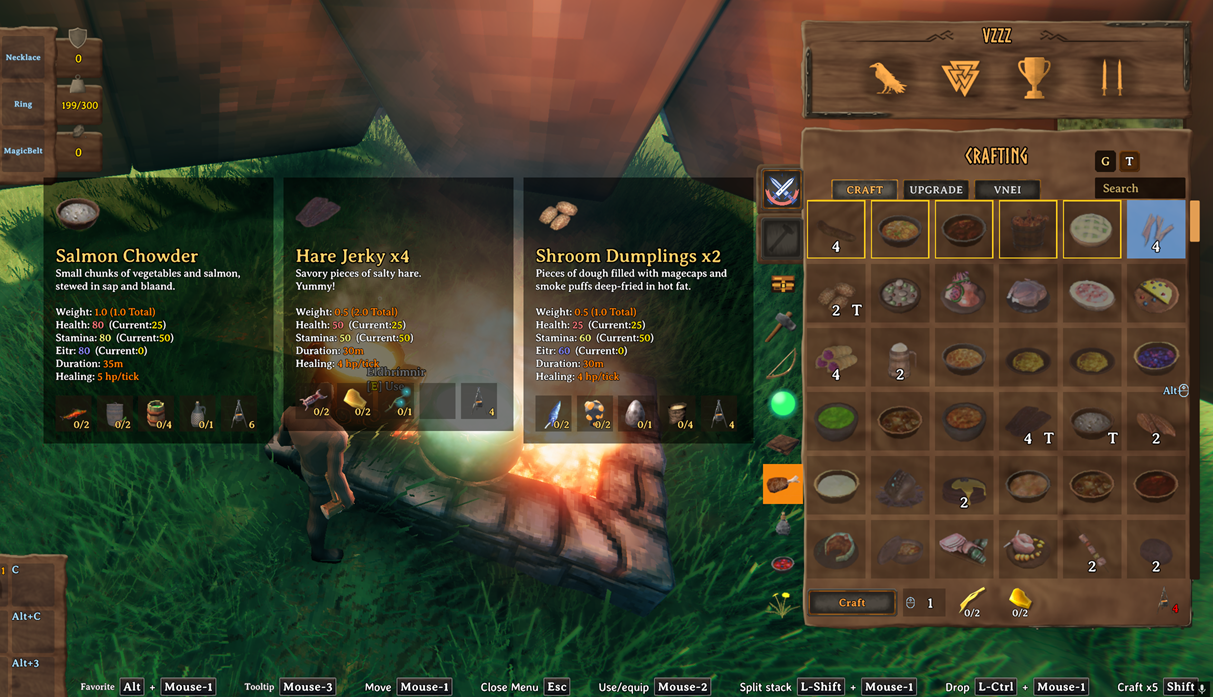
Listing view on crafting station is now available.
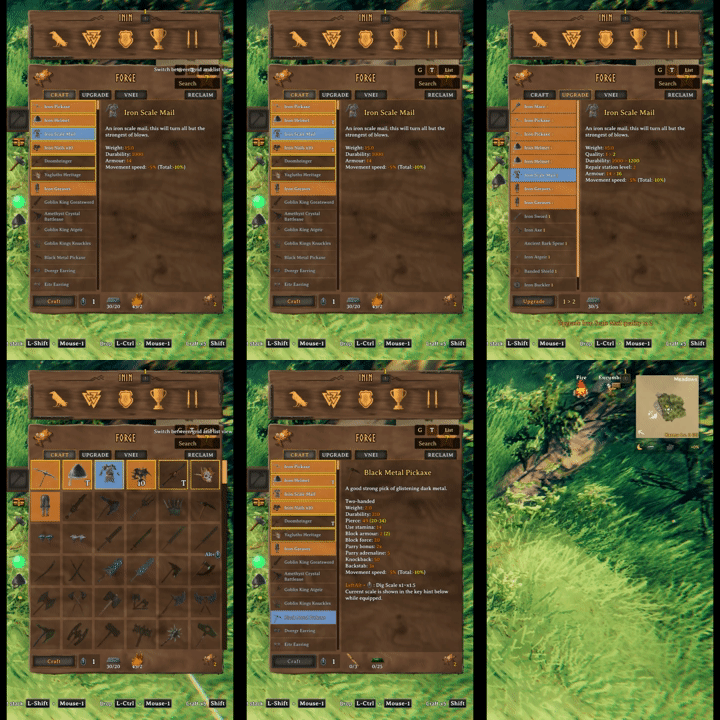
Change between grid view and list view can be applied live with a button.
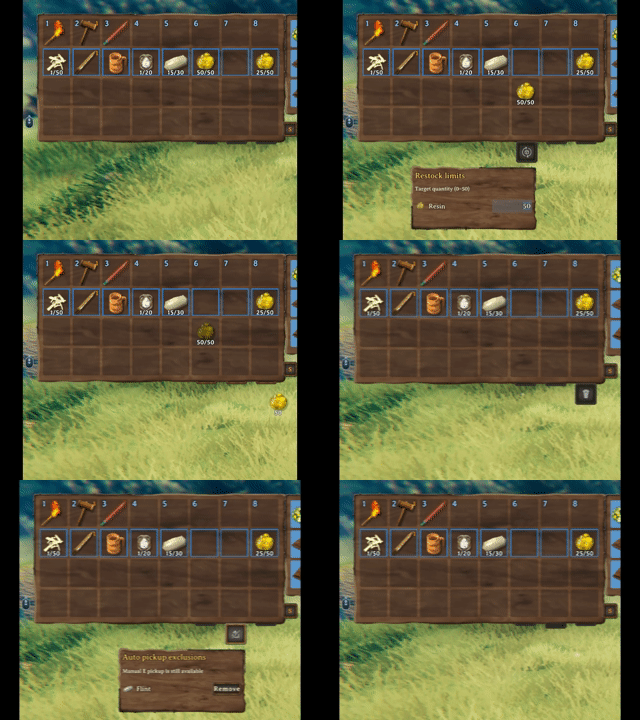
Three inventory buttons: Restock limit, Auto Pickup Exclude, and Trash
Stable Inventory Growth
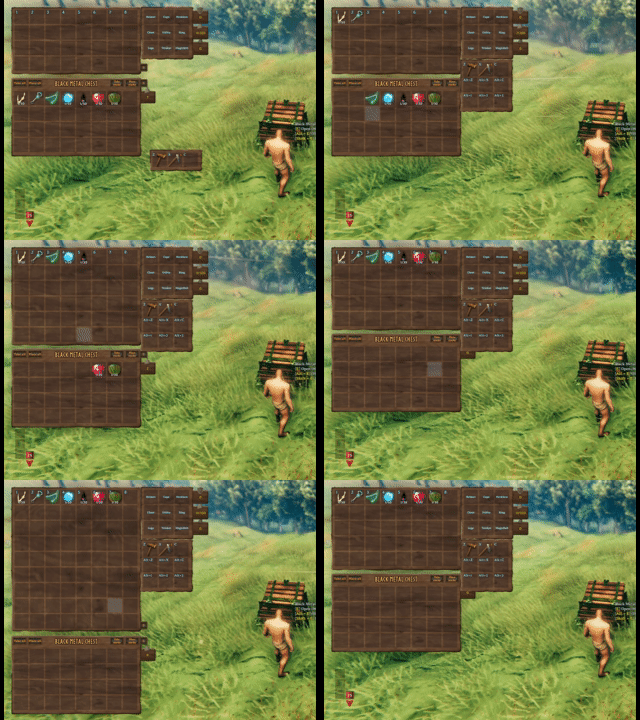
Progressive rows and quick slots unlock over time without reshuffling saved item positions. Clients can expand or collapse the currently visible inventory rows, while equipment slots are defined by InventorySlots/InventorySlots.yml.
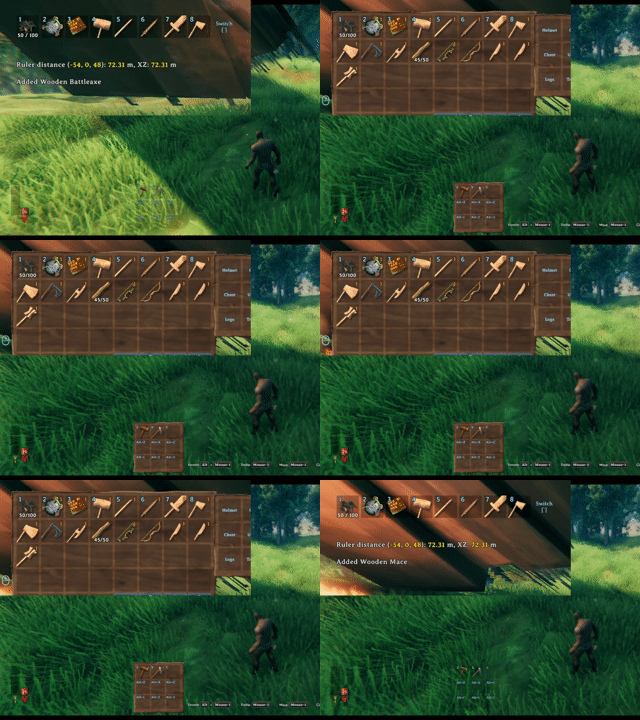
The hotbar switch key rotates the visible hotbar row, keeping a tall inventory practical without moving the underlying item coordinates.
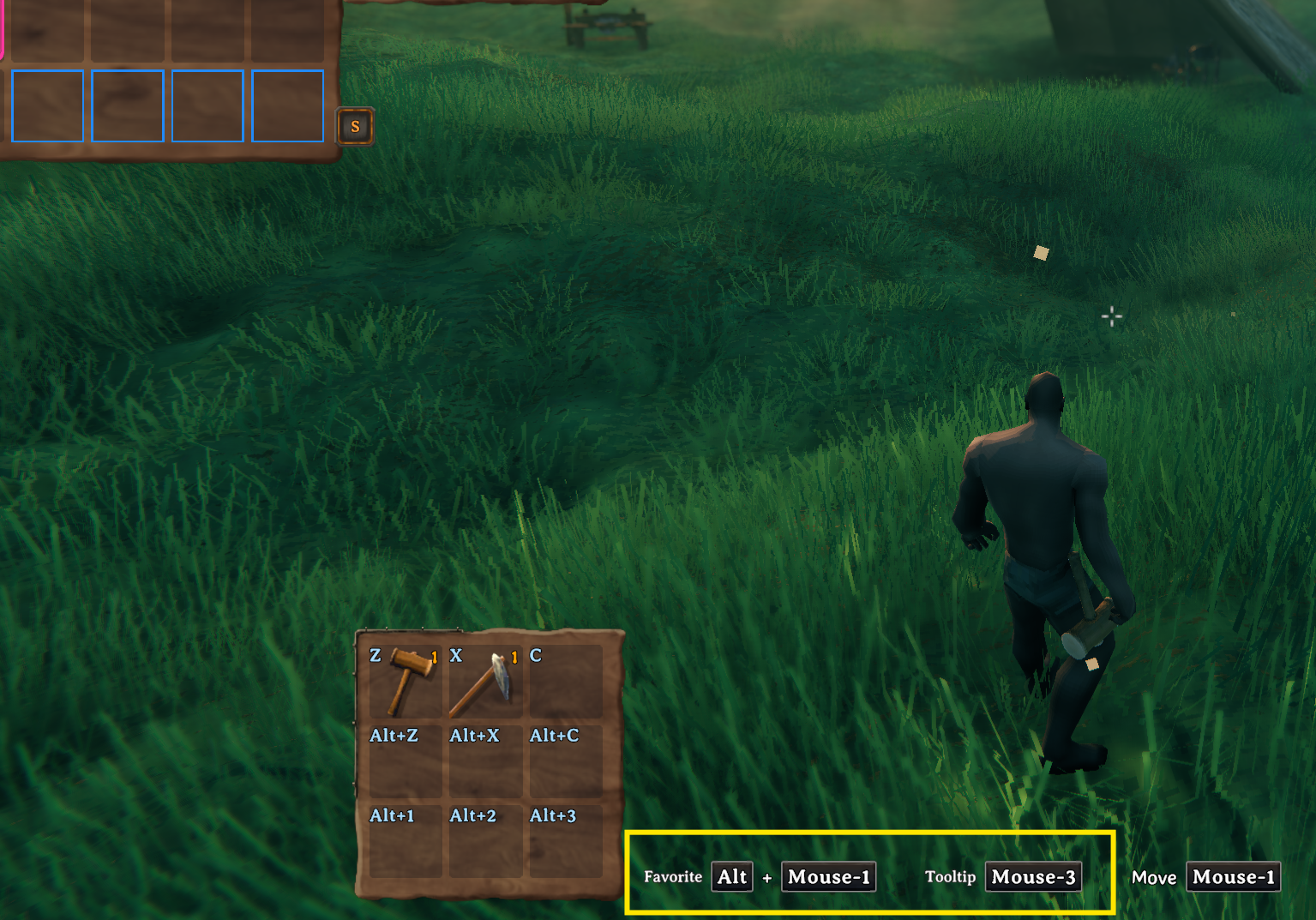
Key hints show the current favorite and tooltip hotkeys, including mouse/controller-aware bindings from the client config.
Crafting Browser

Crafting stations are redesigned into an icon-grid browser with search, group filters, favorites, sorting buttons, page scrolling, and hover/pinned tooltip support.
Use the Grid / List button immediately to the left of the search field to switch live. List is the default for new installations; existing saved selections are preserved, and your selection is saved locally between sessions. List shows recipe names on the left and the selected recipe's scrollable details on the right, without a recipe hover popup. Search, filters, favorites, selection, crafting quantity, and queued crafting are shared between views. List scrolling leaves the selected recipe unchanged. Craft, Upgrade, Jewelcrafting's Socket tab, and Recycle N Reclaim's Reclaim tab support both views. In List, Socket risk warnings and Reclaim status/blocking messages appear above the item description and scroll with it. Material costs, returned-item icons, and action buttons remain below; Grid keeps its existing bottom messages. Other external crafting tabs keep their existing layouts.
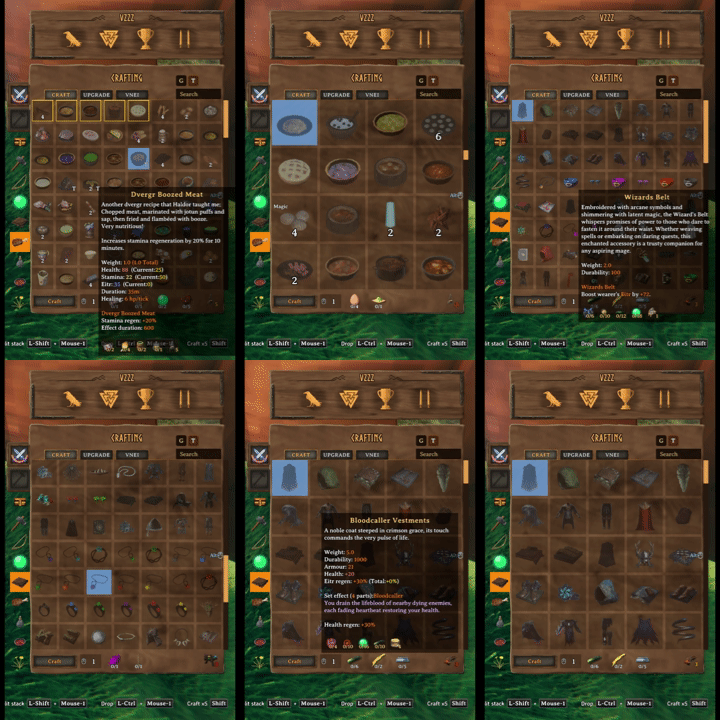
Mark favorite recipes and resize the crafting grid with mouse-wheel zoom.
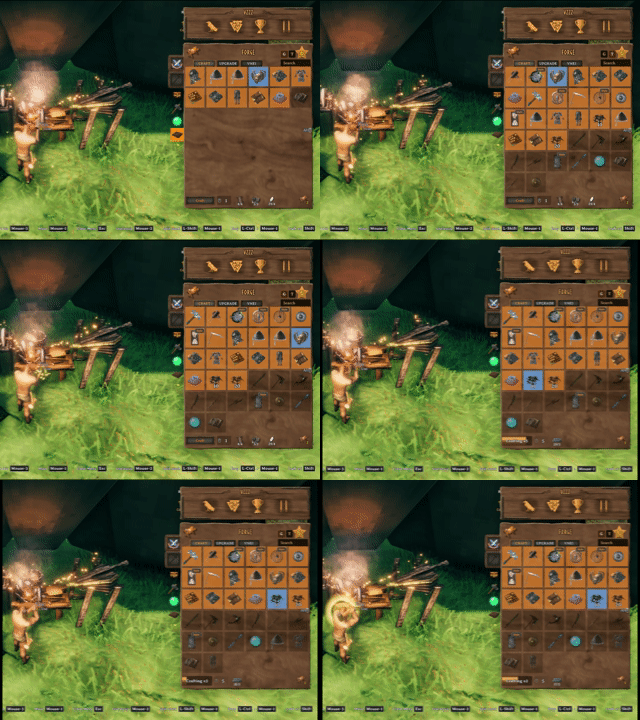
Sort recipes by group and resource tier, then queue up to 999 crafting operations from the same station flow. Each operation still checks materials, inventory space, and the crafting station.
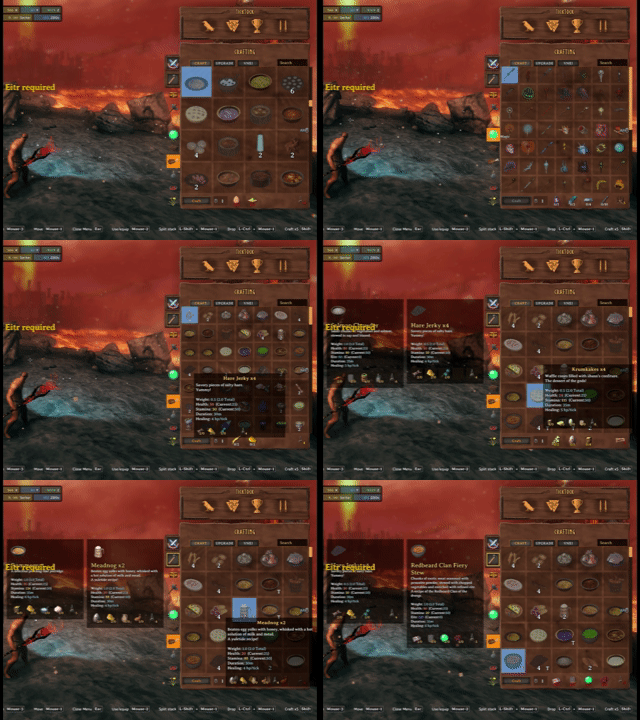
Recipe hover and pinned tooltips stay usable while changing grid size and browsing the crafting station.
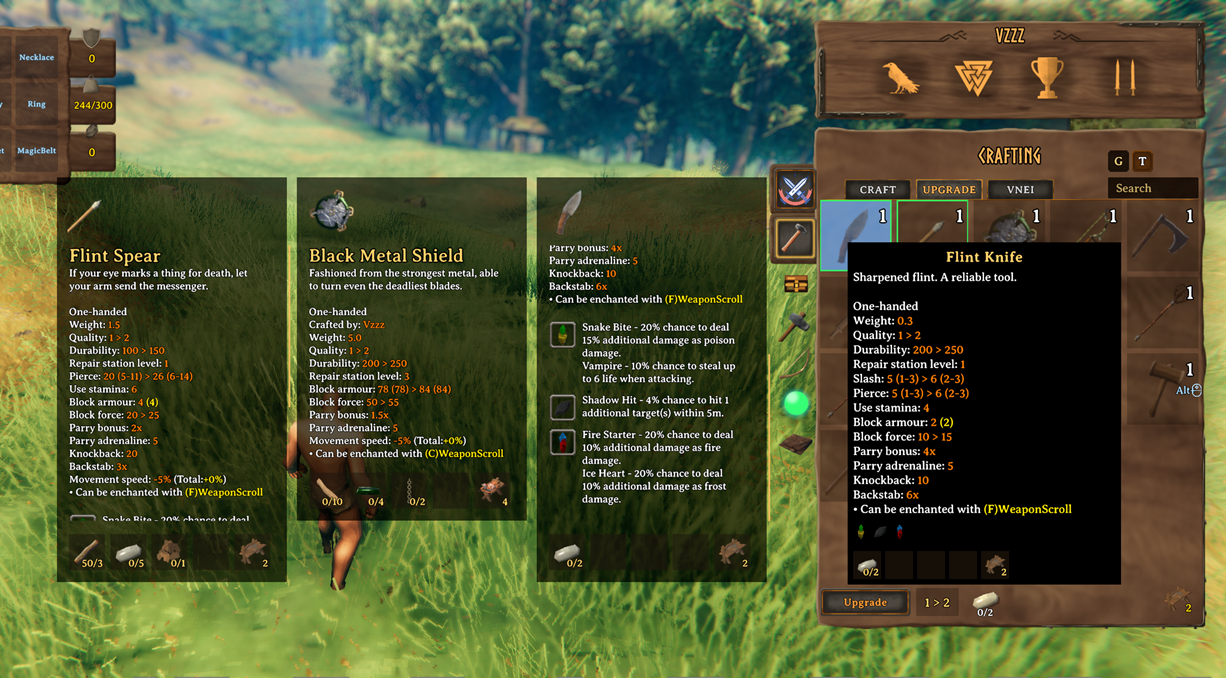
Upgrade views show the stat changes gained from upgrading gear, highlighting upgraded values in yellow in hover and pinned tooltips, with upgrade favorites kept separate from crafting favorites.
Scrollable Tooltips And Comparisons
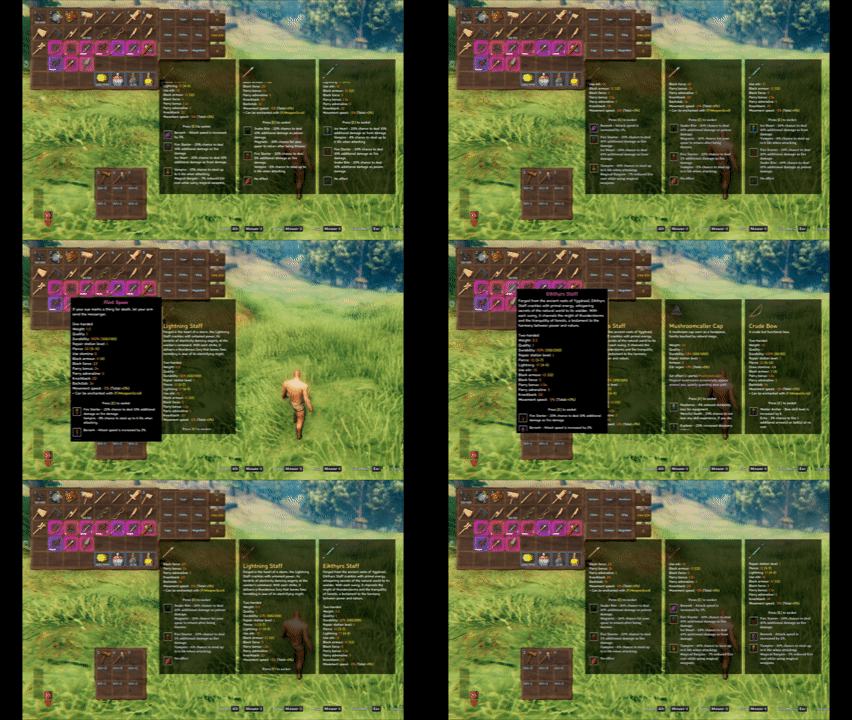
InventorySlots tooltips can expand into scrollable panels and support multiple pinned comparison slots.

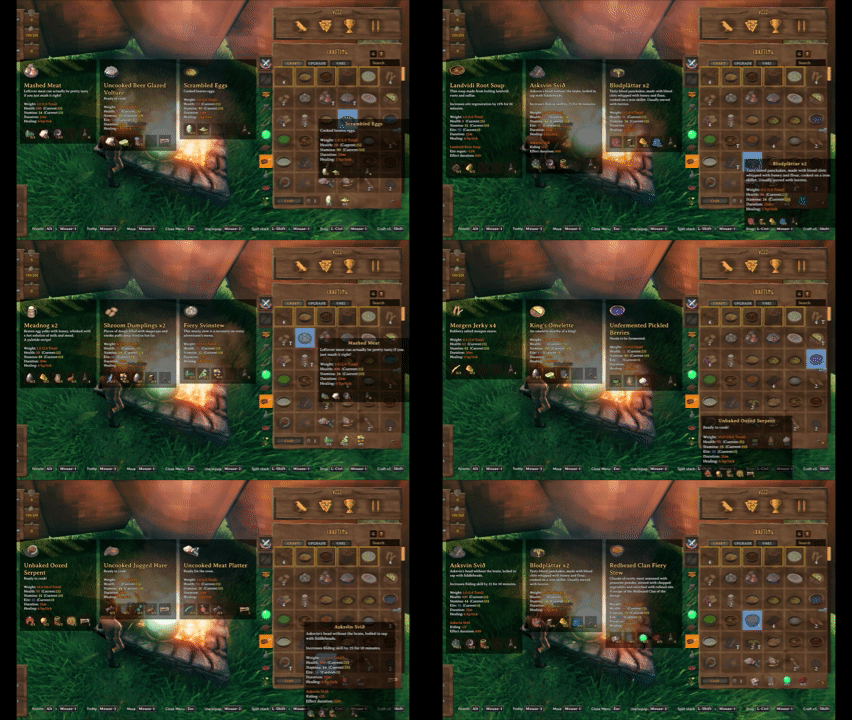
Pin up to three tooltips to compare recipes, meals, potions, and gear without losing your current hover target.
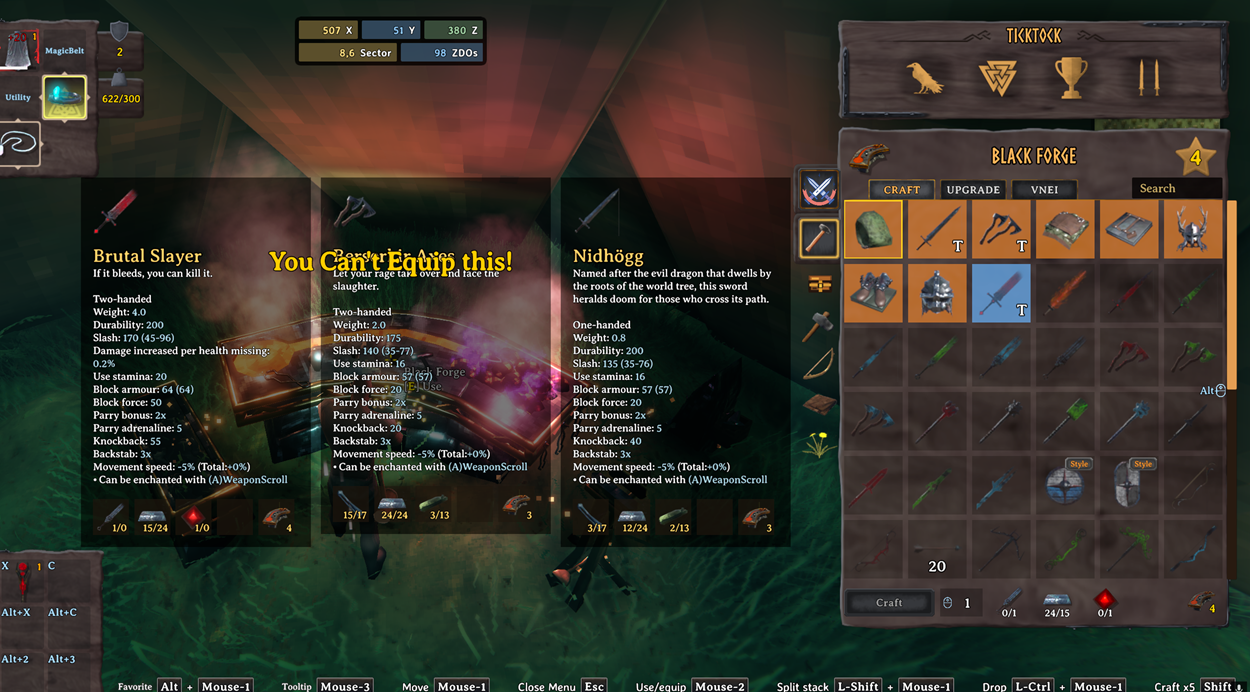
Gear and food comparisons use the same pinned tooltip system.
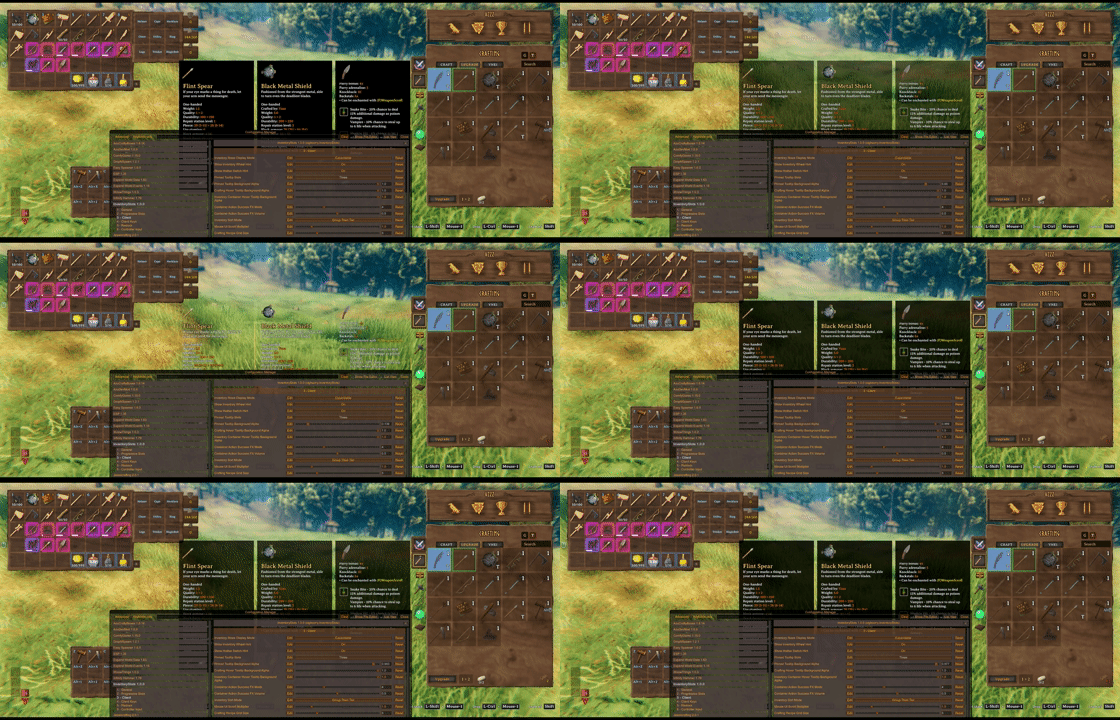
Inventory/container and crafting hover tooltip background opacity are configurable on the client.
Container Tools
Looking at an accessible container can show its contents in a read-only container panel without opening or claiming the container. The preview keeps the last valid grid during its configurable close delay and supports controller-active UI safely. Set the delay to 0 to disable the preview.
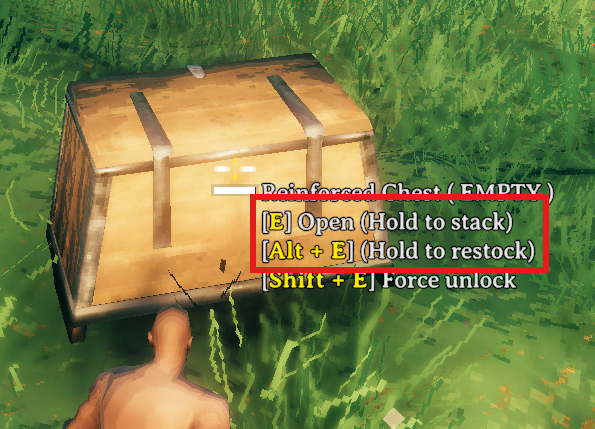
Hovering a container shows hold actions for area quick stack and area restock. Area ranges are centered on the interacted container.

Hold E to quick stack matching non-favorited player items into the hovered container and nearby eligible containers.
Favoriting marks the inventory slot itself, making that slot immune to quick stack while also registering it as a restock target.
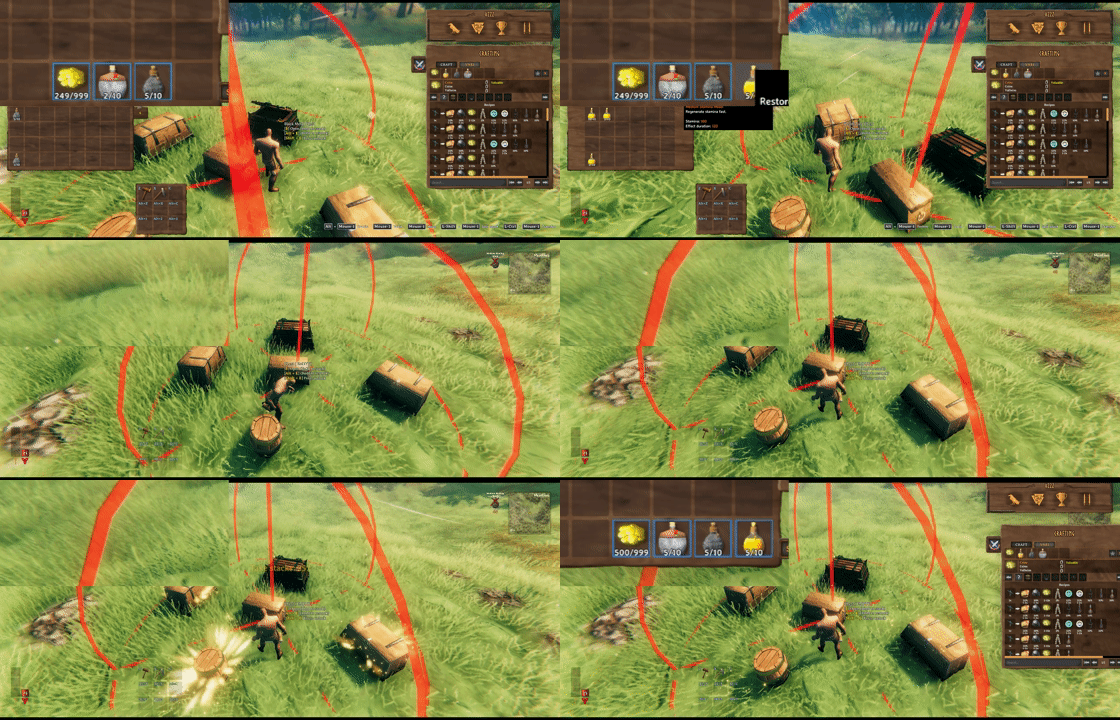
Hold Alt+E by default to restock favorited inventory stacks from the hovered container and nearby eligible containers.
Take stacks pulls only matching stackable items that are not favorited.

Client restock limits can cap favorite restock targets per prefab, such as Stone: 10 or Coins: 500.
Mod Compatibility Examples
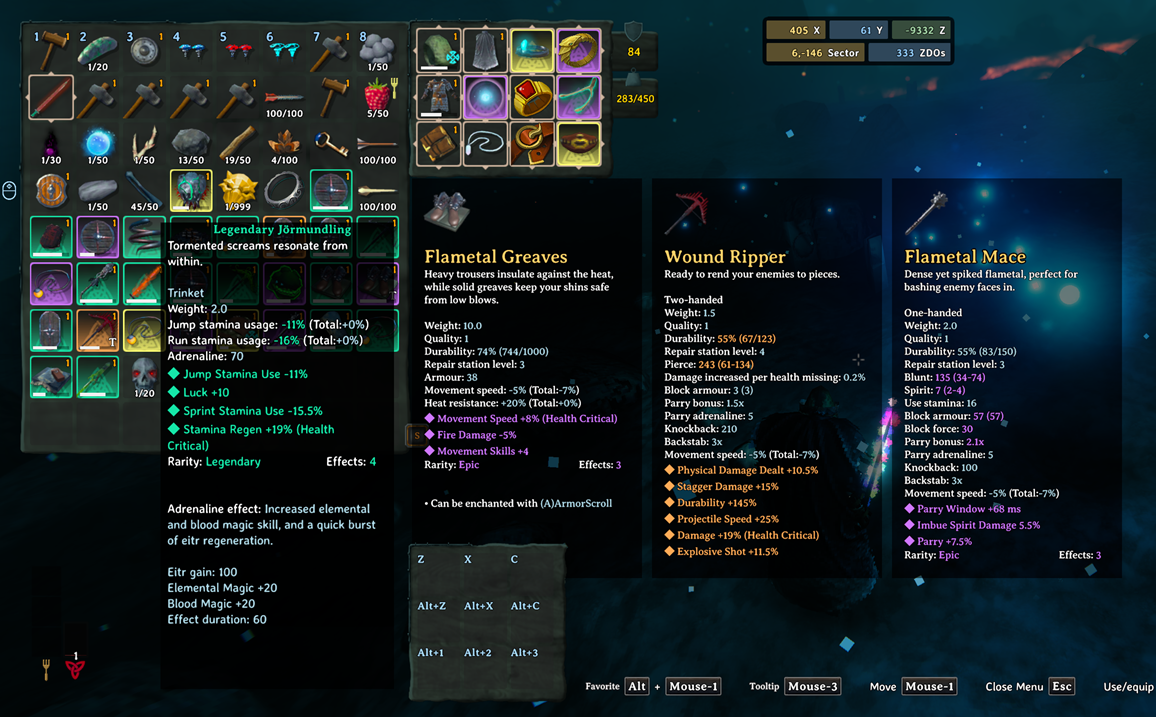
EpicLoot items keep their tooltip data and can use InventorySlots equipment/custom slot routing when configured in InventorySlots/InventorySlots.yml.

EpicLoot gear can be compared from upgrade views with InventorySlots pinned tooltips.
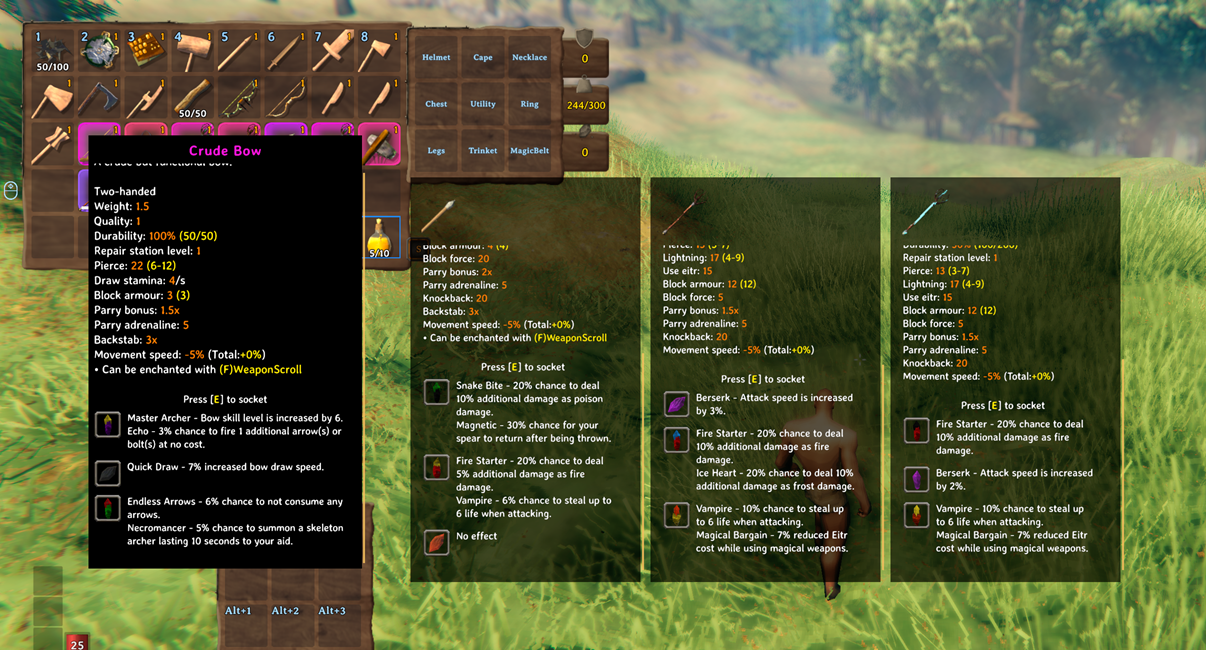
Jewelcrafting sockets and gem tooltip content are supported in InventorySlots tooltip and comparison flows.
Highlights
- Stable inventory growth: locked rows and special slots stay reserved internally, so item coordinates do not reshuffle as progression changes.
- Dedicated equipment and quick slots: built-in equipment slots, YAML-defined custom slots, and a fixed quick slot panel with hotkeys.
- Clean favorite rules: regular rows, hotbar cells, and quick slots can be favorited.
- Container tools: quick stack, take stacks, favorite restock, player/container sort, and safer tombstone take-all behavior.
- Crafting browser: icon grid, search, group filters, recipe favorites, recipe sorting, grid zoom, and multicraft.
- Tooltips: scrollable hover tooltips and pinned comparison panels for inventory, containers, crafting, quick slots, and supported modded tabs.
- Compatibility support for EpicLoot, Jewelcrafting, backpacks, RustyBags, Magic Supremacy, BetterArchery, MultiUserChest, ServerCharacters, ServerManager, TooltipExpansion, and VNEI.
- Shared chest access: multiple players can view standard chests, while each item change waits for an approved ownership handoff. Sharing can be disabled.
Slot Model
InventorySlots reserves the maximum supported layout internally, then exposes only the cells that are currently usable.
- Regular rows are the normal inventory area.
- The hotbar is the first regular row.
- The hotbar switch row is the second regular row.
- Equipment slots and quick slots are anchored after the reserved regular inventory area.
- Locked rows are hidden and blocked, but their coordinates remain stable.
This makes the inventory safer for progression, multiplayer, tombstones, and compatibility code that may touch item positions.
In multiplayer with ServerCharacters or ServerManager installed, InventorySlots leaves character recovery to that mod instead of saving or restoring its own extra-slot backup. Single-player backup behavior is unchanged.
Progressive Rows
For Valheim 1.0.7, the base inventory starts as an 8x4 grid. InventorySlots adds up to three regular rows through item discovery. Haldor's Wider Pockets and Deeper Pockets purchases each add one more row independently, for a maximum of nine regular rows (72 slots).
Default extra row unlocks:
- Extra Row 1:
HardAntler - Extra Row 2:
CryptKey - Extra Row 3:
Wishbone
Wider Pockets costs 1,000 coins after Moder is defeated in the current world; Deeper Pockets costs 2,000 coins after the Queen is defeated. Purchases use vanilla character keys and do not require InventorySlots row unlocks. Setting Enable Progressive Rows to Off immediately unlocks all extra rows set by Maximum Extra Rows (three by default), without item discovery. Purchased rows remain independent.
Maximum Extra Rows now accepts 0-3; previous higher values are capped at 3. Extra Row 4 Items and Extra Row 5 Items no longer participate in progression. The first three configuration keys retain their meaning. Equipment and quick-slot progression are unchanged.
The internal regular storage area remains nine rows and equipment/quick-slot coordinates stay fixed. If a character has items in rows that are now locked, occupied cells remain accessible for recovery; empty locked cells do not become usable storage. Existing vanilla purchases and item data are preserved.
Clients can display unlocked rows in two ways:
Fixed: show all unlocked regular rows.Expandable: remember the visible row count locally and adjust it with the mouse wheel while the inventory is open.
Auto Favorite Hotbar Switch Row defaults to Off. When enabled, it marks the second inventory row as favorite when the local player is loaded or spawned.
Equipment Slots
Built-in equipment slots:
helmetchestlegscapeutilitytrinket
Custom equipment slots can be added with YAML. Each custom slot has a stable id, a display name, and an optional items list.
Slots:
  - id: wishbone
    name: Wishbone
    items:
      - Wishbone

  - id: pickaxe
    name: Pickaxe
    items:
      - pickaxe
      - custom_pickaxes
The built-in slot ids are fixed. Their display names can be changed. Custom slot order follows YAML order.
Quick Slots
Quick slots are fixed special slots shown in a side panel and mirrored in a lightweight HUD.
Default quick slot progression:
- Row 1: available at start
- Row 2:
HardAntler - Row 3:
CryptKey
Default quick slot item rules:
QuickSlots:
  - Melee
  - Ranged
  - Magic
  - healthfood
  - staminafood
  - eitrfood
  - mead
  - potion
These rules also control automatic empty-cell priority. A matching item's new stack prefers the hotbar before regular rows; a non-matching item keeps the regular-rows-before-hotbar order. Existing compatible partial stacks are still filled before a new stack is created, and explicit drag destinations are unchanged.
Favorites
InventorySlots has separate favorite systems for inventory slots, crafting recipes, and upgrade items.
Inventory favorites are position-based. Hold the favorite modifier key, LeftAlt by default, and left-click a regular inventory, hotbar, or quick slot cell to toggle the blue favorite border.
Favorite inventory slots are protected from:
- player inventory sorting
- quick stack
- area quick stack
- take-all safety movement
- inventory trash
Favorite restock uses favorites as intentional targets:
- regular favorite stack: restock target
- hotbar favorite stack: restock target
- quick slot favorite stack: restock target
- empty favorite slot: not used as generic storage
- non-stackable favorite item: not restocked
Current quick stack policy:
- regular non-favorite stackable items can quick stack
- regular favorite items are protected
- hotbar items do not quick stack
- quick slot items do not quick stack
Crafting favorites apply to recipes. Upgrade favorites apply to the specific upgrade item instance, not every item with the same prefab.
Container Tools
When a container is open:
Place stacksstacks matching non-favorited player items into that container only.Take stacksfills matching non-favorited partial player stacks from that container only.- Sort buttons sort the current player inventory or current container.
Player inventory Sort first fills existing favorite stacks from compatible non-favorite stacks outside the hotbar, using only the ordinary slots already eligible for sorting. Favorites are filled top to bottom, left to right, up to their current maximum stack size. Favorite stacks keep their positions and never donate to each other; empty favorite slots stay empty. The remaining ordinary stacks are then merged and sorted. This is always enabled and independent of restock limits. Items filled into favorite slots become protected from quick stack. Container sorting and restock/quick-stack rules are unchanged.
When hovering a container:
- Hold
Eto quick stack into the hovered container and nearby eligible player-built containers. - Hold
Alt+Eby default to refill favorite stacks from the hovered container and nearby eligible containers.
Area ranges use the interacted container as the center. Setting a range to 0 disables nearby-container behavior for that action.
Enable Multi User Chest allows multiple players to keep a standard player-built chest open. Viewing a chest does not grant permission to change it: drag/drop, stack/restock, take-all and sorting use an approved ownership handoff and wait for the current saved contents. A changed slot cancels a pending click instead of moving a different item. Area actions process chests one at a time, including eligible shared chests being viewed by another player. A denied or timed-out request does not move items for that target.
The setting defaults to On and preserves an existing saved On/Off value. Off retains vanilla exclusive opening and approved area transfers to unused chests. Changing it closes the inventory and cancels pending actions before reopening. The former remote item-transfer protocol, escrow and chest receipts are not used; old receipt data is left untouched. The standalone MultiUserChest mod takes precedence, and non-owned area targets are excluded while it is loaded.
Finish pending inventory actions and exit normally before replacing the DLL. Restart the server and all clients with the same build so that area ownership requests use matching implementations.
Container actions retain access and ward restrictions. Tombstones, ships and unsupported container types keep their existing behavior. Shared access does not coordinate direct inventory writes by other mods or make separate character/world saves atomic across crashes. Dedicated-server multiplayer behavior still requires in-game validation; see implementation and verification notes.
Restock target limits can cap favorite restock targets per item:
Stone: 10, Coins: 500
Items not listed refill to their normal max stack. A target of 0 prevents restocking that item.
3 - Inventory Buttons / Restock Leave One Item defaults to On. Favorite restock (Alt+E by default) leaves one item of each kind in each source chest, across all stacks with the same internal item name, to keep that chest eligible for future quick stack. A chest with only one remaining item will not supply it. Turn this client-only setting Off to allow full depletion; in-game changes apply to subsequent transfers immediately. Take stacks, Take All, and manual moves are unchanged. Other players and other mods can still take the last item.
3 - Inventory Buttons also groups Restock Button, Restock Target Stack Limits, Auto Pickup Exclude Button, Auto Pickup Excluded Items, and Trash Button. The three client-only button modes default to Auto: show the bottom edge and expand that button on hover. Holding an item alone does not expand it; an open editor keeps its button expanded, and gamepad use expands Auto buttons. On always displays the full button; Off hides it. Saved restock and pickup rules remain active when their button is hidden. Enabled buttons pack from the right in Trash, Exclude, Restock order. The synced 1 - General / Enable Inventory Trash Panel still controls whether trash is allowed at all. No old-section migration is performed.
Crafting Browser
The crafting panel is redesigned into a fast icon-grid browser.
Core features:
- recipe icon grid
- mouse wheel paging
- grid zoom with the configured zoom modifier
- recipe favorites
- group filter rail
- search input
- craftable recipe highlighting
- pinned recipe comparison tooltips
- recipe requirement rows in hover tooltips
- recipe sorting by favorite, craftable state, resource tier, group, equipment set, and name
Crafting search indexes user-facing names, English localization text, prefab/internal names, and recipe materials.
The crafting recipe grid starts at 6x6; zoom changes made with the grid controls are remembered without exposing a separate Configuration Manager option.
Crafting and inventory/container sorting use separate client sort modes. Crafting defaults to TierThenGroup and is changed with the crafting panel buttons, while inventory/container sorting is configured in 4 - Client:
TierThenGroup: resource tier first, then group.GroupThenTier: group first, then resource tier.
The resource tier map comes from InventorySlots/ResourceMap.yml and defaults to a biome-style progression from Meadows through Deep North. It controls sorting, not crafting costs or progression unlocks. Writhan resources belong to Swamp, Hook to Mistlands, and the lava blob trophy to Ashlands; Fader's completion rewards are grouped with Deep North entry materials.
Tooltips
InventorySlots uses scrollable custom hover tooltips for:
- inventory items
- container items
- quick slot panels
- crafting recipes
- upgrade recipes
- compatible external crafting tabs
Pinned comparison tooltips use the same scrollable body behavior. Client UI options control pinned tooltip slots and hover tooltip opacity.
Item Groups
Item groups power crafting filters, sorting, quick slot rules, keep-on-death rules, and custom slot item lists.
Fixed top-level groups:
MeleeRangedMagicEquipmentFoodConsumableMeadbaseMisc
YAML can reorder built-in subgroups and add custom prefab groups:
Groups:
  Melee:
    - sword
    - axe
    - custom_swords

  custom_swords:
    - SwordNiedhogg
    - THSwordSlayer
Custom groups can then be reused by sorting, quick slots, inventory limits, keep-on-death, and custom equipment slots.
Inventory Limits
InventoryLimits caps the total number of matching item units in the player inventory. Keys can be exact prefab/internal names, built-in groups, or custom groups. Counts include regular rows, hotbar, equipment slots, and quick slots.
InventoryLimits:
  FishingRod: 1
  tankards: 3
  FLG_TamingOrb: 3
A limit of 0 blocks new additions. Existing excess items remain intact after loading a character or lowering a limit, but no more matching items can be added until the count is below the limit. Moves within the same player inventory do not count as additions.
Blocked crafting attempts, manual pickups, and inventory transfers show a localized center message with the item name and configured maximum. Crafting is stopped before consuming materials, and an active crafting queue ends when it reaches a limit. Passive auto-pickup checks stay silent to avoid repeating the message every frame.
Keep On Death
KeepOnDeath decides which items stay with the player instead of moving to the tombstone.
Entries can reference top-level groups, subgroups, custom groups, or exact prefab/internal item names.
Default:
KeepOnDeath:
  - Melee
  - Ranged
  - Magic
  - Equipment
The feature can be disabled with Enable Death Keep Rules.
Configuration Files
InventorySlots uses the following files under BepInEx/config:
sighsorry.InventorySlots.cfgremains in the config root. It contains the BepInEx options shown in Configuration Manager.InventorySlots/InventorySlots.ymlis server-authoritative and containsSlots,Groups,InventoryLimits,QuickSlots, andKeepOnDeath.InventorySlots/ResourceMap.ymlis server-authoritative and controls resource sorting tiers.InventorySlots/ClientState.ymlis local, auto-managed UI state. Do not distribute it as server configuration.
Invalid server-authoritative YAML and unknown properties are rejected so the last stable configuration can remain active.
Minimal InventorySlots/InventorySlots.yml shape:
Slots:
  - id: helmet
    name: Helmet
  - id: chest
    name: Chest
  - id: legs
    name: Legs
  - id: cape
    name: Cape
  - id: utility
    name: Utility
  - id: trinket
    name: Trinket

Groups:
  Melee:
    - sword
    - axe
  Food:
    - healthfood
    - staminafood

InventoryLimits:
  FishingRod: 1
  tankards: 3

QuickSlots:
  - Melee
  - healthfood

KeepOnDeath:
  - Melee
  - Equipment
InventorySlots/ResourceMap.yml maps tier names directly to material lists. Tier order is top to bottom, and the first tier containing a duplicate material wins:
Meadows:
  - Wood
  - Stone
BlackForest:
  - HardAntler
  - Bronze
Existing ResourceMap.yml files are preserved when the mod is updated. Back up your file and merge missing entries from the repository's config/InventorySlots/ResourceMap.yml into the matching sections, keeping your custom entries and tier order. Append DeepNorth after AshLands; do not alphabetize the sections. The server's map is authoritative in multiplayer. YAML edits are hot-reloaded and synchronized: crafting views are invalidated, while inventory and container items use the new tiers the next time you sort them. Invalid YAML keeps the last valid map.
This release does not read or migrate the former root-level InventorySlots.yml, root-level InventorySlots.Client.yml, or an inline resourceMap. Legacy files are left untouched; manually reapply custom settings to the new files and update the server and all clients together.
Config Sections
These options are stored in the root-level sighsorry.InventorySlots.cfg:
1 - General: server lock, death keep rules, trash panel, area quick stack, and area take stacks.2 - Progressive Slots: extra rows, quick slot rows, quick slot progression.3 - Inventory Buttons: button display modes, restock limits/reserve and automatic pickup exclusions (client-only).4 - Client: inventory display, sort modes, crafting grid, container preview and hover behavior, container FX, mouse UI scroll.5 - Client UI: hints and tooltip display options.6 - Client Keys: keyboard and mouse shortcuts.7 - Controller Input: controller scrolling and controller hotkeys.
Controller Input
Controller support is client-side. InventorySlots stores controller hotkeys as a fixed action enum and exposes them through a custom Configuration Manager editor with capture, clear, and preset controls.
Controller DPad Hotkey Mode defaults to InventoryNavigation, leaving DPad input available for vanilla inventory movement. It can also allow DPad hotkeys directly or only while a configured modifier is held.
Compatibility
InventorySlots declares incompatibility with mods that also take ownership of equipment slots, quick slots, or inventory slot movement.
Soft compatibility and adaptive behavior include:
- AzuCraftyBoxes: nearby material counts and colors through its optional API. AzuCraftyBoxes handles material consumption itself; this display integration does not arbitrate simultaneous crafting or building.
- Jewelcrafting: ring/necklace slots, socket tooltips, gem rows, crafting socket UI placement, and visual/stat panel support.
- AdventureBackpacks and Smoothbrain Backpacks: backpack slot support and equipped-backpack synchronization.
- RustyBags: bag/quiver slot support and equipped state synchronization.
- Magic Supremacy: belt slot support and equipped-belt synchronization.
- BetterArchery: quiver/reserved cells are treated conservatively.
- MultiUserChest: the standalone mod controls concurrent chest opening; InventorySlots area transfers do not mutate non-owned containers while it is loaded.
- ServerCharacters: local slot backup/restore avoids stale server-character data.
- EpicLoot: item tooltip content is preserved while InventorySlots-owned tooltip layouts stay isolated.
- TooltipExpansion: InventorySlots-owned tooltips avoid vanilla tooltip scrollbar/layout interference.
- VNEI: crafting and upgrade recipe icons expose item tooltip data for VNEI recipe lookup.
- ContentsWithin: the integrated preview disables itself when the standalone plugin is present to prevent duplicate GUI ownership.
Github
Quick stack, restock, and inventory favorite behavior were originally informed by QuickStackStore.
The container preview is adapted from Redseiko's ContentsWithin and MSchmoecker's GPL-3.0 fork, with a read-only lifecycle and grid-safety rewrite for InventorySlots.
https://github.com/sighsorry1029/InventorySlots
CHANGELOG
Changelog
1.5.17
- Added the server-synced Food Fork Color Mode setting for inventory and crafting icons. EitrFirst preserves the existing default: positive eitr uses blue, otherwise higher health uses red and higher or equal stamina uses yellow. Vanilla follows the game's ratio-based colors, including white for balanced food.
- Food fork color changes apply live. Food effects and food-group classification remain unchanged; client-only installations use the local setting.
- Added an English/Korean quick-guide notice when external MultiUserChest is detected, explaining the limited area Quick Stack/Restock support and recommending InventorySlots' built-in shared chests. The notice explains server/client installation requirements when needed and preserves the guide's collapsed or hidden state.
1.5.16
- Fixed Restock Targets rejecting quantities above the prefab's stack size when another mod increases the maximum for live items, such as AzuMiscPatches. Keyboard and controller edits now accept positive target quantities consistently with F1 settings.
- Preserved configured quantities when editing existing targets or registering an item covered by an existing rule, including targets for empty favorite slots. New targets still default to the held item's current maximum stack size.
- Actual restocking continues to respect each live item's maximum stack size. Updated English/Korean input hints and target documentation.
1.5.15
- Added metadata-aware stacking for compatible EpicLoot crafting materials, Forest/Iron/Gold tokens, Runestones, and ShardStones. Sort now consolidates ordinary stacks and fills matching favorite stacks from non-favorite items while preserving favorite positions.
- Extended container stacking and restocking to these items using EpicLoot's compatibility rules. Different effects, quality, variants, cheat markers, and incompatible third-party data remain separate; enchanted equipment is not opted into material stacking.
- Preserved EpicLoot's metadata merge results when InventorySlots replaces the game's automatic stack lookup, and excluded these items from a capacity-failure cache that does not distinguish their effects.
- EpicLoot remains optional. Its public item-data API is used without a hard dependency; unsupported or failing API paths keep custom-data stacks protected.
1.5.14
- Added F6 to cycle the quick guide through Expanded → Collapsed → Hidden → Expanded during gameplay, with the inventory open or closed. The client-only Toggle Feature Guide Key setting under 6 - Client Keys can be rebound or set to None; Configuration Manager is optional.
- Updated LT + R3 to use the same cycle while the inventory is open, including restoring a hidden guide. The mouse triangle continues to expand/collapse the visible guide.
- Removed the Show Feature Guide config option. Guide visibility and folded state are remembered locally in the existing
InventorySlots/ClientState.yml, alongside its other client preferences. - Updated English/Korean guide hints and the packaged English translation. The header shows the next action, controller hints explain that the inventory must be open, and hiding the guide briefly shows how to restore it. Removed the obsolete F1 hide-guide instructions.
- Updated the BepInExPack dependency to 5.4.2351.
1.5.13
- Fixed startup failing with
Steamworks is not initializedon clients without a saved language setting. Localization now waits for platform initialization, allowing settings and inventory patches to load normally. - Removed startup-time translation from quick-slot definitions. Empty quick-slot tooltips use the current language when displayed.
1.5.12
- Refactored inventory sorting caches and crafting refresh checks while preserving existing sorting, favorite, and crafting behavior.
- Reused the same favorite-slot checks for controller shortcuts and the item action menu. Controls, slot restrictions, settings, and saved data are unchanged.
1.5.11
- Fixed repeated client-state save failures when launchers such as NucleusCoop expose
ClientState.ymlthrough a Windows symbolic link. InventorySlots now keeps normal atomic replacement for regular files and writes through the existing link only when Windows reports that link replacement is unsupported. - Gave each save attempt a unique temporary file, preventing concurrent local instances from colliding on a shared
.tmpname. A successful link-compatible fallback is reported once and no longer leaves favorite memory, crafting favorites, row state, panel positions, or guide state retrying every few seconds.
1.5.10
- Added direct controller navigation for the inventory tools. Move down from the last player row to select Restock, Auto Pickup Exclude, or Trash; move right from the player or container edge to select its Sort button. Auto buttons expand only while selected, hidden buttons are skipped, and returning restores the original inventory cell.
- Added a short right-stick click menu for Favorite and Sort without picking up an item. Existing right-stick modifier chords remain available, and menu/button focus suppresses conflicting quick-slot, scrolling, pickup, close, and world actions.
- Reworked controller rule editing: up/down selects an item, left/right selects Mode, Quantity, or Remove, A activates or edits, X removes, and B closes or finishes quantity editing. Added focused-control highlights, safe trash confirmation navigation, and localized live help.
- Added LT + right-stick click to collapse or expand the quick guide while the inventory is open. The controller chord is shown in the guide header, the saved collapsed state is reused, and releasing the stick does not open the item action menu.
- Moved the open-inventory quick guide into the free upper area between the player and crafting panels. It measures active inventory, equipment, stat, container, and crafting panels at the current UI scale, wraps to the available width, and hides when no readable non-overlapping area remains.
- Fixed raw localization tokens and duplicated labels appearing in controller help and confirmation buttons. Controller help now follows the selected inventory button closely and moves above it near the screen edge.
- Rewrote the English and Korean README pages into a shorter visual overview and added focused guides for InventorySlots, shared inventory actions, controllers, and multiplayer compatibility.
1.5.9
- Added per-slot
applyArmorinInventorySlots/InventorySlots.ymlfor custom equipment slots and the built-in Utility and Trinket slots. Omitted orfalsedisables InventorySlots' additional armor contribution;trueincludes the equipped item's positive armor value and quality bonuses. - Prevented hidden default armor on items such as Wishbone and Demister from contributing unless explicitly enabled. New default YAML enables
applyArmoronly for Circlet and explicitly disables it for the other accessory/custom slots. - Configuration change: existing YAML is preserved, and omitted
applyArmornow meansfalsefor every slot. AddapplyArmor: trueto existing custom slots whose previous armor contribution you want to retain, including Circlet. - Armor settings update after YAML reload or server synchronization without re-equipping. Native helmet, chest, legs, and cape armor, along with other equipped effects, remains unchanged. Armor independently added by another mod is outside this setting's scope.
1.5.8
- Allowed client-only installation when joining vanilla servers, using local settings. If the server installs InventorySlots, all connecting clients must still use the same version and receive its synced settings.
- Added vanilla chest ownership requests for area quick stack and favorite restock on unmodded servers. Transfers run one chest at a time, preserve favorites and restock rules, skip occupied or inaccessible chests, and guard against stale replies and duplicate actions.
- On vanilla servers, the built-in Multi User Chest feature now uses the game's exclusive chest access, and container action effects remain local.
- Added checkboxes to Auto pickup exclusions: uncheck to allow pickup while keeping the entry, or remove it to delete the rule. Changes save immediately; duplicate prefab entries are handled together, and controller A toggles the selected checkbox.
- Added the client-only Show Rule Tooltips setting under 3 - Inventory Buttons, enabled by default. It controls help in both rule panels and the F1 restock editor without hiding item information or Configuration Manager setting descriptions.
- Kept the player stat panels in Armor, Weight, then Jewelcrafting Synergy order, and removed gaps left by hidden stat panels.
1.5.7
- Added configurable controller inventory actions: hold the right-stick click by default, then press A to toggle the selected player slot's favorite protection, X to sort the focused inventory, Y to open Restock targets, or B to open Auto Pickup Exclude. Opening a rules panel with a picked-up player item registers that item.
- Added controller favorite restock by holding the game's alternate-action modifier with Use while looking at a chest. This follows the selected controller layout and preserves target quantities, restock modes, remembered empty slots, chest access checks, and the leave-one-item setting.
- Added controller navigation to both rules panels: up/down selects an entry, left/right adjusts its quantity, A changes its mode, X removes it, and B closes the panel. Changes save immediately, and the quick guide and chest hints show the active bindings.
- Prevented controller actions from also triggering native pickup, use, tab, submit, or close commands. Existing favorite controls now use the selected gamepad cell, competing hotkeys and scrolling pause during rule editing, and cloned action buttons no longer inherit Take All shortcuts.
- Made the Configuration Manager restock editor fit the available width with compact item, mode, quantity, and remove controls. Narrow views wrap without forcing horizontal scrolling, and long item names stay inside their fields.
- Made the controller hotkey editor adapt its preset columns and wrap binding/status text. Current bindings use readable text instead of unsupported sprite markup.
1.5.6
- Remembered favorite-slot item types per character in
ClientState.yml. IncludeEmpty restock restores items to their remembered empty slots instead of assigning them by chest order, including multiple remembered slots of the same item. Occupied slots and slots remembered for other items are never replaced. Replacing an item updates its association; removing favorite protection clears it. - Replaced the Refill empty checkbox with three modes: Off preserves the target quantity without restocking, Existing tops up remaining favorite stacks, and IncludeEmpty also restores empty favorite slots. New entries default to Existing. Quantity editing now clamps to
1..current max stackand does not change the selected mode. - Added compact yellow mode icons: a dash for Off, circular arrows for Existing, and the same arrows with a central box for IncludeEmpty. Both the panel and F1 editor support the modes, and visible panel tooltips update immediately when a mode changes.
- Configuration change: rules now require a positive quantity and explicit mode, for example
Wood: 30 | IncludeEmpty. Old numeric-only rules, zero targets, and| refillare ignored without migration. Re-register old rules or edit their config text. Without a valid rule, existing favorite stacks refill to the normal maximum, so an old zero rule no longer disables restocking. - Favorite memory records only items observed in eligible slots; it cannot identify items consumed before they were observed. Unassigned empty favorite fallback, current stack compatibility, chest access/ownership checks, and Restock Leave One Item remain in effect.
1.5.5
- Added a per-item Refill empty checkbox to Restock targets, unchecked by default. When enabled, Alt+E can refill one eligible empty favorite slot up to the target quantity after that item's favorite stack has been completely consumed. Existing favorite stacks keep their positions and prevent additional stacks from being created.
- Condensed Restock targets into single-line rows with a checkbox immediately left of the quantity field. Checkbox hover explanations are separate from item-name tooltips, long names use ellipsis, and changes save immediately. The F1 rule editor also supports the option.
- Saved the option with each client-side target rule, for example
Wood: 30 | refill. A quantity of 0 still disables restocking. Current maximum-stack limits, item compatibility, eligible-slot restrictions, chest access/ownership checks, and Restock Leave One Item continue to apply.
1.5.4
- Updated the inventory stack-placement Harmony target for Valheim 1.0.15, which restored the three-argument
Inventory.FindFreeStackItemsignature. This prevents InventorySlots from aborting during startup with an undefined target-method error. - Preserved locked-cell placement and source-aware stack identity/metadata checks. When the game performs a source-less lookup, InventorySlots now follows Valheim 1.0.15 instead of inventing the removed cheat-origin argument.
- Kept InventoryActions unchanged because it does not patch or call the affected method and its Valheim 1.0.15 compatibility scan reports no unresolved targets or references.
1.5.3
- Updated for Valheim 1.0.14's parameterless gamepad-stick API, restoring controller scrolling in long item-detail and tooltip views without changing the selected scroll source or direction.
- Updated the inventory stack-placement patch for Valheim 1.0.14's new cheat-origin argument. Automatic placement, quick stack, restock, take-all, sorting, favorite filling, and related recovery paths now keep normal and cheat-marked stacks separate while still merging compatible stacks with matching origins.
- Kept existing favorite positions, custom metadata handling, locked-cell placement, container authorization, ownership leases, saved data, settings, and network contracts unchanged.
1.5.2
- Deferred custom equipment visual restoration until Valheim's material manager has finished initializing. This prevents restored equipment from registering renderers against an uninitialized material block during startup, which could leave
MaterialMan.Update()throwing repeatedly. Inventory restoration, saved slots, and network behavior are unchanged. - In crafting List view, moved Jewelcrafting Socket warnings and Recycle N Reclaim status/blocking messages into the scrollable item-details pane. Grid view keeps the existing bottom messages, while costs, returned-item icons, and action buttons remain below in both views.
- Moved the Grid/List toggle immediately to the left of the search field so it follows the search layout and optional crafting-tab offsets.
1.5.1
- Moved the Grid/List view button to the left of the G/T sorting buttons, keeping the same button height and spacing.
- List is now the default crafting view when no view preference has been saved. Existing saved Grid/List selections are preserved, and the button still switches views live.
1.5.0
- Added live Grid/List switching for Craft, Upgrade, Jewelcrafting's Socket tab, and Recycle N Reclaim's Reclaim tab. The new button sits to the right of the G/T sorting buttons. Grid remains the default; the last choice is saved locally, with no separate entry in the F1 settings menu.
- List view shows recipe names on the left and selected-item details on the right. Long descriptions support mouse-wheel scrolling and dragging, and socketed Jewelcrafting gems appear as compact icons below the item name. Slim scrollbars and balanced spacing leave more room for item descriptions.
- Switching views preserves the shared search, filters, favorites, selected recipe/style, crafting quantity, and queue. Scrolling the list leaves the selected item unchanged. List view suppresses the automatic recipe hover popup while still allowing the pin key to pin a hovered recipe without selecting it.
- Kept Socket costs and risk warnings, Reclaim return materials and blocking reasons, and other mods' independent crafting screens in their existing controls and layouts. Added English/Korean view labels and automated checks for supported tabs, list scrolling, and selection preservation.
1.4.17
- Player inventory Sort now fills existing favorite stacks from compatible non-favorite stacks in the sortable inventory area before merging and sorting the remaining ordinary stacks. Favorites are filled from top to bottom, left to right, up to the current maximum stack size.
- Favorite stacks stay in their original slots and never donate to or merge with each other. This behavior is always enabled; restock limits do not apply. Items moved into favorite slots gain the existing favorite quick-stack protection. Container sorting, quick stack, and restock rules are unchanged.
1.4.16
- Added independent Auto slide-out behavior for the Restock, Auto Pickup Exclude, and Trash buttons. Each button now shows only its bottom edge until hovered, stays open with its own editor, follows the inventory closing animation, and no longer expands merely because an item is being dragged.
- Grouped the related client settings under
3 - Inventory Buttons. Each button now supportsOff,Auto, andOn, defaults toAuto, and enabled buttons fill empty positions from the right. The existing synchronizedEnable Inventory Trash Panelsetting still controls whether trash is permitted. No legacy setting migration is included. - Fixed EpicLoot Enchant and Rune result dialogs, as well as Augment choices, inheriting hidden vanilla crafting elements and showing blank content. Their cloned name, description, icon, rarity background, and description scrollbar are restored without changing EpicLoot item processing.
- Changed
Auto Favorite Hotbar Switch Rowto default to Off. Existing config files keep their explicitly saved value.
1.4.15
- Fixed the built-in multi-user chest feature denying remote Clan, Guild, and administrator access granted by STUWard. InventorySlots now delegates managed-ward container authorization to STUWard while retaining its own requester, ownership, lease, distance, and inventory-transfer safeguards.
- Added a soft compatibility declaration for STUWard. Missing or older STUWard versions continue to use the existing direct ward-permission behavior, and the standalone MultiUserChest mod remains in control when installed.
- STUWard 1.3.14 or later is required for group and administrator grants to pass through this integration. Servers and clients using the built-in multi-user chest feature should update both mods together.
1.4.14
- Added the client-only
Restock Leave One Itemoption, enabled by default. Favorite restock (Alt+E by default) leaves one item per kind in each source chest, counting all stacks with the same internal item name together, so the chest remains a quick-stack destination. - Turning the option Off allows restock to take the last item. In-game setting changes apply to subsequent transfers immediately.
Take stacks,Take All, and manual moves retain their existing behavior. - Each client controls its own restock setting; another player or mod may still remove the last item. Existing ownership, access, and stack-compatibility checks are unchanged.
1.4.13
- Fixed missing slots and items when a 4x4 container is the first chest opened or previewed, including custom container sizes configured by other mods. The original game now creates the missing UI cells without changing container capacity or item data.
- Fixed container previews incorrectly blocking hover restock (Alt+E by default) and pending nearby-container ownership handoffs while the inventory is closed.
- Clarified that setting Enable Progressive Rows to Off immediately unlocks all extra rows set by Maximum Extra Rows (three by default), without item discovery. Haldor's purchased rows remain independent.
1.4.12
- Fixed container previews that could leave the player inventory visible alongside the hovered container. Shared UI ancestors now retain only the branch leading to the read-only preview.
- Moved Restock and Auto Pickup Exclude controls into the player-grid render hierarchy used by Trash, so container panels and native dialogs remain above all three controls. External toolbar listeners and objects are also released with the inventory UI lifecycle.
- Changed the Restock limit editor to keep an in-progress numeric buffer and clamp it to
0..max stackwhen editing ends. For example, an item with a maximum stack of 30 now saves both40and230as30instead of restoring4or23. - Removed the redundant automatic-save status and empty-hand Trash hover tooltip, added a localized title to the delete confirmation, and shortened the quick guide's Restock configuration section.
1.4.11
- Restored the configurable built-in multi-user chest feature for standard player-built chests. Multiple players may keep a chest open for viewing, while drag/drop, stack/restock, take-all, sorting, and nearby-container actions wait for an approved ownership handoff and fresh inventory state before changing items. Stale selections, denied or timed-out requests, ownership/token changes, and duplicate responses fail without moving items.
- Added client-side Restock and Auto Pickup Exclude controls below the player inventory. Dropping an item registers its rule without moving it; restock quantities and removals save immediately, and excluded items remain available through manual pickup.
- Kept the rule buttons aligned with the last visible regular inventory row, including native purchased rows. Either button can be hidden independently, and Restock shifts into the adjacent position when Auto Pickup Exclude is hidden.
- Updated rule panels to use Valheim's Craft button and inventory-slot visuals, reduced their width, kept them below native dialogs, and fixed missing LiberationSans font warnings by assigning an existing game font before activating generated text.
- Retained the standalone MultiUserChest compatibility boundary: when that mod is active it controls shared opening, and InventorySlots does not start non-owner area transfers through its own protocol.
1.4.10
- Fixed the mouse cursor remaining captured after a built-in multi-user container opened while the Use key was held. The remote-container update path now releases Valheim's stack-wait state together with the hold state, matching the vanilla container lifecycle.
- Preserved the existing multi-user access, ownership, request-ordering, and item-transfer safeguards; this change only restores normal mouse input after opening the container.
1.4.9
- Fixed special upgrader Idol resources appearing in ordinary crafting requirements. The compact requirement strip and pinned/hover tooltip rows now follow Valheim's
m_upgraderResourceand current-station policy, while special upgrader stations continue to show their applicable Idol costs. - Kept crafting availability, resource consumption, search, and tier sorting behavior unchanged; Valheim remains authoritative for validating and consuming the active station's resources.
1.4.8
- Fixed built-in multi-user containers failing to open and repeatedly logging an unknown RPC warning. The intercepted request now replies through Valheim's registered
RPC_OpenResponsemethod while retaining the existing access, distance, ownership, and duplicate-processing guards. - Fixed Wide Pockets and Deep Pockets purchases expanding and shifting the entire player inventory panel. Native purchased rows still increase storage independently, while InventorySlots continues to size only its visible grid and background viewport.
1.4.7
- Updated InventorySlots for Valheim 1.0.7. Valheim's purchased Wide Pockets and Deep Pockets rows now extend the inventory independently from InventorySlots' three progression rows, preserving the native unlock state, capacity changes, overflow handling, death recovery, and UI sizing.
- Limited InventorySlots progression to Hard Antler, Swamp Key, and Wishbone. Dragon Tear and Yagluth Drop no longer add mod-owned rows because the two new vanilla pocket upgrades own the later expansion stages.
- Updated changed game API and UI boundaries for inventory resizing, grid elements and input, split dialogs, container revisions, item serialization, and equipment visuals. Custom equipment now tracks item quality, and multi-user transfers preserve Valheim's cheated-item marker without weakening ownership, revision, rollback, or duplicate-request checks.
- Updated the bundled ServerSync compatibility build for Valheim 1.0.7 while retaining configuration/version contracts and additional login-packet ordering protection.
- Expanded the default
ResourceMap.ymlfrom 132 to 210 entries. Deep North sorting now covers verified materials, crops, trophies, molds, and conversion-only outputs, while Writhan resources remain Swamp, Hook remains Mistlands, and the lava blob trophy remains Ashlands. Existing generated maps are preserved and require a manual merge to receive the additions. - Updated the project and compatibility checks to build against the current original game assemblies, corrected the BepInEx package dependency to 5.4.2350, and added original client/server contract and Harmony resize-patch verification.
1.4.6
- Increased the crafting queue limit to 999. The quantity field accepts three digits and adjusts its text size to fit, while each queued craft retains the existing material, inventory-space, and crafting-station checks.
- Highlighted the upgraded values in yellow in both pinned and hover upgrade-comparison tooltips.
- Fixed the Quick Slot HUD remaining visible when vanilla HUD visibility is disabled, including Ctrl+F3. Hidden HUD positions no longer overwrite the saved Quick Slot HUD anchor.
- Replaced generated mouse-wheel graphics with Valheim's native wheel icon. Improved the inventory side hint, Alt+wheel hint, quantity-field icon, and shared crafting/upgrade/socket button alignment.
- Simplified crafting wheel handling and tooltip scroll state, and reduced temporary allocations in pending container-operation cleanup and UI projection while preserving transfer validation and compatibility behavior.
1.4.5
- Disabled InventorySlots' extra-slot backup save and restore in multiplayer with ServerManager, matching the existing ServerCharacters policy. This prevents stale backup data from restoring items after a newer server inventory snapshot. Single-player recovery is unchanged.
1.4.4
- Improved the feature guide with a darker size-to-content background and screen-aware placement for better readability across languages and resolutions.
- Added a collapse control whose state persists in client UI state. Its guarded toggle remains clickable while the inventory is open without intercepting item drags or modal dialogs.
- Reworked the hotbar switch hint into a stable single-line arrow and localized key label positioned after the actual eighth hotbar slot. Duplicate HUD objects and redundant per-frame text layout are removed, preventing overlap, flicker, and missing text after HUD recreation.
1.4.3
- Expanded the default
ResourceMap.ymlwith 22 additional vanilla resources, keys, crops, mushrooms, and trophies from Black Forest through Ashlands.SerpentMeatremains in the Ocean tier, and redundant later entries forResinandBoneFragmentswere removed without changing their effective tiers. Existing generated resource maps are not overwritten and must be merged manually or regenerated to receive the additions.
1.4.2
- Added a localized feature guide beside the hotbar with live key bindings, highlighted controls and configuration paths, and a client-only
Show Feature Guidetoggle. - Changed food classification so any food with positive eitr is Eitr Food; otherwise health greater than stamina is Health Food, while equal or greater stamina is Stamina Food. Items without positive food stats remain unclassified.
- Fixed the Quick Slot panel position so unlocking or showing the Equipment Slot panel no longer moves it. Invalid saved panel coordinates are normalized, and client-state files are replaced atomically.
- Refreshed visible pinned inventory and crafting tooltips and Quick Slot HUD tooltip text on a bounded cadence, keeping time-varying FineDining and other item state current without resetting tooltip scroll positions.
- Fixed full-inventory upgrades of equipped Equipment Slot items. Only the exact slot vacated by the matching upgrade may be reused, the replacement and equipped state are committed transactionally, and failures restore the original before resources can be consumed. The safety boundary is ordered around Jewelcrafting, Recycle_N_Reclaim, and FineDining crafting hooks.
- Hardened full-inventory and special-slot mutations with protected swaps, exact-reference ownership checks, safe equipped-item world drops, bounded Take All amounts, duplicate custom-equipment cleanup, recovery for removed or reordered tail slots, and fail-closed invalid slot coordinates.
- Hardened built-in multi-user chest transfers with shared authoritative mutation validation, support for moving only whole intentional over-stacks, and causally tracked world-drop and shutdown recovery so uncertain delivery cannot create both an inventory fallback and a live drop.
- Extended stack-metadata policy registration with an optional symmetric, fail-closed compatibility predicate. Removed the built-in BeingSpoiled clock fallback and the public
BeingSpoiledExpiryWorldTicksKeyconstant; integrations must now register their own authoritative merge and compatibility policy.
1.4.1
- Updated Expandable inventory rows to reveal newly unlocked progressive rows once when the local player first discovers a configured unlock item. The added space becomes immediately visible, while character loading and later rediscovery leave the locally remembered row count unchanged.
1.4.0
- Added EpicLoot 0.13 public-API compatibility. Items in InventorySlots quick slots are excluded from EpicLoot's Sacrifice tab, custom quick-slot HUD cells show and clear EpicLoot rarity backgrounds, and custom-equipment changes refresh EpicLoot effects and worn visuals through its supported cache endpoint. EpicLoot remains optional, with the existing compatibility paths retained for older versions.
- Updated Quick Stack, Restock, Take All, and related container actions to recognize EpicLoot ShardStones and magic crafting materials through the public API. Effect-bearing Runestones remain excluded from automatic stacking.
- Hardened Sort so it combines only stacks whose metadata InventorySlots governs and has confirmed compatible. Items with unregistered third-party custom data are still repositioned but remain separate, preventing per-item effects or other metadata from being collapsed.
- Fixed the Restock Target Limits editor so negative amounts retain their runtime meaning and normalize to
0instead of being rewritten as positive values; runtime parsing and editor normalization now share the same entry rules.
1.3.9
- Fixed Jewelcrafting socket limits becoming stale while the Socket tab remained open. Socket recipes now adopt the rebuilt state after each attempt and revalidate the exact recipe and item both when crafting starts and immediately before completion, preventing table-level and maximum-socket limits from being bypassed.
- Hardened keep-on-death and tombstone restoration so preparation failures roll back removed items, escrow is released only after exact inventory ownership is confirmed, and a final non-overwriting path preserves items that normal restoration could not return.
- Hardened direct Quick Stack and Store All transfers with ownership-safe positional moves, mutation-time equipped-item checks, and trusted custom stack-metadata handling, removing the temporary shared-item-reference path that could risk duplication or loss.
- Hardened built-in multi-user chest requests against transient RPC failures by publishing pending state before uncertain sends, restoring pre-publication escrow exactly once, and retaining the same request and escrow for safe receipt polling and retries.
- Prevented quest items from being trashed, including a final policy check when the confirmation is accepted.
- Removed unused crafting, inventory UI, tooltip-cache, classification, and layout paths while preserving existing behavior and compatibility boundaries.
1.3.8
- Shared hover-hold Area Quick Stack and Area Take Stacks success effects with currently loaded nearby players: VFX appears at up to 10 changed containers and the SFX plays once at the interacted container.
- Kept the shared effects transient and local on each receiving client, with distance/configuration checks, bounded rendering, and five-second cleanup. The RPC is not persisted or retried, so players entering the area later do not replay completed actions.
1.3.7
- Fixed long crafting, upgrade, and socket-tab hover tooltips so their scrollbar stays inside the panel and the first wheel input scrolls immediately.
- Prevented an overflowing hover tooltip and its underlying crafting tab from scrolling together, while preserving existing pinned-tooltip input behavior.
1.3.6
- Fixed inventory, container, and crafting-result fork icons so they appear only for actual
Consumableitems with direct health, stamina, or eitr food stats. Raw ingredients can still usem_appendToolTipfor food grouping without being shown as edible. - Removed the obsolete standalone fork-icon subproject; direct-consumable fork coloring remains built into InventorySlots.
- Updated BeingSpoiled stack merging for its signed clock format: positive values are running world deadlines and negative values are frozen remaining durations. Mixed states now compare effective remaining time on the shared ZNet clock and preserve the destination state.
- Ensured an already-expired running BeingSpoiled clock cannot be rescued by merging into a Mountain-frozen stack; the result remains immediately due for spoilage.
- Added a load-order-safe BeingSpoiled policy handoff. Its authoritative merge callback can replace InventorySlots' fallback once, while malformed clocks and mixed states without an available world clock remain conservatively unmerged.
1.3.5
- Added mergeable stack-metadata support for BeingSpoiled. Food stacks with different
sighsorry.BeingSpoiled.ExpiryWorldTicksvalues can merge while the combined stack keeps the earlier expiry. - Applied the same metadata rule to automatic and positional adds, sorting, container actions, and owner-authoritative multi-user container transfers without weakening exact checks for unrelated custom item data.
1.3.4
- Added formal CircletExtended compatibility that synchronizes its native circlet state across equip, restore, unequip, death, and configuration changes while avoiding recursive custom visual attachment and duplicate weight or durability handling.
- Added a conditional HipLantern equipment slot. It is available when HipLantern is installed with
Use utility slot = false; HipLantern remains the single owner of its visual, weight, fuel drain, heat multiplier, and recharge behavior. Utility-slot mode continues to use HipLantern's native vanilla utility path. - Added the HipLantern slot to the default
BepInEx/config/InventorySlots/InventorySlots.yml. Existing generated files are not overwritten. To add it manually, insert the following entry at the desired position underSlots:. Thenamevalue may be changed; keep theidandHipLanternprefab value unchanged.
  - id: hiplantern.lantern
    name: Hip Lantern
    items:
      - HipLantern
1.3.3
- Fixed Area Quick Stack and Area Take Stacks success VFX being created as networked objects, which could replay a completed action's sound to players entering the area later. The effects are now local-only and cleaned up after playback.
1.3.2
- Extended the built-in multi-user chest support to Area Quick Stack and Area Take Stacks when another player owns the loaded zone or target container. Remote targets run as sequential owner-authoritative item transactions while retaining access, eligibility, and distance checks.
- Hardened pending remote transfers so durable owner receipts can still resolve an operation after its container object closes, unloads, or changes owner, reducing ambiguous retries during area batches.
- Fixed CurrencyPocket compatibility so the weight panel uses its overlap-aware layout with InventorySlots even when Jewelcrafting is not installed, without adding a second offset when Jewelcrafting is present.
1.3.1
- Fixed cold-start character loads moving items out of occupied progressive quick-slot and inventory rows before prefab-to-item-name lookup data is ready.
- Normal loads now preserve occupied progression rows without authorizing reset reconciliation; explicit progression resets and genuinely locked-row recovery still run after lookup data becomes available.
1.3.0
- Added a Jötunn-free built-in multi-user chest implementation, enabled by default for standard player-built chests. It supports Ctrl-click, drag and split transfers, stack placement, whole-stack exchanges, remote consume and world drop, Take All, and Place Stacks through owner-authoritative transactions.
- Preserved exact item state, including Jewelcrafting socket custom data, while validating pre-mutation stack state and projecting pending remote changes in the container UI.
- Hardened remote transfers with immutable requests, bounded payloads, retries, duplicate prevention, acknowledgement receipts, escrow recovery, and conservative handling of owner changes or ambiguous results. Take All and Place Stacks run as sequential item transactions and stop on the first unresolved conflict.
- Made the external MultiUserChest mod take precedence automatically, and limited the built-in implementation to eligible player-built chests while excluding tombstones, carts, ships, and unsupported container types.
- Changed automatic new-stack placement so items matching
InventorySlots/InventorySlots.ymlQuickSlotsrules prefer the hotbar, while other items continue to prefer regular rows. Existing partial-stack filling and explicit drag destinations are unchanged. - Moved InventorySlots YAML files into
BepInEx/config/InventorySlots/: server-authoritative slot/group rules live inInventorySlots.yml, the server-authoritative resource tiers live inResourceMap.yml, and local auto-managed UI state lives inClientState.yml. - Simplified
ResourceMap.ymlto an ordered biome-to-material mapping. Biomes are assigned tiers from top to bottom, and when a material appears more than once its first occurrence wins. - Breaking config change: root-level
InventorySlots.yml, root-levelInventorySlots.Client.yml, and inlineresourceMapdata are not read or migrated. Existing legacy files are left untouched; reapply custom settings manually to the new files. Update the server and all clients together before reconnecting.
1.2.7
- Fixed character progression resets, including vanilla reset commands and AdminQoL Unlearn All, so progressive quick-slot rows are recalculated from the remaining known items.
- Safely moves items out of newly locked quick-slot rows from the highest row downward, preserves occupied rows when regular inventory space is insufficient, and retries automatically after space becomes available.
- Prevented suppressed equipment restoration from auto-adopting built-in slot grid candidates, and improved recovery of equipment left in hidden or locked rows after death or migration from another inventory mod.
- Reduced Jewelcrafting equipment-chest tooltip overhead by reusing item signatures and bounding retries for tooltips whose socket rows are not produced.
1.2.6
- Added acknowledged, owner-validated remote container sort requests with stale-response and timeout handling; older peers are rejected before incompatible RPC contracts can diverge.
- Prevented sorting, Take All, and restocking from treating different world-level item stacks as interchangeable, and made tombstone fit checks honor compatible partial stacks and configured inventory limits before pickup.
- Hardened YAML reloads and station conversion-token refreshes so invalid slot entries keep the last stable configuration and transient collection failures can retry.
- Reduced crafting-panel work by reusing prepared tab state, removing duplicate Recycle N Reclaim API calls, and including adapter state in tooltip caches.
- Removed dead UI/cache state and proxy layers, simplified valid YAML matching, co-located feature state with its owners, and reused the shared ServerSync assembly for InventoryActions builds.
- Made Release builds synchronize manifest versions and create versioned packages automatically, with
BuildPackage=falseavailable for compile-only builds andDeployToGame=truestill required for game-folder deployment.
1.2.4
- Changed cooking-recipe ingredient detection into a fallback classification so fermenter outputs, potions, mead bases, tools, equipment, and explicitly grouped items keep their primary category. This allows items such as ValheimCuisine's
VC_VineberryAleto use the default mead quick-slot rule even when they are also ingredients in food recipes.
1.2.3
- Replaced
Quick Slot CountwithQuick Slot Rows, using 0-3 rows of three slots each, and removed the nine redundant quick-slot hotkey display-text options. - Reorganized Configuration Manager sections and option ordering, moved Restock directly after Progressive Slots, hid crafting grid size and crafting sort mode while retaining their in-game controls and saved values, and limited Container Preview Close Delay to 1 second.
- Simplified container action success effects to one On/Off option. Area quick stack/restock now shows VFX at up to 10 changed containers and plays its SFX once at the interacted container, with the hold duration fixed at 0.5 seconds.
1.2.2
- Added server-authoritative
InventoryLimitsrules for exact prefab/internal names, built-in groups, and custom YAML groups. Limits count total item units across regular rows, the hotbar, quick slots, and equipment slots. - Blocked pickups, inventory transfers, and crafting before they exceed a configured limit, with a localized center message showing the item and maximum. Crafting stops before consuming materials, and active crafting queues stop when they reach a limit.
- Preserved existing excess items during character loading or after lowering a limit, while allowing movement within the same player inventory and blocking further additions until the count is below the limit.
- Changed automatic item placement to fill unlocked regular inventory rows from row 2 onward before using the hotbar row.
# Maximum total item units the player can carry across regular rows, hotbar,
# quick slots, and equipment slots. Keys can be exact prefab/internal names,
# built-in groups, or custom groups above. A limit of 0 blocks new additions.
# Existing excess items are preserved when loading or lowering a limit.
InventoryLimits:
  FishingRod: 1
  tankards: 3
  FLG_TamingOrb: 3
1.2.1
- Moved crafting recipe food fork indicators closer to the right edge so their visible top and right margins are better aligned across recipe grid sizes.
1.2.0
- Corrected food fork colors in player and container inventories so modded foods follow their highest health, stamina, or eitr value using the same classification as InventorySlots food groups.
- Added matching colored food fork indicators to crafting recipe result icons, while keeping zero-stat consumables and veiled recipes hidden.
1.1.9
- Added a client-side read-only container preview that shows accessible container contents while looking at them without opening or claiming the container.
- Added a configurable Container Preview Close Delay from 0 to 2 seconds; setting it to 0 disables the preview, while enabled values keep the last valid grid visible briefly after looking away.
- Blocked take-all, stack, right-click, and drag interactions while the preview owns the container UI, and safely restores the regular inventory when opening or closing it.
- Added grid validation and automatically disables the integrated preview when standalone ContentsWithin is installed to prevent duplicate GUI ownership.
1.1.8
- Reduced runtime and maintenance complexity by consolidating inventory definition/layout, item classification/sorting, crafting UI refresh/tooltip, and compatibility state into their owning modules, removing redundant controller and proxy layers without intended feature changes.
- Reduced InventorySlots/InventoryActions drift risk with synchronized action-cell, container transfer, and restock-policy copies plus parity tests.
- Fixed container action success sound volume scaling to use Valheim's ZSFX modifier directly, so the configured volume is applied once instead of being multiplied across reflected audio fields.
- Removed obsolete fallback, debug, and duplicated UI update paths and simplified project source discovery.
1.1.7
- Fixed EpicLoot and Jewelcrafting equipment effects not reliably refreshing after keep-on-death restores items kept in InventorySlots equipment slots.
- Improved keep-on-death slot restoration so built-in and custom equipment slots restore their equipped state through the same path.
- Moved Tankard, Tankard_dvergr, and TankardAnniversary out of the hard-coded tool override and into the default YAML tankards group so players can customize the grouping more flexibly.
1.1.6
- Improved AdventureBackpacks custom equipment slot visuals by applying AdventureBackpacks' own bone reordering after backpack visuals are attached, fixing Iron/Silver backpack visuals that could appear offset like they were held in the left hand.
- Removed the temporary shoulder-slot visual swap used for AdventureBackpacks and now keeps backpack visuals on the InventorySlots custom visual path.
- Fixed custom equipment death-drop preparation so equipment-slot items are handled before tombstone contents are created.
1.1.5
- Kept the center-screen result counts for container quick stack and container restock actions.
- Removed the other action success/result messages, including take all, place all, sort, and trash, while keeping failure and warning messages.
- Restored only the quick stack/restock result localization tokens and removed unused result tokens for the quieter actions.
1.1.4
- Reduced inventory state audit, slot projection, and custom equipment visual refresh overhead, especially around equipment changes and auto-equip flows.
- Improved dedicated slot routing and inventory placement cache paths to reduce repeated scans during item movement and pickup handling.
- Removed debug/performance logging from hot InventorySlots and compatibility paths so disabled diagnostics no longer spend time building log messages.
1.1.3
- Added a client option to logarithmically scale player health, food, stamina, eitr, and adrenaline bar lengths so high stats take less screen space.
- Fixed quick slot HUD anchoring after game start and improved equipment/quick slot panel dragging so panels track the cursor more accurately with less layout churn.
- Improved Jewelcrafting compatibility for socketed ring and necklace tooltips, socket container interaction from InventorySlots equipment slots, utility gem equip blocking, and first-hover socket row layout stability.
- Limited trash deletion to regular inventory cells and clarified the related message.
- Reduced several low-risk duplicate refresh paths and added policy tests to reduce InventoryActions drift.
1.1.2
- Fixed a frame drop issue when auto-pickup items were nearby while the inventory was full.
- Added Jewelcrafting compatibility for the Wisplight Gem and Wishbone Gem server options so the default Demister and Wishbone custom equipment slots are disabled while those gem options are On, and restored when they are Off.
1.1.1
- Added Circlet, Wishbone, and Demister as enabled default custom equipment slots in InventorySlots.yml.
- Equipment/custom equipment slots now stay hidden until the player has discovered, carries, or has equipped a compatible item.
- Allowed mouse-wheel recipe page changes while hovering the crafting recipe scrollbar area.
- Minor refactoring and optimizations.
1.1.0
- Added a Crafting Hover Tooltip mode option with Full, TitleOnly, and Off modes.
- Fixed crafting recipe tooltip pinning so the selected recipe cell can still be pinned while hovered, without changing recipe selection when using the pinned tooltip hotkey.
- Fixed crafting recipe hover tooltips after mouse-wheel page or grid zoom changes so the item under the cursor updates without requiring another hover.
- Allowed mouse-wheel recipe page changes while hovering the crafting recipe scrollbar.
- Stabilized the crafting recipe grid zoom hint layout and tightened the Alt+ mouse-wheel icon spacing.
1.0.9
- Improved crafting and inventory classification stability for recipe items whose prefab identity is not populated yet, including Tankard-style tool grouping and YAML prefab aliases.
- Reduced crafting UI refresh/stamp complexity and consolidated more runtime state behind focused controllers.
- Fixed Configuration Manager ordering for client UI options.
1.0.8
- Added a client-only Quick Slot HUD Follows Panel option so players can lock the quick slot HUD to its last saved position and move the QuickSlot panel separately.
- Saved quick slot HUD position and cell size in the client state.
- Updated keyboard hint and HUD key labels to display mouse buttons using Valheim's one-based mouse button numbering.
- Set the pinned, crafting hover, and inventory/container tooltip background alpha defaults to 0.9.
1.0.7
- Cleaned up more config options.
- Refactoring and optimizations.
1.0.6
- Updated crafting group UI: Equipment now uses the leather helmet icon, and crafting hover tooltips can be toggled on the client.
- Reworked food grouping: feast materials are grouped as feast, balancedfood was removed, and tied food stats now resolve by health, then stamina, then eitr.
- Classified Tankard, Tankard_dvergr, and TankardAnniversary directly as tool items.
- Improved quick slot key labels with compact auto text and optional per-slot display overrides.
- Improved container hover actions with movement-friendly quick stack/restock handling and configurable hover hold duration.
- Added protections for hidden inventory rows, full-inventory pickup checks, and hotbar-switch rows during inventory sorting.
1.0.5
- Minor cleanup and optimizations.
- Added compatibility for VeiledRecipes.
1.0.4
- Restock limit config now accepts localized in-game item names.
- Fixed checking fermenter and cooking station input/output too often, which caused frame drops while the inventory was open and ValheimCuisine was installed.
- Reinforced compatibility for other mods.
- Minor optimization and refactoring.
1.0.3
- Added a server-synced Trash panel to the inventory.
- Fixed quick slot rows 2 and 3 moving their items to the inventory when the player logged in.
- Allowed stackable Jewelcrafting and EpicLoot items to use quick stack and restock container actions.
1.0.2
- Fixed keep-on-death items in quick slot rows 2 and 3 moving to the inventory on player death.
- Added more compatibility patches for Jewelcrafting and EpicLoot.
- Added compatibility for MyLittleUI, CurrencyPocket, and RecycleNReclaim.
- Fixed errors related to
fx_hildrichestvolume. - Fixed quick slot hotkeys being recognized while chat was open.
1.0.1
- Added WackyItemRequiresSkill requirements to crafting station tooltips.
- Fixed items in rows 5 through 9 being removed on login.
- Fixed the inventory while scrolling over a container.
- Fixed grouping not working correctly for some modded items.
- Added compatibility for the Jewelcrafting table and Homestead circlet configuration.
- Added potion and mead groups to the Consumable group in InventorySlots.yml and removed balancedfood.
1.0.0
- Initial release.
