
Please disclose if any significant portion of your mod was created using AI tools by adding the 'AI Generated' category. Failing to do so may result in the mod being removed from Thunderstore.

OhMyGrid
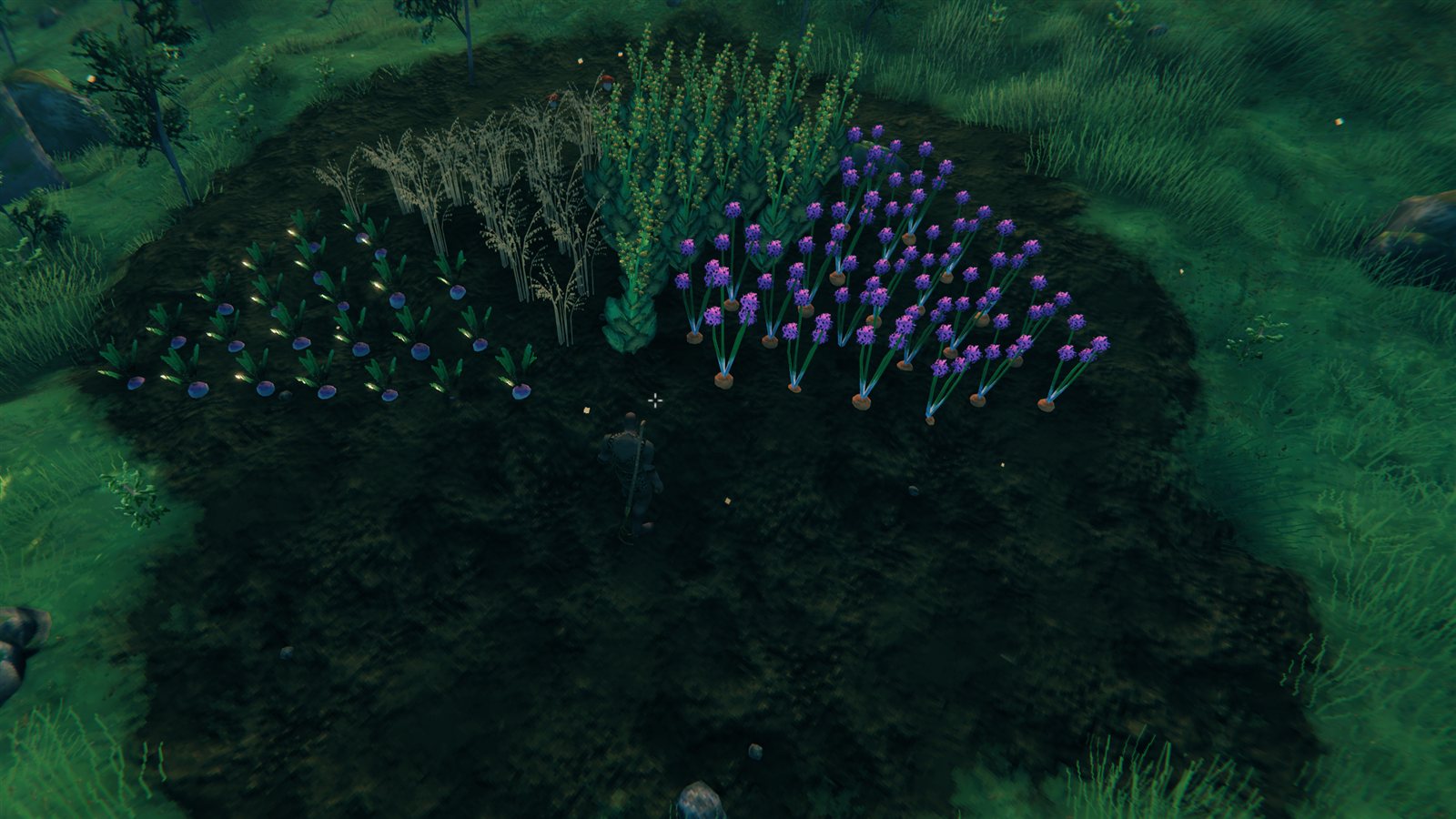
Plant crops in donuts, wedges (circle slices) and other non-square patterns. Cycle center modes, auto-snap to existing plants for concentric placement, see cost and yield live, and mass-pick/refuel with Shift+E.
| Last updated | a week ago |
| Total downloads | 285 |
| Total rating | 0 |
| Categories | Mods AI Generated |
| Dependency string | suspicious_geet-OhMyGrid-1.1.0 |
| Dependants | 0 other packages depend on this package |
This mod requires the following mods to function

denikson-BepInExPack_Valheim
BepInEx pack for Valheim. Preconfigured with the correct entry point for mods and preferred defaults for the community.
Preferred version: 5.4.2350README
OhMyGrid
Plant crops in donuts, wedges and other non-square patterns in Valheim. Lay
down a big onion ring, drop a smaller carrot donut concentric inside it, or build
a circle one wedge (circle slice) per crop. Stop fighting the rectangular grid.
Also: mass-pick / mass-refuel with Shift+E.
Install: Thunderstore page (direct download OhMyGrid-1.1.0.zip). Use r2modman or Thunderstore Mod Manager to drop it into a Valheim profile.
Features
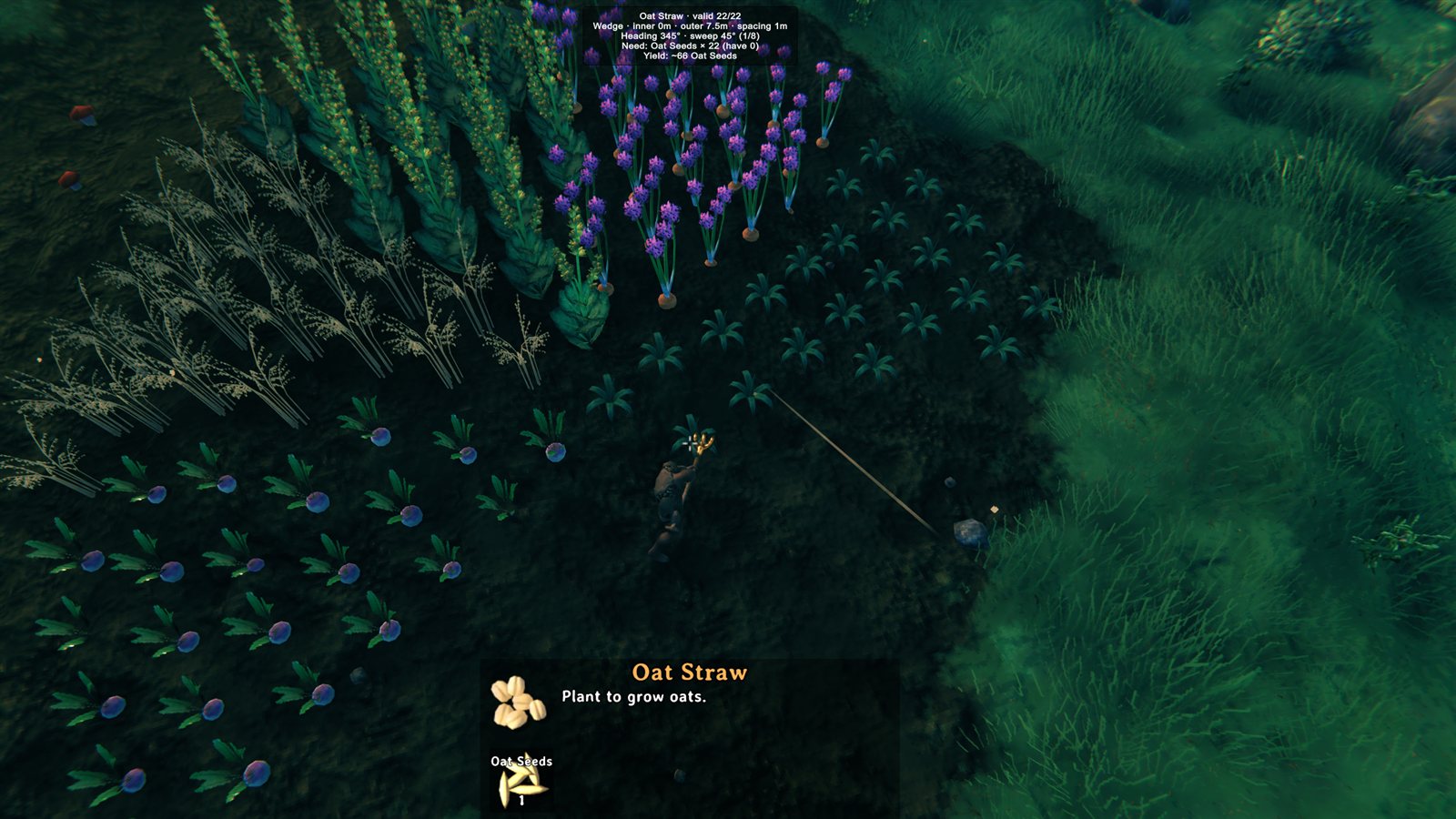
- Donut planting. While holding the cultivator with a seed selected, a ring of ghost previews shows around your chosen center. Left-click plants the whole donut in one go.
- Wedge planting. A slice of the donut with a heading and a sweep. Turn it
with the mouse wheel and widen it with
Shift+./Shift+,, in 15° steps (1/2, 1/3, 1/4, 1/6, 1/8, 1/12 of a circle). After each wedge the heading advances by one sweep, so consecutive wedges complete the circle. They tile exactly, with no doubled edges and no crowded tip. - Per-point validity. Each ghost turns red when its spot is invalid — blocked by rocks/plants, out of reach, or on uncultivated soil. Green ones are the only ones that get planted, charged, and counted.
- Cost + yield overlay centered at the top of the screen: shows the
current plant, valid/total point count, total seed cost, and expected yield
— all live as you tune the radii. It also says how many points are out of
reach (
[Grid] IgnoreReachplants those too). - Four center modes, cycled with
F7(top-left HUD toast on change):- Player — donut follows you.
- Fixed — pins the donut at your current spot. Walk away, donut stays.
- Cursor — donut follows where the cultivator ghost aims.
- CursorSnap — like Cursor, but the center snaps to the nearest remembered planting center (every donut/wedge you plant is saved), or to the centroid of nearby plants if there is none. Perfect for concentric donuts and for completing a circle wedge by wedge.
- Geometry toggle.
F6cyclesOff → Donut → Wedge → Off. InOff, the mod stays out of the way and you place one plant per click like vanilla. - Shift+E mass-interact (hover-scoped, same-type only):
- Hover a Pickable → harvest every Pickable of the same item type in range. Carrots don't sweep nearby strawberries.
- Hover a Fireplace → fuel every Fireplace in range.
- Hover a Smelter / Charcoal Kiln → feed every smelter in range.
- Persists across sessions. Center mode, geometry mode, radii, hotkeys,
and toggles are all stored under
cgaggino.OhMyGrid.cfg.
Default hotkeys
All hotkeys are configurable under [Hotkeys] in the config file.
| Key | Action |
|---|---|
F6 |
Cycle geometry: Off → Donut → Wedge → Off |
F7 |
Cycle center mode: Player → Fixed → Cursor → CursorSnap → Player |
F8 |
Dump every donut grid point to the BepInEx log |
] |
Outer radius +1 spacing step |
[ |
Outer radius −1 spacing step |
Shift+] |
Inner radius +1 spacing step |
Shift+[ |
Inner radius −1 spacing step |
. / , or mouse wheel |
Rotate wedge clockwise / counter-clockwise (one AngleStep) |
Shift+. / Shift+, |
Widen / narrow wedge (one AngleStep) |
Left-click |
Plant the entire donut / wedge (when holding a Plant ghost) |
Shift+E |
Mass-interact with the hovered object's type in range |
Defaults: InnerRadius=2m, OuterRadius=6m, Spacing=1m, AutoSnapRadius=12m,
MassInteract.Radius=5m. All editable in the cfg file (or via BepInEx
ConfigurationManager if you have it installed).
Concentric donut workflow
- Stand inside an existing donut of one crop (or anywhere if it's the first).
- Tap
F7until the HUD showsMode: CursorSnap. - Aim near the center — the donut snaps to the centroid of the existing plants automatically.
- Bring
[until the outer radius matches the inside of the previous donut. - Swap seed type and left-click. The new ring lands concentric to the old one.
Wedge-by-wedge circle workflow
F6until the HUD showsGeometry: Wedge. Set the radii with[/].- Pick the slice size with
Shift+./Shift+,(for example 90° = 1/4). - Plant the first wedge. Then
F7toCursorSnapand aim near the circle. The center snaps to the one you just planted (AutoSnap: anchor). - Swap seed type and left-click. The heading has already advanced by one sweep, so the new wedge starts exactly where the last one ended.
- Repeat until the circle is closed.
Building from source
You need a local Valheim install with BepInEx (the build references
assembly_valheim.dll and friends; they're not redistributable):
$env:VALHEIM_INSTALL = "C:\Program Files (x86)\Steam\steamapps\common\Valheim"
dotnet restore
dotnet build -c Release
The output is bin/Release/OhMyGrid.dll. Drop it in your r2modman /
Thunderstore Mod Manager profile under BepInEx/plugins/.
Known limitations
- Centroid fallback is biased on asymmetric clusters. Plantings made
before 1.1.0 have no remembered center, so
CursorSnapfalls back to the plant centroid. For a half donut or an irregular patch, that is not the geometric center. Anything planted with 1.1.0+ snaps exactly. - Fixed-mode center doesn't persist across sessions. The center mode
saves and reloads as
Playeron the next launch (no anchor to restore). Other modes restore exactly as you left them.
Planned (v1.2+)
- More geometries on the
F6cycle: square grid, hex grid, spiral, and a user-drawn polygon. Shift+Esupport for more interactables (Beehive, Cauldron, Workbench repair).- A toggle to mass-fill a single Smelter / Fireplace with one press, not just one tick per press.
- Optional ground ring rendered at the AutoSnap centroid so the snap target is visually obvious before you click.
Compatibility
- Targets Valheim 1.0 (1.0.1+; 1.0.0 was built for 0.221.x and does not work on 1.0).
- BepInEx 5.x via
denikson-BepInExPack_Valheim(5.4.2350+). - Tested on Valheim 1.0.15 (network version 40) with BepInExPack 5.4.2350, Windows,
1.0.2 build — play session with
BepInEx/LogOutput.logreview: 0 exceptions, seed accounting exact (planted=18 … paidHere=17 paidByVanilla=1, 18 seeds in → 0 left), ghosts render green/red with the cost overlay, Shift+E feeds only the aimed kiln/smelter slot, F7 cycles all four center modes. - 1.1.0 tested on Valheim 1.0.21 (network version 41) with BepInExPack 5.4.2360, Windows: a half circle built from four wedges of different crops, anchor snap, auto-advance, mouse-wheel rotation, 0 OhMyGrid exceptions.
Known issues
- Valheim's own requirement panel (bottom of the build UI) still shows the cost of
one plant while the donut is active; the mod's overlay at the top shows the real
batch cost (
Need: … × N (have M)) and that is what gets charged. Cosmetic; planned for 1.0.3. - Client-only — no
ServerSync. Use freely on dedicated/multiplayer servers without forcing other players to install.
Contributing / releasing
PRs welcome. The dev release workflow (version bump, zip build, Thunderstore
upload via tcli) is documented in RELEASING.md.
License
MIT — see LICENSE.
