
Please disclose if any significant portion of your mod was created using AI tools by adding the 'AI Generated' category. Failing to do so may result in the mod being removed from Thunderstore.

CommandItemQueue
Queue items for the Artifact of Command per item tier. Command cubes pick the next queued item automatically. Per-tier repeat, named builds, works with new item tiers.
| Last updated | 2 hours ago |
| Total downloads | 41 |
| Total rating | 0 |
| Categories | Mods Tweaks Artifacts Client-side AI Generated |
| Dependency string | AllOfThem-CommandItemQueue-1.2.0 |
| Dependants | 0 other packages depend on this package |
This mod requires the following mods to function

bbepis-BepInExPack
Unified BepInEx all-in-one modding pack - plugin framework, detour library
Preferred version: 5.4.2100README
Command Item Queue
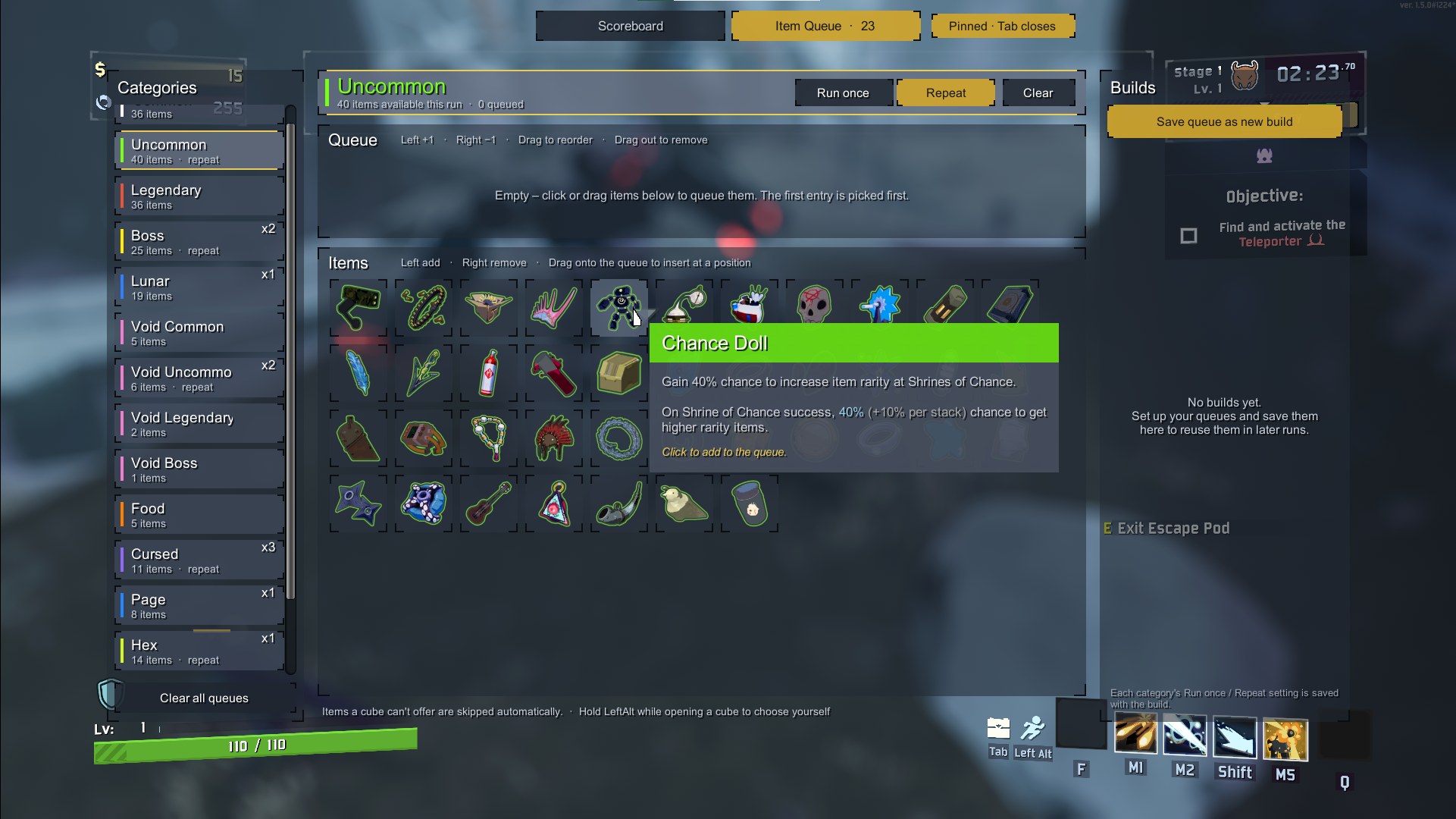
Queue up items for the Artifact of Command. When you open a command cube, the next queued item of that tier is picked automatically.
Features
- One queue per item tier: Common, Uncommon, Legendary, Boss, Lunar, Void tiers, equipment and any tier the game adds later (e.g. Hex, Page). Tiers are read from the game data at startup.
- Hide categories you don't use (e.g. Lunar): click Show / hide categories below the category list.
- Run once or Repeat, set per tier. Every run starts with all tiers on Run once.
- Builds: save all queues, including each tier's Run once / Repeat setting, under a name and load them in later runs. One build can be set to load automatically at run start.
- Built into the Tab scoreboard, with item icons and the game's item tooltips.
- In-game settings with Risk Of Options (optional): Settings → Mod Options → CommandItemQueue.
- Client-side: only you need the mod. It also works when the host doesn't have it.
How to use
- Start a run with the Artifact of Command.
- Hold Tab and click Item Queue at the top. Click Keep open if you don't want to hold Tab.
- Pick a tier on the left and click items to add them to its queue.
- Open a command cube. The next queued item that the cube offers is picked for you.
If no queued item is offered (not unlocked, DLC disabled, queue empty), the normal selection window opens. Hold Left Alt while opening a cube to always choose yourself.
Controls
| Where | Action | Result |
|---|---|---|
| Item list | Left click | Add 1 to the end of the queue |
| Item list | Right click | Remove 1 |
| Item list | Drag onto the queue | Insert at that position |
| Queue | Left / right click | +1 / -1 for that entry |
| Queue | Drag | Change the order |
| Queue | Drag out of the queue, or middle click | Remove the entry |
Builds
| Button | Result |
|---|---|
| Save queue as new build | Saves all queues and asks for a name |
| Load | Replaces the current queues with the build |
| Update | Overwrites the build with the current queues |
| Rename | Changes the name |
| Auto | Loads this build at the start of every run |
| Delete | Deletes the build (click twice) |
Builds are stored in BepInEx/config/CommandItemQueue.builds.txt.
Configuration
With Risk Of Options installed, all settings can be changed in game under Settings → Mod Options → CommandItemQueue. Otherwise edit BepInEx/config/AllOfThem.CommandItemQueue.cfg.
| Setting | Default | Description |
|---|---|---|
| KeepQueueBetweenRuns | false | Keep the queues when a new run starts |
| OnlyWithArtifactOfCommand | true | Only show the Item Queue tab when Command is enabled |
| ApplyToVoidPotentials | false | Also auto-pick from Void Potentials |
| ManualPickKey | LeftAlt | Hold while opening a cube to choose yourself |
| DefaultView | RememberLast | View shown when opening the scoreboard |
| SwitchViewKey | none | Optional key to switch between Scoreboard and Item Queue |
| Scale | 1 | Size of the Item Queue window (1 = as large as fits the screen, down to 0.6) |
| ShowUnavailableItems | false | Also list items that can't drop in the current run |
| ShowTooltips | true | Show item tooltips |
| Categories / name | true | Show this category in the Item Queue window. One switch per category, created automatically. Queued items of a hidden category are still picked. |
Notes
- Requires only BepInEx. R2API is not needed. Risk Of Options is optional.
- Keyboard and mouse only. Controllers are not supported.
AI disclosure
The code and the icon of this mod were created with the help of AI. The mod was tested in game.
Links
- Source and issues: https://github.com/The-regular-Hedgehogs/CommandItemQueue
- Inspired by CommandQueue by KubeRoot.
