
Please disclose if any significant portion of your mod was created using AI tools by adding the 'AI Generated' category. Failing to do so may result in the mod being removed from Thunderstore.

OverlayLayerFix
Fixes the messy, stacked glow outline of shields, Immune, invisibility and elite effects on custom skins and detailed character models. One clean outline, any character. Client-side.
| Last updated | a day ago |
| Total downloads | 105 |
| Total rating | 0 |
| Categories | Mods Tweaks Client-side AI Generated |
| Dependency string | H1xl-OverlayLayerFix-1.0.0 |
| Dependants | 0 other packages depend on this package |
This mod requires the following mods to function

bbepis-BepInExPack
Unified BepInEx all-in-one modding pack - plugin framework, detour library
Preferred version: 5.4.2122README
OverlayLayerFix
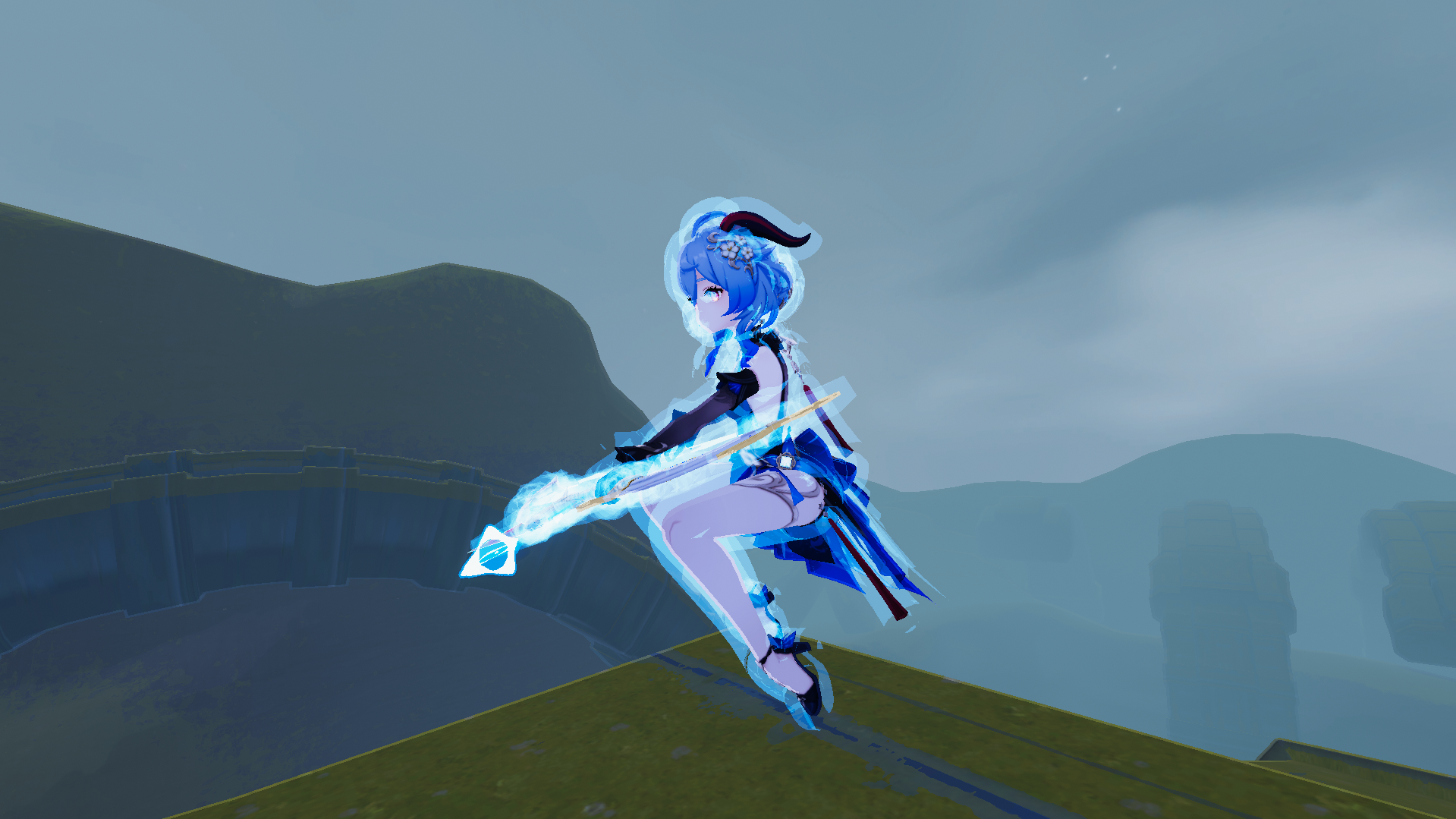
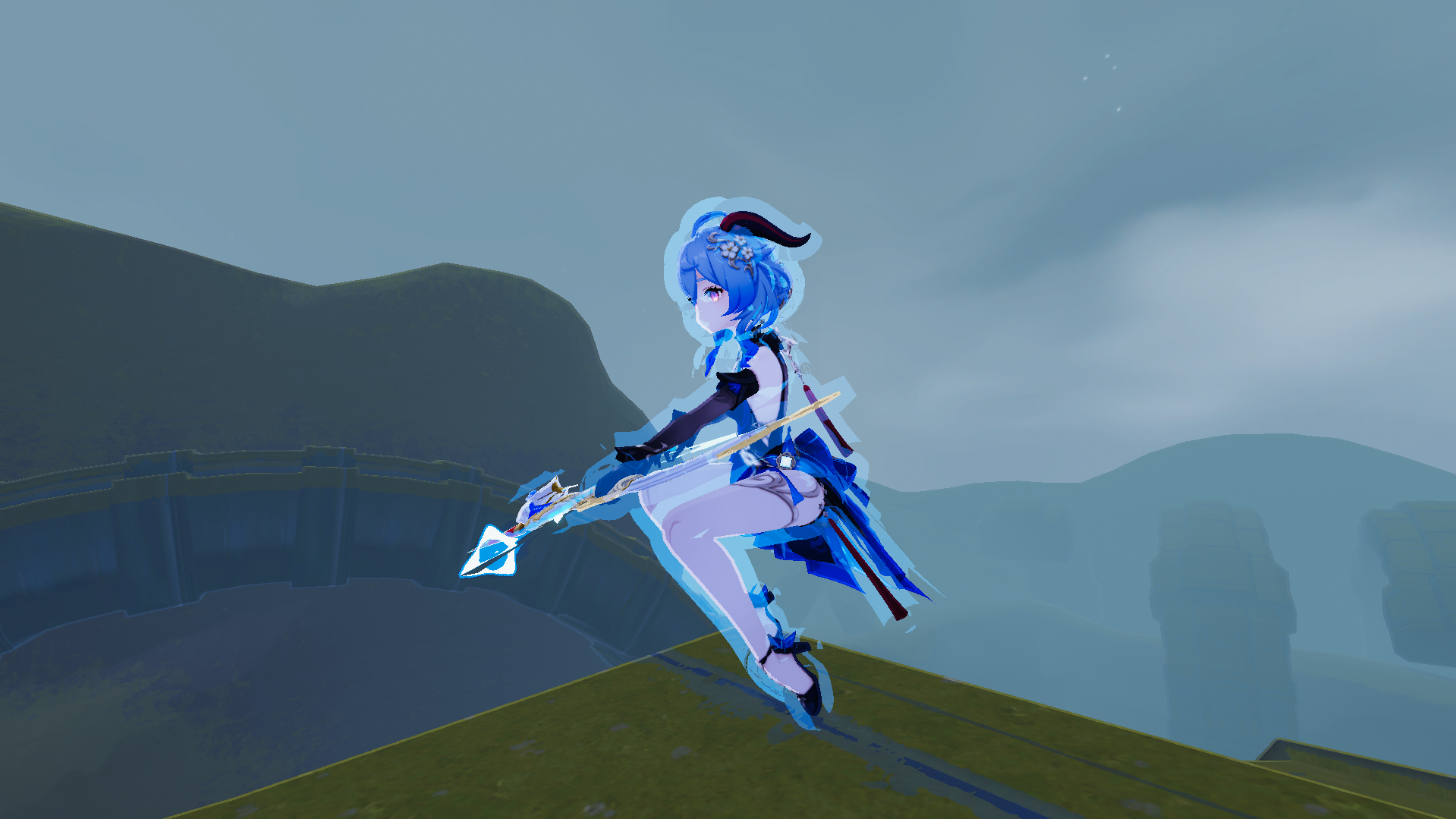
Fixes the glowing outline that Risk of Rain 2 draws around a character with a shield, an elite aura or a buff. On custom skins and detailed character models this outline piles up into a bright, messy blob; with the mod it is one clean layer again.
Client-side: only you need the mod.
Why skins need it
The game draws these effects as an overlay shell: a copy of the character's mesh, pushed outwards a little and drawn with a glow on top. Vanilla survivors are simple closed meshes, so the result is a neat outline. Skins and modded characters are usually built from layers (hair over the head, clothes over the body, ribbons, a separate weapon). Each layer gets its own shell, the shells stack, and the character turns into a glowing mess. Invisibility shows every hidden layer through the others in the same way.
Screenshots
A shield on a layered skin, the same shot without the mod and with it.
Features
- One clean outline for the shield (Personal Shield Generator, Transcendence, Kinetic Dampener), Immune, elite auras and buff overlays, however many layers the model has.
- One clean layer for invisibility (Old War Stealthkit, Bandit's Smoke Bomb).
- Any character and any skin: vanilla survivors, monsters, modded survivors and skins. Nothing is set up per model, and vanilla characters look the same as before.
- Optional thin outline: one thickness for every overlay instead of each effect's own.
- Experimental silhouette mode: the shield is drawn only around the character, never over the body.
- Light on performance: one extra, very cheap draw per covered mesh, only while an effect is active. On layered models it can even save GPU time, because the costly glow is no longer drawn several times over.
Installation
Install with r2modman or Thunderstore Mod Manager. Risk Of Options is optional: with it, every setting can be changed in game.
Configuration
Settings are in BepInEx/config/com.H1xl.OverlayLayerFix.cfg (or the mod manager's Config editor).
The file appears after the first launch. With Risk Of Options they are also in Settings → Mod Options →
OverlayLayerFix. Changes apply at once, without a restart: turn Enabled off and on to see the difference live.
General
| Setting | Default | Description |
|---|---|---|
Enabled |
true |
Turns the mod on or off. |
Scope |
AllCharacters |
AllCharacters: every character. PlayersOnly: only characters controlled by players. |
Overlays
| Setting | Default | Description |
|---|---|---|
SingleLayerShells |
true |
One layer for the shield, Immune, elite and buff outlines. |
SingleLayerCloak |
true |
One layer for invisibility and other see-through effects. |
ShellThickness |
0 |
0 keeps each effect's own thickness (shield 0.04, Immune 0.1). Above 0 it replaces the thickness of every overlay; 0.015–0.025 gives a thin, tidy outline. Range 0–0.2. |
Experimental
| Setting | Default | Description |
|---|---|---|
SilhouetteOnly |
false |
The shield is shown only as an outline around the character, never over the body. |
SilhouettePullDistance |
0.25 |
With SilhouetteOnly: how far (in metres) in front of the body shield parts are still hidden, 0.02–1. |
Advanced
| Setting | Default | Description |
|---|---|---|
DepthBiasFactor |
0 |
Raise it to 0.5–1 only if an outline flickers or shows small holes. Range 0–2. |
DepthBiasUnits |
2 |
Constant offset of the hidden copy that removes the extra layers, 0–10. Rarely needs a change. |
Multiplayer
Only you need the mod: nothing is sent over the network, and you can join any lobby. You see clean outlines on every character; other players see the game's own outlines unless they have the mod too.
Known limitations
- The hidden copy of the shell can hide other transparent effects that pass through the few centimetres of the shell around a character.
- When two outline effects are active at once, the thicker one can hide the thinner one where they overlap.
- Small gaps in the outline can show where a model has sharp edges (hair, skirts, faces).
- Needs Direct3D 11, the game's default graphics API.
Reporting problems
Open an issue at https://github.com/H1xl/OverlayLayerFix/issues with the mod version, your mod list (or the mod
manager's profile code), BepInEx/LogOutput.log from a game where it happened, the steps, and what you expected.
Credits
- Mod icon: the Ganyu Huntress skin with the Ganyu model by jacenrick (Sketchfab) and the Amos Bow model by Yuniesque (Sketchfab).
Ganyu and the Amos Bow are from Genshin Impact © HoYoverse. This is a free, non-commercial fan mod and is not affiliated with HoYoverse or Hopoo Games / Gearbox.
