Please disclose if any significant portion of your mod was created using AI tools by adding the 'AI Generated' category. Failing to do so may result in the mod being removed from Thunderstore.

ScalerCore
Scaling library for shrink and grow mods in R.E.P.O. Handles physics, audio, NavMesh, animation, colliders, and sync. Enemies, players, valuables, items, carts, doors. Vehicles stay drivable and pocketable when scaled. API for size mods.
| Last updated | 2 weeks ago |
| Total downloads | 275081 |
| Total rating | 12 |
| Categories | Mods Libraries Client-side Server-side |
| Dependency string | Vippy-ScalerCore-1.0.6 |
| Dependants | 38 other packages depend on this package |
This mod requires the following mods to function

BepInEx-BepInExPack
BepInEx pack for Mono Unity games. Preconfigured and ready to use.
Preferred version: 5.4.2305README
ScalerCore
A scaling library for R.E.P.O. modders. Handles the hard parts of scaling game objects -- physics, audio, animation, colliders, NavMesh, multiplayer sync -- so you don't have to.
A note from Vippy
After way too long of a break, I'm finally back and working on these again :D Every one of my mods just got a full pass: bugs fixed, reports read, a few things I'd always meant to do. New builds and fixes land in Vippy's Discord before they hit Thunderstore, so come hang out. Thanks for sticking around.
v1.0.0: the API is stable. Growth is a first-class direction now, not just shrinking: enemies, players, and props grow as well as shrink, with the audio, reach, mass, and physics that sells the size. Grown enemies cap their physical footprint so they still fit the level, voices pitch with an intelligibility floor, and grown players hold items at arm's length. The public surface (
ScaleManager,ScaleOptions,IScaleHandler) is stable for the 1.x line.
If you're building a mod that changes the size of things (shrink rays, growth potions, whatever), ScalerCore gives you a clean API and takes care of the edge cases.
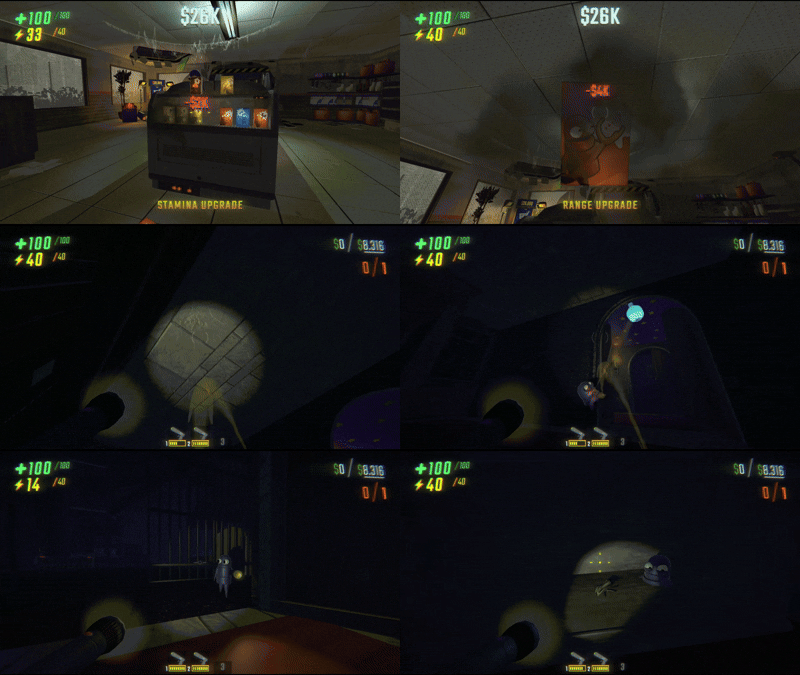
This is a library, not a standalone mod. End users don't need to interact with it directly. If you're a player, you probably got here because a mod like ShrinkerGun: COMPRESSOR depends on it.
For modders building size-changing mechanics. If you're looking for a shrink ray, check out ShrinkerGun: COMPRESSOR which is built on ScalerCore.
Installation
Reference the API at compile time via NuGet (runtime stays on Thunderstore, so exclude it from your output to avoid double-loading the DLL):
<PackageReference Include="ScalerCore" Version="1.0.6" ExcludeAssets="runtime" PrivateAssets="all" />
Then declare the runtime dependency: add Vippy-ScalerCore-<version> to your Thunderstore manifest.json, and a hard dependency in your plugin:
[BepInDependency("Vippy.ScalerCore", BepInDependency.DependencyFlags.HardDependency)]
(Prefer a direct DLL reference? You can still <Reference> ScalerCore.dll with Private="false". The NuGet package just adds the typed API and IntelliSense.)
ScalerCore automatically attaches ScaleController components to all enemies, players, valuables, items, carts, vehicles, cosmetic boxes, dead Semibot heads, the shop radio, and doors at runtime via Harmony patches. You don't need to add them yourself.
Quick Start
using ScalerCore;

// Shrink with default options (40% scale)
ScaleManager.Apply(targetGameObject);

// Shrink with custom options
var opts = ScaleOptions.Default;
opts.Factor = 0.5f;
opts.Duration = 60f;
ScaleManager.Apply(targetGameObject, opts);

// Restore with animation
ScaleManager.Restore(targetGameObject);

// Restore instantly (for bonk/damage reactions)
ScaleManager.RestoreImmediate(targetGameObject);

// Check state
bool tiny = ScaleManager.IsScaled(targetGameObject);
ScaleManager.Apply is host-authoritative. The host calls it, and RPCs propagate to all clients automatically. Late-joining players receive the current state on connect.
How It Works
ScalerCore attaches a ScaleController (a MonoBehaviourPunCallbacks) to every enemy, player, valuable, item, and door. On the first scale operation, the controller:
- Resolves a handler via
ScaleHandlerRegistrybased on what the object is - Applies the target scale with a smooth animation (back-out easing for players, linear interpolation for objects)
- Adjusts physics (mass, grab force, collider radius), audio pitch, and NavMesh speed
- Syncs state to all clients via Photon RPCs
- Force-applies the target scale every
LateUpdateto fight game code that resetslocalScale
Built-in handlers cover enemies, players, valuables, items, carts, and doors.
Custom Handlers
Implement IScaleHandler and register it with a predicate:
using ScalerCore;
using ScalerCore.Handlers;

public class MyBossHandler : IScaleHandler
{
    public void Setup(ScaleController ctrl)
    {
        // Cache components, set ScaleTarget if the visual root
        // is different from the physics root
    }

    public void OnScale(ScaleController ctrl)
    {
        // Called when the object is scaled down
    }

    public void OnRestore(ScaleController ctrl, bool isBonk)
    {
        // Called when restored. isBonk = true means instant (damage),
        // false means animated (timer/gun toggle)
    }

    public void OnUpdate(ScaleController ctrl)    { }
    public void OnLateUpdate(ScaleController ctrl) { }
    public void OnDestroy(ScaleController ctrl)    { }
}
Register it at plugin startup. Use priority > 0 to override built-in handlers:
ScaleHandlerRegistry.Register(
    new MyBossHandler(),
    go => go.GetComponentInParent<EnemyParent>()?.name.Contains("MyBoss") == true,
    priority: 10
);
The registry resolves handlers by checking predicates in descending priority order. First match wins.
API Reference
ScaleManager (static)
| Method | Description |
|---|---|
Apply(GameObject target) |
Scale with default options (ScaleOptions.Default). |
Apply(GameObject target, ScaleOptions options) |
Scale with custom options. Same factor on an already-scaled target toggles it back; different factor rescales. |
ApplyIfNotScaled(GameObject target) |
Scale only if not already scaled. No-op if already scaled. Returns true if scaling was applied. |
ApplyIfNotScaled(GameObject target, ScaleOptions options) |
Same with custom options. Ideal for cart mods and continuous triggers. |
GetController(GameObject target) |
Get the ScaleController for a game object (resolves through PlayerShrinkLink). Returns null if none. |
Restore(GameObject target) |
Restore with smooth animation. No-op when locked via RejectExternalApply. |
RestoreImmediate(GameObject target) |
Restore instantly (respects bonk immunity timer). No-op when locked via RejectExternalApply. |
ForceApply(GameObject target, ScaleOptions options) |
Apply without the RejectExternalApply check. For the mod that owns the lock. |
ForceRestore(GameObject target) |
Restore without the RejectExternalApply check. For the mod that owns the lock. |
UpdateOptions(GameObject target, ScaleOptions options) |
Replace the stored options on a live session without re-dispatching scale. Read CurrentOptions, mutate, pass back. Useful when restore-direction fields (RestoreSpeed, SuppressImpactFlash, SuppressCameraShake) need to track a config change mid-session. Returns false on missing controller, no active session, or RejectExternalApply lock. |
ForceUpdateOptions(GameObject target, ScaleOptions options) |
UpdateOptions without the lock check. For the mod that owns the lock. |
IsScaled(GameObject target) |
Returns true if the object is currently scaled. |
CleanupAll() |
Restore all scaled objects. Called automatically on level change. |
AllowDeadHeads |
Static bool, default false. Whether scaling may hit dead Semibot heads. Policy belongs to the calling mod: bind a config on your side and assign this (ShrinkerGun does exactly that). ScalerCore itself ships no user-facing settings for it. |
ScaleController (MonoBehaviourPunCallbacks)
Attached automatically to game objects. Key public members:
| Member | Description |
|---|---|
IsScaled |
Whether the object is currently scaled. |
OriginalScale |
The object's scale before any modification. |
CurrentOptions |
Snapshot of the active session's options. Read-only. |
TargetType |
What kind of object this is (ScaleTargets.Players, .Enemies, etc.). |
ScaleTarget |
Override in handler's Setup to scale a different transform than the controller's. |
AllowManualScale |
Static bool, gates debug shrink/expand requests. Host sets it. |
RequestBonkExpand() |
Client-safe expand request (sends RPC to host if called on non-host). |
RequestManualExpand() |
Manual expand (skips bonk immunity). |
RequestManualShrink() |
Manual shrink request. |
IScaleHandler
public interface IScaleHandler
{
    void Setup(ScaleController ctrl);
    void OnScale(ScaleController ctrl);
    void OnRestore(ScaleController ctrl, bool isBonk);
    void OnUpdate(ScaleController ctrl);
    void OnLateUpdate(ScaleController ctrl);
    void OnDestroy(ScaleController ctrl);
}
ScaleHandlerRegistry (static)
| Method | Description |
|---|---|
Register(IScaleHandler handler, Func<GameObject, bool> predicate, int priority = 0) |
Register a handler. Higher priority wins. Built-ins use priority 0. |
Resolve(GameObject target) |
Returns the highest-priority matching handler, or null. |
ScaleOptions
Each Apply() call takes a ScaleOptions struct. Use ScaleOptions.Default as a starting point and override what you need. ScaleOptions.Growth is the same struct pre-filled for a growth mod (2x, heavier, slower deliberate animation, low footsteps, EnemyPhysicalFactorCap at 1.4); the table below lists the Default values.
| Field | Default | Description |
|---|---|---|
Factor |
0.4 |
Scale multiplier (0.4 = 40% of original size) |
Duration |
0 |
Seconds until auto-restore (0 = permanent) |
Speed |
2.0 |
Scale animation speed (used for both directions when RestoreSpeed is 0) |
RestoreSpeed |
0 |
Animation speed for the expand direction. 0 falls back to Speed. |
BonkImmuneDuration |
5.0 |
Grace period after scaling before damage can restore |
MassCap |
50.0 |
Max rigidbody mass while scaled |
SpeedFactor |
0.75 |
Enemy NavMesh speed multiplier |
AnimSpeedMultiplier |
1.5 |
Player animation speed while scaled |
FootstepPitchMultiplier |
1.5 |
Player footstep pitch while scaled |
AudioPresence |
1.0 |
Grow-side audio presence: 0 = pitch only, 1 = full (volume lift, light reverb, falloff scales with size). Rides the sync RPC. |
EnemyPhysicalFactorCap |
0 |
Grow-only, enemies only: colliders and nav radius stop at this factor while visuals/reach/audio keep climbing to Factor, so a giant still fits the level. 0 disables. |
EnemyWidthFactorCap |
0 |
Grow-only, enemies only: the body's X/Z stop at this factor while height keeps climbing to Factor. Wins over EnemyPhysicalFactorCap. 0 disables. |
EnemyHeightFactorCap |
0 |
Grow-only, enemies only: the collider's Y stops at this factor while width grows to Factor, so a giant bulks out instead of wedging under ceilings. 0 disables. |
EnemyNavRadiusFactorCap |
0 |
Grow-only, enemies only: caps nav agent radius growth apart from the body so a wide enemy still paths through doorways. 0 falls back to the physical/width factor. |
AllowedTargets |
All |
Flags: Players, Enemies, Items, Valuables, All |
InvertedMode |
false |
If true, scaled state is the default and bonk temporarily grows back |
SuppressValueDropExpand |
false |
If true, valuables won't expand when damaged while scaled (for cart mods) |
PreserveMass |
false |
If true, rigidbody mass stays at original value while scaled (for cart mods) |
SuppressImpactFlash |
false |
Skips the impact flash on shrink/expand (for cart-style mods that fire constantly) |
SuppressCameraShake |
false |
Skips the camera shake on expand (pair with SuppressImpactFlash for a silent restore) |
SuppressVoicePitch |
false |
No audio pitch shift on the controller's sounds or player's voice chat |
IgnoreBonkExpand |
false |
Damage does not restore the controller. Covers every bonk path. |
RejectExternalApply |
false |
External Apply/Restore/RestoreImmediate calls from other mods no-op. Owning mod uses ForceApply/ForceRestore. |
ScaleTargets
Flags enum for filtering what Apply() affects:
var opts = ScaleOptions.Default;
opts.AllowedTargets = ScaleTargets.Enemies | ScaleTargets.Valuables;
ScaleManager.Apply(target, opts); // skips players and items
There are four bits and more than four handlers. Items covers items and vehicles; Valuables is the catch-all, so carts, doors, cosmetic boxes, dead Semibot heads and the shop radio all need that bit set.
Configuration
ScalerCore is a pure library with no user-facing config. All scaling behavior (factor, speed, duration, etc.) is controlled per-call via ScaleOptions -- consuming mods expose whatever settings make sense for them.
What ScalerCore Handles
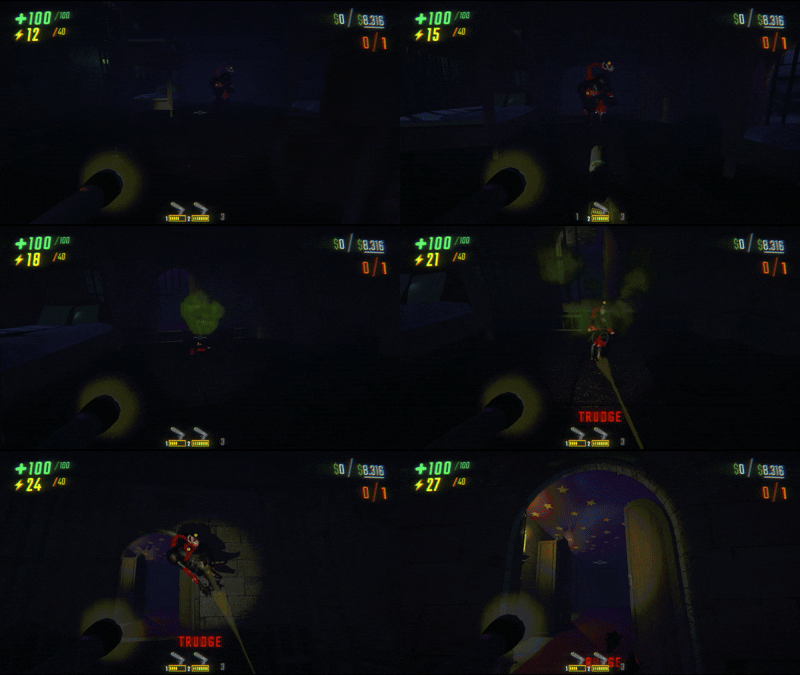
For enemies:
- Visual mesh + physics rigidbody scaled separately (EnemyParent is never scaled)
- NavMesh agent speed and radius
- Grab force reduced to zero (instantly grabbable when shrunken)
- Follow force scaled so grabbed enemies don't fight back
- Damage output reduced
- Knockback force reduced
- Bonk restore on taking damage (with immunity window)
For players:
- Camera offset, crouch/crawl positions, vision targets
- Collision capsules (stand, crouch, stand-check)
- Grab strength, range, throw strength
- Movement speed
- FOV adjustment
- Voice chat pitch
- Footstep sound pitch
- Animation speed
- Enlarged pupils (big cute eyes)
- Pause menu avatar scaled to match
- Near clip plane adjusted
For valuables:
- Mass scaled and clamped
- Extraction zone detection box scaled
- Brief indestructibility after shrinking (prevents fall damage from collider resize)
- Value-drop detection triggers bonk restore
- ForceGrabPoint disabled to prevent grab oscillation
For items:
- Effect fields auto-scaled (explosion size, orb radius, damage)
- Inventory system compatibility (yields during equip/unequip)
- ForceGrabPoint handling
For vehicles:
- Visible mesh kept at the right world scale whether or not it's deparented (
ItemVehicledeparents its mesh while somebody is riding) - Stays drivable and pocketable while scaled
For non-pocketable items (carts, cart cannon, cart laser, tracker):
- Become pocketable while shrunken (press inventory key to stash)
- Shrunken players can't pocket shrunken items. If you get shrunk while holding one, it drops
- Restoring removes the equip ability so full-size items stay on the ground
For all types:
- Audio pitch shifted on all Sound objects
- Smooth scale animation with force-apply in LateUpdate
- Multiplayer sync via Photon RPCs
- Late-join state sync
- Automatic cleanup on level change
Dependencies
- BepInEx 5 (5.4.2100+)
Reference Implementation
ShrinkerGun: COMPRESSOR is a shrink ray gun built on ScalerCore. Shows how to build ScaleOptions, call Apply, and handle per-target-type durations.
Come hang out
I'm Vippy. I make R.E.P.O. mods and I read every bug report.
| Vippy's Discord | Test builds land here before Thunderstore, you get a say in what comes next, and it's the fastest way to get a bug fixed. Come say hi. |
| GitHub Issues | Bug reports and ideas that deserve a paper trail. |
| R.E.P.O. Modding Server | The whole modding scene, not just me. |
| More of my mods | Everything else I've made for R.E.P.O. |
Keep the mods coming
Everything I make is free and stays free. Two ways to help if you feel like it, neither one expected:
- Ko-fi: buy me a coffee and your name goes on the supporters list in my Discord. Every coffee buys another evening on the next update.
- BisectHosting: hosting a server for Minecraft or anything else your crew plays? Code
vippytakes 25% off, and I get a cut at no cost to you. It's where my own servers live.