
Please disclose if any significant portion of your mod was created using AI tools by adding the 'AI Generated' category. Failing to do so may result in the mod being removed from Thunderstore.

Larder
A food planner in your inventory: the best three foods from your bag, nearby chests and feasts, when to eat them, and the one dish to cook next with its ingredients. Client-side.
| Last updated | 4 days ago |
| Total downloads | 154 |
| Total rating | 0 |
| Categories | Mods Client-side AI Generated Deep North Update |
| Dependency string | Jumpingmushroom-Larder-0.2.0 |
| Dependants | 0 other packages depend on this package |
This mod requires the following mods to function

denikson-BepInExPack_Valheim
BepInEx pack for Valheim. Preconfigured with the correct entry point for mods and preferred defaults for the community.
Preferred version: 5.4.2350README
Larder
Larder is a food planner that lives on the inventory screen — no separate window — and plans from the food you actually own: your bag, chests and carts you can open nearby, and placed feasts. It picks the best three for your goal, shows each one's slot timing (active with time left, refreshable now, or eat in Xm), and gives bag foods an Eat button that uses the game's own right-click path. When nothing you own beats the plan, it names the one dish to cook next that would improve it, with its ingredients as have / need down the ingredient chain — BepInEx only, no Jotunn.
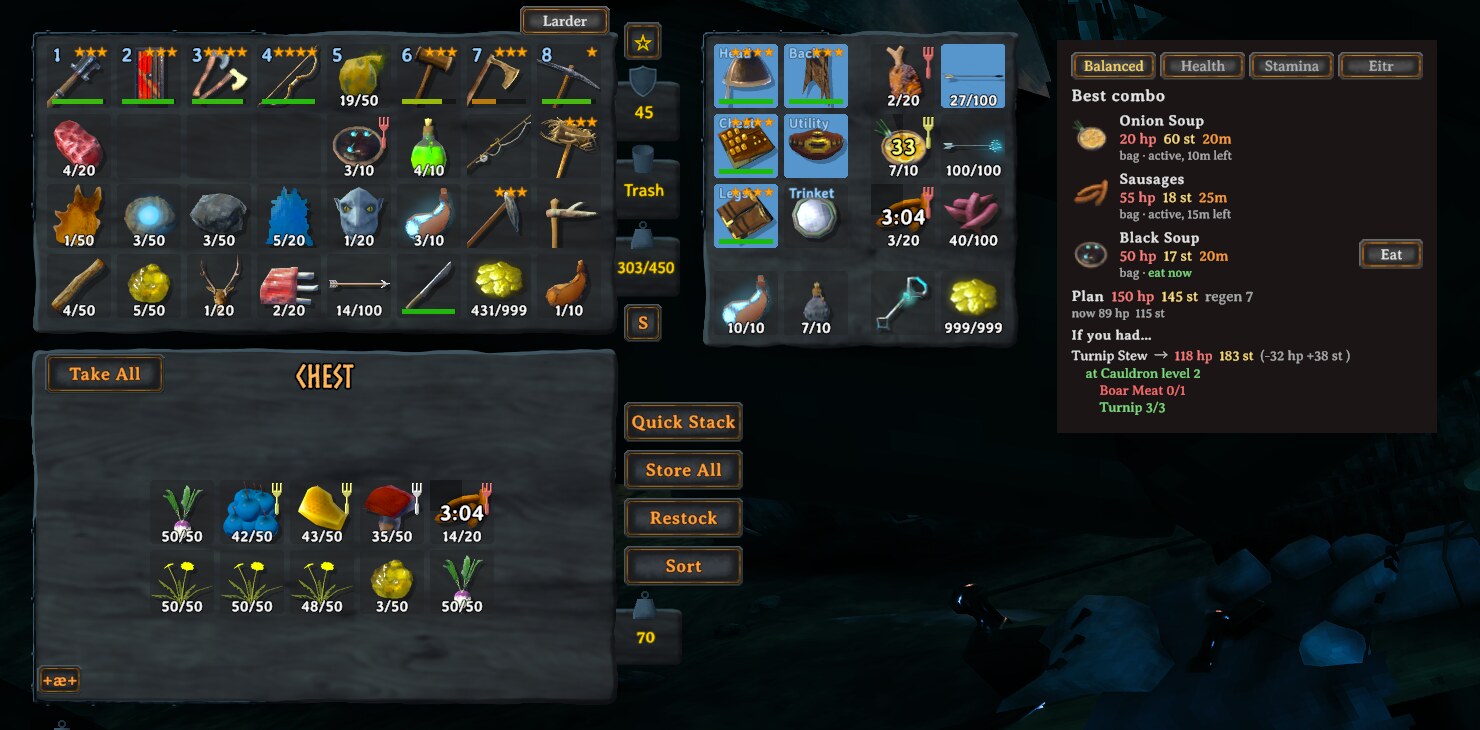
The inventory screen with a chest open and another mod's extra-slot grid: Larder's panel sits clear of both, right of the whole cluster.
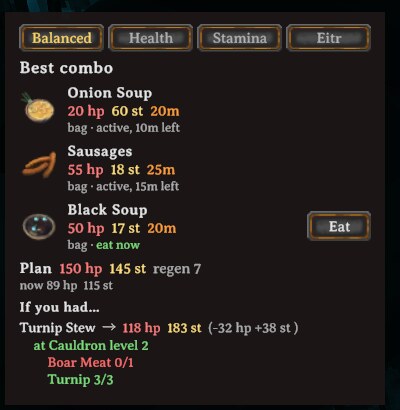
The panel close up: best combo with slot timing and an Eat button, the plan's totals, and the one dish to cook next — here an "if you had…" pick with its ingredients.
Features
- Plans from what you own. Your bag, chests and carts you can open within a configurable radius (20 m by default), and placed feasts with portions left. No templates, no saved plans.
- Best three for your goal. Balanced, Health, Stamina or Eitr, remembered per character.
- Slot timing. Each planned food shows what to do with it: eat now, can refresh now, active with time left, or eat in Xm once a slot frees. With all three slots full the game replaces the refreshable food with the least time left, so when eating would push out a planned food, Larder tells you to refresh that one first. Foods outside the plan show when their slot frees.
- Eat button. For planned foods you're carrying, using the same code path as right-clicking the item — the same checks, the same messages.
- Eat N button. Eats every planned food it safely can from your bag in one click, refreshing planned foods before eating new ones so nothing you planned gets pushed out.
- Cook next. The one dish that would improve the combo and that you can make right now, plus an "if you had…" pick that beats it, each with its ingredients as have / need and any intermediate steps.
- No spoilers. Undiscovered recipes are never suggested unless you turn on
ShowUndiscovered. Food you already own is never hidden.
How it chooses
Larder ranks combos by full stats: for the Health goal that's total HP first, then stamina + eitr, then regen, then duration; Stamina and Eitr work the same way with their own stat first; Balanced sums health and stamina and leaves eitr as the last tiebreak. Duration is only a tie-breaker — it never puts a weaker combo ahead of a stronger one — because every food decays on the same curve, so its lifetime average works out to about 77% of its max value regardless of how long it lasts. Duration changes how often you eat, not which food is stronger.
A chest, cart or ship hold counts if you can actually open it: within range (Radius, 20 m by
default) and not a ward or private chest you don't have access to; tombstones never count. A
placed feast in range counts as its own source with its portions left; a feast item sitting in
your bag or a chest counts as "place it, then eat".
Only dishes you've discovered are ever suggested to cook next, and the missing ingredients named
in an "if you had…" pick are ones you've seen. Turn on ShowUndiscovered to lift that. Food you
already own is always shown, discovered or not.
Cook suggestions check that the station is in range, but not whether an oven or cooking station has fuel.
Configuration
Edit in-game with a mod config manager (F1), or BepInEx/config/com.jumpingmushroom.larder.cfg.
| Section | Setting | Default | Meaning |
|---|---|---|---|
| General | Enabled | true |
Master switch. Off hides the Larder button and panel. |
| General | Radius | 20 |
Metres to search for chests, placed feasts and cooking stations (5–50). |
| General | ShowUndiscovered | false |
Allow cook suggestions for recipes you haven't discovered yet, and name ingredients you haven't seen. Food you own is always shown. |
| General | IncludeCartsAndShips | true |
Count carts and ship holds within range as containers. |
| UI | PanelOpen | true |
Whether the panel is open. The Larder button toggles this. |
| UI | Placement | Auto |
Where the panel goes. Auto: right of the inventory and anything other mods put beside it. Below: under the chest window (or the inventory when none is open). Manual: at OffsetX/OffsetY from the top-left of the screen. |
| UI | ToggleKey | none | Optional key that toggles the panel while the inventory is open. |
| UI | Scale | 1 |
Size of the panel (0.6–1.6). |
| UI | OffsetX | 0 |
Horizontal nudge in pixels (positive is right); in Manual, position from the screen's left edge. |
| UI | OffsetY | 0 |
Vertical nudge in pixels (positive is up); in Manual, position measured from the screen's top edge, positive still up (so use negative values to move down). |
| Logging | Verbose | false |
Log plan timing to the BepInEx log. |
Console
larder— prints the current snapshot summary, the plan and the cook-next picks to the console and the BepInEx log.larder foods— lists the food catalogue with stats.larder goal <balanced|health|stamina|eitr>— sets your goal from the console. Useful on a gamepad, where the goal tabs are mouse-only in 0.1.0.
Compatibility
Client-side only: no RPCs, no ZDO writes, nothing on the server. Works on vanilla servers with no server-side install. Foods and cooking stations from other mods are picked up automatically, since Larder reads everything from the game's own item and recipe data at runtime instead of a hardcoded list. BepInEx only, no Jotunn.
Crossplay: console players can't run mods, but a PC player running Larder on a crossplay server plays fine alongside them — the panel is only ever shown to you.
