
Please disclose if any significant portion of your mod was created using AI tools by adding the 'AI Generated' category. Failing to do so may result in the mod being removed from Thunderstore.

RossPortals
Pick a portal's destination from a searchable, foldered list, and mark every portal on the map. No tag pairing.
| Last updated | 3 hours ago |
| Total downloads | 444 |
| Total rating | 0 |
| Categories | Mods Tweaks Utility Building AI Generated |
| Dependency string | Ross-RossPortals-0.2.5 |
| Dependants | 0 other packages depend on this package |
This mod requires the following mods to function

denikson-BepInExPack_Valheim
BepInEx pack for Valheim. Preconfigured with the correct entry point for mods and preferred defaults for the community.
Preferred version: 5.4.2350
ValheimModding-Jotunn
Jötunn (/ˈjɔːtʊn/, 'giant'), the Valheim Library was created with the goal of making the lives of mod developers easier. It enables you to create mods for Valheim using an abstracted API so you can focus on the actual content creation.
Preferred version: 2.30.0README
RossPortals
Pick a portal's destination from a list, and actually find the one you want.
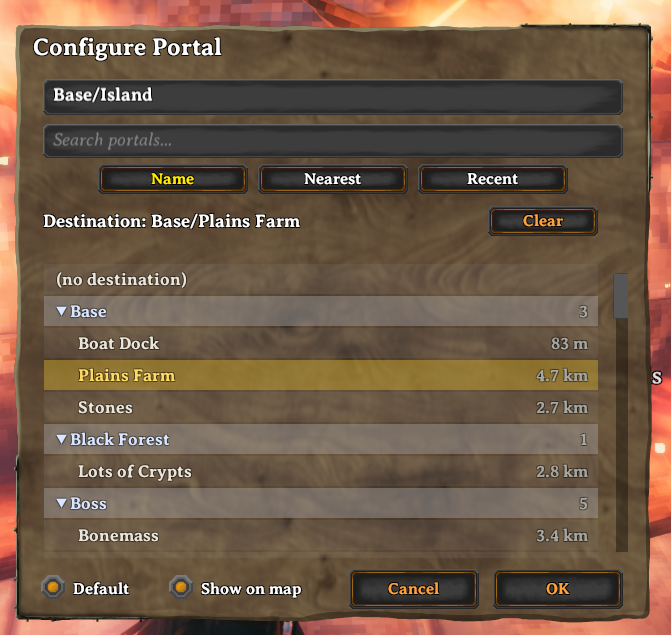
Once you have more than a handful of portals, vanilla tag-pairing — and even a plain destination dropdown — turns finding the right one into a scavenger hunt. RossPortals gives every portal a configuration panel with:
- A search box. Type any part of a name to filter the list instantly.
- Folders. Put a separator in a portal's name and it becomes a folder:
name portals
Mines/Copper,Mines/Iron,Base/Homeand they group under collapsible Mines and Base headers. The separator is/by default and configurable. No extra menus — you organise purely by how you name things. - Sorting. Sort by Name (which keeps the folders), or by Nearest or Recent — those two show a flat list of every portal, so you can jump straight to the closest one, or the one you just came from.
- No tag pairing. Portals don't need matching tags or to point at each other. Choose a destination and go.
- Default destination. Mark one portal as the default and every new portal you place points at it automatically — no configuring each one.
- Portals on the map. Every portal is marked on your map with the portal icon and its name, so you can see your whole network at a glance. Toggle any portal off the map individually.
Switching from XPortal
RossPortals is a drop-in replacement for XPortal and imports your existing portal network the first time it loads a save: every destination you set in XPortal is carried over automatically. Just disable XPortal and enable RossPortals — your portal names and connections come with you.
The two mods can't run at the same time (they both take over the portal interface), so remove or disable XPortal before playing.
Multiplayer
Everyone on a server needs the mod, at the same minor version. The server keeps the authoritative portal list and syncs it to every player.
Usage
Walk up to a portal and press your Use key. Give it a name (use / to file it
in a folder), search and pick a destination, and press OK. That's it.
