
Please disclose if any significant portion of your mod was created using AI tools by adding the 'AI Generated' category. Failing to do so may result in the mod being removed from Thunderstore.

WorldPreGenerator
Pré-gera zonas do mundo pelo menu ESC ou console, mostra progresso e grade verde/amarela no mapa sem revelar o terreno inexplorado.
| Last updated | a week ago |
| Total downloads | 123 |
| Total rating | 0 |
| Categories | Mods Tweaks Tools Server-side Client-side Utility World Generation AI Generated |
| Dependency string | XineladaLendaria-WorldPreGenerator-1.0.14 |
| Dependants | 0 other packages depend on this package |
This mod requires the following mods to function

denikson-BepInExPack_Valheim
BepInEx pack for Valheim. Preconfigured with the correct entry point for mods and preferred defaults for the community.
Preferred version: 5.4.2333README
World Pre-Generator
Pre-generate Valheim world zones before exploring them. The mod uses the game's ghost-zone path and works in controlled batches, so the world can be prepared while the host follows progress.
Benefits
- Reduces pauses and processing spikes caused by generation during exploration.
- Leaves terrain, locations, and structures ready before players arrive.
- Keeps map exploration and exploration-related achievements tied to manual play.
- Saves progress at configurable intervals, allowing an interrupted generation to continue later.
- Provides independent checking, time estimates, and safe cancellation.
- Binds the routine to the active world name and cancels automatically when returning to the menu.
- Allows only one generation at a time; checking can follow an active generation.
- Displays which zones have been generated on the M map without revealing hidden terrain.
- Restricts the map grid and management controls to the host or an authorized admin.
- Works in local worlds, multiplayer hosts, and dedicated servers. In a dedicated connection the modal sends actions to the server, which keeps the counters and generates the dedicated save.
Screenshots
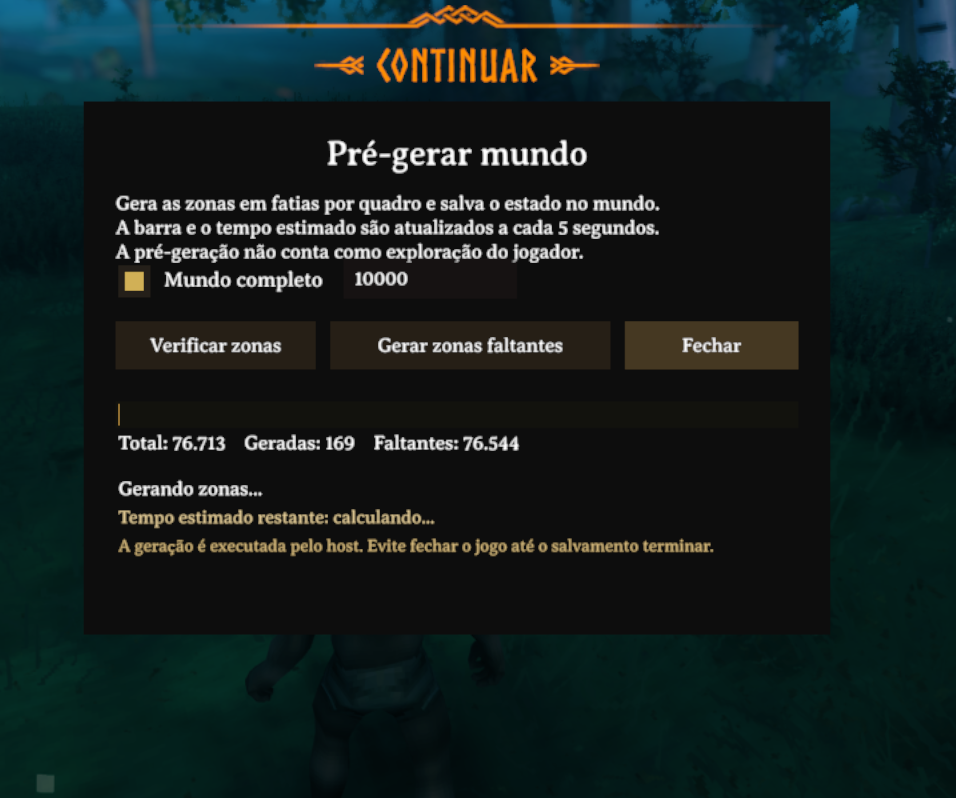
Modal for configuring, checking, generating, and cancelling pre-generation.
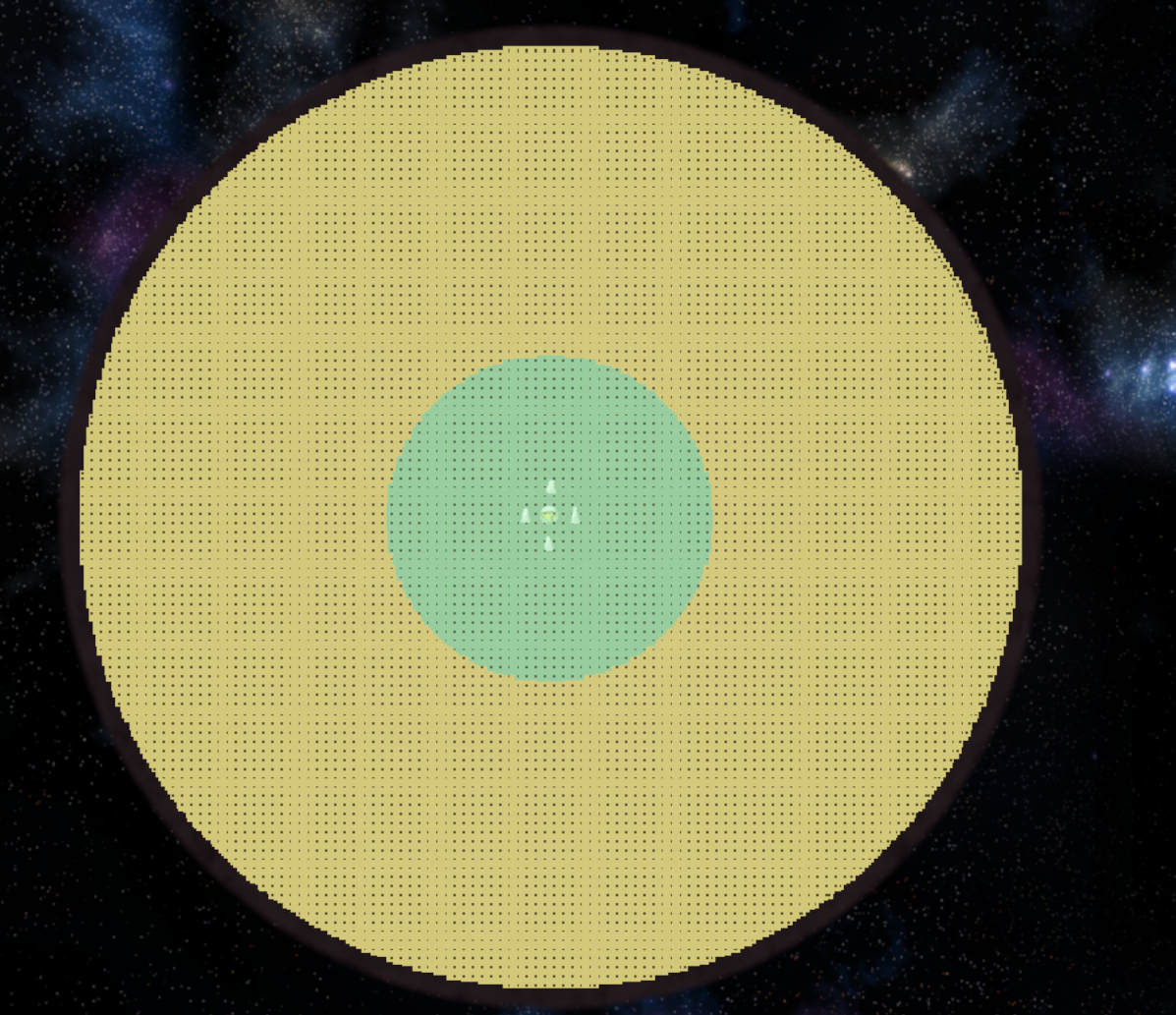
The grid shows zone state without revealing hidden terrain: green means generated and yellow means still missing.
Thunderstore package layout
The ZIP uploaded to Thunderstore keeps README.md, manifest.json, and icon.png
at its root. The screenshots are also included in images/ for local previews and
offline distribution. The README uses absolute HTTPS image URLs because Thunderstore
does not resolve relative links to files inside a package page:
README.md
manifest.json
icon.png
images/worldpregen-modal.png
images/worldpregen-map-grid.png
Do not move the screenshots into BepInEx/plugins. If you replace the hosted images,
keep direct HTTPS URLs that return PNG files and update the two Markdown links above.
Installation
- Install BepInExPack Valheim.
- Extract the contents of this ZIP into the Valheim folder.
- Confirm that the file is at
BepInEx/plugins/WorldPreGenerator/WorldPreGenerator.dll. - Start the game through your mod manager.
BepInEx Configuration Manager is optional. When installed, it exposes the mod options inside the game.
How to use in game
- Enter the world as a local player, host, or administrator.
- Open the pause menu with ESC and select Pre-generate world.
- Check Complete world, or clear it and enter a radius in metres.
- Click Check zones to update the generated and missing zone totals.
- Click Generate missing zones to start the cascade.
- The progress bar, counters, and estimated time update every 5 seconds.
- Use Close to hide the modal while generation continues. Use Cancel to stop generation and save the progress already completed.
The host can check zones while a generation is active. Checking never starts a second generation.
When leaving the world, the routine is cancelled before the scene changes and saved progress is preserved. When entering another world, the modal state and counters start clean; use Check zones to read that save's state.
Map grid
Enable Map grid in the modal and open the map with M:
- green: zone already generated;
- yellow: zone still missing;
- transparency is reduced under fog to preserve the unexplored map;
- the grid shows generation state only and does not mark the map as explored;
- only the host or an authorized administrator can enable and view the grid;
- on a dedicated server, colors come from a compact snapshot of the server's authoritative save state; generated zones appear green even if the client has not loaded them locally;
- points-of-interest icons stay hidden until the area is explored manually when
HideUnexploredLocationIconsis enabled.
Dedicated server
Install the plugin in the dedicated server's BepInEx/plugins folder as well. The
server version must show Loading [World Pre-Generator ...] in its log. If the log
shows Skipping ... because of process filters (valheim.exe), the DLL is old and does
not include the valheim_server.exe process.
After an administrator joins, the client modal queries the save state on the server.
Checking and generation run on the server, never on the client's local ZoneSystem.
You can also use the commands directly in the server console:
The client plugin is optional for joining and playing on the server. Players without the plugin can connect normally, but they do not receive the tool state, modal, map grid, or progress messages. The client plugin is required only for the interface and progress display; the server plugin remains mandatory to generate the dedicated save.
Once generation starts on the server, the player who clicked the button may leave without interrupting it; the server continues the cascade by itself. When the server shuts down, the routine is cancelled before the network is destroyed and progress saved up to the last interval remains available to continue later. On completion or cancellation, the final state is sent to clients. When changing worlds, RPCs are registered again so the modal cannot inherit the previous save's state.
When leaving through the menu, the mod stops the routine before the scene changes and lets Valheim's normal save handle the world. This avoids a second save call that could stall singleplayer loading. If the player is not on the administrator list, the server returns a denial to the modal instead of leaving it stuck at “Request sent”.
In version 1.0.13, dedicated connections use a direct RPC between client and server.
The remote modal updates every 5 seconds, and the client receives a progress message
in chat every 30 seconds, in the language selected by that client. In singleplayer and
on a local host, the same notice is shown in local chat. The server sends state only to
clients that announced the plugin, avoiding unknown tool RPCs on vanilla clients.
After a client joins, the server log should show RPC direct registered for a client.
Clicking Check zones or Generate missing zones should produce a request line in
the server log. If the modal remains at “Request sent...” without counters, confirm that
the same 1.0.13 DLL is installed on both client and server and remove old copies of the
plugin.
worldpregen start full       starts complete-world generation
worldpregen start <radius>   starts generation within a radius in metres
worldpregen check full       checks the complete world
worldpregen check <radius>   checks zones within a radius
worldpregen status           shows state, counters, failures, and ETA
worldpregen cancel           cancels generation and preserves saved progress
The aliases worldpregen_start, worldpregen_check, worldpregen_status, and
worldpregen_cancel are also available.
Configuration
File: BepInEx/config/com.kimbauer.valheim.worldpregen.cfg
Interface.ShowMenuButton: shows or removes the button from the ESC menu;Interface.ShowChunkGrid: enables the map grid when the world opens; the grid is available only to the host or an authorized administrator;Interface.HideUnexploredLocationIcons: hides location icons until manual exploration;Generation.DefaultRadius: initial radius when Complete world is unchecked;Generation.MaxMillisecondsPerFrame: per-frame work limit; lower it to prioritize stability;Generation.SaveEveryZones: saves after this many completed zones;0saves only when finished;Generation.ZonesPerBatch: number of zones processed per batch;Generation.MaxConcurrentZoneRequests: maximum number of terrain requests waiting for processing;Generation.BatchPauseSeconds: pause between batches to keep the game responsive.
Recommendations
Back up the world before a long generation. A complete world can contain tens of thousands of zones, take hours, and use substantial CPU, memory, disk, and additional save-file space. Generate after installing every mod that changes terrain, locations, or zones.
Final zone creation still runs on Unity's main thread to preserve game-object integrity. Limited preloading and configurable batches reduce pressure on the generator, but they do not remove the total cost of generating the world.
Compatibility
Compatible with the current Valheim version and BepInExPack Valheim. Menu and modal text follow the language selected in Valheim.
