
Please disclose if any significant portion of your mod was created using AI tools by adding the 'AI Generated' category. Failing to do so may result in the mod being removed from Thunderstore.

AdditiveDamageModifier
Makes resistances and weaknesses stack additively, with configurable modifier values, player minimum damage caps, fall damage tuning, and visible adm_ status effects with icons, percent labels, and clearer tooltip/compendium info.
| Last updated | a week ago |
| Total downloads | 5709 |
| Total rating | 2 |
| Categories | Mods Misc Server-side Client-side AI Generated Deep North Update |
| Dependency string | sighsorry-AdditiveDamageModifier-1.2.4 |
| Dependants | 14 other packages depend on this package |
This mod requires the following mods to function

denikson-BepInExPack_Valheim
BepInEx pack for Valheim. Preconfigured with the correct entry point for mods and preferred defaults for the community.
Preferred version: 5.4.2350README
AdditiveDamageModifier
AdditiveDamageModifier makes Valheim resistance and weakness modifiers stack together instead of letting only the strongest modifier win.
The current development build targets Valheim 1.0.7 (Windows client build 25185596 / dedicated server build 25185644) and BepInExPack Valheim 5.4.2350. Older game binaries are not supported by this build. Existing mod configuration keys and translation formats are unchanged.
The 1.0 compatibility patch updates the six-argument item tooltip hook (including appended tooltips), processes the new NonPlayer damage channel without adding a player minimum setting or new adm_ effects, and repairs three obsolete constant-field accesses in the bundled ServerSync. See ServerSync repair details.
In vanilla, several sources of resistance and weakness do not cancel each other out. The game chooses one final modifier by priority. This mod changes that into an additive calculation, so every relevant modifier contributes to the final damage multiplier.
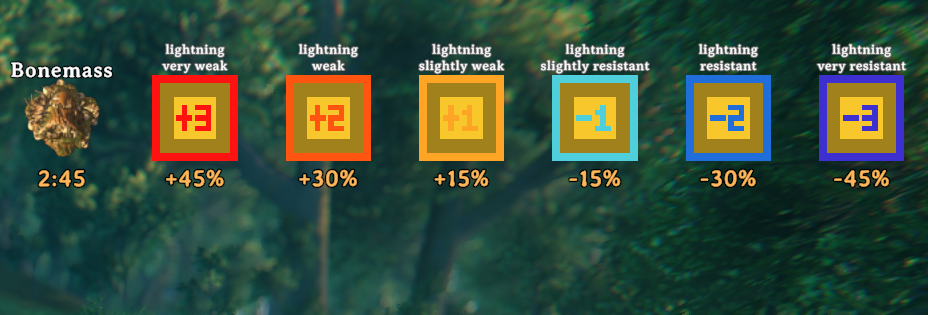
Adds visible adm_ status effects for testing, events, commands, and other mods. You can use addstatus command for testing.
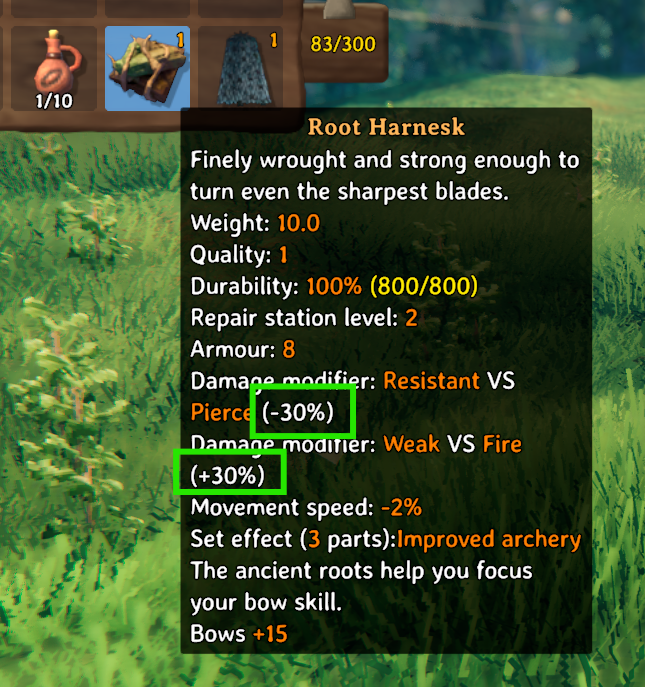

Shows the effective modifier percent in tooltips and active effect UI.

CheckOut this mod to use training dummy for damage and resistance testing. https://thunderstore.io/c/valheim/p/sighsorry/TouchGrass/
Above is an example of RootArmor(+30%) + FeatherCape(+45%) + FireResistMead(-30%) = SUM(+45%) of fire damage with the mod's default setting.
Main Features
- Stacks resistance and weakness modifiers additively per damage type.
- Affects both players and creatures.
- Lets servers configure the percent value of each modifier tier.
- Adds player minimum damage caps so very strong resistance cannot always reduce player damage to 0.
- Adds visible
adm_status effects for testing, events, commands, and other mods. - Shows the effective modifier percent in tooltips and active effect UI.
- Adds a Compendium page that explains the current server values, calculation, player minimums, and vanilla differences.
- Adds configurable fall damage cap and fall damage multiplier options.
- Keeps ServerSync version enforcement and synced gameplay config.
Additive Damage Examples
Default modifier values:
- Very Weak:
+45% - Weak:
+30% - Slightly Weak:
+15% - Slightly Resistant:
-15% - Resistant:
-30% - Very Resistant:
-45% - Immune:
-100%
Example player modifiers:

Root Armor pierce resistance (-30%)
+ Berserker Mead pierce weakness (+30%)
+ Bonemass pierce resistance (-15%)
= pierce -15%
The player takes 85% pierce damage.
Feather Cape fire weakness (+45%)
+ Barley Wine fire resistance (-30%)
= fire +15%
The player takes 115% fire damage.
Creature resistances and weaknesses are additive too. A creature that is weak to pierce by +30% takes 130% pierce damage; a creature resistant by -30% takes 70%.
Player Minimum Damage Caps
Player damage has configurable minimum damage taken caps for these damage types:
- Blunt
- Pierce
- Slash
- Fire
- Poison
- Frost
- Lightning
The config option is named Player Minimum Damage Taken Percent - <damage type>.
The default value is 10, so an immune or heavily resistant player still takes at least 10% of the original damage from those capped types.
In the Active effects compendium, this same cap is shown on the additive modifier scale as MinTotal -90%.
Spirit intentionally has no player minimum cap because vanilla players are already immune to Spirit damage.
Status Effects
The mod registers 56 status effects named:
adm_<damage_type>_<modifier>
Supported damage types:
blunt, pierce, slash, fire, poison, frost, lightning, spirit
Supported modifiers:
very_weak, weak, slightly_weak, slightly_resistant, resistant, very_resistant, immune
Examples:
adm_blunt_very_weak
adm_fire_immune
adm_spirit_resistant
These effects can be added with commands such as:
addstatus adm_blunt_resistant
Each adm_ effect has a generated status icon, a readable HUD name without the adm_ prefix, and a percent label. Modifier icons use simple tier markers:
+1, +2, +3, -1, -2, -3
Tooltips And Compendium
Damage modifier tooltip lines can show the configured modifier percent, for example:
Damage modifier: Resistant VS Fire (-30%)
When the exact passive armor item is equipped, or the displayed status effect is currently active on the local player, the same line also shows the combined modifier for that damage type:
Damage modifier: Resistant VS Fire (-30% / Net -45%)
Net is the raw sum before the player minimum damage cap. Direct weapon and shield damage modifiers are block-only and are not included in passive Net; an Equip or Set status effect from those items is included while that effect is active.
Net is calculated at most once per tooltip generation and shared by its nested effect descriptions. Valheim can regenerate an item tooltip every frame while the inventory is open; this is not a cache for the entire time the tooltip is visible.
This non-compendium percent suffix is controlled by a client-only config option:
[1 - General]
Show Modifier Percent in Tooltips Outside Compendium = On
The Active effects compendium always shows fuller information, including the current Net for active effects and MinTotal when applicable:
Damage modifier: Resistant VS Fire (-30% / Net -45% / MinTotal -90%)
The Active effects page shares one Net snapshot when the page is generated. Reopen the Compendium to refresh effects or values that changed while it was open.
If the combined result is Valheim's special Ignore modifier, it is shown as Net Ignore and MinTotal is omitted because that cap does not apply.
The Compendium also includes an Additive Damage Modifiers page. It reads the current server configuration and explains:
- Current additive modifier values
- The damage formula and a calculated example
- Player minimum damage and
MinTotal - Vanilla modifier values and selection behavior
- Spirit, Immune, Ignore, and Cold/Freezing rules
Localization
The Compendium page includes English and Korean translations in the mod DLL. The Thunderstore package also includes AdditiveDamageModifier.English.yml as an editable translation template.
Additional client-side translations can be placed anywhere under the BepInEx folder. Name the file after the language selected in Valheim:
AdditiveDamageModifier.<Language>.yml
Example:
AdditiveDamageModifier.Turkish.yml
Use the English translation file as the template. Missing or blank keys fall back to English, and unknown keys are ignored. A malformed external file is skipped and reported in the BepInEx log.
Fall Damage
Fall damage has two synced config options:
Maximum Fall Damage: raises the maximum base fall damage before status effects.Fall Damage Multiplier: controls how fast fall damage grows.
Useful examples:
- Vanilla reaches
100fall damage at20m. Maximum Fall Damage = 200andFall Damage Multiplier = 1.00reaches200damage at36m.Maximum Fall Damage = 200andFall Damage Multiplier = 2.00reaches200damage at20m.- With multiplier
2.00,100damage happens at12m.
Fall Damage Multiplier keeps 2-decimal precision. Most other numeric config values are integer sliders.
Cold And Freezing
The frost modifier can control Cold and Freezing immunity through:
Cold/Freezing Immunity Trigger Frost Delta Percent
Default value is -15%. If the effective additive frost delta is less than or equal to this threshold, vanilla Cold and Freezing effects are blocked or cleared.
The same threshold applies to a single resistance tier and an equal total from multiple sources. For example, with a -50% threshold, a single -15% resistance no longer grants environmental immunity. Vanilla warmth and shelter rules are unchanged.
Config Sections
1 - General
Lock ConfigurationShow Modifier Percent in Tooltips Outside Compendium
2 - Additive Damage
- Modifier tier values
- Player minimum damage taken caps
- Cold/freezing immunity threshold
3 - Fall Damage
- Maximum fall damage
- Fall damage multiplier
Building Packages
The project references the original Valheim assemblies from CorlibPath; publicized assemblies are not required. Set GamePath in your build arguments when using a different game installation. Reflection and Harmony field injection handle the required non-public game members.
Set ModVersion in Plugin.cs, then run a Release build:
dotnet build AdditiveDamageModifier.csproj -c Release
After ILRepack completes, the Release build updates Thunderstore/manifest.json to the DLL version and creates both Thunderstore/AdditiveDamageModifier_v<version>.zip and Nexus/AdditiveDamageModifier_v<version>.zip. Rebuilding the same version replaces those archives. Debug builds do not update the manifest or create packages. Release packaging currently requires Windows PowerShell. Update the changelog manually when changing versions.
Regression Checks
Build the current code and run the actual-DLL checks with PowerShell 7:
dotnet build AdditiveDamageModifier.csproj -c Debug -p:DeployToGame=true
pwsh -NoProfile -File .\Test-Mod.ps1
Use -AssemblyPath for a different build output and -GamePath for a different Valheim installation. The script does not launch the game or save configuration. It checks managed calculations, context cleanup, translation contracts, and game patch targets; it does not replace live Unity or multiplayer testing.
The Debug command also copies the final merged DLL into the game's BepInEx/plugins folder. Use -p:DeployToGame=false to explicitly skip that copy. For dedicated-server assembly checks without an installed BepInEx, pass -GamePath pointing to the server and -BepInExCorePath pointing to a compatible client BepInEx/core directory. This is an assembly check, not a running server test.
Before releasing, also check these in game:
- HUD slots with no ADM effects, multiple ADM effects, ADM-to-normal replacement at the same effect count, and full slot rebuilds. Verify layout at different UI scales and with HUD mods.
- Cold/Freezing thresholds just below, equal to, and above a resistance value, including one source versus an equal combined value, Immune, Ignore, and warm areas.
- Equipped armor, active Equip/Set/Mead effects, tooltip details Off, and reopening the Active effects page after an effect expires.
- Existing and migrated config values across restart, administrator locks, synchronized settings, and matching/mismatched versions on client, host, and dedicated server.
Use Unity Profiler to compare HUD allocations and CPU time with the inventory closed and open. Runtime hot unload/reload is not a validated lifecycle; the icon cache and registered status effects are intended to last for the process.
