
Please disclose if any significant portion of your mod was created using AI tools by adding the 'AI Generated' category. Failing to do so may result in the mod being removed from Thunderstore.

Groundwork
Pollination boosts honey and plant growth, rain speeds plant growth, hoe/cultivator ranges scale with grid views, pickaxes get scalable digging, scythes harvest all crops, and Farming skill scales mass planting, plant growth, and beehive capacity.
| Last updated | 2 days ago |
| Total downloads | 28883 |
| Total rating | 13 |
| Categories | Mods Tools Server-side Client-side Utility AI Generated Deep North Update |
| Dependency string | sighsorry-Groundwork-1.1.13 |
| Dependants | 9 other packages depend on this package |
This mod requires the following mods to function

denikson-BepInExPack_Valheim
BepInEx pack for Valheim. Preconfigured with the correct entry point for mods and preferred defaults for the community.
Preferred version: 5.4.2350README
Groundwork
Pollination boosts honey and plant growth, rain speeds plant growth, hoe/cultivator ranges scale with grid views, pickaxes get scalable digging, scythes harvest all crops, and Farming skill scales mass planting, plant growth, and beehive capacity.
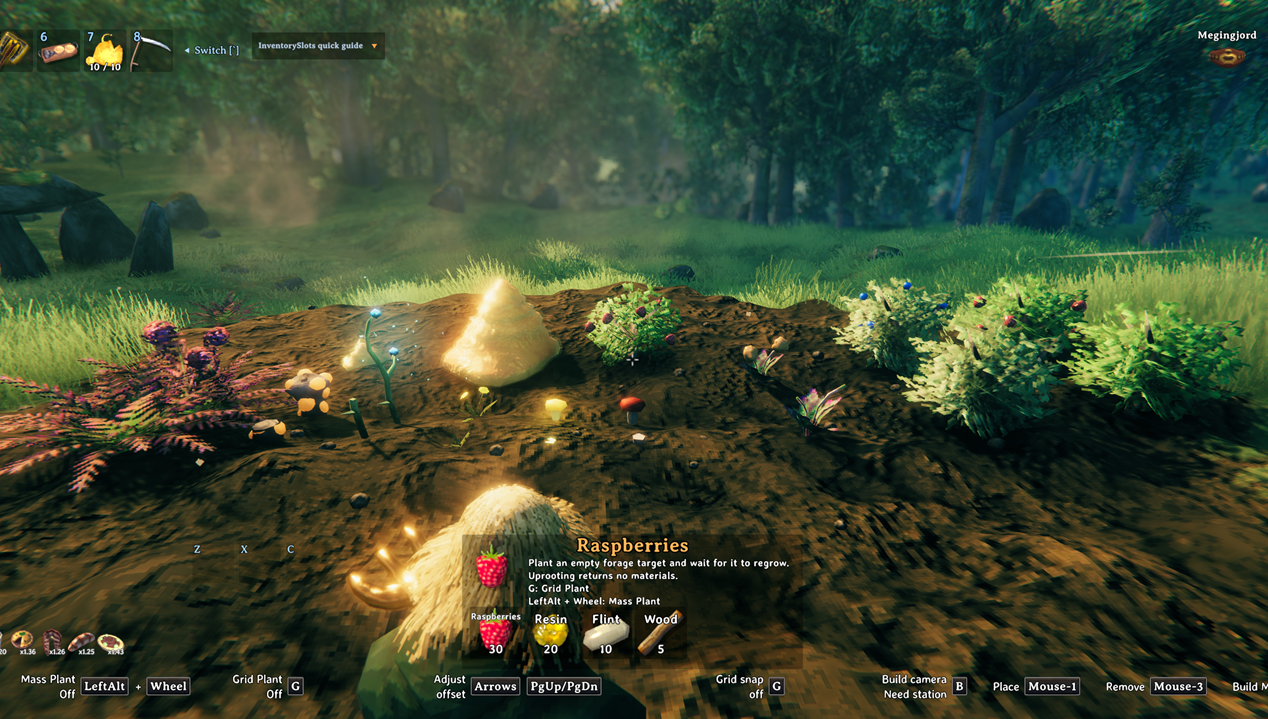
You can plant berry bushes and mushrooms and such with configurable recipes. BepInEx/config/Groundwork/cultivation.yml

Configurable terrain tool scaling with radius and cost. Larger terrain ranges can require proportionally more materials, stamina, and durability, making expanded tools powerful but balanced.
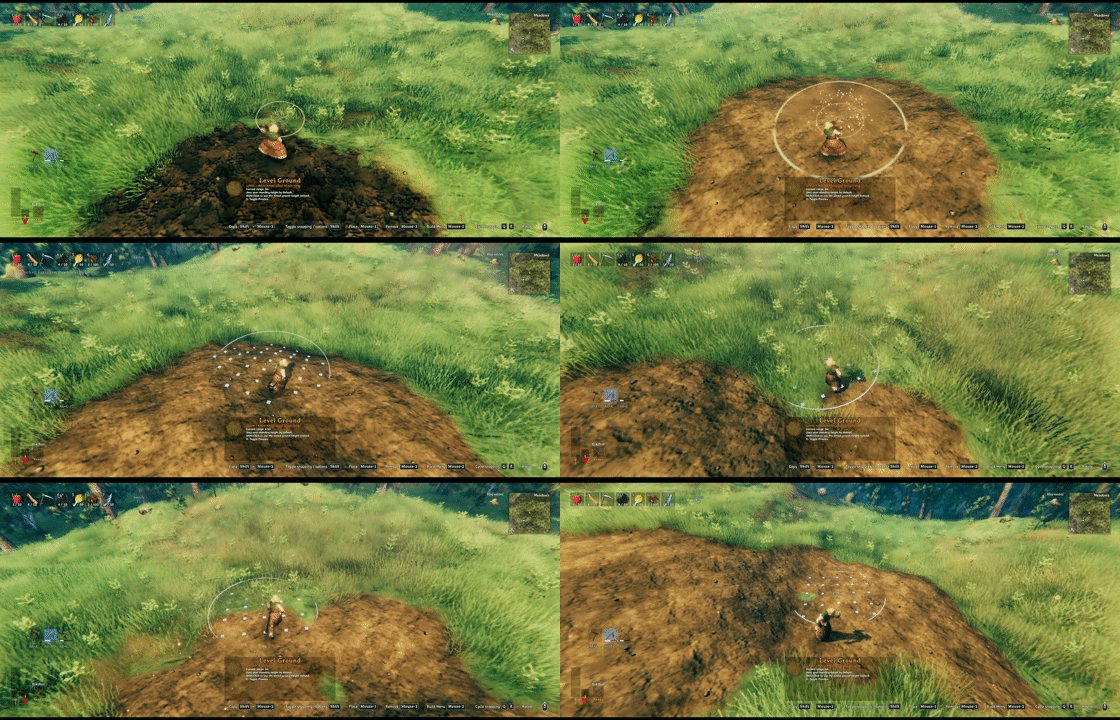
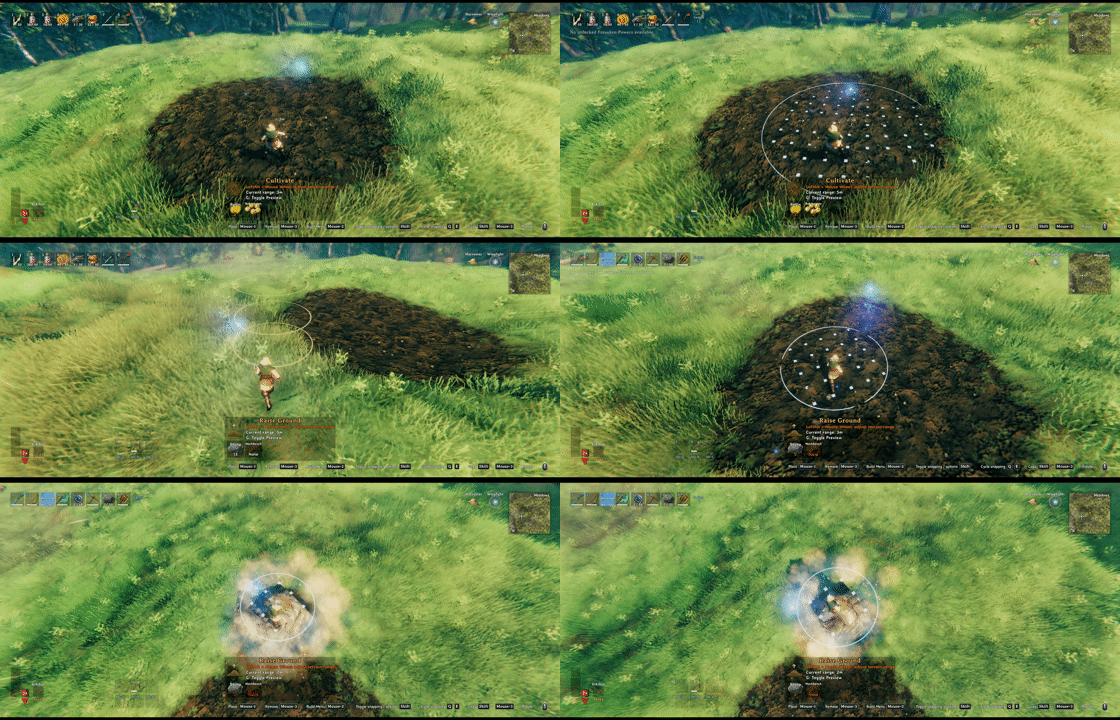
Hoe and Cultivator terrain range scaling with precision grid preview. Adjust tool radius with the wheel modifier, preview affected terrain cells, and see range/cost feedback before placing.
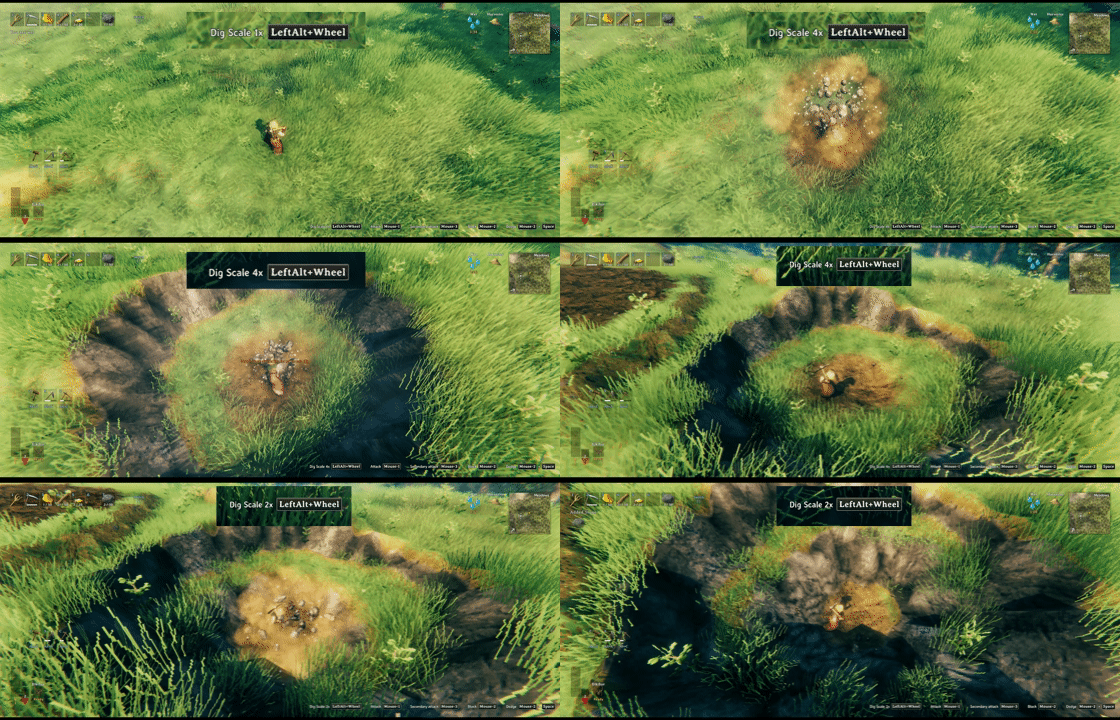
Scalable pickaxe terrain digging. Increase radius and depth per pickaxe, with stamina and durability costs scaling from the selected dig size.
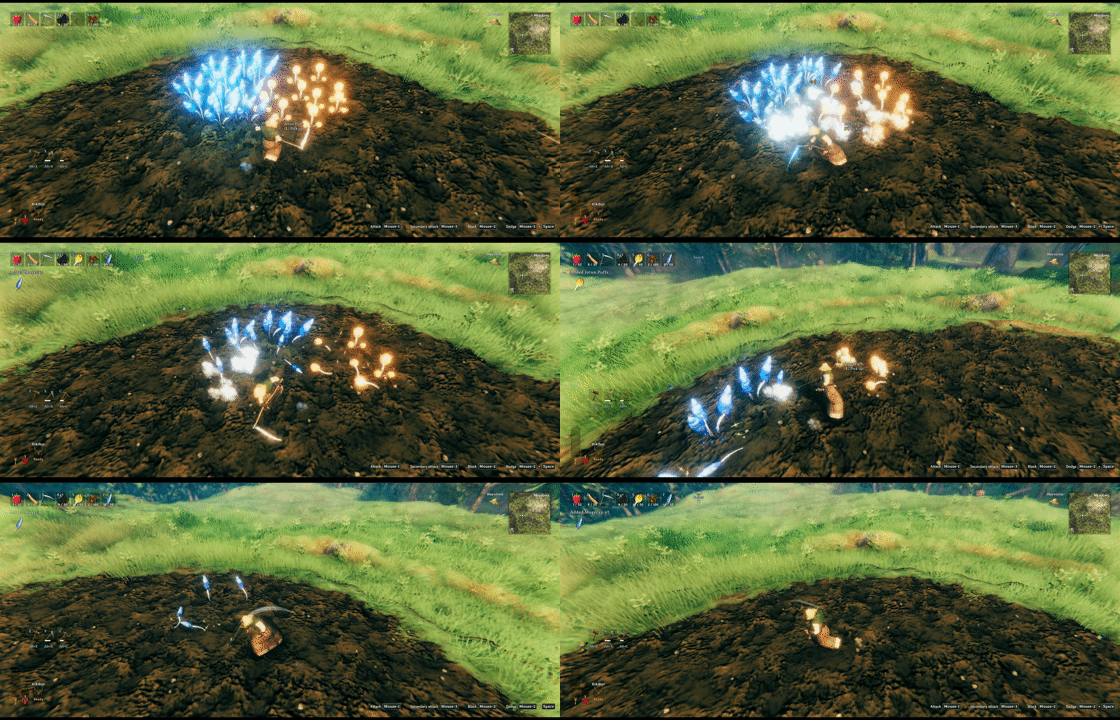
Scythe harvesting for all supported crops. Sweep through planted fields and harvest mature crops in a wide arc.
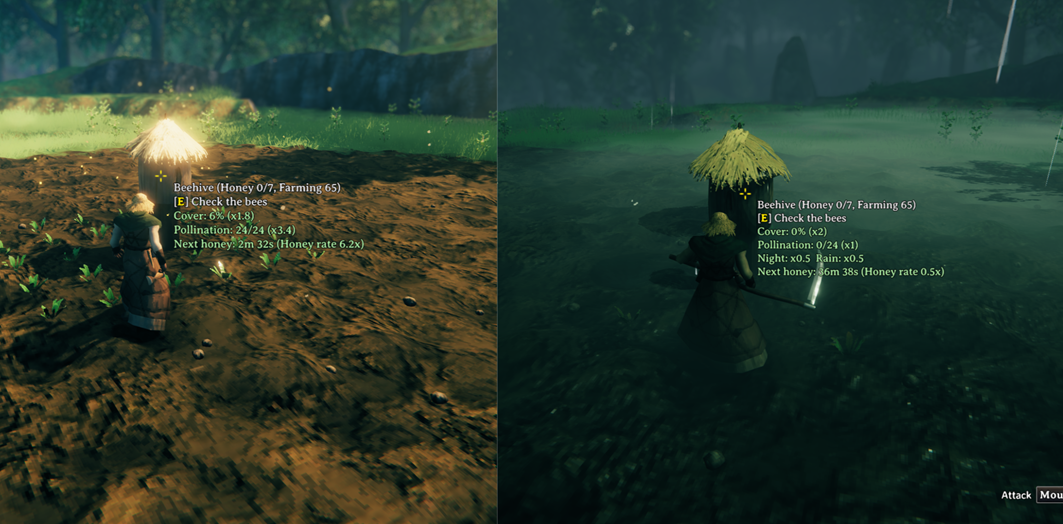
Beehive upgrades and hover details. Farming-scaled honey capacity, cover, pollination, night/rain modifiers, total honey rate, and next honey timing are shown at a glance.

Rain and pollination plant growth info. Hover text shows active Farming, pollination, and rain multipliers alongside the remaining growth time.

Farming-scaled mass planting, grid planting, and foraging pollination. Plant in clean grids, scale planting count by Farming level, and let beehives boost nearby foraging respawn when conditions are right.
Features
Farming and Planting
- Grid planting is always available while placing crops.
- Mass planting scales with Farming level:
- 0-19: Off
- 20-39: 5 plants
- 40-59: 10 plants
- 60-79: 15 plants
- 80-99: 20 plants
- 100: 25 plants
- Hold the tool wheel modifier hotkey and use the mouse wheel to change mass-plant count.
- Turn off
Mass Planting Enabledto disable only multi-plant placement; grid planting stays available. - Mass planting processes slots nearest to the player first (horizontal distance), using the same order for preview and placement. Material, stamina, and durability limits select the nearest slots; invalid selected slots are skipped without extending the batch to farther slots.
- Planted crops can grow faster based on the planter's Farming skill.
- Mass planting can grant extra Farming skill.
Natural Pickable Removal = Onlets the Cultivator permanently remove natural Pickables in the server-syncedNatural Pickable Removal Prefabsallowlist. The default list isPickable_Branch,Pickable_Flint,Pickable_Dandelion,Pickable_Mushroom, andPickable_Thistle. Removal gives no items or harvest and still uses Valheim's normal distance, no-build, ward, and ownership checks.Scythe Handle Required Global Keycontrols when the Bog Witch sellsScytheHandle. Vanilla usesdefeated_dragon; Groundwork defaults todefeated_bonemass. See YouAreNotWorthy for per-player progression and discovery of additional global keys.- Hovering Farming in the Skills tab shows its original description and enabled Groundwork Farming effects to the left of the Skills panel, aligned with the Farming row and kept within the screen bounds.
Foraging
- Edible respawning pickables, plus prefabs registered in
BepInEx/config/Groundwork/pickables.yml, can be affected by Farming skill. - Higher Farming skill can increase nearby pickup range.
Farming Range Harvest Targets = ForagingAndCropsalso includes mature crops produced by Plant prefabs. - Higher Farming skill can speed up foraging respawn.
- Rain can speed up foraging respawn while the current environment is wet.
Beehives
- Beehive capacity can increase with Farming level.
- Newly placed hives store the builder's Farming level.
- Harvesting honey updates the hive's stored Farming level from the harvester.
- Harvesting honey can grant Farming skill.
- Lower cover increases honey production speed.
- Night honey production can be slowed or paused.
- Rain can slow or pause loaded honey production.
- Beehives can pollinate nearby growing plants and foraging targets, except while it is raining.
- Empty hives give stronger pollination bonuses; the bonus fades as the hive fills with honey.
- Growing nearby pollination targets can speed up honey production.
- Beehive hover text shows honey capacity in the title, plus cover, pollination, night/rain rates, and next honey time with total rate.
- A client-only setting can show short explanations below the next-honey line for the configured cover and pollination effects.
- One client setting controls both the centered terrain range guide and marker highlights around Plant/Pickable targets assigned to a hovered beehive. Raising a hive shrinks the guide, while slopes change it by direction. The range turns gray when unavailable or paused; assigned target markers turn gray while rain or night pauses pollination.
Terrain Tools
BepInEx/config/Groundwork/Groundwork.ymlcontrols Hoe and Cultivator piece costs and adjustable terrain ranges.- Hold the tool wheel modifier hotkey and use the mouse wheel to adjust terrain range.
- Preview mode can be vanilla ghost scaling or an exact grid preview.
- Paved Road can optionally skip vanilla smooth-height behavior.
- Pickaxe primary terrain digging can scale radius and depth.
- Pickaxe scaled digging has configurable stamina and durability cost factors.
Hover Info
Groundwork adds compact hover information to:
- Beehives: honey capacity in the title, cover, pollination, night/rain rates, next honey with total rate.
- Plants: remaining growth time, rain growth, pollination growth.
- Foraging pickables: remaining respawn time, rain respawn, pollination respawn.
The client-only Crop Hover Hint, Foraging Hover Hint, and Beehive Hover Hint settings each support Off, Compact, and Detailed. Off keeps vanilla text; a hidden harvested forage target keeps only its name when Groundwork must provide a hover proxy. Compact shows timing and, for beehives, the production summary. Detailed also shows active crop/foraging multipliers or the beehive explanation. These display settings do not change growth, respawn, pollination, honey production, Farming effects, or proxy-based target discovery.
Groundwork.yml
BepInEx/config/Groundwork/Groundwork.yml defines terrain tool piece costs and adjustable ranges.
Example:
Pickaxe:
  terrainDig:
    range:
      enabled: true
      radiusMax: 1.5
      depthMax: 1.5
      staminaCostFactor: 1
      durabilityFactor: 1

# Exact override for a specific pickaxe prefab.
# Unspecified values fall back to Pickaxe: terrainDig.
PickaxeBlackMetal:
  terrainDig:
    range:
      # Optional: overrides the generic Pickaxe enabled state.
      # enabled: true
      radiusMax: 2
      depthMax: 2

Hoe:
  raise_v2:
    cost:
      Stone: 2
    range:
      enabled: true
      min: 1
      max: 5
      materialCostFactor: 1
      staminaCostFactor: 1
      durabilityFactor: 1
Fields:
cost: replaces the build menu material cost. Use{}for no material cost.range.enabled: enables mouse-wheel range adjustment.range.min: minimum range.range.max: maximum range.range.default: optional default range.range.radiusMax: maximum radius scale forPickaxe: terrainDig.range.depthMax: maximum depth scale forPickaxe: terrainDig.range.materialCostFactor: material scaling above base range.0keeps base cost.range.staminaCostFactor: stamina scaling above base range.0keeps base cost.range.durabilityFactor: durability scaling above base range.0keeps base cost.
For Pickaxe: terrainDig, min and default scale are fixed at 1. Use range.enabled to turn the feature on or off, and use radiusMax and depthMax to set separate caps. staminaCostFactor and durabilityFactor apply to extra costs above x1; cost and materialCostFactor are ignored.
Specific pickaxe prefab blocks, such as PickaxeBlackMetal: terrainDig, override only the values they specify. Missing values fall back to the generic Pickaxe: terrainDig block, and an exact block can set range.enabled: true or false independently.
On multiplayer, the server's BepInEx/config/Groundwork/Groundwork.yml is synced to clients.
Pickable and Plant overrides
Groundwork keeps each growth domain in a separate file under BepInEx/config/Groundwork/:
pickables.reference.yml: generated Pickable values, grouped by the prefab's original provider.pickables.yml: editable Pickable and Farming overrides.plants.reference.yml: generated Plant values, grouped by the prefab's original provider.plants.yml: editable Plant grow-time and allowed-biome overrides.cultivation.yml: editable Cultivator recipes for respawning Pickables. Harvested visuals use fixed built-in defaults.
Each override file is a root YAML sequence, not a pickables: or plants: mapping. Groundwork creates pickables.yml with Pickable_Dandelion and Pickable_Thistle registered as Farming targets:
- prefab: Pickable_Dandelion
  farming: [true, true, 0.25, 1]
- prefab: Pickable_Thistle
  farming: [true, true, 0.25, 1]
Copy only the entries you want to change from the corresponding generated reference. For example, a Plant override can be written as:
- prefab: Beech_Sapling, 3000~5000
- prefab: sapling_jotunpuffs
  biomes: [Mistlands, Meadows]
Pickable cultivation and harvested visuals
cultivation.yml uses a root sequence with flat recipe settings. Harvested visuals are built in and are not configured in this file:
- prefab: Pickable_Mushroom
  plantable: false # disable planting only; keep the recipe settings and harvested visual
  resources:
    - Mushroom, 30 # item prefab, positive amount
    - Resin, 15
  cultivatedGroundOnly: true # default true when omitted
  spacing: 1 # default 1; base center-to-center planting distance in meters
  biomes: [Meadows, BlackForest, Plains] # optional allowed planting locations
