
Please disclose if any significant portion of your mod was created using AI tools by adding the 'AI Generated' category. Failing to do so may result in the mod being removed from Thunderstore.
Main menu
Updated a day agoMain menu
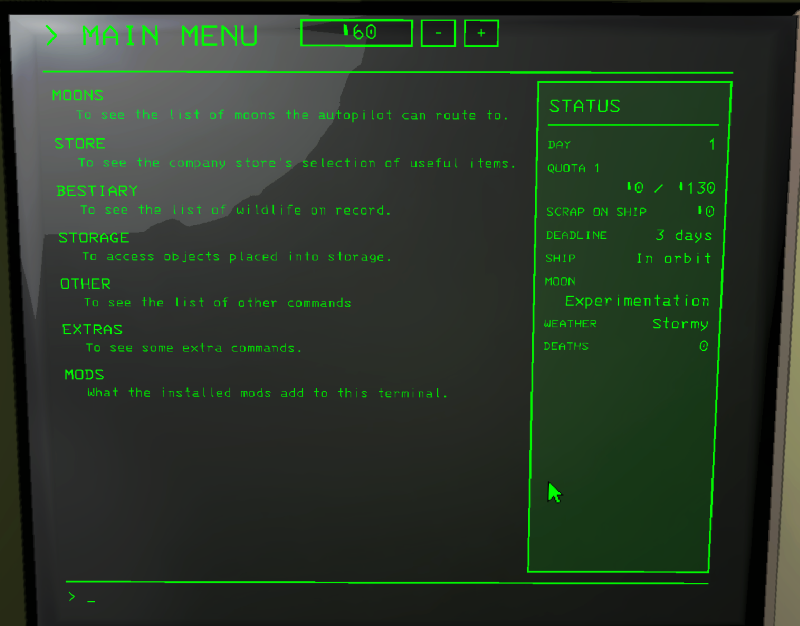
The game's own commands, one row each:
- MOONS: the moons the autopilot can route to.
- STORE: items, vehicles, ship upgrades, decorations, suits, and your saved carts.
- BESTIARY: the creatures you have scanned.
- STORAGE: what is put away in storage.
- OTHER: monitor, transmit, scan, logs, eject.
- EXTRAS: ship buttons added by this mod (where they go is the Extras setting).
- MODS: everything the installed mods add.
Status
On the right is how the run stands: day, quota, scrap on the ship, deadline, the ship, the moon and its weather, and the deaths. On a moon the time is shown under the buttons at the top.
Windows
Info pages, questions and short answers come up in a window over the page. Close it with its X or BACK. Anything that costs money asks first in a window, so a stray click doesn't spend your credits.
Text size
Every page has its own text size. The - and + buttons at the top change it for that page until you close the game. TextScale is for the pages that don't have a size of their own.
Controller
No cursor, the chosen thing gets a frame. The d-pad or the left stick steps between things, LB and RB switch tabs, the triggers turn a page, A clicks, X is the right click, B goes back.
Settings
- OwnPages: off gives you the game's own text pages, the mouse and controller still work on them.
- RememberLastPage: the terminal opens on the page you left it on.
- SkipWelcome: skip the welcome screen.
- ScreenAlwaysOn: the screen stays on with the last page when nobody uses it (only on your side).
- DebugLog: writes what the terminal loads and shows to the log. Turn it on when you report a bug.
- SharpTerminal, ZoomToScreen, CursorSpeed, LineScroll, ScrollLines: how the terminal looks and moves.
